Tag: app

  • 360 Security Lite App Review – #MadeForIndia

    360 Security Lite App Review – #MadeForIndia

    The concern of security for the any smartphone is far from straightforward. There’s discussions about whether you need a smartphone security app. There’s no denying that malware has grown much of a concern since the origin of smartphone era. If you’re not using any anti-malware app on your smartphone, then you’re putting yourself and your beloved phone at risk of infected apps and hidden malwares. But to the rescue there are much advanced apps for your help. The good news is that your options are far from limited. They offer optimized malware detection and prevention from them.Screenshot_2015-12-09-12-54-07
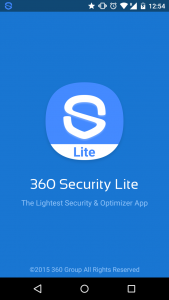
    One such great app is 360 Security which available to download for free from Google Playstore.

    It features a optimized real-time scan will safeguard your device from malware, spyware, and the threat of infection. It also detects and fixes system vulnerabilities and allow you to clean up idle background apps which helps in speeding up your smartphone and saving some juice out of your battery.

    360 Security is downloaded over a 100 million times. And, now there is a Lite version of 360 secutiry which aims devices which are low on resources like with less than 1 gigs of RAM and limited available storage space. It is designed beautifully and that’s why it requires where little power to operate.

    360 Security Lite has three major functions Boost, Clean and Antivirus. Tap the Scan button and the app is on the hunt for malware. It also provides real-time protection as the new apps are installed.
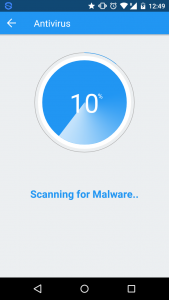
    Screenshot_2015-12-09-12-49-39

    For the clean-up process, it scans the device for junk files that are taking up unnecessay space. You can browse through the scanned list and select as you want.Screenshot_2015-12-09-12-48-57
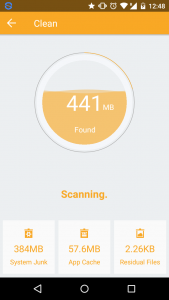
    The Boost feature assist you in performance boost and extending battery life of your device. It list the apps that are using memory too much and taking up unnecessary resources. You can close them within the app.
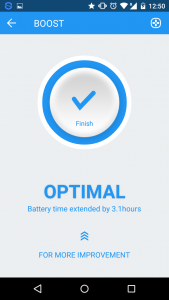
    Screenshot_2015-12-09-12-50-50

    You can also whitelist the apps that you don’t want to mess up with.

    So to summarize the app provides following features:

    • Looks up both malware and viruses throughout all apps and files on the device.
    • Simple and easy performance boost
    • Cleaning up of junk files to free up space
    • Elegant and simple UI

    Conclusion

    360 Security is definitely one of the best looking security and optimization applications on the play store. It comes with a beautiful and elegant UI. It features a simple interface and easy functionality make it more convenient to use. The antivirus feature is the best functionality of the app along with optimized cleaning of junk and unused memory space.

    “I am reviewing the 360 Degree Security Lite App for the #MadeForIndia activity at BlogAdda.”
  • How to Use WhatsApp on your PC Using Chrome

    How to Use WhatsApp on your PC Using Chrome

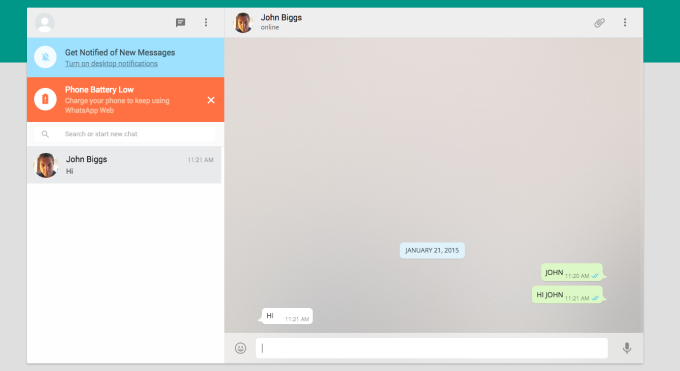
    WhatsApp Web new feature launched by the company which is not a replacement for mobile client as you still need. The official mobile app must be installed on your phone to make use of it as.

    In a recent blog post they said “Today, for the first time, millions of you will have the ability to use WhatsApp on your web browser.”

    The web client will mirror conversations and messages from the mobile device.

    whatsapp-webHow to access Whatsapp in web browser?
    WhatsApp can be connected by https://web.whatsapp.com in a Google Chrome browser (more browser coming soon).

    You must have updated version of WhatsApp app on your phone.

    Choose WhatsApp Web from the menu.

    You will see a QR code, scan the code inside of WhatsApp, and you’re ready to go. Your mobile app and web client are now connected.

    Your phone needs to stay connected to the internet for our web client to work. (WiFi recommended)

    This service is currently available to Android, Windows and Blackberry users. (Sadly not available on iOS)

    Also Read: How To Make Your Smartphone Work For You

  • Annoyed of Screen Turn off while reading ? We Have Solution.

    Annoyed of Screen Turn off while reading ? We Have Solution.

    We all know the feeling of reading awesome article or book on your phone or tablet and the screen suddenly turns off after a minute or two. Annoying, right ? Yes, you can fix it (somewhat) by increasing the sleeping settings for a longer period of time, but this is not that effective solution as often it can interfere with the usability of the device. But not to worry, there are some handy yet useful apps that does the job pretty well.

    Wakey: keep your screen awake

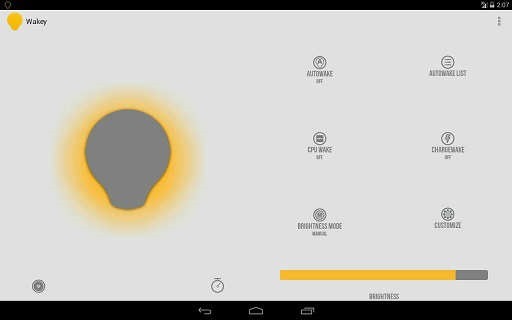
    Wakey is an app thought for people that want to use their devices without the hassle of the screen turning off constantly. It is memory and battery friendly.

    Features:

    • AutoWake
    • ChargeWake
    • CpuWake
    • Brightness controller
    • Ability to dim the screen while awake

    wakey


    Gravity Screen – On/Off

    One of the most popular app out there. It turns automatically your screen off when you put your phone into your pocket or onto a table and turn the screen on when you take it out or up. No need to touch any button and you are ready to go.

    Features:

    • Pocket Sensor
    • Table Sensor
    • Turn Screen Off by Proximity
    • Turn Screen On by Motion
    • Keep Screen On by Motion

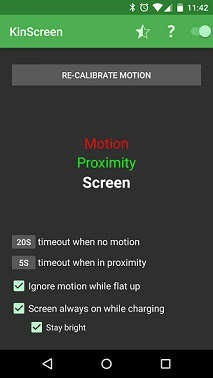
    KinScreen

    KinScreen is a lightweight application that automatically manages the screen time-out. It keeps your screen on when you need it (convenient) and turns it off when you don’t (battery savings).

    Features:

    • Works in the dark
    • Keep your screen on while charging
    • Battery friendly
    • Simple, without a ton of confusing options

    kinscreen


    KeepItOn

    New to the market.It detect any small movements and prolongs the time to turn off the screen, like if you have touched the screen. Even if the screen turns off, you can always shake to wake you up during a time set by you, default is 5 seconds.

    You can follow application thread of KeepItOn on xda.

    keepiton

    Hope these apps help you. Do you use any other apps for this purpose ? Share it in comments.

  • Askme – Your assist companion for smartphone

    Askme – Your assist companion for smartphone

    Askme app

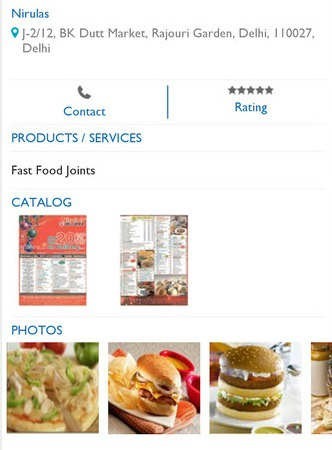
    If you think you are missing something exciting on your smartphone then try out the new Askme app developed by Getit Infoservices Pvt. Ltd . The target behind the app is to combine the facets of local search listings, online shopping and ads and deals posting for buyers and sellers, all into one app.

    Just like the gaint search engines, AskMe can also search for the best deals and free ads that are offered according to your locality. And you can do this without returning to the homepage. App is there to help you with any information you need, just ask anything! Not only giving a list of cool places to eat or shop, it will also help you to buy deals instantly and get exciting discount coupons sent right at your mobile numbers.

    askme-app-screen

    Askme main features:

    The app comes with some very useful features:

    • Search and locate businesses around your range
    • Search out good deals tendered by your preferred local business
    • Get latest ad classifieds
    • Know about the good businesses in your zone by reading reviews.
    • Share best local businesses to find products with family and friends though twitter, email, SMS and Facebook
    • Search for addresses and contacts of thousands of businesses and get in touch with them straight away
    • Get additional information on businesses, for example, their ratings, opening and closing hours, methods of pay. This will assist you in making the right choice easily.

    The ‘Baap’ of all app have a minimalistic and easy to use UI which looks great on your smartphone with its handy utilities. It’s a light app and doesn’t take too much of your smartphone’s space which is also a key point to note. It doesn’t eat up your battery life because it uses very little amount of battery.

    App already got over 5,00,000 installs till now, and is growing at a very fast pace. You can download the app via Google Play Store: Askme.

  • Mobile App Development with Its New Level

    Mobile App Development with Its New Level

    Due to the wide usage of the Internet and related Electronic devices, the platform for Applications are taking into a next level of thinking where mobile Apps are no longer remaining as Mobile Apps with us. Gone are the days when we only have a phone with the purpose of making calls and Texts, then came a time of Multimedia and other related things, the current one is considered to be most sophisticated device in the field of communication called Smartphones.

    With the increasing usage of Apps and numerous technology aspects of Smartphones shown up a way to take it to the next level of Communication called wearable devices. Along with the advancement of Technologies and Apps, the mindset of people is getting improvised and broaden to the level of perceiving things which were unimagined once!

    Now, using the Smartphones are not as flexible as it was once. Tech geeks and majority of the Smartphone users are very much anticipation for the next level of communications and its ways.

    Mobile Apps were developed based on the platform and the nature of the devices and Companies manufacturing it. Because, the Apps developed for Android may not be supported in the devices manufactured by companies doesn’t provide devices for the same.

    App developers should explore the ideas of taking the Apps work to the next level by giving more important to voice-command feature. Developing Apps which is a voice – command oriented will be greatly welcomed as the Smartphones are going into the next level of wrist phones and Glasses in the place of phones. Devices with such nature of technologies will expect the Apps with more about Voice-command features in almost all the Apps. It should be developed in a way where more of Voice command should be used rather than Touch or Texting by using the device. This way, the usage of Smartphones will be reduced enormously in real time scenario and the Convenience of using the devices will take its transformation into the next level of easiness. On top of that, people with blindness will be benefited by it to an incredible level.

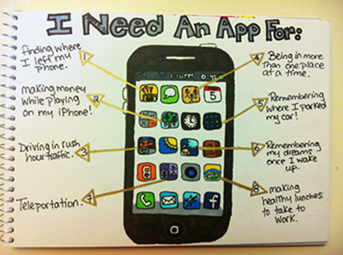
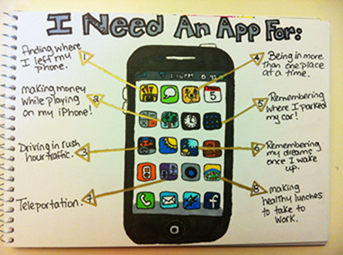
    One Effective way to develop the Apps to fulfill the expectations of users is to do an in-depth research over what the User really wanted in real time from the users’ perspective. An Image below would give an idea as a user simply needs on his phone in terms of Apps.

    clip_image002

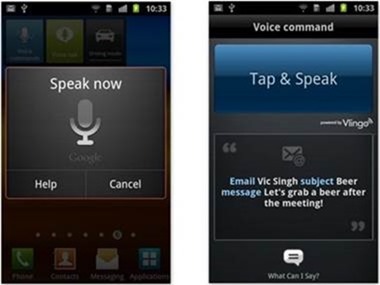
    Imagine a feature of Technology, where all you must do is, asking the phone to open up the Apps and send the messages to right contacts or asking App to download the songs and store it in your favorite folder. It is more of “do it on your own” voice command to phones.

    clip_image004

    Siri was one of the initiatives of such in the industry. Developers can see that an example to develop more Apps of that nature.

    If the more sophisticated Apps are not developed in the near future as per the expectation and needs of the users, perhaps, it will create an option to adapt to other devices like Glasses and Wrist watches of Giant companies which will become the killer of Smartphones eventually.

    The Bottom line is, Nature of Mobile Apps should explore its ways to something we have never experienced, but at the same time, the Human mind has perceived in the subconscious mind. Developers must be keen on developing Apps which will have features and usages beyond the level of user expectations to keep a stand for the longest time in the industry.

    The Author Bio:

    Basheer Ahmed is a passionate technical writer, fervently obsessed with technologies. He is working for MSys Technologies as a senior technical content writer. MSys Technology is an innovator in the field of Test Automation and many other emerging technologies such as Storage, Virtualization, Cloud Computing, Enterprise Applications, Embedded Systems and Communications.

    Follow on Google+ ,Facebook, LinkedIn, Twitter

  • Top 5 Best Battery Saver Apps for Android Smartphones

    Top 5 Best Battery Saver Apps for Android Smartphones

    Android-Battery-LifeEveryone wants a better battery life for their smartphone. But the bulky applications running on your smartphone are just eating away your battery, but do not worry we have a collection of best battery saving apps.

    These apps will not only extend the life of your handset, but could also improve its overall performance.


    1. Juice Defender (Free/Paid)

    juicedefender-best-battery-saver-android-appsWith almost endless options, Juice Defender is the all favorite app on this list. Juice Defender is free app but it also comes in Plus and Ultimate versions. Depending on what level of control you are looking for. It can turn mobile data off automatically, and most of all, it can extend your battery life for long periods of time.

    Main Features of JuiceDefender
    • Multiple Preset Profiles
    • Easy UI
    • Home screen Battery Widgets
    • Smart Brightness control
    • 2G/3G auto toggle and Wi-Fi auto control
    • Battery Consumption Optimization
    • Comprehensive Connectivity Scheduling
    • CPU scaling when phone is idle


    2. DU Battery Saver (Free/Paid)

    du-best-battery-saver-androidDU Battery Saver has many intelligent options that provide more advantage over other battery saving apps. 

    There are various intelligent mode and pre-set options that you can set up to minimize your phone’s battery usage as possible. DU Battery Saver also comes with many inbuilt home screen widgets.

    Main Features of DU Battery Saver
    • Home screen widgets

    • Multiple preset profiles

    • One-Click Optimization

    • CPU Frequency management

    • Healthy charge manager

    –> Also Read: 7 tips for improving your smartphone’s battery life  <–

    3. Easy Battery Saver

    Easy Battery Saver is a powerful manager app specifically designed to extend battery life and optimize using habit. It saves your battery by intelligently dealing with phone’s network connectivity, screen time out and screen brightness. Also, the considerable sleep schedule setting will save your battery when you are sleeping.

    Main Features of Easy Battery Saver
    • Multiple Modes
    • Visual Battery status
    • Battery consumption list of real-time running items
    • Simple, interactive and helpful tutorial
    • Notice of how to use battery better


    4. Battery Doctor

    Battery Doctor also features a built-in task killer to get rid of the apps taking extra space and power in the background.

    This battery saver Android app actually shows information very accurately. One of the best parts of this app is it accurately gauges battery levels, you actually have an idea of when your device is going to run out of battery, based on previous your consumption patterns. Pretty much like a deadline.

    Main Features of Battery Doctor
    • Battery Level Gauges
    • Task Killer
    • Unique three-charge cycle that boosts battery life
    • Widgets that improve battery performance
    • Device software and hardware information


    5. Battery Widget Reborn

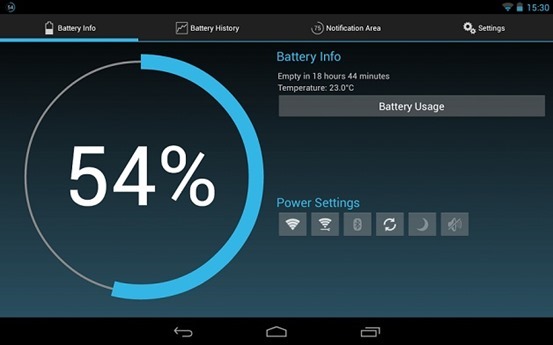
    Battery Widget Reborn comes with better design, Dashclock Extension that lets you activate you camera flash to use as a flashlight. It also has features like power saver mode etc. There are a few power saving options that automatically kick in during the night while you’re sleeping, such as turning Airplane Mode on. Overall, it’s one of the more useful battery saving Android apps, so check it out. If you want a Battery Widget Reborn for free you can try its beta version.batteyreborn

    Main Features of Battery Widget Reborn
    • Circle battery level indicator
    • Shortcuts to Power-Summary/Background Sync/Wifi/BT Settings
    • Status bar notification of battery status
    • Prediction (estimation) how long battery lasts
    • Automatic airplane mode during the night charging and discharging chart
    • Optional charging and discharging chart
    • Power related toggles: Wifi/Bluetooth/Background Sync/Airplane mode
    • Customizable notification priority


    So these is our top 5 picks for Battery saving apps, you are using any other app do let us know in comments and we will add it also

  • How to download Flappy Bird on Android and Hack the score !

    How to download Flappy Bird on Android and Hack the score !

    Flappy-Bird-TeaserIn an interview with Forbes, Flappy Bird developer Dong Nguyen has opened the real reason why he removed the extremely popular game from the App Store and the Google Play Store. According to him, the game’s addictiveness is what forced him to remove it, and the game will not back.
    Flappy Bird, an 8-bit inspired game features a bird that must navigate through a series of pipes extending from the top and bottom of the screen. Player taps the screen to keep the bird flying and not hitting the ground or pipes. Flappy Bird became so popular for being highly challenging and difficulty level.

    Nguyen cites people “sharing their scores on social networks” as a key reason for Flappy Bird’s ascent, and denies claims that he used questionable tactics to inflate the game’s rankings.

    “I respect other people’s opinions about my games,” says Nguyen. “I am sure I didn’t cheat anything, and I don’t have to do that.”

    The developer didn’t confirm how much money he made with Flappy Bird, however people estimates say he may have collected as much as $50,000 per day from ads – the app was available as a free download.

    How to play Flappy Bird in your browser

    Don’t worry if you can it on time from Play Store. You can still play the awesome-addictive Flappy Bird online in your browser too. Just head over to Kongregate for a flash version of Flappy Bird.


    But if your friends are teasing you by showing the game on their smartphone or you are too lazy to play it to your laptop or PC and really want it your smartphone and cut the chase.

    How to Download Flappy Bird on your android phone

    • First download the .apk file from xda-developers.
    • Move/Copy the .apk file to your phone.
    • Use any file explorer to install the game from .apk file
    • Select the Flappy Bird icon and your are DONE. 

    How to Hack Score in Flappy Bird

    You’ll need ES File Explorer to start with a rooted device 

    • Open Flappy Bird and play at least one time.
    • Close it. (Also kill it from task manager if you wish).
    • Open ES File Explorer, Go to the “Tools” line item and make sure “Root Explorer” is turned on.
    • Then select the “Local” line item, and choose “Device.” This puts you in the root of the System, and it’s where you need to start.
    • Go to folder named “data”, then again go to folder “data” and tap to open it.
    • Scroll down to find the folder named “com.dotgears.flappy” and open it.
    • Open the “shared_prefs” folder, & open the FlappyBird.xml file. You’ll get a choice of ways to open it, choose ES Note Editor.
    • Tap the three dots in the upper right, and choose Edit.
    • The line you need to change.

    <int name=”score” value =”your_showoff_score” />

    <int name=”score” value =”999999″ />

    • After changing, save the file when prompted.
    • Close ES File Explorer and open Flappy Bird. Play, and you’ll see your new high score.
  • Improve and visualize sleeping habits with Sleep as Android

    Improve and visualize sleeping habits with Sleep as Android

    sleep_as_android_logoSleep as Android is an accelerometer-based sleep cycle tracking app that provides a nice set of helpful ‘sleep tools’, including lullaby mode, sleep noise recording, lucid dreaming detection audio and a Captcha test. But more interesting feature is sleep cycles, by which it knows just the right time to wake you up.
    Previously, people used to huge amount of money on devices that would track and improve their sleeping habits, but now you can do this by just using an application that you can get from the Google Play Store: Sleep as Android. There are many such apps, for both Android & iOS devices, but Sleep as Android is one of the best on the market. There is a ‘free 14-day trial’. There is also a pro version with all the features Sleep as Android has, we believe it’s very good value for money.

    Sleep Tracker

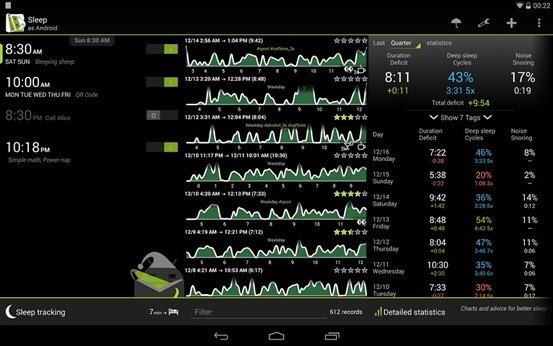
    sleep-trackerLet’s talk about the most useful feature ‘Sleep Tracker’: each night, before sleeping, put the app into a mode that uses your phone’s gyroscope, then lay your phone on your bed near you and just go to sleep.
    How it Works: The app will then track your movements in the night and plot them on a nice graphical view for you, times of inactive movement are referred to as “deep sleep” (or rapid-eye-movement cycles) as opposed to times when you’re more active.  It is helpful to wake you up during a period of light sleep, making it easier to get out of bed.

    Trying this on subsequent nights can get you interesting and useful results. You can see comparisons of nights across a span of time, and figure out exactly how much you slept. You can set ‘ideal sleep range’ from preferences menu so the app can tell your cumulative sleep different from ideal.

    Lullaby and time-to-bed notification

    Sleeping aids such as lullabies are also included.

    Aids also include an insistent time-to-bed notification — For the set alarm, the app will also notify you the ideal time for bed so that you get the ideal sleep as you want..

    Other Features:

    • Gentle alarms
    • Sleep noise recording;
    • Special lucid dreaming detection audio
    • Captcha test.

    Sleep as an Droid is available on Google Play

  • ‘Jelly’ helps Crowdsourcing answers from your social networks

    ‘Jelly’ helps Crowdsourcing answers from your social networks

    Social_Search_Engine_Jelly_y1eazsTwitter co-founder Biz Stone has launched Jelly, an app that helps its users to find an answer to whatever question puzzles them at the moment.
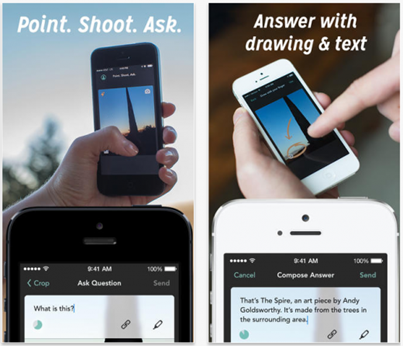
    Jelly is intended to tap  into the potential of users’ extended social network. It allows users to post a query, accompanied by a picture or a drawing, and receive a response from the people they know and trust.

    The idea behind Jelly, was to create a search engine that would give relevant results with knowledge from friends and family, rather than from a generic algorithm. Although, there are several existing social QnA apps and forums like Quora, Jelly utilises pictures for the same purpose.

    One can click a picture and ask his/her friends across Facebook and Twitter. With imagery, the discussion becomes more interactive. Each query is submitted to the people in the network who also have Jelly. The app notifies the user back when there are answers.Screen-Shot-2014-01-07-at-9.22.10-AM-520x446

    The company touts three specific benefits to its app. The first is that it works with your existing social networks — it’s not something new that you have to sign up for. Secondly, it allows you to forward your questions outside of your friends so it’s not constrained to 150 people or 5,000 folks on a particular social network. Lastly, questions aren’t limited to text-only. Users can upload an image, crop it, reframe, draw on it to help add more specific context to their inquiry.


    The idea for a social search service has been criticised in the media, with many observers pointing out that users can already share their questions, accompanied by pictures, through existing social networking services, and don’t really need Jelly.

    Jelly was named after the jellyfish. Stone was inspired by this sea creature saying that the neurological decentralization of the animal has caused it to be more of a ‘group-think’ one whose brain is “more ‘we’ than ‘me’.”


    ➤ Jelly for iOS | Android

  • Pirate Bay cofounder is building ‘Heml.is’ an NSA-proof messaging app

    Pirate Bay cofounder is building ‘Heml.is’ an NSA-proof messaging app

    hemlis_ui_mocksHeml.is (Swedish word for “secret”) is an elegant messaging app for iOS and Android that uses end-to-end encryption to make sure no third party — governments and ISPs included — can intercept the users’ communication.

    Peter Sunde, co-founder of BitTorrent search engine The Pirate Bay, needs your help to create a private messaging app.

    New mobile messaging app that will have superior encryption to prevent pretty much any outside party from listening in on your conversation, he said. 

    Plenty of people are working on making supersecure communication services, but few have the kind of bragging rights that Sunde and Olsson do. Sunde previously attempted to create an ultrasecure cloud storage service, Bay Files, and both he and Olsson also cofounded the ambitious crowdfunded social platform Flattr.

    The app is crowdfunded with a goal of $100,000, with the donation counter currently standing at $27,000. Users who donate $5 or more get unlock codes for the app and other perks, depending on the size of the donation.

    Hemlis will initially be available on iOS and Android The app won’t necessarily be open source because that doesn’t guarantee privacy, but the founders do intend to stay as open as possible with Hemlis’s code. It also said it won’t collect data, sell advertising, or accept funding from investment firms or angel investors. “To guarantee the safety of our users, we can not accept any money ‘with string attached,’” the team wrote in a blog post that was posted recently.

    Why is Heml.is different from WhatsApp, MessageMe, iMessage etc?

    “Our focus is your privacy so we are building everything from software to company structure to protect that. The others are focused on maximising profit.”


    Update (on helm.is blog):

    Funded 100% in 36 hours!
    Wow and incredible thanks to all our backers for funding us in 36 hours! That is one hell of a thing to wake up to. Yeah!