
Tag: browser

  • When its cricket you want to Surf it all ! Surf it fast !

    When its cricket you want to Surf it all ! Surf it fast !

    Its right to say that cricket is a religion in India and Sachin is the god of cricket. I still miss the era when Sachin., Dravid, Ganguly, Laxman, Sehwag and Zaheer played for India. There are a few moments I still can’t forget.

    banner-dravid

    The India-Pakistan game at Centurion was a day before finals. It was ridiculous to even expect anybody to study or even pretend to when there was a game of such magnitude going on. Funny thing was that parents, who usually are on your case in Indian families, went right along with it. I don’t think in our entire class anybody got more than a 70. We all felt pretty accomplished for watching that Sachin innings though.

    Another is during the 2004 series when India was touring Pakistan for first time in 15 years. It was also our report card day and they used to sell the books for next year at the school as well. Our school principal was obviously not familiar with the passions of cricket(Catholic school and all that) so he expected everything to go smoothly as years before. The game, I remember, was supposed to start at 10:30 am and I have never seen anything quite like it. Parents and kids ran rampant through that school. Books and report cards for more than 2000 kids were done in an hour as everybody literally(unfortunately I am being literal here) ran over each other in the rush to be the first one out. Books were thrown about, few destroyed as almost everyone wanted to get the hell out so they didn’t miss anything. Next day our principal gave us an earful in lieu of our parents but they never sold books in our school again.

    In the 2011 WC semi final which we were watching (do or die match with no doubt) all my friends lost hope after 4-5 overs of Pak batting assuming the score was under par and Kamran Akmal and Mohd Hafeez looking fluent and went to sleep. The tension was palpable throughout the match and you could see it on the player’s faces. What happened after that was nothing sort of miraculous. I specifically enjoyed Umar Akmal’s wicket and Munaf Patel doing an Anti Anil Kumble to dismiss Abdul Razzaq.

    The most memorable moment was when Ganguly took his shirt off at Lord’s (2002 NatWest Series). The extraordinary match with the perfect climax.

    Sourav Ganguly, Lord's

    And lastly, you turn up the volume to hear the crowd cheer and Harsha Bhogle’s epic comments !

    Those were the days. But now in this modern day technology, we need the update right at every moment of time and for that we have smartphones. Everyone wants updated real time score updates and match situations! And if you are a true cricket fan you will surely like the extraordinary UC Browser that helps in keeping all the updates. The UC Cricket feature is the perfect way to connect to the game no matter where you are.


  • Here’s why we like Maxthon Cloud Browser !

    Here’s why we like Maxthon Cloud Browser !

    Banner4Maxthon Cloud Browser is nothing new on the market but it struggled with “the Internet Explorer clone label” but it has been long lost thanks to the interesting multiple features and improvements implemented over the development.
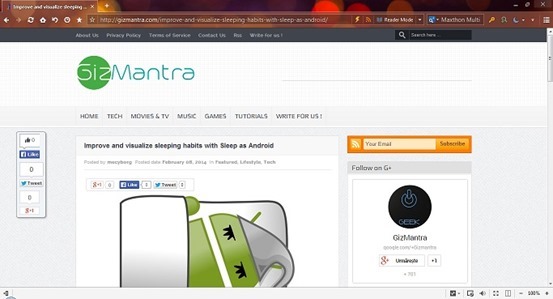
    With version 4.2, Maxthon integrates a tweaked Blink rendering engine in order to infuse increased browsing speeds and faster startup and file download times. With Modern Looks and essential buttons readily available in the toolbar, a multifunctional address bar, and the less used features hidden under the menu button.

    The browser is available both as a desktop version as well as a portable download for Windows PC. Also available for various platforms including Android, Mac, iPhone and Windows Phone.

    So, What we Like about Maxthon ? 

    Maxthon Cloud Services

    Maxthon offers many cloud services in-built with the browser such as:


    • Cloud Push: Supports sending text, images, websites/links and tabs to Mac, Android and Windows operating systems.
    • Cloud Share: Supports sharing text, images, websites/links and files with friends.
    • Cloud Download: Supports downloading files in various formats and uploading them to ‘My Cloud’ for backup on any device.
    • My Cloud Tabs: Lets you pick up where you left off by automatically syncing your tabs to Android, iOS or Mac devices.
    • Cloud Sync: Syncs account data (Favorites, Settings and Magic Fill data) to other devices.

    Also Read: Improve and visualize sleeping habits with Sleep as Android


    Easy Reading Features

    Reader Mode: Makes it easy to view articles by adjusting font sizes and removing ads and other distractions. It automatically detects long texts in the page and offers the possibility to switch to a view that hides distractions and focuses on content. There are tweaking options as far as the page width, color and font go.

    Night Mode: Adjusts the brightness of the screen for low-light reading. It changes the page colors to fit the contrast between the display and a darker environment. It can be also be scheduled to activate in between specific times.

    screenshot

    More Convenient Browsing

    • Magic Fill: Securely saves the names and passwords of websites you visit and then fills in that information when you return.
    • Ad Hunter (Ad-block): Maxthon removes advertisements with one click, and automatically blocks annoying pop-up windows.
    • New Session: Users and gamers can simultaneously log into the same website with different accounts.
    • Source Sniffer: Extract all photos, embedded videos and audio files from a web page and download them with one click.
    • SkyNote: Save and access text notes anywhere, anytime. You can also sync them across Windows and Android.
    • Snap: Click the camera button in the toolbar to easily and quickly capture a screenshot of the entire web page in one click!
    • “Do Not Track” protects your privacy by preventing ad networks from tracking you.

    Also Read: How to install Ubuntu on your Phone or tablet

    Extension Center

    Maxthon has a diverse selection of extensions for entertainment, information and social media.

    Extensions are easy to install and manage with just one click.


    Security and Privacy

    • Safe site technology identifies websites you are about to visit and lets you know if they are safe and secure.
    • Maxthon blocks malicious websites and phishing attempts for you, automatically.
    • Easily launch a private browsing session that does not track history.

    Free Download

    Maxthon for Windows

    Maxthon for Mac

    Maxthon for iPhone/iPad

    Android Browser

    Windows Phone Store