Tag: download

  • Youtube ‘Offline’ is now available in India

    Youtube ‘Offline’ is now available in India

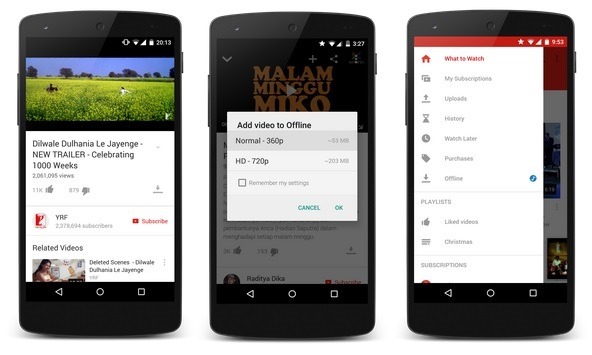
    YouTube has launched the offline feature that allows users to download videos to their Android or iOS device for offline viewing without internet connectivity in India.

    Users will have to sync with YouTube to watch the videos. The downloaded content will be available for offline playback only via the YouTube app. YouTube stated that, “much of India’s popular YouTube content” is available to view offline.

    John Harding, Vice President of Engineering at YouTube, “In a country like India, the future of the Internet is mobile… By launching this offline experience on YouTube in India today, we hope to help people move past the challenges of data connection, speed and cost to enjoy a smooth, buffer-free version of YouTube.”

    youtube-offline

    For videos where this feature is available, you can choose to add the video for offline viewing by tapping on the offline icon. The videos will be available for viewing for 48 hours only, to help avoid issues involved with free downloading of copyrighted content.

    Along with India this feature is launched for the users in Indonesia and the Philippines too.

  • Google will allow users to download and watch YouTube videos offline in India

    Google will allow users to download and watch YouTube videos offline in India

    youtube-banner

    After Android One, India will have another first from Google as the tech giant plans to make YouTube available offline, allowing people to save on download charges for watching their favorite videos.

    YouTube executive Ceasar Sengupta mentioned at the launch event that the move was to better serve users in the country, where a consistent cellular data connection is not always available.

    YouTube is popular here. You watch some videos again and again. How awesome would it be if you could keep watching them again and again without having to pay for data, and take the videos with you wherever you go? Within the coming few weeks, much of YouTube will be available offline in India. This is huge, and our users will really, really like this. You can download a video once, save it to your phone, and watch it again and again.

    It is not clear at the moment whether this new offline feature is restricted to India, or if this will be an Android only feature. The demand for video on mobile has been around for a while – some telecom providers have experimented with YouTube focused data packs, which let you stream videos at a discounted data rate.

    Reports suggest that 3.7 billion online videos are consumed per month in the country. According to comScore, the total online video audience in India saw growth of over 70 percent in 2013 with the average viewer watching 18 percent more videos and spending 28 percent more time viewing.

    The service will not be restricted to music videos, and users will have the ability to download any video off the service and store it offline.

  • Google Chrome Offline installer (Standalone) download

    Google Chrome Offline installer (Standalone) download

    The online process for downloading Google chrome is not preferred and even most of you might not. To download Google chrome, you will need to download a small online installer first and then you will need to run the installer, after which the installer will download and install Chrome from Google’s servers. It can be a time consuming process if you have a slow internet connection.Google-chrome-offline

    Along with many other benefits, following are the two main benefits of using the Google Chrome offline installer when installed on Windows PC. Foremost is the fact that you may download the complete package altogether and then use it anytime you want to. In case you are installing the Firefox with online installer, then disconnection of internet connection means that the installation will be stopped. When you will resume the internet connection, you will have to start the installation process all over again.

    Like most other programs, its always better to install programs from a Full standalone offline installer. Once you download a offline installer, you can easily save it, share it or use it for installing the program once again in the future..

    Features of Google chrome:

    Chrome is designed to be fast in every possible way. It’s quick to start up from your desktop, loads web pages in a snap, and runs complex web applications lightning fast.

    Chrome’s browser window is streamlined, clean and simple. For example, you can search and navigate from the same box and arrange tabs however you wish — quickly and easily.

    Chrome is designed to keep you safer and more secure on the web with built-in malware and phishing protection, auto-updates to make sure you have all the latest security fixes, and more.

    Chrome puts you in control of your private information while helping protect the information you share when you’re online.

    There are tons of ways to customize Chrome and make it yours. It’s easy to tweak your settings and add apps, extensions, and themes from the Chrome Web Store.

    Mozilla Firefox Offline Installer (standalone) download

    Download Link for Chrome Offline installer (for single user account)

    Download Link for Chrome Offline installer (for all user accounts)

    After downloading Full standalone offline installer for Google chrome, you can save it on your computer and use later to install Google Chrome without an internet access.

  • Mozilla Firefox Offline installer (Standalone) download

    Mozilla Firefox Offline installer (Standalone) download

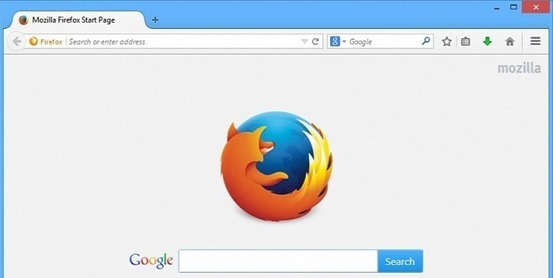
    firefox-bannerThe common thread that runs throughout Mozilla is our belief that, as the most significant social and technological development of our time, the Internet is a public resource that must remain open and accessible to all. With this in mind, our efforts are ultimately driven by our mission of encouraging choice, innovation and opportunity online.
    To achieve these goals, we use a highly transparent, extremely collaborative process that brings together thousands of dedicated volunteers around the world with our small staff of employees to coordinate the creation of products like the Firefox web browser. This process is supported by the Mozilla Corporation, which is a wholly-owned subsidiary of the non-profit Mozilla Foundation.
    In the end, the Mozilla community, organization and technology is all focused on a single goal: making the Internet better for everyone.

    This post is about how to get Mozilla Firefox Offline Installer (standalone)download in an easy manner.

    Along with many other benefits, following are the two main benefits of using the Mozilla Firefox offline installer when installed on Windows PC. Foremost is the fact that you may download the complete package altogether and then use it anytime you want to. In case you are installing the Firefox with online installer, then disconnection of internet connection means that the installation will be stopped. When you will resume the internet connection, you will have to start the installation process all over again.

    From the Mozilla website you may install loads of extensions and addons. These will offer you specific functionalities to the Mozilla Firefox.

    In order to keep your data synchronized, you can create your own account. The Mozilla Firefox also enables its users to go for multi-tasking. The browser is better, faster and more secured as compared to any other web browser.

    Mozilla Firefox Offline Installer (standalone) download

    Download Link for Firefox Offline installer

    Download Link 2

    GO and grab the best internet browser.

  • Firefox 29 redesigned with Australis

    Firefox 29 redesigned with Australis

    Australis is one of the most important redesigns in the history of Firefox, as Mozilla has redesigned its browser with a whole new look after a long time. mozilla-firefox-29

    Firefox customization options now have the ability to drag and drop features and tools to easily accessible places, eg. for checking your RSS feeds instantly, or moving the new tab button..

    These customization options also applied to the Firefox add-ons you can download so whether you want to scrap the default options and use just your Add-ons.

    To use this mode, just head to the menu, then choose Customize. You can position your favorite shortcuts to the area directly right of the search box or by clicking on the drop down menu, identified by three horizontal lines on the far right of the toolbar.

    The bookmark manager icon has been moved next to the bookmark star so it’s easier to add the current page as a bookmark in one click.

    Other new tweaks include an onboard tour to help users navigate through the new interface and a new gamepad API, allowing a gamepad to be used for web gaming.

    New Features

    • A set of new improvements to the Firefox user interface
    • An interactive onboarding tour to guide users through new interface changes
    • A redesigned and improved customization mode
    • The ability to set up Firefox Sync by creating a Firefox account
    • Gamepad API finalized and enabled
    • Malay [ma] locale added
    • navigator.plugins is no longer enumerable, for user privacy
    • Clicking on a W3C Web Notification will switch to the originating tab

    • ‘box-sizing’ (dropping the -moz- prefix) implemented

  • Cut the Rope 2 arrives on android

    Cut the Rope 2 arrives on android

    cut-the-rope-2

    Just after its App Store debut in December 2013, developer ZeptoLab has released Cut the Rope 2 on Android. It’s currently available for free download in the Google Play store and will be launching on the Amazon Appstore on March 30. Although on app store the game is priced at $0.99.

    Also, ZeptoLab announced that the its Cut the Rope series got over 500 million overall downloads. The original has spawned a few sequels now, including Cut the Rope: Time Travel and Cut the Rope: Experiments.

    Om Nom breaks out of his box and travels through lush forests, busy cities, junkyards and underground tunnels, all in pursuit of one goal – CANDY! Along the way, he encounters the Nommies, the cutest candy collecting helpers a little green monster could wish for!

    Familiar to play, yet challenging to master, Cut the Rope 2 brings fresh challenges and unanticipated obstacles to the candy crunching, physics-based phenomenon that has delighted millions of players around the world!

    Don’t waste any time – exciting surprises await! Help Om Nom find his way home…out of the forest, through a pond and a junkyard, into the city and beyond!

    ALL NEW LOCATIONS TO EXPLORE! Travel through an interactive map to discover new locations filled with candy collecting, rope cutting action.

    ALL NEW CHARACTERS TO MEET! Find 5 new characters, the Nommies, to help you on your unexpected journey.

    ALL NEW HATS TO BRAG ABOUT! Customize Om Nom, choose your favorite candy and select your finger traces.

    ALL NEW ADVENTURES FOR OM NOM! Experience completely new graphics, sound and gameplay elements, including the ability to move Om Nom.

    ALL NEW MISSIONS! Collect the perfect number of stars and strategically gather fruit to complete the mission in each level.

    MEET OM NOM’S NEW FRIENDS, THE NOMMIES!

    • Roto can carry Om Nom to the best candy catching locations
    • Lick can make small bridges with his tongue to help Om Nom reach his goal
    • Blue can lift Om Nom to new levels of candy hunting fun
    • Toss can throw objects, including candy
    • Boo can scare Om Nom to jump to new heights

    Download Cut the rope 2 for android

  • How to download Flappy Bird on Android and Hack the score !

    How to download Flappy Bird on Android and Hack the score !

    Flappy-Bird-TeaserIn an interview with Forbes, Flappy Bird developer Dong Nguyen has opened the real reason why he removed the extremely popular game from the App Store and the Google Play Store. According to him, the game’s addictiveness is what forced him to remove it, and the game will not back.

    Flappy Bird, an 8-bit inspired game features a bird that must navigate through a series of pipes extending from the top and bottom of the screen. Player taps the screen to keep the bird flying and not hitting the ground or pipes. Flappy Bird became so popular for being highly challenging and difficulty level.

    Nguyen cites people “sharing their scores on social networks” as a key reason for Flappy Bird’s ascent, and denies claims that he used questionable tactics to inflate the game’s rankings.

    “I respect other people’s opinions about my games,” says Nguyen. “I am sure I didn’t cheat anything, and I don’t have to do that.”

    The developer didn’t confirm how much money he made with Flappy Bird, however people estimates say he may have collected as much as $50,000 per day from ads – the app was available as a free download.

    How to play Flappy Bird in your browser

    Don’t worry if you can it on time from Play Store. You can still play the awesome-addictive Flappy Bird online in your browser too. Just head over to Kongregate for a flash version of Flappy Bird.


    But if your friends are teasing you by showing the game on their smartphone or you are too lazy to play it to your laptop or PC and really want it your smartphone and cut the chase.

    How to Download Flappy Bird on your android phone

    • First download the .apk file from xda-developers.
    • Move/Copy the .apk file to your phone.
    • Use any file explorer to install the game from .apk file
    • Select the Flappy Bird icon and your are DONE. 

    How to Hack Score in Flappy Bird

    You’ll need ES File Explorer to start with a rooted device 

    • Open Flappy Bird and play at least one time.
    • Close it. (Also kill it from task manager if you wish).
    • Open ES File Explorer, Go to the “Tools” line item and make sure “Root Explorer” is turned on.
    • Then select the “Local” line item, and choose “Device.” This puts you in the root of the System, and it’s where you need to start.
    • Go to folder named “data”, then again go to folder “data” and tap to open it.
    • Scroll down to find the folder named “com.dotgears.flappy” and open it.
    • Open the “shared_prefs” folder, & open the FlappyBird.xml file. You’ll get a choice of ways to open it, choose ES Note Editor.
    • Tap the three dots in the upper right, and choose Edit.
    • The line you need to change.

    <int name=”score” value =”your_showoff_score” />

    <int name=”score” value =”999999″ />

    • After changing, save the file when prompted.
    • Close ES File Explorer and open Flappy Bird. Play, and you’ll see your new high score.
  • Firefox 26 arrives with click to play plug-ins

    Firefox 26 arrives with click to play plug-ins

    firefox-26logoThe latest release of the Firefox web browser boosts browser security and stability by blocking Java software component plug-ins from loading by default.
    The latest version of Firefox, Firefox 26, is now officially available to download. This is one of the most significant releases in recent history, introducing built-in “click to play” functionality for all plug-ins (except for Flash). Firefox 26 also represents the dramatic culmination of Mozilla’s MemShrink project, which has spent the last two and a half years trying to battle Firefox’s reputation for being a memory hog. Firefox 26 has a very svelte memory footprint indeed.

    Click to Play revamp was supposed to be for all versions of all plugins, except the latest release of Flash. Unfortunately, Mozilla has pushed back this change and decided to focus on just Java.

    In short, the feature means Firefox now only loads Java plugins when users click to interact with them. Previously, Firefox would automatically load Java whenever a site requested it, unless Mozilla had blocked it for security reasons (the company already blocks old versions of Java, Silverlight, and Flash).

    Firefox 26, click to play. Note the gray bar asking if you want to allow Java to run or not.firefox-26-click-to-play-640x386
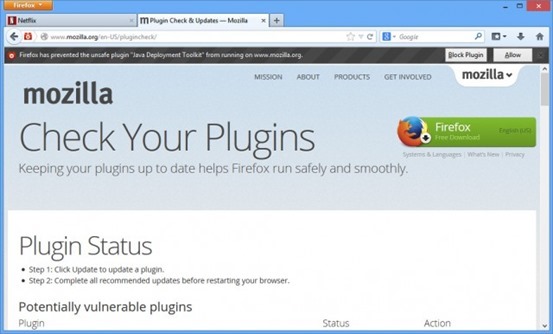
    Now, when a site tries to use Java, the user can choose whether to enable the plugin on that site. Firefox will only load it when you take the action of clicking to make it play. Alternatively, you can also configure Click to Play so that it always runs plugins on a particular website.

    The next big release of Firefox will be version 28, which will introduce Australis — a big rework of the Firefox UI to make it sleeker and more extensible (and look like Chrome).

    What’s New

    NEW

    All Java plug-ins are defaulted to ‘click to play’

    NEW

    Password manager now supports script-generated password fields

    NEW

    Updates can now be performed by Windows users without write permissions to Firefox install directory (requires Mozilla Maintenance Service)

    NEW

    Support for H.264 on Linux if the appropriate gstreamer plug-ins are installed

    CHANGED

    Support for MP3 decoding on Windows XP, completing MP3 support across Windows OS versions

    CHANGED

    CSP implementation now supports multiple policies, including the case of both an enforced and Report-Only policy, per the spec

    DEVELOPER

    Social API now supports Social Bookmarking for multiple providers through its SocialMarks functionality (see MDN docs)

    DEVELOPER

    Math.ToFloat32 takes a JS value and converts it to a Float32, whenever possible

    DEVELOPER

    There is no longer a prompt when websites use appcache

    DEVELOPER

    Support for the CSS image orientation property

    DEVELOPER

    New App Manager allows you to deploy and debug HTML5 webapps on Firefox OS phones and the Firefox OS Simulator

    DEVELOPER

    IndexedDB can now be used as a “optimistic” storage area so it doesn’t require any prompts and data is stored in a pool with LRU eviction policy, in short temporary storage

    FIXED

    When displaying a standalone image, Firefox matches the EXIF orientation information contained within the JPEG image (298619)

    FIXED

    Text Rendering Issues on Windows 7 with Platform Update KB2670838 (MSIE 10 Prerequisite) or on Windows 8.1 (812695)

    FIXED

    Improved page load times due to no longer decoding images that aren’t visible (847223)

    FIXED

    AudioToolbox MP3 backend for OSX (914479)

    FIXED

    Various security fixes
    Complete list of changes in Firefox 26
                               Download Firefox 26 for Windows / Mac / Linux
  • Angry Birds Star wars 2 is out !

    Angry Birds Star wars 2 is out !

    After hyping it up for quite a bit of time, Rovio has finally released Angry Birds Star Wars II. This sequel to the Star Wars-infused spin-off looks to shake things up quite a bit. For starters, it’s based on the three prequels that were released after the original Star Wars Trilogy.

    Another big change in this sequel is that you can now choose to play with the darkside — that is, you can play with the pigs! That gives you the ability to play as top villains such as Darth Maul, Darth Vader and more. In all, there are over 30 playable characters, the ability to bring those characters into your game by taking pictures of your telepod figurines, and more.

    Angry Birds Star Wars was one of the most intriguing new directions explored by the franchise made by Rovio, and now it seems that the Finnish developer is back with Angry Birds Star Wars II.
    The installment features new characters and a new storyline which will even let players choose their side, either go with the good birds or the bad piggies.

    The game, like its predecessor, combines the bird-tossing action of the Angry Birds franchise with the powers, characters, and settings of Star Wars universe.

    Download Now for iphone

    Download Now for android

    Download Now for ipad

    Download Now for Windows phone

  • How to install Tizen SDK

    How to install Tizen SDK

    Step 1 – From TIZEN site (https://developer.tizen.org/downloads/tizen-sdk) download Install Manager and SDK Image for your compatible Platform

    Prerequisites :-

    At least dual-core 2 GHz of CPU

    At least 2 GB of RAM memory

    At least 3 GB of free disk space

    Local administrator authority

    Step 2 – Download the JDK 6 or 7 installer executable for your Windows version

    Step 3 – Set Environmental variable for system path variable and modify path by adding this location path – C:\Windows\System32.

    Step 4 – Set Environmental variable for system path variable and modify path by adding this location path of your Java JDK bin folder in Program files.

    Step 4 – Now Run the Install Manager.

    Click on Advanced.

    In the Advanced Configuration windows, select the SDK Image radio button.

    Click the folder button, browse to the SDK image file, and click OK.

    Click Next.

    Accept the terms and conditions, and click Next.

    Select the components you want to install and click Next.

    Select the SDK home folder and click Install.


    How to Run Tizen web Application on Emulator

    For further details visit:-

    https://developer.tizen.org/downloads/sdk/installing-tizen-sdk

    https://developer.tizen.org/downloads/sdk/installing-sdk/prerequisites-tizen-sdk