Tag: Features

  • FIrefox 24 is Now Available !!

    FIrefox 24 is Now Available !!

    Mozilla has uploaded a few minutes ago, September 16, 2013, the final packages of their exceptional Mozilla Firefox 24.0 web browser for Linux, Mac OS X and Windows platforms.

    This announcement is only for those of you who want to download the brand-new Mozilla Firefox 24 web browser ahead of the officially announcement, which will happen later today. Therefore, you can download the final version of Mozilla Firefox 24.0 right now (see download links at the end of the article for your favorite platform(s)) from the official Mozilla FTP servers.

    Get Firefox 24 Now !!

    firefox_24

    If you prefer to wait for the official launch, you’ll soon be able to grab it directly from Firefox.com. Soon after it arrives tomorrow, Mozilla will also push it out via the browser’s automatic updates feature.

    NEW

    Support for new scrollbar style in Mac OS X 10.7 and newer

    NEW

    Implemented Close tabs to the right

    NEW

    Social: Ability to tear-off chat windows to view separately by simply dragging them out

    CHANGED

    Accessibility related improvements on using pinned tabs (see 577727)

    CHANGED

    Removed support for Revocation Lists feature (see 867465)

    CHANGED

    Performance improvements on New Tab Page loads (see 791670)

    DEVELOPER

    Major SVG rendering improvements around Image tiling and scaling (see 600207 )

    DEVELOPER

    Improved and unified Browser console for enhanced debugging experience, replacing existing Error console

    DEVELOPER

    Removed support for sherlock files that are loaded from application or profile directory

    FIXED

    Replace fixed-ratio audio resampler in webrtc.org capture code with Speex resampler and eliminate pseudo-44000Hz rate ( see 886886)

    FIXED

    24.0: Security fixes can be found here

    • First Look at Samsung Galaxy Gear smartwatch

      First Look at Samsung Galaxy Gear smartwatch

      1240108_10151606469743045_816110074_n

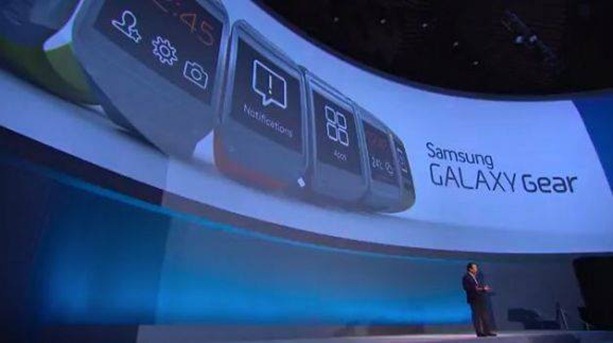
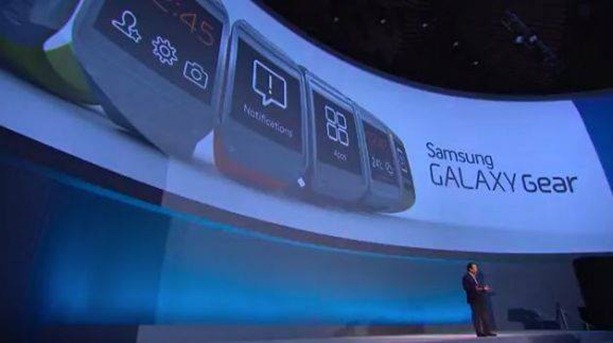
      Samsung Electronics unveiled its highly anticipated digital wristwatch that can snap photos, track workouts and use an array of apps – gadgetry that the company hopes will catapult it into a market of smart portable devices that leave cellphones in users’ pockets.

      Samsung will start shipping the $299 Gear smartwatch in September, ahead of a similar product expected from Apple. I had a chance to play with a pre-production unit for about 10 minutes and briefly with the version that Samsung announced Wednesday in Berlin on the eve of the annual IFA consumer electronics show.

      Features

      – 512 MB of RAM 

      – Internal memory of 4 GB

      – 800-megahertz, single-core CPU

      – Weighs 2.6 ounces

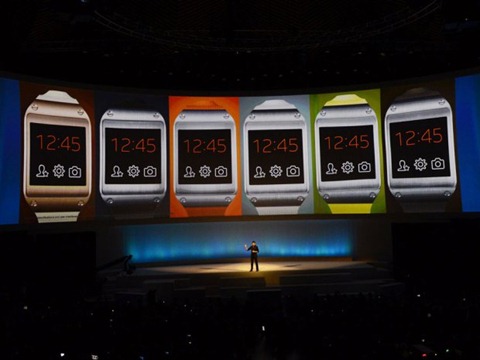
      – Available colors include lime green, oatmeal beige, wild orange, mocha gray, jet black and rose gold. samsung-galaxy-gear-watch

      The Pros

      – The Gear supports apps such as Facebook and lets the wearer answer incoming calls or check email without picking up the smartphone that’s paired with it.

      – The Gear’s design flair and ease of use are its sweetest attributes. It is sleek, with a thin metallic bezel surrounding the display. The strap comes in six different colors – black, gray, orange, beige, gold and green.

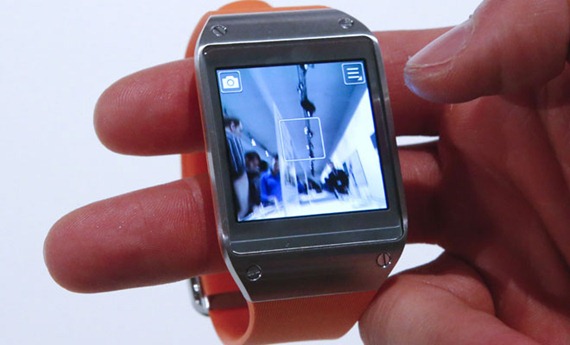
      – It is easy to activate the camera and quick to shoot a photo. It left both hands free while placing and answering calls. The full message can also be read. Samsung says replies are possible through voice dictation.

      – Easy navigation of the touch screen is one of the device’s biggest pluses.

      – Samsung has dispensed with buttons on the screen, so there’s no home or back button.

      – One tap anywhere on the screen takes and saves a photo in the Gear and the smartphone that’s paired with it.

      – The first generation of the Gear seems to be cool but not compelling enough.

      M_Id_416769_Samsung_Galaxy_Gear

      The Cons

      – Gear is not an independent device. For useful functionality, the Gear needs to be linked with a specific Samsung smartphone or tablet computer. The pairing is done wirelessly over a Bluetooth connection built in to both sides.

      – The Galaxy Gear may have an intuitive interface, but it is not an independent device, instead a slave which can be used only when it is paired to a smartphone.

      – The big disappointment for Samsung gadget owners is that the Gear does not work with most of its phones and tablets. For now the Galaxy Gear can only be paired with the Galaxy Note 3 smartphone and the Galaxy Tab 10.1 tablet PC.

      – It is priced at about twice the price of the Sony SmartWatch and the Pebble.

      – Its 1.9 megapixel camera is said to be of poorer quality than a typical smartphone camera.

      – One downside is that the Gear doesn’t support a wireless earpiece, so both sides of any conversation can be overheard.

    • Firefox 23 arrives with new logo and network monitor

      Firefox 23 arrives with new logo and network monitor

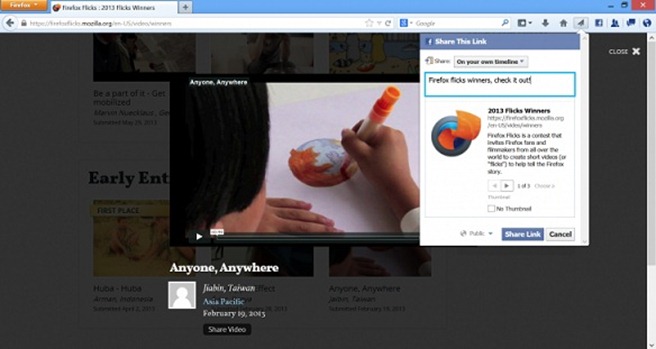
      firefox_logo-newMozilla today launched Firefox 23, which adds a couple of interesting features that extend the browser’s capabilities beyond just displaying websites. On the desktop, Firefox recently added the ability to integrate a number of social sites like Facebook, Cliqz and Mixi or new sites like msnNOW into a persistent sidebar in the browser. Now it is expanding this feature by adding a share button to the browser toolbar, too.

      This feature currently works with Facebook Messenger for Firefox and Cliqz and, as the Firefox team notes, allows you to “post an interesting article to your profile, share a recipe with your friends or send an idea for a gift in a private message or email, all without leaving the Web page you are visiting.”

      The new desktop version was available on the organization’s FTP servers last night, but that was just the initial release of the installers. Firefox 23 has now officially been released over on Firefox.com and all existing users should be able to upgrade to it automatically. As always, the Android version is trickling out slowly on Google Play.

      The biggest addition is no doubt the new share button and panel for the browser’s Social API. In short, developers can let users share content with friends in one click (Facebook users, for example, can use it to share content directly from Firefox, regardless of where they are on the Web).Facebook-Screenshot-730x388

      Next up is the mixed content blocker, which prevents non-secure (HTTP) content on a website from being read or modified by attackers by blocking the non-secure content from being compromised. In case you’re wondering, mixed content occurs when a webpage containing a combination of both secure (HTTPS) and non-secure (HTTP) content is delivered over a secure data channel to the browser. Here’s how it looks in action:

      Also in this release, developers can finally use the new Network Monitor. It breaks down individual website components, highlighting how long it takes for each to load.


      There are naturally other Firefox 23 features worth noting; here’s the official changelog:

      • NEW: Mixed content blocking enabled to protects users from man-in-the-middle attacks and eavesdroppers on HTTPS pages (learn more).
      • NEW: Options panel created for Web Developer Toolbox.
      • CHANGED: “Enable JavaScript” preference checkbox has been removed and user-set values will be reset to the default.
      • CHANGED: Updated Firefox Logo.
      • CHANGED: Improved about:memory’s functional UI.
      • CHANGED: Simplified interface for notifications of plugin installation.
      • CHANGED: Enabled DXVA2 on Windows Vista+ to accelerate H.264 video decoding.
      • CHANGED: Users can now switch to a new search provider across the entire browser.
      • CHANGED: CSP policies using the standard syntax and semantics will now be enforced.
      • CHANGED: input type=’file’ rendering improvements (see bug 838675).
      • CHANGED: Replace fixed-ratio audio resampler in webrtc.org capture code with Speex resampler and eliminate pseudo-44000Hz rate.
      • CHANGED: “Load images automatically” and Always show the tab bar” checkboxes removed from preferences and reset to defaults.
      • DEVELOPER: HTML5 input type=”range” form control implemented.
      • DEVELOPER: Write more accessible pages on touch interfaces with new ARIA role for key buttons.
      • DEVELOPER: Social share functionality.
      • DEVELOPER: Added unprefixed requestAnimationFrame.
      • DEVELOPER: Implemented a global browser console.
      • DEVELOPER: Dropped blink effect from text-decoration: blink; and completely removed element
      • DEVELOPER: New feature in toolbox: Network Monitor.
      • FIXED: Various security fixes.
    • Its all about Android 4.3

      Its all about Android 4.3

      Android-4.3-640x353Unlike previous versions of Android, 4.3 Jelly Bean leaked all over the place before the official announcement. A full system ROM was even extracted from a few internal Google devices and made available online.  Android 4.3 might not be the biggest update, but it’s still something to look forward to.

      Officially, Android 4.3 is still a version of Jelly Bean, which makes sense, considering the minor nature of its changes. But of course, this may disappoint Android fans whose mouths have been watering for Key Lime Pie since Google I/O in May.

      Performance Improvements

      With the first version of Jelly Bean, Google introduced us to Project Butter. This was a unified effort to streamline UI responsiveness with extra buffering and hardware acceleration. In 4.3, Project Butter has been enhanced with rewritten vsync timing, triple buffering, reduced touch latency, CPU input boost, and hardware-accelerated 2D rendering.

      Android 4.3 includes support for OpenGL ES 3.0, which makes Android the first mobile platform to support this standard. Game developers working with the native development kit (not running code through the Java virtual machine) will be able to take advantage of many new features.

      The new version of OpenGL allows apps to render higher-quality visuals and deeper textures on the same hardware. It should also make advanced native games run on a wider range of devices, assuming they are running Android 4.3 — which most won’t be.

      Multi-User Restricted Profiles

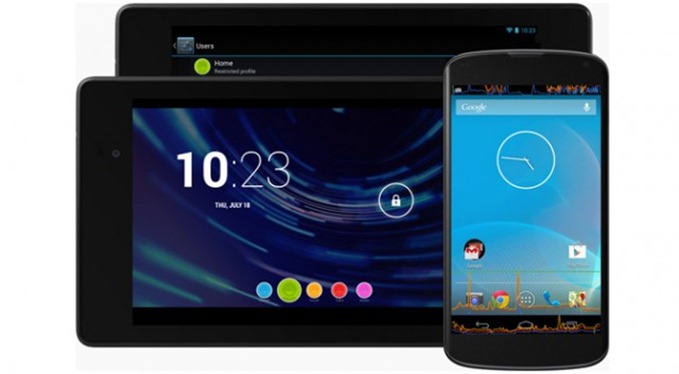
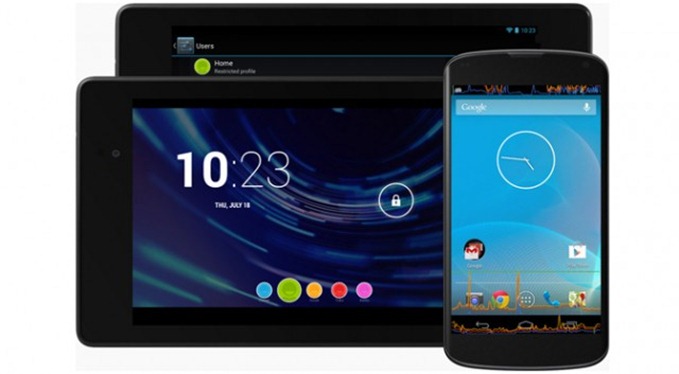
      The biggest addition to Android 4.3 is the Multi-User Restricted Profiles feature, which lets you control the usage of apps and other content on a user level. Multiple user profiles were already available in 4.2.2, but the ability to create restrictions has long been requested, so it’s sure to be a big hit.multiuser_lockscreen2_610x381
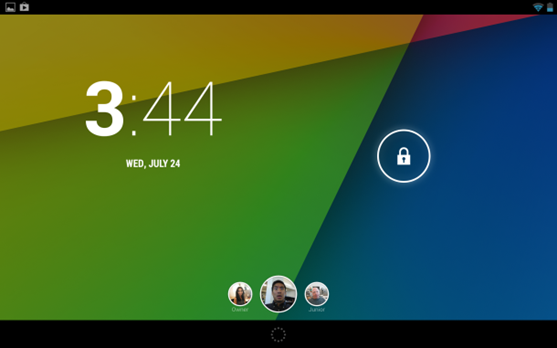
      The people most obviously to benefit from the new profile controls are parents. We saw this in Google’s demo; being logged into a restricted user profile caused an app to behave differently. Specifically, a freemium game showed up without all of the in-app purchasing functionality, which is clearly going to be useful for parents with young children who use the device.

      From the primary user’s Settings screen, it’s easy to configure a restricted account’s access using the sliders. And if an app offers in-app restrictions (such as the games mentioned above), then there’s a button for extra options next to it.

      With Restricted Profiles, Google is obviously trying to lure more users — specifically parents and businesses — away from iOS, a platform that still lacks a user profiles feature altogether. As well, the feature opens a number of doors to developers who can now create in-app restrictions.

      Open GL ES 3.0

      A big deal for gamers, Open GL ES 3.0 makes the new version of Android more efficient and just plain better at displaying graphics. Google’s demo showed us impressive textures, lens flares, and reflections that the older OS would have had trouble displaying. While the upgraded graphics might be indiscernible to the average user, Open GL ES support is still important because of the new possibilities it opens up for developers.

      Bluetooth Smart technology
      jb-btle-300x168Support for Bluetooth Smart technology is another addition to Android 4.3 that wasn’t all that unexpected, considering it’s been available on iOS since early 2012. With this, the updated Android now allows you to connect with the newer generation of power-efficient accessories that use Bluetooth Smart. And of course, the Smart connection should be less taxing on your Android device’s battery. During Google’s presentation, we saw an Android device connecting with a Bluetooth Smart-enabled heart-rate monitor that was being powered by the popular Runtastic fitness app.

      The update also came with Bluetooth AVRCP 1.3 support, which lets your device now transmit metadata, like a song’s title and artist, to Bluetooth controllers.

      New DRM

      Android is an open platform, but it also has to work in the real world. To those ends, Android 4.3 includes new media DRM APIs. App developers will be able to more easily integrate DRM standards into their streaming services, which are often required to provide high-resolution video.

      As if to prove to us that more DRM in Android can be a good thing, Google announced at the event that the first app to make use of this feature is Netflix. The new version, which was quietly pushed on Monday, has support for the advanced DRM in Android 4.3. This allows the app to stream 1080p video. On other devices, it will still stream in standard definition.

      Hindi support lands on Android 4.3

      Google has introduced native local language support to its operating system for Africaans, Amharic, Hindi, Swahili and Zulu. Hindi has finally reached the stock Android operating platform.

      With the update, Google has also added support for Hebrew and Arabic (right-to-left) in the home screen, Settings, Phone, People, and Keep apps.

      Additional

      First up, is Android’s dialer, which now has autocomplete for both phone numbers and names. I haven’t gotten to try the feature on a phone yet, but its presence in 4.3 is confirmed, and the added convenience is notable. That said, the reality is that most Android users may not even notice the upgraded dialer, since autocomplete has already come built into the custom operating systems by hardware manufacturers like Samsung.

      One feature that Google didn’t formally announce is the new Emoji keyboard, which comes stock with the OS and can be enabled through the Language & input menu under Settings. Once enabled, you can long-press the spacebar key to pull it up and emote to your heart’s content.

      When I will get it ?

      If you have a Nexus 4, GSM Galaxy Nexus, or original Nexus 7, the update is going to be rolling out over the air to your device very soon. The new Nexus 7 will ship with 4.3 pre-installed, but that’s not leaving warehouses until July 30.

      Android 4.3 root using SuperSU via xda

      If you’re using any other Android device, you’ll have to wait on your OEM and maybe the carrier to get around to developing and approving a new OS version. That could take a few months, or it might never happen. Owners of newer devices like the HTC One and Galaxy S4 will get the update at some point.

      If you don’t want to wait with fingers crossed, the code for 4.3 has already been pushed to the Android Open Source Project, where it will be picked up by ROM developers. Give them a week or two, and 4.3-based ROMs such as CyanogenMod will start hitting the web.
    • Fedora 19 ‘Schrodinger’s Cat’ is out officially

      Fedora 19 ‘Schrodinger’s Cat’ is out officially

      fedora-19-logoThe Fedora Project has released the latest version of the team’s open source operating system. Fedora 19 “Schrodinger’s Cat” is now available for download.

      Fedora 19 includes a wide range of updates, uses the Linux 3.9 kernel, and comes with a choice of GNOME 3.8, KDE Plasma 4.10, or MATE 1.6 desktop environments.

      “Fedora is a Linux-based operating system, a suite of software that makes your computer run. You can use the Fedora operating system to replace or to run alongside of other operating systems such as Microsoft Windows or Mac OS X. The Fedora operating system is 100% free of cost for you to enjoy and share,” reads the official website.

      What’s new in Fedora 19 ?

      The Linux kernel has been updated to version 3.9.0.
      An option has been added in order to enable access to the Extlinux bootloader, which is part of the Syslinux family of bootloaders.
      The initial setup screens have been revamped for Fedora 19.

      The anaconda installer has been reworked and the distribution now provides support during installation for advanced storage, such as fcoe, iscsi, and multipath.
      The text mode of the anaconda installer has also been improved.
      The distribution can now join a domain from a kickstart file or from the anaconda installer.
      The appearance of GRUB and GRUB menus have been changed.
      FreeIPA realmd support has been added.

      Complete list of new features and changes are available in the official announcement.

      Fedora 19 also includes an improved Anaconda installer (which walks you through the process of actually installing the operating system, 3D modelling and printing software, a built-in language translation tool, and updated apps including the LibreOffice 4.0 office suite.

      Download your copy from project website or the Fedora Project Bittorrent Tracker.

    • Apple Unveils iOS 7 : How ‘Big’ it is ?

      Apple Unveils iOS 7 : How ‘Big’ it is ?

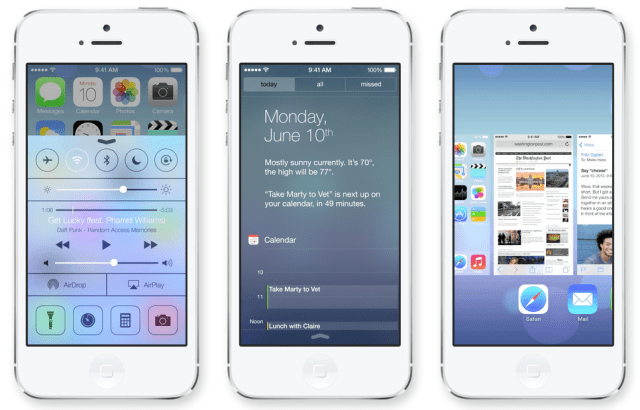
      Apple has officially taken the wraps off of iOS 7 at its Worldwide Developer Conference today. iOS 7 is the latest version of Apple’s mobile operating system that debuted back in 2007 on the original iPhone. According to Apple CEO Tim Cook, iOS 7 is the biggest change to the platform since the iPhone was introduced five years ago. The new design is evident in everything from sharper, flatter icons, slimmer fonts, a new slide-to-unlock function, and a new control panel that slides up from the bottom of the screen for frequently accessed settings. The stock apps have all been redesigned — including a major revamp of the weather app with new animations that are scarily reminiscent of Yahoo’s great-looking Weather app graphics.
      New Look

      • iOS 7 has a new font leading the way, which seems to be a sort of Helvetica Neue Ultra. It’s very skinny, clean, and it was hinted at in the iOS 7 banners that went up for WWDC yesterday.
      • Instead of white bars on a black background, Apple will now tell you what kind of service coverage you have with five little dots, which are white and grey depending on how strong the signal is across a translucent background.
      • The lock screen is changed for the first time in iOS’s history, with no more shine top or bottom bars for slide to unlock or the clock. Instead, Slide to unlock is translucent above the background image.
      • Default app icons are now flatter, but not quite flat, just as predicted.
      • Jony Ive’s hand has had its way with iOS notifications. The notifications panel isn’t laced with dark grey linen anymore, but actually has a very flat look to it. There is a today view, that lets you see friends birthdays, upcoming invitations, calendar, stocks, and a quick look at tomorrow.
      • The apps all seem to have a white base, except for the stocks app which has a black background and the weather app, which shows motion in the background to convey the current weather.
      • The keyboard is more white, than grey, with a translucency that lets you see what’s underneath the keyboard.
      • New Features

        2

        Control Center

        • Control Center is a pull-up tray that is available in your lock screen.
        • You can adjust brightness, volume, and other settings including Wifi, Airplane mode, rotation lock, or Bluetooth.
        • The Control Center even offers a flashlight, along with tabs for music, camera, and other quick-access apps.
        • The Control Center takes on the environment it’s in, so if you swipe up while you’re in mail, it will have the same blue and white coloring under that translucent panel.
        Multitasking
        • iOS 7 lets you multitask between all third-party apps with much better battery consumption.
        • You can double-tap the home button to enter into multi-tasking mode, just like always, but the interface for multitasking has been revamped. It appears to offer live previews, but Apple wasn’t clear about that.
        safari_tab_screen

        Safari

        • Safari opens straight into full screen mode now, with the option to pull down to bring up the search bar at the top.
        • The search field has been improved to be a unified smart search field, which lets you have access to all your favorite websites with a single tap.
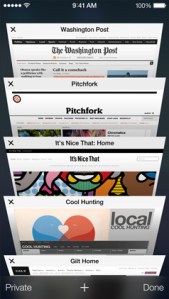
        • Tabs come with a totally new interface, scrolling in a vertical carousel, and there are no longer any limits. In other words, you can have as many tabs as you want, as opposed to just 8 like before. Swipe a tab off to the side to throw it away.
        • The new Safari is integrated with iCloud keychain from OS X Mavericks, and also comes with parental controls.

        AirDrop

        • You can share sharesheets with other people by simply tapping their name. No NFC required.
        • Airdrop supports iPhone 5, iPad 4th gen, iPad Mini

        Camera And Photos

        • The Camera app lets you swipe between your various camera types, such as panorama or HDR so you can quickly take a pic instead of fumbling around with settings.
        • Photos marks the first update to the photo gallery on iOS since it was introduced.
        • You can search based on date, and location, within the photos app.
        • Instagram must be flattered — Apple has introduced photo filters so you can add a little professionalism to the picture.
        • Users can share via AirDrop, iCloud photo-sharing, as well as shared Photo Streams.
        • You can even share video with iCloud photo-sharing.
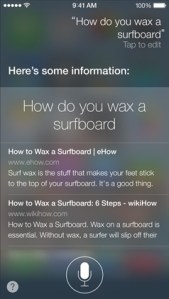
        siri_ask_screen

        Siri

        • Siri has a new voice! It sounds similar, but also weird. You can choose a male or female voice, if you like. Voices include languages like French, German, and other languages “over time.”
        • The visual UI has also been upgraded, with a sound wave going along the bottom.
        • Siri has also been integrated with settings, letting you tell her to turn on bluetooth, or lower the screen brightness.
        • The company has also added support for Twitter, Wikipedia, and shows web search results direct from Bing.

        iOS in the Car

        • iOS in the Car depends a lot on Siri.
        • It puts the iOS homescreen on the screen of your car, and lets you search for directions, listen to music, etc.

        App Store

        • You can now search for apps based on location. In other words, search for apps by the Louvre and see a lot of French museum apps.
        • The App Store also automatically updates apps for you in the background now. Hallelujah again!
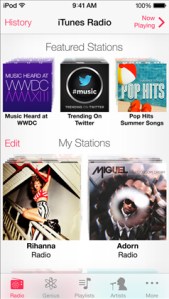
        itunesradio_mystations

        iTunes Radio

        • Apple has finally introduced the much-anticipated iTunes Radio, which gives a Genius-like experience to the entire 26-million title iTunes catalog.
        • You can see the full list of songs on each station by clicking history, with purchase and preview buttons built right in to send you to the iTunes store.
        • iTunes Radio also lets you customize each station by clicking a star to show that you want more of this type of music.
        • iTunes Match users will get an ad-free experience, but others will be able to use the app for free with a few audio and text ads.

        Activation Lock

        • This is for those of us who have had an iPhone stolen.
        • If a thief steals your phone and tries to turn off Find My iPhone, they can no longer turn the device back on without your iCloud password.
        • Users can also block messages and calls from other users.

      Coming This Fall

      • Developers will have access to iOS 7 on Monday and it will hit iOS devices this fall.
    • Sony unveils PlayStation 4 with social, remote features

      Sony unveils PlayStation 4 with social, remote features

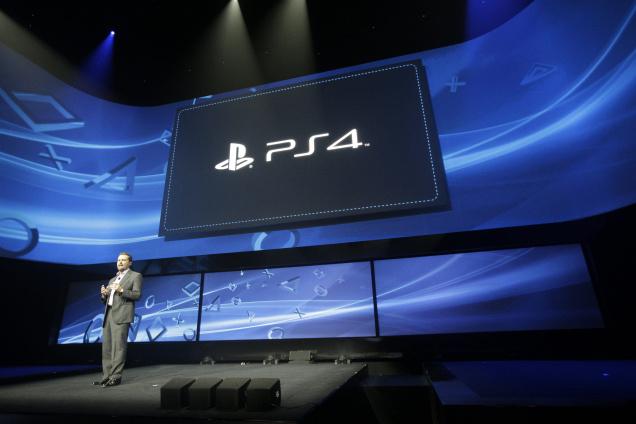
      Sony launched the latest salvo in its ongoing rivalry with Microsoft with the launch of the PlayStation 4, the first of a new generation of consoles. At an event held in the Hammerstein Ballroom in New York’s Manhattan Center, Sony revealed that the PlayStation 4 would go on sale this Christmas. It refused to set a price, or even show the console itself but it is unlikely to cost much less than £300.

      With under-the bonnet power considerably in excess of that of the PlayStation 3 and Xbox 360, it will usher in a new breed of games with startlingly lifelike graphics, set in virtual worlds that operate in a much more believable manner than the current crop. But it will not have that ground to itself: Microsoft is applying the finishing touches to a successor for its Xbox 360 which, it is believed, it will unveil at the E3 Show in Los Angeles in June. That, too, is likely to go on sale this Christmas, unleashing a titanic battle for living room supremacy between Sony and Microsoft.

      “Today marks a moment of truth and a bold step forward for PlayStation,” said Andrew House, CEO of Sony Computer Entertainment.

      Sony said the system will feature an eight-core processor that can juggle more tasks than the PlayStation 3 and be part of a new digital ecosystem that’s “the fastest, most powerful gaming network.”

      There was no word on price or availability, other than a flash on the screen saying “holiday 2013.”

      The PS4 is arriving amid declines in video game hardware, software and accessory sales. Research firm NPD Group said game sales fell 22 per cent to $13.3 billion in 2012. With the launch of the PS4, Sony is looking to attract audiences who may have shifted their attention to games on Facebook, tablet computers and mobile phones.

      Beyond games, the PlayStation 4 will let people create animation in 3-D using a Move motion controller all in real time.

      Full Specifications and Features

      Main Processor

      • Single-chip custom processor
      • CPU : x86-64 AMD “Jaguar”, 8 cores
      • GPU : 1.84 TFLOPS, AMD next-generation Radeon based graphics engine

      Memory

      • GDDR5 8GB

      Hard Disk Drive

      • Built-in

      Optical Drive

      • (read only)
      • BD 6xCAV
      • DVD 8xCAV
      • I/O
      • Super-Speed USB (USB 3.0), AUX

      Communication

      • Ethernet (10BASE-T, 100BASE-TX, 1000BASE-T)
      • IEEE 802.11 b/g/n
      • Bluetooth 2.1 (EDR)

      AV output

      • HDMI
      • Analog-AV out
      • Digital Output (optical)*Specifications are subject to change without notice.

      Wireless Controller for PlayStation4 (DUALSHOCK4)

      External Dimensions

      • Approx. 162mm x 52mm x 98mm (width x height x depth) (tentative, excludes largest projection)

      Weight

      • Approx. 210g (tentative)

      Keys / Switches

      • PS button, SHARE button, OPTIONS button
      • Directional buttons (Up/Down/Left/Right)
      • Action buttons (Triangle, Circle, Cross, Square)
      • R1/L1/R2/L2 button, Left stick / L3 button, Right stick / R3 button, Pad Button
      • Touch Pad 2 Point Touch Pad, Click Mechanism, Capacitive Type
      • Motion Sensor Six-axis motion sensing system (three-axis gyroscope, threeaxis accelerometer)

      Other Features

      • Light Bar, Vibration, Built-in Mono Speaker
      • Ports: USB (Micro B), Extention Port, Stereo Headset Jack
      • Wireless Communication Bluetooth Ver2.1+EDR
      • Battery Type Built-in Lithium-ion Rechargeable Battery Voltage DC3.7V (tentative) Capacity 1000mAh (tentative)

      PlayStation 4 Eye

      • External Dimension Approx. 186mm x 27mm x 27mm (width x height x depth)(tentative)
      • Weight Approx. 183g (tentative)
      • Video Pixel (Maximum) 1280 x 800 pixel x 2
      • Video Frame Rate 1280×800 pixel @ 60fps
      • 640×400 pixel @ 120fps
      • 320×192 pixel @ 240fps
      • Video Format RAW, YUV (uncompressed)
      • Lens Dual Lenses, F value/F2.0 fixed focus
      • Capture Range 30cm~∞
      • Field-of-View 85
      • Microphone 4 Channel Microphone Array
      • Connection Type PS4 dedicated connector (AUX connector)
      • Cable Length Approx. 2m (tentative) *Specifications are subject to change without notice.-
    • Lenovo Announces K990 Smartphone

      Lenovo Announces K990 Smartphone

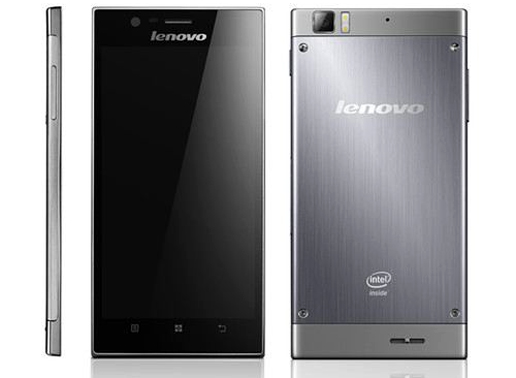
      Lenovo K990 Smartphone

      Lenovo recently at the 2013 edition of Consumer Electronics Show unveiled its latest flagship smartphone, the K900, which sports a 5.5-inch IPS screen and a super slim 6.9mm profile, all running on an Intel Atom processor.

      With the K900, our team has broken down the key functions of the smartphone and redesigned them from the ground up, said Liu Jun, president, Mobile Internet Digital Home, and senior vice president, Lenovo.

      Rather than focus on specifications that look good on a datasheet, weave zeroed in on what consumers want and proved that for smartphone users, top performance doesn’t require a thick profile. The K900 is a game-changer that looks as good as it performs.

      7 tips for saving your smartphone’s battery life

      The K900 resets the bar on these aspects. At 6.9mm, the K900 is the thinnest phone in its class by a wide margin and weighs in at a mere 162g (5.7 ounces), making it a device that unobtrusively slips into a jacket pocket or handbag.

      Made from a composite of stainless steel alloy and polycarbonate in a Unibody mold, the K900 manages to stay strong and look sharp while maintaining its slim profile.

      The K900 is one of the first smartphones in the world to combine a 5.5-inch IPS display with 1080p full high-definition resolution performance at 400+ pixels-per-inch, all under the latest, touch-capacitive Gorilla Glass 2.

      Centered on the forthcoming Intel Atom processor platform for smartphones, the K900 is very responsive, especially for key functions such as web-browsing and application-loading.

      How To Make Android Faster: What Works, And What Doesn’t

      Megapixels is the first specification that many users recognize for digital cameras, and with 13MP, the K900 ranks at the top of its class in this aspect and combines this with an industry-leading, SonyExmor BSI sensor for what would already be considered outstanding performance.

      The K900 smartphone will be available from April in China and in select regional markets soon thereafter. Pricing for the K900 will be announced at a later date.