
 The latest release of the Firefox web browser boosts browser security and stability by blocking Java software component plug-ins from loading by default.
The latest version of Firefox, Firefox 26, is now officially available to download. This is one of the most significant releases in recent history, introducing built-in “click to play” functionality for all plug-ins (except for Flash). Firefox 26 also represents the dramatic culmination of Mozilla’s MemShrink project, which has spent the last two and a half years trying to battle Firefox’s reputation for being a memory hog. Firefox 26 has a very svelte memory footprint indeed.
Click to Play revamp was supposed to be for all versions of all plugins, except the latest release of Flash. Unfortunately, Mozilla has pushed back this change and decided to focus on just Java.
In short, the feature means Firefox now only loads Java plugins when users click to interact with them. Previously, Firefox would automatically load Java whenever a site requested it, unless Mozilla had blocked it for security reasons (the company already blocks old versions of Java, Silverlight, and Flash).
Firefox 26, click to play. Note the gray bar asking if you want to allow Java to run or not.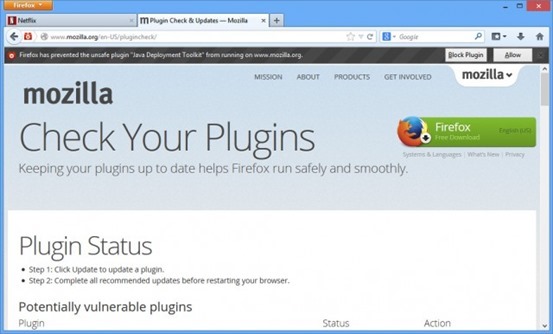
Now, when a site tries to use Java, the user can choose whether to enable the plugin on that site. Firefox will only load it when you take the action of clicking to make it play. Alternatively, you can also configure Click to Play so that it always runs plugins on a particular website.
The next big release of Firefox will be version 28, which will introduce Australis — a big rework of the Firefox UI to make it sleeker and more extensible (and look like Chrome).
What’s New
NEW
All Java plug-ins are defaulted to ‘click to play’
NEW
Password manager now supports script-generated password fields
NEW
Updates can now be performed by Windows users without write permissions to Firefox install directory (requires Mozilla Maintenance Service)
NEW
Support for H.264 on Linux if the appropriate gstreamer plug-ins are installed
CHANGED
Support for MP3 decoding on Windows XP, completing MP3 support across Windows OS versions
CHANGED
CSP implementation now supports multiple policies, including the case of both an enforced and Report-Only policy, per the spec
DEVELOPER
Social API now supports Social Bookmarking for multiple providers through its SocialMarks functionality (see MDN docs)
DEVELOPER
Math.ToFloat32 takes a JS value and converts it to a Float32, whenever possible
DEVELOPER
There is no longer a prompt when websites use appcache
DEVELOPER
Support for the CSS image orientation property
DEVELOPER
New App Manager allows you to deploy and debug HTML5 webapps on Firefox OS phones and the Firefox OS Simulator
DEVELOPER
IndexedDB can now be used as a “optimistic” storage area so it doesn’t require any prompts and data is stored in a pool with LRU eviction policy, in short temporary storage
FIXED
When displaying a standalone image, Firefox matches the EXIF orientation information contained within the JPEG image (298619)
FIXED
Text Rendering Issues on Windows 7 with Platform Update KB2670838 (MSIE 10 Prerequisite) or on Windows 8.1 (812695)
FIXED
Improved page load times due to no longer decoding images that aren’t visible (847223)
FIXED
AudioToolbox MP3 backend for OSX (914479)
FIXED
Various security fixes