Tag: pc

  • How to Use WhatsApp on your PC Using Chrome

    How to Use WhatsApp on your PC Using Chrome

    WhatsApp Web new feature launched by the company which is not a replacement for mobile client as you still need. The official mobile app must be installed on your phone to make use of it as.

    In a recent blog post they said “Today, for the first time, millions of you will have the ability to use WhatsApp on your web browser.”

    The web client will mirror conversations and messages from the mobile device.
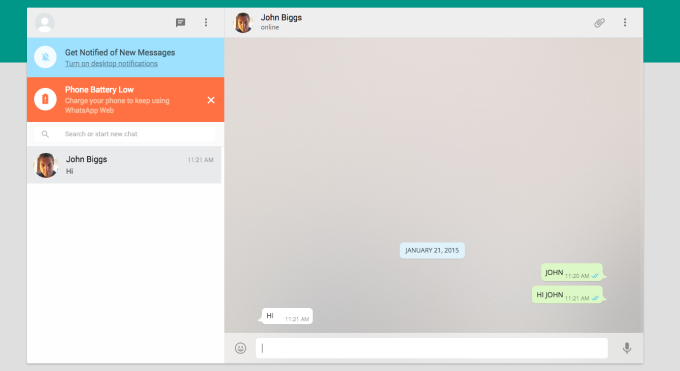
    whatsapp-webHow to access Whatsapp in web browser?

    WhatsApp can be connected by https://web.whatsapp.com in a Google Chrome browser (more browser coming soon).

    You must have updated version of WhatsApp app on your phone.

    Choose WhatsApp Web from the menu.

    You will see a QR code, scan the code inside of WhatsApp, and you’re ready to go. Your mobile app and web client are now connected.

    Your phone needs to stay connected to the internet for our web client to work. (WiFi recommended)

    This service is currently available to Android, Windows and Blackberry users. (Sadly not available on iOS)

    Also Read: How To Make Your Smartphone Work For You
  • Windows 10: Almost Everything you need to know

    Windows 10: Almost Everything you need to know

    Microsoft gave the first look at its Windows 10 operating system recently, a major release that will span all hardware from PCs to phones and try to recover the Windows 8 loss.

    Windows 10 and not Windows 9

    The natural name would have been Windows 9, but Microsoft is eager to suggest a break with the past. “We’re not building an incremental product,” said Terry Myerson, head of Microsoft’s Operating Systems Group.

    Will run on every device

    Microsoft demonstrated only the desktop version, but Windows 10 will be for tablets, smartphones and embedded products, too.

    “It will run on the broadest types of devices ever, from the smallest ‘Internet of things’ device to enterprise data centers worldwide,” Myerson said. “Some of these devices have 4-inch screens, and some will have 80-inch screens. And some don’t have any screen at all.”

    And yes there is a start menu

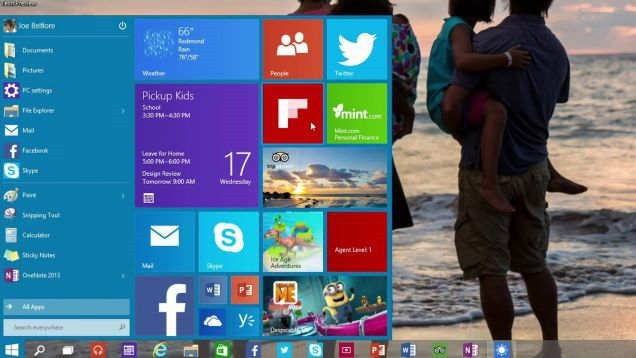
    They tried to combine the familiarity of Windows 7 with the modern interface of Windows 8. That means the new start menu is divided into 2 parts: On the left, apps are displayed in the familiar Windows 7 style, while on the right windows 8 stylized live tiles. The start menu is customizable, so you can resize the tiles and move them around.

    windows-10-start

    Multiple desktops

    Windows 10 has a feature like that lets you zoom out and see everything that’s open on a PC, then select any app to enter it. You can also navigate through several virtual desktop displays at the bottom of the screen.

    Command Prompt just got better

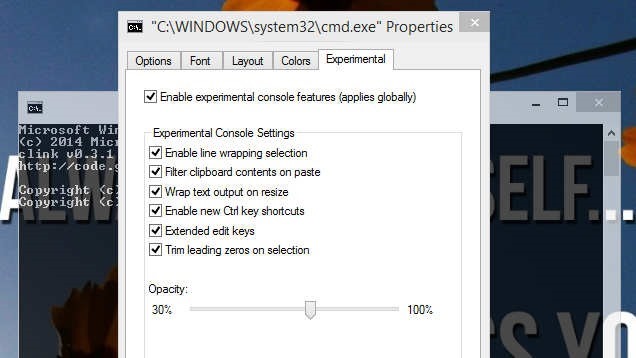
    Microsoft made an unusual point of specifying that Ctrl-V would work inside the command prompt. Alongwith, click the Experimental tab and there are several other new features you can enable.

    cmd-windows-10

    Cortana might be Coming to the Desktop

    Microsoft has been working on its voice assistant called Cortana that’s allegedly supposed to appear in Windows 10 before its released.

    The OS will launch around the middle of next year, after Microsoft’s Build conference.But, you can try Windows Technical Preview right now. But take care while installing it.

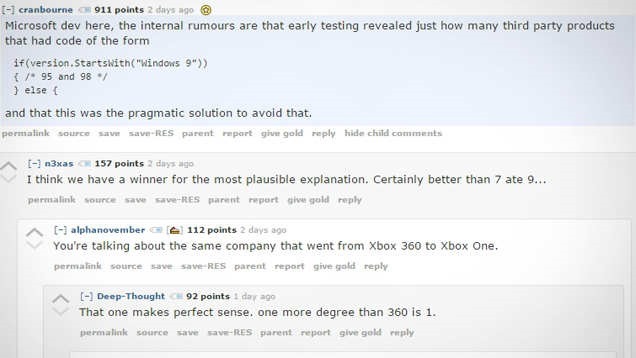
    Bonus – Lazy Programming might be the reason for windows 10 not 9

    Someone (probably developer team member) posted this recently.

    windows10-9

  • China reveals own government-approved Operating System

    China reveals own government-approved Operating System

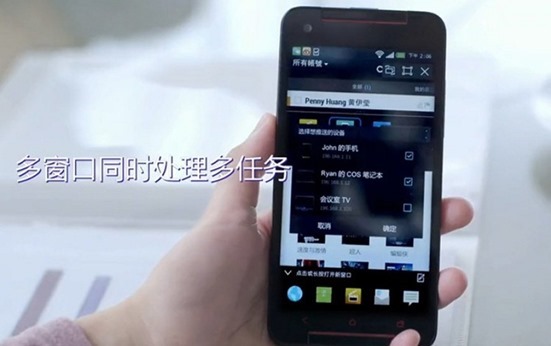
    Chine-mobile-osChina offers revealed a unique mobile system, named China Main system (COS) using the try to split the actual monopoly of giants actually have available in the market. The particular state-approved as well as government-funded operating system was developed collectively by simply China’s Institute of Software at the Chinese Academy of Sciences (ISCAS) and Shanghai Liantong Network Communications Technology.
    COS is based on Linux as well as serves just as one managing system pertaining to Computers, mobile phones, tablets, as well as set-top box along with sustains HTML5 apps.

    ”The operating system has already risen to become a national security matter,” said Shanghai Liantong Network Communications Technology in a statement on its website.


    The COS is “completely” independently developed, from the basic coding to the user interface, said an article posted on the Chinese Academy of Sciences website.

    COS is not the only domestically produced operating system to make headlines recently. On Jan. 9, the Chinese technology company Coship Electronics announced that it had produced the country’s first smartphone operating system with independent intellectual property rights. The company’s chairman, Yuan Ming, said that the system, called 960 OS, took 15 years to develop.

    Will probably be exciting to be noticed simply what types of impact COS could have about competing operating systems in the region, specially with the latest deal which Apple was able to ink with China Mobile. iPhone goes on discount sales with the business beginning next week pursuing negotiations on prices which started in 2008 having then-CEO Steve Jobs.

  • How to use Whatsapp on your PC/Mac without Bluestacks?

    How to use Whatsapp on your PC/Mac without Bluestacks?

    whatsapp_windows_phone_header_logoWhatsapp is one of the most famous messaging app available for smartphones, so people who don’t own a smartphone like to use it via their laptops or computers. Now if you are one of those people who want to install Whatsapp on their phone without installing Bluestacks or any other App Player or Simulator.

    We know that there are many reasons for not using these players or simulators, they are bulky, they require high configuration, they require graphic cards to run or may be you don’t trust them to be installed on your PC. But Now with this method you don’t need any Graphic Card.

    Things you Need –

    • Working PC with Windows XP/Vista/7/8
    • A Internet connection
    • Mobile number to create your new Whatsapp account (not needed if you already have a Whatsapp account).
    • Wassapp Application

    wassapp_logoWassapp application basically allows any user to chat with his WhatsApp contacts from a computer (using a phone number that has been previously registered in WhatsApp, using a smartphone or any other method).


    Linux and OS X versions will be available soon.


    Here are the easy steps to Download Whatsapp on your PC without using Bluestacks or any other App Player.


    1. First of all Download Wassapp for Windows.
    2. After completeing the download, double click the downloaded file and install the Wassapp application.
    3. When installation is completed open Wassapp using desktop shortcut.
    4. Now enter you mobile number and password.
    5. Then either click on Login or Register. Login if you are already using Whatsapp from your number or register if you don’t have an account.
    6. That’s it, now add you friends to your list using their contacts and chat with them for free.

    NOTE:

    If the phone number was registered on an Android phone, the password is the phone’s IMEI.
    If the phone number was registered on an iPhone, the password if the WiFi MAC address.


    If you are having any problem, feel free to contact.

  • CES 2014: Intel announces Edison dual-core PC the size of an SD card

    CES 2014: Intel announces Edison dual-core PC the size of an SD card

    2014-01-07T045031Z_1_CBREA060DGW00_RTROPTP_2_CESIntel CEO Brian Krzanich wants to introduce you to Edison, a miniature computer based on the same technology condensed into the form factor of an SD card. The tiny computer is built on the company’s 22nm transistor technology, runs Linux and has built-in WiFi and Bluetooth modules.

    Edison is based on Quark technology, the tiny, low-power system-on-a-chip that was designed for wearable computers, such as smart watches, and the Internet of Things.

    “It’s a full Pentium-class PC in the form factor of an SD card,” Krzanich said.

    To demonstrate the potential for Edison, Intel showed a concept for a “Nursery 2.0.” In the concept, a baby was wearing a Mimo onesie outfitted with sensors tracking things like temperature, and Edison was used display that information on, of all things, a coffee mug. When the baby was comfortable, blinking lights on the mug show a happy green smiling face, but when something is wrong that face turns red.

    Edison is Intel’s attempt to not repeat the mistake it made in the smartphone market. With smartphones and tablets, Intel failed to see the trend and did not address the market properly until 2012. Now when the companies are expected to push smart glasses and smart watches, Intel intends to not repeat the mistake it made earlier.

    It not only supports multiple OSes and has built-in support for Bluetooth and Wi-Fi, but it also has its own app store – and has Wolfram Alpha’s Mathematica baked in by default.
    Follow it all at CES 2014 on Gizmantra