Tag: release

  • Firefox 39.0 launched with performance improvements

    Firefox 39.0 launched with performance improvements

    Mozilla just released its new version of firefox for all supported devices. If you haven’t received any update then your can check for it manually, go to Help > About Firefox.

    It was delayed due to last minute bug but its now fixed and public.That’s why we recommend do not download Firefox from third party websites as it may contain the buggy version.

    Check out : Awesome Firefox Tricks You Might Not Know

    The further update for all Firefox channels is also done.That is Firefox Beta is now upgraded to version 40, Firefox Dev to version 41, and Firefox nightly to version 42. There is no 64 bit version for windows yet.
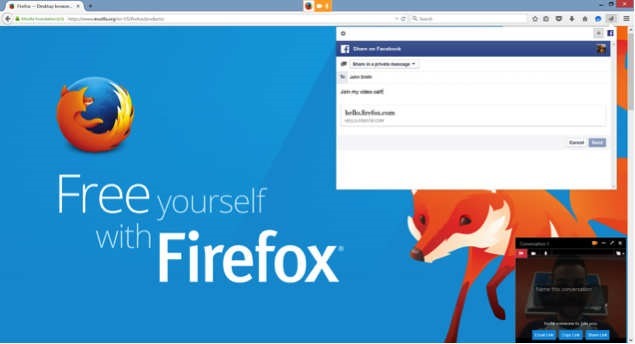
    Firefox-Hello-link-sharing

    What’s new

    • New

      Share Hello URLs with social networks

    • New

      Project Silk: Smoother animation and scrolling (Mac OS X)

    • New

      Support for ‘switch’ role in ARIA 1.1 (web accessibility)

    • New

      SafeBrowsing malware detection lookups enabled for downloads (Mac OS X and Linux)

    • New

      Support for new Unicode 8.0 skin tone emoji

    • Changed

      Removed support for insecure SSLv3 for network communications

    • Changed

      Disable use of RC4 except for temporarily whitelisted hosts

    • Changed

      The malware detection service for downloads now covers common Mac file types (Bug 1138721)

    • Changed

      Performance of displaying dashed lines is improved (Mac OS X) (Bug 1123019)

    • HTML5

      List-style-type now accepts a string value

    • HTML5

      Enable the Fetch API for network requests from dedicated, shared and service workers

    • HTML5

      Cascading of CSS transitions and animations now matches the current spec

    • HTML5

      Implement <link rel="preconnect">allowing anticipation of a future connection without revealing any information

    • HTML5

      Added support for CSS Scroll Snap Points

    • Developer

      Drag and drop enabled for nodes in Inspector markup view

    • Developer

      Webconsole input history persists even after closing the toolbox

    • Developer

      Cubic bezier tooltip now shows a gallery of timing-function presets for use with CSS animations

    • Developer

      localhost is now available offline for WebSocket connections

    • Fixed

      Improve performance for IPv6 fallback to IPv4

    • Fixed

      Fix incomplete downloads being marked as complete by detecting broken HTTP1.1 transfers

    • Fixed

      The Security state indicator on a page now correctly ignores loads caused by previous pages

    • Fixed

      Fixed an issue where a Hello conversation window would sometimes fail to open

    • Fixed

      A regression that could lead to Flash not displaying has been fixed

    • Fixed

      Update to NSS 3.19.2

    • Fixed

      Various security fixes

  • Mozilla Firefox 34 released with ‘Firefox Hello’

    Mozilla Firefox 34 released with ‘Firefox Hello’

    Mozilla released Firefox 34 on first of December along with new partnership with Yahoo.

    Firefox 34 brings a number of major features, such as an improved search bar, better theme switching, Firefox’s experimental ‘Hello’ chat client and the rollout of Yahoo as the default search engine for North America.

    When you update to the new version, Firefox will ask if you want to switch to Yahoo for your default search engine, however you can click ‘later’ to keep it as Google.

    Matchstick: Mozilla’s Firefox powered Chormecast alternative

    The improved search bar reduces the number of clicks to your search and makes it easier to search third party sites, like Wikipedia, Amazon and Twitter. Mozilla showed off the feature just last week.

    Firefox for Android was also updated to version 34 today, bringing a new theme and the ability to mirror tabs to your Chromecast.

    What’s New

    • Default search engine changed to Yahoo! for North America
    • Default search engine changed to Yandex for Belarusian, Kazakh, and Russian locales
    • Improved search bar (en-US only)
    • Firefox Hello real-time communication client
    • Easily switch themes/personas directly in the Customizing mode
    • Wikipedia search now uses HTTPS for secure searching (en-US only)
    • Implementation of HTTP/2 (draft14) and ALPN
    • Recover from a locked Firefox process in the “Firefox is already running” dialog on Windows

    Download: Mozilla Firefox Offline installer (Standalone) download

  • Firefox 28 launches With Support For VP9 Video

    Firefox 28 launches With Support For VP9 Video

    The latest version of the Mozilla Firefox web browser has been made available for download.

    The main feature in this release was originally supposed to be support for the Windows 8 Metro mode, but as the mozilla announced, they decided to drop this due to low user involvement during the beta process.

    Without Windows 8 support, the new features in this release are relatively minor. They include support for VP9 video decoding and the OS X notification center, so that notifications from web apps can now appear there. Also new is support for volume control for HTML5 audio and video and support for WebM Opus audio.Elsewhere, support for the spdy/2 protocol has been dropped, while developers gain a handful of new features, including support for the MathML 2.0 “mathvariant” attribute and background threat hang reporting.

    Mac users will find a bit more on offer, including Notification Centre support. Android users will find native text selection, cut, and copy items; more share buttons; and predictive lookup from the Awesome Bar.

    more: Try out the new Future Fox : Australis

    Firefox 29, scheduled for release next month, may be the first to feature Firefox’s new Australis user interface.

    What’s New

    • NEW – VP9 video decoding implemented
    • NEW – Mac OS X: Notification Center support for web notifications
    • NEW – Volume control for HTML5 audio/video
    • NEW – Support for Opus in WebM
    • CHANGED – Now that spdy/3 is implemented support for spdy/2 has been removed and servers without spdy/3 will negotiate to http/1 without any penalty
    • DEVELOPER – Support for MathML 2.0 ‘mathvariant’ attribute
    • DEVELOPER – Background thread hang reporting
    • DEVELOPER – Support for multi-line flexbox in layout
    • FIXED –  Various security fixes
  • Firefox 27 now Available with extended SocialAPI

    Firefox 27 now Available with extended SocialAPI

    Mozilla has released the latest version of its open-source, cross-platform web browser with the launch of Firefox 27 for Windows, Mac and Linux.

    One major new feature of in this latest release – the SocialAPI, which allows providers to provide social networking updates directly from within the browser, can now handle multiple providers simultaneously.

    So, moving forward, lets look at the other new features:firefox-27

    Firefox 27 What’s New

    Support for TLS 1.2 implemented

    Firefox 27 supports TLS (that is Transport Layer Security) 1.2 now. TLS is like successor of SSL, and version 1.2 is the most recent cryptographic protocol that Firefox supports.

    Up until now, that meant to see if TSL 1.0 is supported, and if it is, it would be used. If not, browser and server would fallback to SSL v3 instead.

    With TLS 1.2 support in Firefox 27, TLS 1.2 is now used if supported by the server.

    You can change the minimum requirements (or maximum but that is not suggested) so that TLS is always used. This may mean however that connections to some servers, those that only support SSL 3 but not TLS, cannot be established anymore.

    Also Read: How to turn off Images and Javascript in Firefox 23 and above

    SocialAPI supports multiple providers

    Firefox’s SocialAPI enables webmasters to offer services that make use of it in the browser.

    Up until now, only one social provider could be active at the same time in the browser. Firefox 27 changes this as you can now receive notifications and other information from multiple social providers.

    Social features are not enabled by default, and activate only once at least one social provider has been added to the browser.

    Support for SPDY 3.1 added

    SPDY 3.1 is only supported by some servers, Google’s servers support it for say, while many others not.

    For checking any service supports SPDY protocol, load Spdycheck in your browser.

    Other Changes:

    • DEVELOPER CHANGES
    • Ability to reset style sheets using ‘all:unset’
    • You can now choose to deobfuscate javascript in the debugger (see 762761)
    • Added support for scrolled fieldsets (see 261037)
    • Implemented allow-popups directive for iframe sandbox, enabling increased security (see 766282)
    • CSS cursor keywords -moz-grab and -moz-grabbing have been unprefixed (see 880672)
    • Added support for ES6 generators in SpiderMonkey (see blog post)
    • Implemented support for mathematical function Math.hypot() in ES6 (see 896264)
    • HTML5
    • Dashed line support on Canvas (see 768067)
    • FIXED
    • Get Azure/Skia content rendering working on Linux (see 740200)
    • 27.0: Security fixes can be found here
  • Firefox 25.0 released

    Firefox 25.0 released


    UntitledMozilla has once again released a new version of Firefox a few hours early on its FTP servers. Firefox 25 is now available for download for Windows, Mac and Linux from that location, but will likely launch the latest public build of the web browser on Tuesday via the automatic update feature or on Firefox.com. The Android version of Firefox 25 will also likely become available on Google Play on Tuesday as well.
    What’s New

      NEW

      Web Audio support

      NEW

      The find bar is no longer shared between tabs

      CHANGED

      If away from Firefox for months, you now will be offered the option to reset it to its default state while preserving your essential information

      CHANGED

      Resetting Firefox no longer clears your browsing session

      DEVELOPER

      CSS3 background-attachment:local support to control background scrolling

      DEVELOPER

      Many new ES6 functions implemented

      HTML5

      iframe document content can now be specified inline

      FIXED

      Blank or missing page thumbnails when opening a new tab

      FIXED

      Security fixes can be found here

    •                                                              

    •                                                               Get it Now
  • Nokia’s first Windows tablet Lumia 2520

    Nokia’s first Windows tablet Lumia 2520


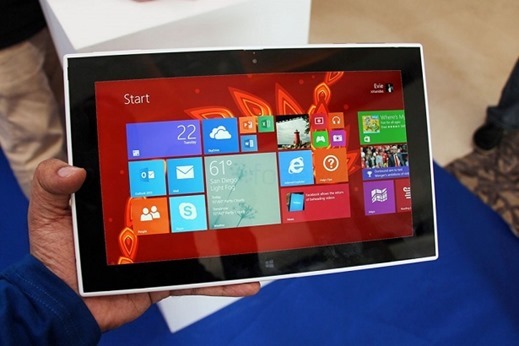
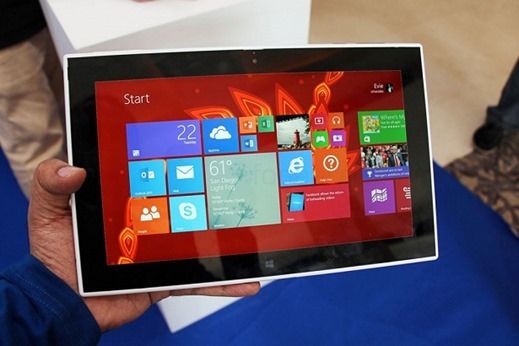
    nokia-lumia-2520Nokia has expanded its Lumia lineup by introducing a pair of new devices: a larger 6-inch smartphone and an entirely new product for the company, a Windows tablet. Both were revealed at the Finnish company’s Nokia World event in Abu Dhabi. Nokia also made several app announcements for its devices and the Windows Phone platform, the major one involving Instagram — the official word from Nokia is that the photo-sharing app will arrive on Windows-powered mobile devices in “the coming weeks.”

    It’s packing LTE, and a 2.2GHz Snapdragon 800 CPU inside, with a bright 10.1-inch 650nit screen made out of Gorilla Glass 2. Nokia showed off a video demonstrating its outdoor readability in sunny Abu Dhabi, bright enough to check out Flipboard on Windows RT. With 1920 x 1080 display viewing angles are great and the brightness is equally impressive. Color reproduction is incredibly accurate, and it’s clear Nokia has really aimed high with the display on its first tablet.It also packs the Storyteller app seen on the 1520, along with a 6.7MP rear camera featuring Zeiss optics and a 2MP front facing camera.

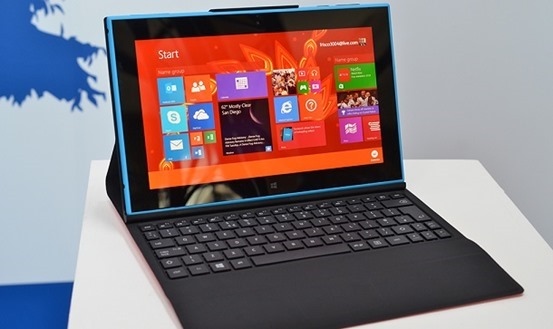
    As with other Windows RT devices, Nokia’s tablet gets the entire Microsoft Office RT suite with Word, Excel, Powerpoint and now Outlook. You also get some Nokia exclusives, like Nokia Music and the Nokia HERE maps. The company is also offering its own Nokia Power Keyboard, a wraparound cover that functions as a keyboard and trackpad, and will give the tablet five extra hours of battery life.lumia2520-cover

    While the Surface 2 has its own Touch and Type Covers, Nokia has opted for a Power Keyboard. It adds a Surface-like keyboard and trackpad, alongside two USB ports and a boost of five hours to the battery life. Nokia says the Lumia 2520 should get 11 hours by itself, so it’s possible this device will reach 16 hours in total with the cover attached.

    LTE included, the Lumia 2520’s unsubsidized price is $499 in either a red/white glossy finish, or cyan and black matte paintjob when it ships in Q4. Also included are quick charging capabilities that let its 800mAh battery go from drained to 50 percent charge in just 40 minutes. The Nokia Power Keyboard accessory shown above costs an extra $149, and promises an extra five hours of battery life plus two extra USB ports. Check after the break for a full list of specs and a video demo, we’ll have hands-on impressions of the new slate from Nokia World in just a moment.

  • Mozilla Firefox 22 Stable Released

    Mozilla Firefox 22 Stable Released

    Mozilla is currently preparing to upgrade all versions of the Firefox web browser starting with the stable version of it. Firefox 21 will be upgraded to version 22 on 25th June, while Beta, Aurora and Nightly users of the browser will have to wait a day or so longer before their version of the browser is updated as well.

    Mozilla is currently preparing to distribute the newest version of Firefox to its ftp server and from there to its mirror distribution system. Once that is out of the way, the official release announcement will be made on the website.

    Firefox users can use the automatic update feature of the browser to upgrade to Firefox 22, or download the latest version of the browser from the Mozilla website instead and install it from there.

    Firefox 22 What’s New

    • Operating system specific
    • WebRTC is now enabled by default
    • HTML5 Audio and Video Playback Speed modifications
    • Performance improvements
    • Social Services

    Other Changes

    • Improved memory usage when rendering images. This should help on systems with low amounts of RAM if pages with large images are viewed regularly.
    • Firefox is now using word wrap for plain text files.

    Developer changes

    • The CSS3 Flexible Box has been enabled by default (introduced in Firefox 18)
    • The initial value for min-width and min-height is 0.
    • Node.getUserData, Note.setUserData, Node.isSupported and Note.attributes have been removed (DOM).
    • HTMLMediaElement.crossorigin and HTMLInputElement.inputmode have been renamed to HTMLMediaElement.crossOrigin and HTMLInputElement.inputMode.
    • XHR multipart response support has been removed.
    • HTML elements with tag names no longer use the HTMLSpanElement.
    • LSProgressEvent, ProgressEvent.initProgressEvent and SVGEvent have been removed.
    • Unknown SVG Elements will be SVGElement and not SVGUnknownElement.
    • NoteIterator.detach does nothing.
    • ParallelArray is now disabled in Beta, Release and ESR channels but not in Aurora and Nightly channels.
    • HTML5 data element has been added to the browser.
    • The range state of the input element has been implemented.
    • ASM.js optimizations are enabled.
    • ES6 Arrow Function syntax has been implemented.
    • The new Object.is function has been added.
    • Pointer Lock API can now be used outside of full screen.
    • New Web Notifications API implemented.

    Firefox Developer Tools

    • Font Inspector now shows which fonts on your computer are applied to the page.
    • Dev tools can now be docked to the right side and not just the bottom of the screen.
    • Visual paint feedback mode shows when and where a page is repainted.

    Security updates

    1. The | Components | object is no longer accessible from web content.

    For all Firefox fans