Networking apps are good to have for connecting with friends while on the go. They are not only easy to use and convenient but also add in an element of fun. While there is no dearth of social applications that allow you to connect with friends, one that has been garnering a lot of attention is WeChat. We decided to find out how good the application was and if it was worth downloading?

Developed by Tencent , the largest Internet company in APAC , We Chat is the only Social Messaging App to offer Video/Audio calling and voice messaging with about 200 million users worldwide. It is a free mobile communication and social networking app for Smart phones with features like Video/Audio Calling, Push-to-Talk Voice Messaging, Group Chat-text & voice (up to 40 people) and Location based friend-discovery social features.
 WeChat’s interface is something that will take getting used to. On the homescreen you will find all your contacts who use the application. You can start a conversation with them by simply tapping on their name. You can convert the conversation into group chat by clicking on the face icon on the right hand corner at the top of the screen. Clicking on the keyboard icon will allow you to type a message. This keyboard icon also alternates as the speaker icon to send voice chat when the keyboard is in use. To send a voice message press on the ‘Hold to Talk’ button, you will have to keep it pressed till you are done with the message, simply release to send. Currently you can send messages up to one minute long. You can cancel the recording by an up swipe movement.
Pros: Apart from the novelty this app offers ,this app has a sound presence with its novelty in chatting as briefed above.To use the best of this app from the android market, you and your friends has to use WeChat and then no one is going to stop you.The speed is fast and sitting from UK , you can send a faster message to Turkey.And if you have connected your FB friends, then be ready for a typing war.It also offers the convince of grouping your friends/family together and then do a group chat. A well designed app for conversation at great speed l. A new feature Video which has been added recently lets you to group video chat. The mobiles in -build camera works at its best for you and you can talk roaming around with just a click on the go. A cool app which is totally free offers you ads-free HD Video Chat.
Sharing Files and Chatting through PC
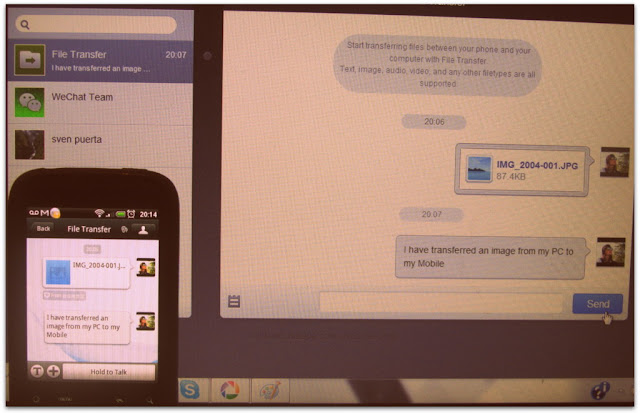
Extendability of using WeChat even from PC through the browser is by scanning the code displayed in web.wechatapp.com .One addition here is “File Transfer” where we can transfer files (text, image, audio, video, and any other file types) between my phone and my computer with File Transfer. We can also to the same with our contacts in WeChat.
Video Chat and Voice Messaging :
Another great leap in this social app making it popularity grow very fast. Using this service, it is very easy to send and receive voice messages at greater speed as well as use web cam on the mobile to its best.
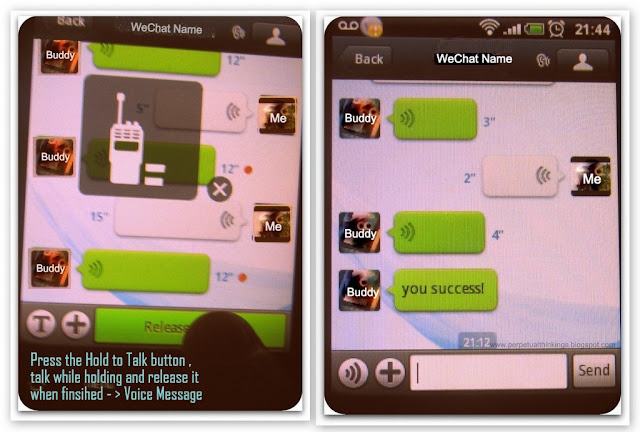
From the above image you can see that to use Voice Messaging, you got to Press& Hold the button on the right side for sending your Voice Message. A sophisticated way of using free Voice Chat on Mobile/Tablet/IOS .
Video Calling
To use this free feature, just click on the add button on the lower bar of the app and choose Video Call (see Features and Addition Image above ) .

Plugins
With couple of plugins pre-installed plugins, WeChat offers more.Moments , a new plugins uses Face Book like feature with a WeChat cover and options for text ,photo as well video sharing (see “getting social ” image above).
Cons : Being a Chinese social app , whenever you stumble upon someone or someone stumbles upon you he/she happens to be a Chinese.Rarely we happen to meet an English speaking one.Also, it also surprises you with a ping from unknown people cleverly using this app for inappropriate use and this personally doesn’t work for me.But still, being a part of “look around” and “shake“, it offers loads of fun for people who love to make new friends .If I have to offer one suggestion for improvement, it will be that there should exist a way to acknowledges this app as relevant to Face Book/Twitter and using them for proper use other than unknown flirting hiding their identity .
Neutral View: As far as the privacy is concerned , unless we allow this app to post on your behalf on the FB wall when used Face Book to sign in, otherwise with use of We Chat ID’s and QR codes , this app is perfectly safe and fine chatting with new people with its Fact sheet
- Protects user data by offering on-demand contact list backup and retrieval to/from our cloud-based service.
- Provides a secure and robust social networking platform that emphasizes user privacy and fast response performance.
When compared to other social apps giants like FaceBook , Twitter, Tango , Palringo , etc that flocks the Internet , Android Markets, Google Play and iTunes , WeChat offers the combined effects/results that all the above specified apps offers. WeChat apps multimedia communication flexibility and convenience offers hassle free text messaging, hold-to-talk voice messaging, Video/Audio calling, broadcast (one-to-many) messaging, photo/video sharing, location sharing, and contact information exchange at all in One.
Conclusion
Overall, WeChat is a good option that you can consider if you are looking for a networking app. But considering that there are several other networking apps that have quite established their presence, convincing your friends to switch to WeChat could be challenging. However, the video calling feature is something that can give it an edge over others. And while the app offers the necessary features to network, there are some that you can do without, especially if you are concerned about privacy. Thankfully, you can disable these features and still be able to use the app without a problem. You will however need to get used to the interface. Lastly, even though the app is free it is devoid of ads.
Click here to download WeChat for Android
Click here to download WeChat for iPhone
Click here to download WeChat for BlackBerry
Click here to download WeChat for Windows
Click here to download WeChat for Symbian

 Twitter co-founder Biz Stone has launched Jelly, an app that helps its users to find an answer to whatever question puzzles them at the moment.