
Tag: tips

  • How Your Website Design Can Make or Break Your Startup

    How Your Website Design Can Make or Break Your Startup

    web-design

    Let’s get some things straight at the very beginning – if you do not exist on the Internet, you do not exist at all. Starting a business may have its hardships, but it can all be in vain if you do not dominate the online realm. Consider your website to be a digital hub where people can get a chance to audio-visually experience what your company has to offer. Without it, your efforts to expose yourself to the public eye will undoubtedly cost more money and time. Yes, it may be a bit abstract to some people to rely on something that is, in fact, intangible, but a website really can either make or break your startup, so you might as well design it right.

    The logo

    Nowadays, everything is about the visuals. The visual content you deliver to current and potential clients is a far more potent tool for communicating that just using texts. That is why the logo itself is like your emblem, your coat of arms, an image which defines your activities. Having a polished, professional logo which is linked to your home page is of the essence. Hi-res image of your brand should also be on any other platform you use, and by clicking it, it will always direct people to your website.

    Navigation

    Our attention spans are much shorter than before, mainly because we are exposed to all manner of information that we massively and blatantly disregard if doesn’t wow us. However, not only you’re your content have to be unique, simplicity has become a paramount trait for any website. So, when you design the navigation option, make sure that it is intuitive. Whenever a page has confusing layouts, people will quit it in an instant without trying to figure things out. Also, primary information should always be placed on the top of the navigation bar or landing page, while those less crucial should be placed at the bottom or footer.

    Do not clutter things

    This is another thing that simplicity regulates. If you put too much content for people to see or read, it will overload them. Too many options will never coincide with a sound digital marketing strategy. Cut down the number of graphics, photographs, animated gifs, and anything else that makes the website look cluttered. According to Mind Arc, a digital agency from Sydney, visitors judge things with just one look, so consider limiting the links and options while putting an emphasis only on important things. If you find it hard to differentiate what material is relevant and what isn’t, feel free to seek advice from the experts in the field.

    Use of fonts and color

    Fonts too, play a crucial role in the overall website image, so make sure yours is easy to read, size 11pt minimum, and universal (please stay away from Comic Sans!). Color should purposely be used in a strategic manner, because a tasteful combination of such visual stimuli can define the appeal of your company. Neutral colors, for instance, will help you project an elegant, modern appearance, while strong, vibrant colors can rarely make you look serious in the world of business. Also, check what colors patterns suit your taste and make sure that they are consistent with your marketing materials. Remember, they can either be complementary, analogous, triadic, monochromatic, or you can even try to combine your own patterns which you find pleasing to the eye.

    Invest in good photography

    People, especially the youth can detect a generic photo in no time. If you want to make an impression, it would be smart to invest in quality photography to back up your texts and other content. Show your visitors that you care about how things look and that you are capable of drawing attention with a certain gravitas. Visual communication is always more potent than verbal, especially in the Internet world. Consider this to be a postulate.

    Everything discussed so far is related only to the aesthetics of the website. Once you make things look nice, professional, and appealing, then the SEO process can start and you will have to find ways to boost your traffic as best as you can. It isn’t an easy job, but goldmines are to be found on the Web, you just have to make sure that the products/services you sell are worthy of a wider audience.


  • How to Stay Safe When Using Torrent Sites

    How to Stay Safe When Using Torrent Sites

    Using a torrent site can be one of the best (or only) ways to get the content you need to listen to or watch. In addition, it is a very efficient way to transfer data between people instead of dealing with some slower or more difficult to work with options.

    torrentvpn

    However, torrent sites can also be very dangerous for your internet safety, because there is a lot of malware and other nefarious content waiting within the lists of files that you can download. While you may be eager to just speed through or otherwise take some risks to get the data faster, you should keep your own safety and security as your primary concern.

    clip_image002

    Here are a few things that you should know before you press go on the address bar:

    You Should Use a VPN

    The first thing that you should consider getting if you know you are going to be torrenting frequently is to get a Virtual Private Network. Effectively, it connects your computer over a network to a secure server and will get the data for you and send it to you. This means that your computer will only be seen by outside onlookers at best to be using a VPN, and they cannot see your torrenting.

    Also of note, using a VPN might help you should you be downloading copyrighted materials, as a VPN will veil your use to the government and outside interested parties. The potential cost of such trouble greatly outweighs the relatively minor cost of a VPN service, which often isn’t much more than a Netflix subscription.

    Also note that if you are going to be travelling while you are torrenting, my recommendation changes from “you should get one” to “you absolutely have to have one.” A VPN will allow you to stay safe in public networks as well as bypass government censorship and regional restrictions on your internet. It will also allow you to leave less of a trail for people to track or monitor your internet use on the road.

    If you are looking for a good VPN for torrenting, you should take a look at http://securethoughts.com/3-best-vpns-torrents/

    Look Before You Click

    Not all files are the same, and the best torrenting websites will give you a better look at the file you are going to download before you download it. If a torrenting site effectively asks you to trust them, you shouldn’t trust them.

    One thing you should look at first is the file type of whatever you are downloading. If you are downloading an audio file, does the file come in an audio format? If you are downloading pictures, are you getting one of the common picture formats? If you are unsure, you can always look it up in a new tab, and the few extra seconds spent will be absolutely worth it.

    Another thing to look at is the file name. You want a clean-sounding name and nothing that looks like it was hastily considered or misspelled. A lot of hackers or cyber-criminals just won’t put the time in to make their bad software look like it fits, so as to create more volume. Try to find something with the exact name of the data you are looking for.

    Don’t Give Out Anything

    If you have to give out anything more than an email address, you shouldn’t be using that torrenting website. Also, you should have a separate email address for torrenting purposes that you won’t mind losing. Under no circumstances should you give out an address or any financial data whatsoever. I reiterate: if you are asked for financial data at any time you should run away and never look back.

    This data, should you give it to them, can be used to track you down for either legal purposes (whether you have knowingly committed any crimes or not), or used to steal your identity, which can be a nightmare in itself that will take days, if not weeks, to recover from.

    This guideline also goes out for sharing things on torrenting websites. While it may be considered the polite or fair thing to do, that doesn’t mean you necessarily have to do it. There is little advantage to sharing, and you are only opening yourself up to trackers and hackers looking to make your day miserable. This is a situation where it is ok to be selfish.

    Do Research Beforehand on the Service

    On the internet, what kind of reputation does the particular website you are thinking of using have? It is known for being an insecure place relative to other websites? Does it have a reputation of something that will be shut down soon? Be sure to read reviews or forum posts about the service you are thinking of, and then try to find a website that is a good fit for you. The best ones will also have some sort of rating system (that is actually used) on the files so you know what to expect.

    Have Protection

    You should have one regardless, but if you are going to be using a torrent website you absolutely have to have an anti-virus program and an anti-malware program. There is no way you can be 100% accurate with everything you download, and you should be scanning things as they come in, so your computer isn’t ruined two hours later.

    Also, you need to make sure that your programs are updated every time before you start torrenting. Internet security changes every day, and only the latest patched and updates can protect you from everything that is out there. Hackers are not going to try older methods of getting to you that they know there are protections against. They are going to try new things, which you haven’t downloaded the fixes to yet.

    clip_image004

    I hope that these tips will help you in your search for a good torrenting website and staying safe after you have found it. Remember that no piece of data is worth ruining your computer and identity over, or risking legal action. Thank you for reading.

  • Blogging Tips That Can Help You Out

    Blogging Tips That Can Help You Out

    Blogging is a fast and fun way to increase your business or personal presence on the Internet. In recent times, blogging has become common in society, especially since it can increase one’s popularity. But, some people still do not use blogging. Use the following article to help you begin this beneficial form of communication.

    keyboard-and-hand

    Be careful to never copy content from anywhere. People take a dim view of plagiarism, and your reputation will be ruined immediately if people find out you are doing this. It’s not necessary to work as a professional writer, as long as you are passionate about your subject.

    Try to be authentic. Don’t appear like a “know-it-all.” Be honest, transparent and open to new ideas. Do this always. Blogging is about expression and uniqueness. Reaching for perfection is probably a waste of time, so focus on improving your site instead. Everyone makes mistakes, and if you make one, it’s not the end of the world. You are unique and no one is like you.

    Focusing on your content ensures that you gain traffic through well written blog posts. If your blog contains high quality and useful information, chances are high that readers will come back often.

    Don’t just write large paragraphs for the content of your blog. Conduct plenty of research so that your blog postings are all informative and intelligent. If you simply write on all the wrong things, you will never succeed. The quality of your blog’s content will determine its success.

    Whenever you can, make lists that include your keywords. Emphasizing your keywords properly will improve your blog’s search engine performance. This in turn will rapidly expand your reader base. This tip should definitely be remembered because it is very helpful.Blogging

    Sticking with a simple routine may not be the best idea for maintaining your blog. Instead, look at it from a business perspective and continually grow your knowledge in the field. Learn new tricks from experienced bloggers, and change your blog to reflect the new techniques you have learned. Always seek to improve your blog through new methods and techniques.

    Use a variety of social media and informative techniques, but don’t overwhelm your visitors with too much. If everything you tweet is a link to your blog, people will not pay attention to them after a while. The main content should be interesting and informative on its own. The links can then reinforce this content.

    Putting together lots of relevant, quality posts will increase your chances of showing up in search engine listings. The more people that can find you and your blog, the larger readership you will have. Follow this advice to see a powerful increase in your readership.

    It is of the utmost importance that you make your blog fun, not only for the reader, but for yourself. Avoid boring writing by paying attention to the topics you choose to write about. Always choose topics that actually interest you rather than writing something because you feel you should be writing something. Whatever topics you love, blog about them. Blogging should be fun. Put a smile on your face, be original and love what you do, and readers will look forward to reading your remarks.

    With this article’s advice in hand, you should be better prepared to share your opinions with the world through a well-made blog. Always remember that the possibilities for your blog are limitless. Always try to stay updated with the newest information and your blog will remain successful.

  • How To Make Your Smartphone Work For You

    How To Make Your Smartphone Work For You

    smartphone_users

    It is hard to know all the ins and outs of various cell phone models. There are so very many options that it’s difficult to know how to find a good cell phone and then how to optimize it. The article below will provide some great tips that will help you maximize your options to improve your cell phone experience.

    Restart your phone periodically to purge the memory of programs like Facebook and Twitter. This ensures it runs quickly and correctly.

    There is no need to update to a new phone so quickly. Many times, it’s not necessary. Though many providers make consistent changes, they usually are not big ones. Make sure you read up on the phone prior to buying it to determine if it is something you want. You often won’t.

    Top 5 Best Battery Saver Apps for Android Smartphones

    It’s likely that your cell phone is used multiple times daily. But be sure to restart it every so often. Smart phones work like computers. If you periodically restart the device, your smartphone operates more efficiently and without consuming excess memory. Even if you only restart your phone once or twice weekly, you are likely to see improvements.

    Be wary when it comes to extended warranty protection. They’re often just a waste of money. If a cellular phone is about to fail, it mostly happens on the year it is covered by its basic warranty. Many people get new phones every year, so it’s not worth the money.

    The longer you own your smartphone, the more it will slow down. That is why updating is harder as time goes by. There are times where you will need to choose. You can choose the features you already have, or upgrade to a more advanced version.

    Use your smartphone as your wallet

    Be sure that you actually need a smartphone before you buy one. They cost quite a bit, but they also offer many different features. However, not everyone requires the latest, most innovative features — just a simple means of calling others. Smartphones not only cost more up front, but require a higher fee each month. They are not the best investment for everyone.

    Be sure you observe what others have and speak to them before purchasing your next cell phone. They will have great reviews for you. They will be able to help you pick out a phone, making the shopping process easier.

    smartphone-user

    If your sole purpose for getting a phone is for talking, you do not need a smartphone. Many people own a smartphone, but they tend to use it for going online or checking emails. There are many extra things that you would be paying for if you get a smartphone.

    Don’t let your phone’s battery die before recharging it. Batteries need to be recharged from time to time. If you always let the battery get low, it will have trouble holding a charge. Just get into the habit of doing it before it goes dead.

    If you don’t know much about cell phones, it’s normal. Things are always getting bigger and better. Use what you have read here to get more from your cell phone.

  • 6 Website Design Ideas to Improve the Engagement on your site

    6 Website Design Ideas to Improve the Engagement on your site

    Getting an overwhelming response from your website is not a piece of cake. Internet is although flooded with information on how to innovatively create a website that drives a significant volume of traffic towards your site, but sources that provide trustworthy and accurate information are close to zero. Regardless of tons of experience you have in web designing, unless you have some special skills at your behest, it is highly unlikely that you will receive positive upshots. webdesign

    Therefore, rather than pondering over the internet and getting befuddled, you should probably check out these 5 innovative website design ideas to improve the engagement on your website.

    5 Ideas to Improve Website Traffic

    1. Minimize the Loading Time

    No one wants to keep eyeing that incessantly revolving loading icon for long. The online domain necessitates a paced approach. Visitors have become more impatient than ever, therefore unless you have something breathtaking in your arsenal; people will choose to move on to other sources rather than waiting up on your website to load. Complexity in a website often leads to this unnecessary loading time. Therefore it is advised to keep things simple but precise.

    2. Easy Interface and Navigation

    Remember, an agitated visitor is certainly no good. Make sure you don’t give a chance to your visitors to get annoyed or irritated just because a landing page was too complicated to get through. Ease up the navigation on your website and design it in a manner such that the visitor requires minimal number of clicks to get to the desired page.

    3. Visual Scheme

    Website is after-all a readable presentation of your services. Therefore making it visually soothing, attractive and at the same time informative is something you require the most. Ensure the usage of appropriate colors and convenient options to attract more visitors. Avoid an imprudent approach that will eventually drive the visitors away from your domain.

    web design

    4. Over Use of Pop-ups – Bad Idea

    Pops are though touted to be sale booster, but it is entirely the other way around. It is normally contemplated that frequently appearing pop-ups will compel a customer to make a purchase, but the reality carries with itself a disparity. A pop up can be exasperating that might lead to losing a potential customer. Therefore it is advised not to go overboard with pop-ups.

    5. Stay Focused towards the Objective

    Every single aspect of your website should be designed keeping in mind the objective. It has been observed that designers get too much carried away sometimes with their work that they get deviated from the original motive. There might be the case, where visitors might get attracted with the overall finish of the website, but in the end your motto is to sell, not to impress.

    6. Keep in Mind the Compatibility

    Compatibility is the need of the hour. Your website should be adaptable to different browsers or operating systems. You shouldn’t force people to install updates just to navigate your website. Different platforms and operating systems are being introduced by day. You don’t expect a visitor to upgrade to your websites specifications every time an update is rolled out.

    Smartphones are hugely popular these days. People chose to have instant access to everything right from their cellphones which is why it becomes crucial to have your website optimized for cellphone use.

    Website designing is all about motivating customers to make a purchase. Therefore it becomes crucial to design a website that converts a potential visitor in to a customer. All these website design ideas to improve the engagement on your website will definitely help in getting the job done. Therefore start making changes to your website now.

  • Awesome Firefox Tricks You Might Not Know

    Awesome Firefox Tricks You Might Not Know

    firefox-banner

    Yes, we know you love firefox. It’s the most customizable browser ever. You can add great extensions available out there. But we are going to give you some cool tricks that will make you love even more.

    Use Firefox as Notepad

    Open new tab, type the following (without quotes) in address bar :

    "data:text/html, <html contenteditable>"

    And the best thing is you can even customize it using html styles. Come, on where’s your geeky mind ! Here’s one example for you.

    data:text/html, <title>I love Firefox!</title><style>html,body{margin: 0; padding: 0;}</style><textarea style="font-size: 1.5em; line-height: 1.5em; background: %23000; color: %233a3; width: 100%; height: 100%; border: none; outline: none; margin: 0; padding: 90px;" autofocus placeholder="Say Hi..." />

    pic53

    Go on, copy and paste the above code in a new tab. (It works in other modern browsers as well)

    Now, you can use the page as a quick notepad to carry your notes while browsing.


    Add ‘Search Keywords’ For Your Favorite Websites In Just A Few Clicks

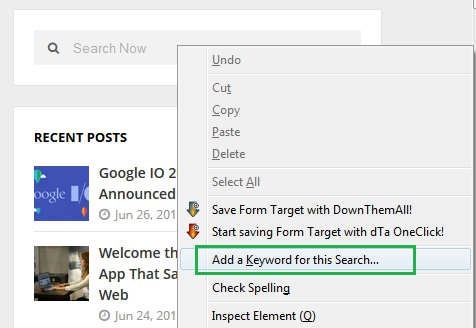
    This a tip most of you might not be knowing, you can add any search box on any website to the Firefox URL address bar in a very handy way. Just go to the any Search Box and simply right-click on it, then click “add a keyword for this search”.

    pic_11


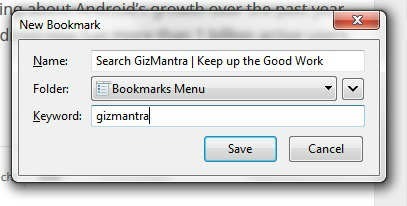
    Then you’ll get a prompt, just name the bookmark, then type in a simple short keyword you can remember.

    pic_1


    Now you can search your favorite site of choice anytime by typing the keyword, followed by what you want to search in the Navigation Bar.

    pic2


    It can save up lots of your time.


    Switch tabs with Keyboard shortcuts

    Instead of moving the mouse and select different tabs that you have open, use the keyboard. use these simple shortcuts:

    • Ctrl+Tab (rotate forward among tabs)
    • Ctrl+Shift+Tab (rotate to the previous tab)
    • Ctrl+1-9 (choose a number to jump to a specific tab)


    Quickly Delete Items from Address Bar History

    When you start typing in the address bar, firefox automatically show previous URLs you’ve visited as drop-down list. But if you want to quickly delete them (You know why?), Go to the address bar, start typing an address, and the drop-down menu will appear with the URLs of pages you’ve visited. Use the down-arrow key to go down to an address you want to delete, and press the Delete key to make it disappear.


    Auto Complete URL

    Most of you as geeks might know this one. Oh ! yeah.  Go to the address bar (Ctrl+L) and type the name of the website without the “www” or the “.com”. Then hit Ctrl+Enter, and it will automatically fill in the “www” and the “.com”. similarly for “.net” addresses, press Shift+Enter, and for “.org” addresses, press Ctrl+Shift+Enter.


    Mouse shortcuts

    These are some simple but useful shortcuts

    • Middle click on link (opens in new tab)
    • Shift+scroll down (previous page)
    • Shift+scroll up (next page)
    • Ctrl+scroll up (decrease text size)
    • Ctrl+scroll down (increase text size)
    • Middle click on a tab (closes tab) [Really useful]


    Open Previously Closed Tab

    If you have closed a tab by mistake, don’t panic! Hit Ctrl+Shift+T. This will open up the last tab you closed. If you keep clicking the shortcut, all your recently closed tabs will open.

    That’s it for now. We’ll keep adding more.

  • Do it better with these Google Now Voice Commands

    Do it better with these Google Now Voice Commands

    google-now-voice-command

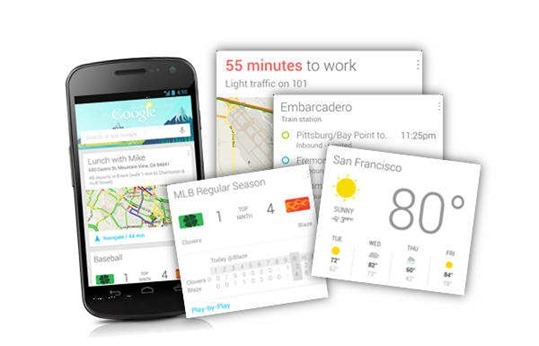
    Google Now is getting better with each update. Google keeps adding new voice commands and cards with each update. You pick up your phone and say “OK Google”… and then what? Your phone is listening. Here’s a list of almost everything you can say to Google Now. Try experimenting with different phrasing, you’ll be surprised how much it understands.

    Basic Google Now Voice Commands

    There are some basic commands that will help you get started with Google Now. Some examples:

    • “Search for ”: “Search for Gizmantra”: Regular Google Search for the keyword you specify after “Search for”
    • “What is ”: “What is Android”
    • “Who invented ”: Who invented cellphones”
    • “What is the meaning of ”:
    • “Who is married to”:
    • “Capacity of ”:
    • “Show me the stocks for ”:
    • “Author of ”:
    • “How old is ”:

    Time & Date Google Now Voice Commands

    • “What time is it in ”
    • “When is the day in ”
    • “When is the sunset in ”
    • “What is the time zone of ”
    • “Time at home”

    Weather Related Google Now Voice Commands

    • “Weather”
    • “Is it going to rain tomorrow”
    • “Do I need an umbrella”
    • “Should i bring a Jacket today”
    • “Will it snow this week”
    • “What’s the weather in ”
    • “How’s the weather on going to be”

    Maps & Navigation Google Now Voice Commands

    • “Map of ”
    • “Show me the nearby on map”
    • “Where is situated”
    • “ Where is [the Louvre]?”
    • “Navigate to on car”
    • “How far is from ”
    • “Where’s my hotel?”

    google-now-cards

    Calculations & Conversions Using Google Now

    • “How much is times ”
    • “What is percent of ”
    • “Square root of ”
    • “ ….. equals”
    • “What is the numerical value of Pi”
    • “Convert into ”
    • “Temperature of the sun”

    Google Now Commands for Sports Lovers

    • “ points table”
    • “Who won the last match between and ”
    • “ scorecard”
    • “schedule of games”

    Browsing the Web using Google Now

    • “Go to ”
    • “Open ”
    • “Show me ”
    • “Browse to ”

    Music, Movies and Entertainment on Google Now

    • “Listen to ”
    • “Play ”
    • “YouTube ”
    • “When was the first episode of ”
    • “ movies”
    • “Who acted in ”
    • “Who is the producer of ”
    • “When was released”
    • “Runtime of ”

    Add Notes & Reminders using Google Now

    • “Remind me to at ”
    • “Wake me up in ”
    • “ at ”
    • “Self note to ”
    • “Set alarm for

    Communication with Google Now

    • “Call ”
    • “Send to ”
    • “Post to [Twitter]: [your text]”
    • “Email to , B C C , Subject , message ”

    Image Search Using Google Now

    • “Images/photos/pictures of ”
    • “Photos of at sunset”
    • “Images of ”
    • “Show me the photos of at ”
    • “Logo of ”

    Just for Fun !

    Many of these deliver funny voice responses, but normal search results. Turn up your sound!

    • What is the loneliest number?
    • Do a barrel roll!
    • Askew / Tilt
    • Go go Gadget [Spotify]
    • When am I?
    • Make me a sandwich
    • Sudo make me a sandwich
    • Who’s on first?
    • Up, up, down, down, left, right, left, right
    • Tell me a joke
    • Who are you?
    • Beam me up, Scotty!
    • What is [Jennifer Lawrence’s] Bacon number?

    Know of new commands? Drop a comment!

  • Google launches ‘Google Tips’ for ease of use

    Google launches ‘Google Tips’ for ease of use

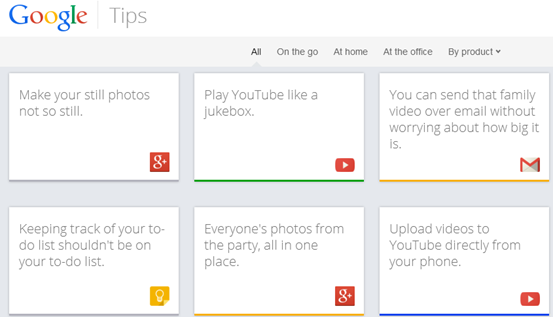
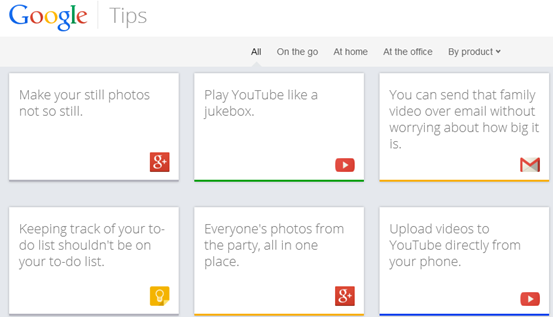
    Though we’re sure Google tries to keep its products like Now and Docs as easy to use as possible, who has the time to learn every single feature? That’s likely why Google just launched Tips, a site that uses its info card trope to help you dive more deeply into all 13 of its consumer products. For instance, if you choose Google+, one card suggests you can “make your still photos not so still,” and reveals step-by-step instructions when you flip it along with each device it supports.
    The site is broken into cards, Google’s latest design style of choice, each of which offers a quick description and the option to flip over to learn more. Every card can be shared to Google+, Twitter, Facebook, and via email.google_tips_coverThe site currently spans 13 products: Search, Gmail, Chrome, Android, YouTube, Maps, Docs, Drive, Play, Calendar, Keep, News, and Google+. All of them either require you to be signed in, or work better when you are, which is exactly the message Google wants to send. There are just over four pages of tips, and on the fifth page (as well as on the bottom) there’s a suggestion box where you can tell Google what you think it should add.
    You can even submit your own idea for a tip, though to do that and other functions, you’ll need a Google account. It’s only available on desktop browsers for now, but if you want to give it a spin and see all the supported products, hit the source.

  • Top 10 IDM Tips and Tricks

    Top 10 IDM Tips and Tricks

    Internet Download Manager is what most people generally use for better and faster downloads. You almost always find yourself getting more speeds when you are using IDM, especially if it is your first download manager.

    By all means, many believe IDM is the best of the pack out there and the fame is well deserved for it not only boosts your speeds but also hosts a lot of features which you may not know about.

    Here are the best ever IDM tricks. When you are done reading, you will possibly be making better use of IDM.


    1. Adding new file extensions

    Add MKV, DOCX, XLSX, APK, IPA and other extensions so that IDM can automatically detect these files and download them immediately. Go to Downloads > Options and click on the File Types tab. Type in the new extensions into the text box that already shows the list of file types that IDM is tracking.


    2. Batch download files from a site

    If you want to download a list of files which have similar file names, choose Batch download from Tasks and enter the URL in the Address field. Use the asterisk symbol wisely and you will be able to queue downloads easily.


    3. Manage downloads using queues

    Queues let you manage downloads easily and group them together to perform tasks on all of them. Right click Queues on the categories pane and Create a new queue. Once done, add downloads to it and resume and stop them all together whenever needed.


    4. Resume broken downloads

    Another life-saving feature of IDM is the capability to resume downloads after they’ve been broken. Even if resuming is not supported, you can attempt to do it by right clicking on the download and choosing Refresh Download Address. Though it may not work all the time, make sure you try it whenever a popup similar to the one above shows up.


    5. Download anything from any site

    Ever wanted to download everything from a site? The Site Grabber let’s you do it. Click on the Grabber button from the navigation bar and enter the URL of the website and assign the condition. With some luck, you might just save a lot of time.


    6. Assign special keys

    Special Keys are used to let you prevent IDM from downloading a file. You can also use them to force into IDM downloading a particular file. Go to Downloads > Options and click on Keys button from the General tab. You can configure it to be any of the following keys : Alt, Shift, Ctrl, Insert.


    7. Address Exceptions

    Some web browsers automatically downloads files when you have not requested for it. For example, IDM might download pling.mp3 when you receive a chat message on Facebook or download a video file when you want it to be played on the browser. You can add exceptions to prevent such behaviour from the File Types tab in the Options dialog.


    8. Schedule downloads and auto-shutdown after completion

    Scheduling is a great way to manage your internet connection and downloads. You can assign particular queues to start and stop at particular times and also ask your computer to shutdown automatically. Hit the Scheduler button from the Navi bar to get started.


    9. Quickly open multiple URLs

    One of the most irritating aspects of the internet is that large files are always split up into many parts. Bigger the file size, larger the number of parts. What makes this worse is that you need to open each of these links one by one. With URLOpener, you don’t have to because it opens you all the links you enter in a text field in new tabs with a single click.


    10. Quick Downloads

    Let us take a particular example. I want to download a 50 part file from MediaFire and I do not want to spend too much time on it.

    By default, what you will do is open each of these pages, click on the download link, click on ‘Start download’, then minimize the window. Now that is 4 tasks for one part and 4×50 makes 200 clicks, not to mention the dragging and loading times.

    By changing a few options, you can make this task twice as easy. Go to Options and hit the Downloads tab. Choose Don’t show from the Download progress box and uncheck both the options towards it’s right.

    Now let’s try that again.

    1. Use URL Opener to open all the 50 parts at once
    2. Right Click on the IDM icon in the task bar and click show target. Move the drop box near the download link.
    3. Drag and drop the download link into the drop box.
    4. Use a shortcut key to move to the next tab: ( Ctrl + Tab in Firefox)
    5. Drag and drop the links in each tab till you get finished.
    6. Have a look at your watch.

    A software is more useful when you really know how to use it properly. Enjoy using the tricks and please do leave your feedback.