So I must seem quite fanatic when I get asked something like this, which is not a problem at all. However the first thing I sputter out is “Everything”. And while one can claim this is a completely crude and mundane answer I think this describes it very precisely.
Which real Gunner would be able to say anything different from this? I mean let’s face it, this is what Arsenal is all about, that even when everything sucks and everybody’s talking about how crappy we are and the Spuds claim the thing they do whilst hobbling around on the pitch is actually football, we still know that we are the greatest team. I think no other big club in Europe had to suffer this much as we had to, in the previous season. We lost important players, and it seemed as if we were going to play the next season without the Champions League (which was obvious bullshit to me even at the time we were on place 16, and we had to struggle with a worrying amount of injuries. So that’s how we had our first bad spell in the beginning of the season. After we recovered everything seemed turning brighter, but January and the Boxing Days knocked on the door and knocked us down, again. So the Spuds were 10 points ahead of us on the day we kicked their stupid ass out of our beautiful stadium, and I guess that’s how it began.
Now everyone has been proven wrong, even if we did lose Carling Cup, FA Cup and the Champions League. We showed what class this team has and what this team can accomplish with a little luck granted by the Football Injury God. However the loss in the Champions League is by far the one, that depressed me the most even if we left the pitch with our heads held high. For me, it would have been perfectly alright if we had progressed to the quarter finals and not Milan. We played a crappy game, they played a crappy game, so it would have been just fair for us as well. Especially for the piece of run down battlefield-like field where they could have harvested potatoes the day before, they were presenting us as their campo di calcio.
So, I guess there is no need to say, why someone loves Arsenal. You can hear it from every player.
As our king has once said it,-“you never really leave Arsenal.”
I was wondering whether I could stream my PC’s audio to my tablet. After a lot of research I found that it is possible to stream your Windows PC’s audio to your Android based phone/tablet. So in this post I will tell you how you can actually stream your PC audio to your Android device within LAN.
Now you might wonder, what are the benefits of this! Listed below are some benefits that you may enjoy after following this tutorial:
You can simply create a wireless music system within your home or at any other place.
You can connect your android device to large speakers and stream your Windows audio to rock a party.
Some large speakers might not fit into your PC desk, you can create a wireless speaker system that don’t needs to kept around your PC every time.
Stream Windows Audio to Android device
Things you’ll need: An internet connection, Windows PC, Android device.
Step 1: Click here to go to Georgie Labs and download Soundwire. Choose your Windows version and download the setup file. After install Soundwire on your PC you need to install it on your Android device. You may search for “soundwire†on Google Play Store or you can simply click here.
Note: When you run Soundwire on Windows, your firewall would prompt you to grant access for Internet and Network. Click on ‘Allow’ to run the software without any problems.
Step 2: Run Soundwire Server on Windows. Under the “Input Select†menu choose the device you want to stream to your phone. Here I am using default multimedia device because it will let me stream all the audio including system sounds, log on sounds and etc. Note down the Server Address mentioned in the Soundwire window.
Step 3: On your Android device, run the installed Soundwire app. In the text box enter Server Address you noted down in the previous step and now tap on the above large soundwire button and you would be successfully connected to your server.
Note: To complete the above step your device and Windows PC needs to be connected to the same network.
Now you will able to easily stream your Windows Audio to an Android device and you can connect the same device to external speakers to make your own wireless sound system.
The much awaited Google Nexus 7 tablet has finally found its way into the Indian market. It looks like today was the D-day for ASUS as it announced its four Windows 8 powered devices in the Indian market and it has spilled out beans about its Android Jelly Bean tablet. ASUS has now confirmed that its Nexus 7 tablet will be there for the Indian customers available through various large format retailers at a price of Rs 19,990. Unaez Quareshi, sales and distribution director, ASUS India said that the tablet has been priced at Rs 19,990 and will be available through Chroma, a Tata group electronics retailer, and other large format retailers, reports Mobile Indian. Google Nexus 7 is a 17.78-cm (7-inch) tablet featuring an IPS display along with 10 finger multi-touch support. The device runs on Google’s Android 4.1 aka Jelly bean and is powered by 1.2GHz quad-core Nvidia Tegra 3 processor. The tablet is incorporated with 1 GB of RAM which will smooth out the functions carried out on the device. Nexus 7 will be available in two variants- 8GB and 16GB storage. Though, Nexus 7 has received a remarkable response worldwide, still the competition is high with a few other Android tablets like Samsung Galaxy Tabs and Kindle Fire. iPad continues to be the market leader with 50 per cent shares in the global tablet market. Also, Google recently launched a 32GB version of the Nexus 7 tablet which sports a 1.2 MP front camera and connectivity options like WiFi, Bluetooth and NFC.
Google updated the Nexus 7 tablet released earlier this year. It increased the storage on the $199 version of the device to 16GB from 8GB, and introduced a new $299 version of the Nexus 7 with a cellular data service option. Google also unveiled a new Nexus 4 smartphone, made in partnership with LG Electronics, that features a quad-core processor and a 4.7-inch display.
MORE ABOUT THE NEXUS 7 Google selling a million Nexus 7 tablets per month Asus, the Taiwan-based technology company responsible for manufacturing Google’s Nexus 7 tablet, claims the device has just hit the 1 million sales a month milestone.
Released in July to universal critical acclaim, the Nexus 7 was Google’s first tablet and until now, there have been no official figures as to how well it has performed in relation to its competitors.
Google Nexus 7 becomes ‘best-selling tablet’ Google Nexus 7 has become the highest selling Android tablet just three months after its launch, a media report said Monday. Google’s first tablet went on sale July 27. Its main selling point has been its affordable 159-pound price tag, The Telegraph reported.
Google Nexus 7 named Gadget Of The Year Google’s Nexus 7 by ASUS was honored as the ‘Gadget Of The Year’ and also named the ‘Tablet Of The Year’ at the T3 Gadget Awards 2012. Taiwanese multinational tech giant, ASUS, was the big winner of the night at London’s Old Billingsgate, scooping no fewer than five accolades. The awards recognise and honour the gadgets, software and personalities which have intrigued, inspired and wowed the world over the past 12 months.
While this version of the browser only introduces a few new features for consumers, developers can look forward to using Firefox’s new Developer Command Line. The Command Line, says the Firefox team, “provides easy keyboard control over Firefox Developer Tools and is intuitive, completing commands and parameters for you.â€
In addition to this, the latest stable release of Firefox includes a boatload of other developer-oriented features, including CSS3 Animations, Transitions, Transforms, Image Values, IndexedDB and Values and Units. In addition, Firefox 16 gives developers access to the Battery API, which enables them to see a mobile devices’ battery status, as well as the Vibration API. Both are currently making their way through the W3C standardization process.
For users, the stable release now brings preliminary web app support to Mac, Windows and Linux, as well as initial VoiceOver support for Firefox on OS X. As has often been the case with new Firefox releases since Mozilla moved to this rapid release cycle, there are now major changes to the Firefox user interface.
Mobile Firefox, which doesn’t always get the credit it deserves, is also getting some new features. Most importantly, Mobile Firefox will now offer a Safari-like, distraction-free reader mode. Just like in Safari, users will now be able to click on the “Reader†icon in Firefox’s URL bar to activate this mode. In addition, Mobile Firefox now also allows you to use the “Share†menu and Firefox Sync to send tabs to your desktop or another mobile device.
What’s New in Firefox 16
The release notes for the beta version of Firefox 16 reveal the major changes in the new stable version of the browser. Probably most interesting from a user perspective is the incremental garbage collection that Mozilla integrated into Firefox 16.
This feature improves the browser’s responsiveness by dividing the work of the garbage collector into smaller pieces. Instead of running the garbage collector for hundreds of milliseconds at a time, the new technology runs it in ten millisecond intervals which do not affect the browser’s responsiveness anymore. If you have noticed lag when moving the mouse for instance from time to time, you may now experience a smoother experience thanks to the incremental nature of the garbage control algorithm.
The remaining features may appeal to a smaller part of the browser’s audience, but are for the most part not that interesting:
Firefox on Mac OS X now has preliminary VoiceOver support turned on by default
Initial web app support (Windows/Mac/Linux)
Acholi localization added
New Developer Toolbar with buttons for quick access to tools, error count for the Web Console, and a new command line for quick keyboard access
CSS3 Animations, Transitions, Transforms and Gradients unprefixed in Firefox 16
Recently opened files list in Scratchpad implemented
Debugger breakpoints do not catch on page reload (783393)
No longer supporting MD5 as a hash algorithm in digital signatures (650355)
Opus support by default (772341)
Reverse animation direction has been implemented (655920)
Per tab reporting in about:memory (687724)
User Agent strings for pre-release Firefox versions now show only major version (728831)
Developer Toolbar
Mozilla has launched a new feature with Firefox 16 called the Developer Toolbar, which comes with what Mozilla calls the Developer Command Line. This is designed to provide easy keyboard control over Firefox developer tools, and it completes commands and parameters for you.
“In addition, Firefox unprefixes a number of stable features including: CSS3 Animations, Transitions, Transforms, Image Values, IndexedDB and Values and Units,†Mozilla says in a blog post. “Firefox also unprefixes Battery API and Vibration API, two Web APIs that Mozilla helped create.â€
“On mobile, Firefox for Android introduces Reader Mode to make it easier to view, read and share articles and stories from your mobile phone or tablet,†Mozilla adds. “Simply tap the ‘Reader’ icon in the Awesome Bar to activate. This feature provides an enjoyable and clutter-free way to read online content by removing advertisements, reformatting pictures and increasing font size.â€
The toolbar will also show you the errors on a page if there are any. It displays an error indicator next to the web console.
Stream video or music, whenever and wherever you want
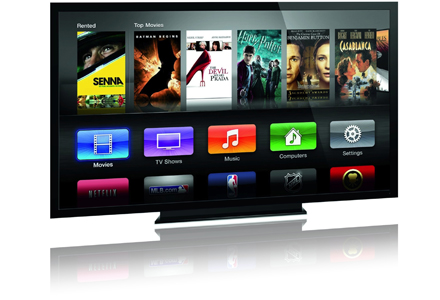
Do you want to stream video or audio from U.S.-based on-demand Internet streaming media providers but can’t get in on the fun because you’re living outside the U.S.? Fear not, you have come to the right place. Tunlr lets you stream content from sites like Netflix, Hulu, MTV, CBS, ABC, Pandora and more to your Mac or PC. Want to watch Netflix or HuluPlus on your iPad, AppleTV or XBox 360 even though you’re not in the U.S.? Tunlr lets you do this.
It’s absolutely free
That’s right. Tunlr won’t cost you a dime! Our service is absolutely free and without any limitations (some restrictions apply). We also have a strict “no advertisment” policy.
Easy to setup
There’s no software to install. You don’t need to create an account with us. No password to remember. Setting up Tunlr is a breeze and you can start watching video or listening to music instantly.
Streaming in HD quality
Thanks to Tunlr you will be streaming data
in the best quality available. Since we don’t route multimedia content over an intermediary network, only the speed
of your internet connection is the limiting factor.
Get started with Windows 7
Please read our FAQ regarding the limitations of our DNS server before you start.
Open Network Connections by clicking the Start button , clicking Control Panel, clicking Network and Internet, clicking Network and Sharing Center, and then clicking Manage network connections.
Right-click the connection that you want to change, and then click Properties. If you are prompted for an administrator password or confirmation, type the password or provide confirmation.
Click the Networking tab. Under This connection uses the following items, click  Internet Protocol Version 4 (TCP/IPv4), and then click Properties.
Click Use the following DNS server addresses, and then, in the preferred DNS server and alternate DNS server boxes, type the addresses of the primary and secondary DNS servers.
The primary (preferred) DNS server is 184.82.222.5
The secondary (alternate) DNS server is:Â 199.167.30.144
Tired of lengthy process of downloading files from FSN or file sharing networks like Rapidshare, Megaupload etc. Now no need to worry any more about downloading files from these file sharing networks. Your all worries will comes to end as you will complete reading this article. Today i will discuss about a revolutionary software called JDownloader.
What is JDownloader ?
JDownloader is a file downloader software like IDM ( internet download manager) or DAP (Download Accelerator Plus) but it is specially designed to download files from 1000′s of File sharing networks like rapidshare,megaupload etc.It allows you to download many files simultaneously and it also allows you to bypass waiting time for many file sharing sites.
    How to use JDownloader ?
Download JDownloader from http://jdownloader.com and install it by following on screen instructions.
After installing it, run the program from the icon on desktop or start menu.
JDownloader mainly has 3 tabs which are listed below Download : It will initiate the download process of the file and will show the progress of downloading. Link Grabber : It will automatically grab the link of the file if it is copied on File sharing network and gives details about the file. Settings : It is used to define additional settings like where to save file or whether to start the software on start up or not etc.
Copy download link of the file hosted on File sharing network. For example i will download a file named screamable.txt which is uplaoded on rapidshare.com.
5. Jdownloader will automatically capture the link by Link Grabber.
6. Link Grabber will first check the details about file and after checking will display different details like ‘Size of file’.’Host’,Status. etc.*Status is very useful function as if you are downloading a package which contains lots of files ,so status option will first check if all the files are available , this can be helpful if any of the files is missing then you can choose other package and it will eventually save your time and bandwidth.
7. Then right-click on file name and click ‘continue’.*Select continue with all to download all files or Continue with selected file to       download only the selected files.
8. Â The file will be automatically transferred to Download Tab and it will start downloading.
9.  You can see the progress of downloading and it also shows other details such as how much time is left for download to complete
   Some Useful Tips for using the Software
You can even pause or stop the download in between using the top pane.
 If you are downloading multiple files you can set priority of it by right-clicking on the file and selecting Priority option from drop-    down menu. This can help if you want certain files to be downloaded first.
So what are you guys waiting for just download the software and start downloading your files from the file sharing networks such as rapidshare, megaupload etc with ease and simplicity.
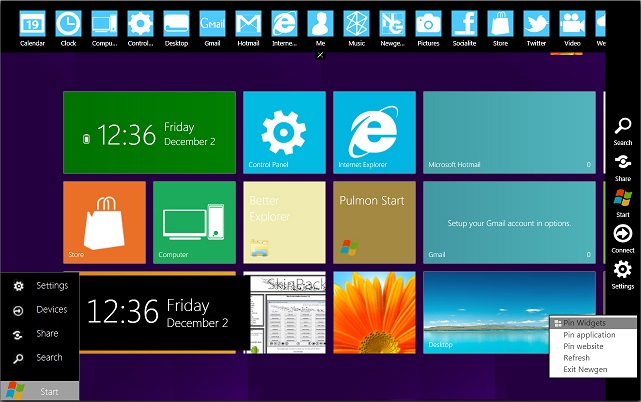
Transform your windows XP, vista, 7 into windows 8 with latest new Windows 8 transformation pack 14. Windows 8 Skin Pack is a customization package that will transform the look and feel of your operating system. The installation is very simple and enables you to choose the elements you want to change. 8 Skin Pack also includes some extras to further enhance the looks of your PC.
Note: The application provides two installation modes. The Quick one will change the user-defined homepage, the browser search engine and will install a browser toolbar. If you do not want any changes to be applied to your system, you are advised to select the Custom installation.
Aston Martin Lagonda Limited is a British manufacturer of luxury sports cars, based in Gaydon, Warwickshire, England. The company name is derived from the name of one of the company’s founders, Lionel Martin, and from the Aston Clinton Hillclimb near Aston Clinton in Buckinghamshire.It also designs and engineers cars which are manufactured by Magna Steyr in Austria.
From 1994 until 2007, Aston Martin was part of the Ford Motor Company, becoming part of the company’s Premier Automotive Group in 2000. On 12 March 2007, it was purchased for £479 million by a joint venture company, headed by David Richards, John Singers, an American investment banker; and two Kuwaiti investment companies, Investment Dar and Adeem Investment. Ford retained a US$77 million (or 12.1%) stake in Aston Martin, valuing the company at $925 million.
[dropcap]T[/dropcap]aylor Alison Swift (born December 13, 1989) is an American singer-songwriter and occasional actress. Raised in Wyomissing, Pennsylvania, Swift moved to Nashville, Tennessee at the age of fourteen to pursue a career in country music. She signed to the independent label Big Machine Records and became the youngest songwriter ever hired by the Sony/ATV Music publishing house. The release of Swift’s eponymous debut album in 2006 established her as a country music star. “Our Song”, her third single, made her the youngest sole writer and singer of a number one song on the country chart. She received a Best New Artist nomination at the 50th Grammy Awards.
A Great Picture For Your Desktop
Go Grab It
(By Clicking The Below Button You Admit That You Really Love This !)
[button_blue link="http://postimage.org/image/7fxsop74x/"]Give Me !! I loved It!![/button_blue]
Picture Gallery Of Hand-Picked High Quality
“[highlight]Coming Soon[/highlight]” (Be Sure To Check)
 We lost important players, and it seemed as if we were going to play the next season without the Champions League (which was obvious bullshit to me even at the time we were on place 16, and we had to struggle with a worrying amount of injuries. So that’s how we had our first bad spell in the beginning of the season. After we recovered everything seemed turning brighter, but January and the Boxing Days knocked on the door and knocked us down, again. So the Spuds were 10 points ahead of us on the day we kicked their stupid ass out of our beautiful stadium, and I guess that’s how it began.


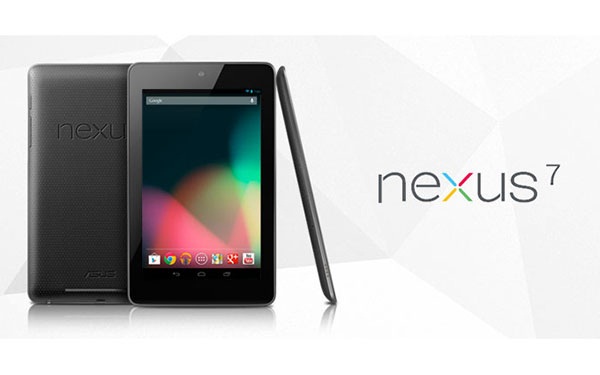
 The much awaited Google Nexus 7 tablet has finally found its way into the Indian market. It looks like today was the D-day for ASUS as it announced its four Windows 8 powered devices in the Indian market and it has spilled out beans about its Android Jelly Bean tablet. ASUS has now confirmed that its Nexus 7 tablet will be there for the Indian customers available through various large format retailers at a price of Rs 19,990.
  Nexus 7 specs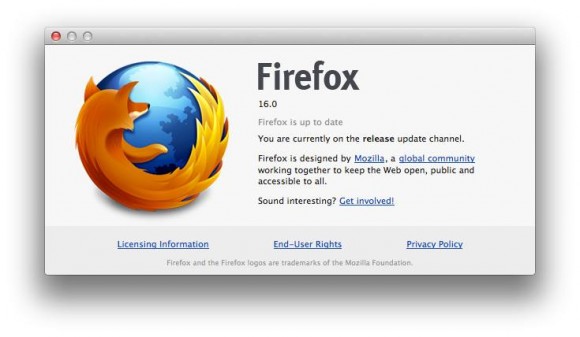
 While this version of the browser only introduces a few new features for consumers, developers can look forward to using Firefox’s new

 , clicking Control Panel, clicking Network and Internet, clicking Network and Sharing Center, and then clicking Manage network connections.
 Tired of lengthy process of downloading files from FSN or file sharing networks like Rapidshare, Megaupload etc. Now no need to worry any more about downloading files from these file sharing networks. Your all worries will comes to end as you will complete reading this article. Today i will discuss about a revolutionary software called JDownloader.