Transform your windows XP, vista, 7 into windows 8 with latest new Windows 8 transformation pack 14.
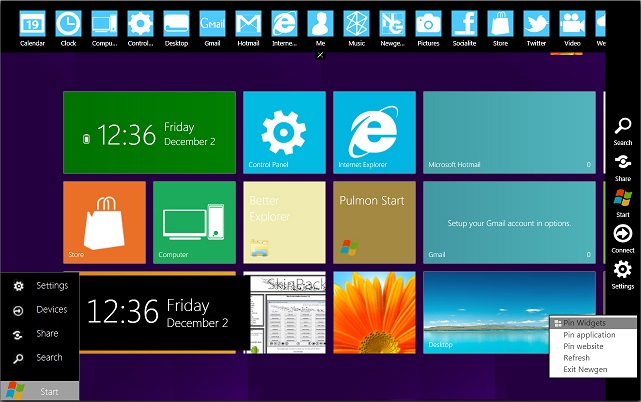
Windows 8 Skin Pack is a customization package that will transform the look and feel of your operating system. The installation is very simple and enables you to choose the elements you want to change. 8 Skin Pack also includes some extras to further enhance the looks of your PC.
 Note: The application provides two installation modes. The Quick one will change the user-defined homepage, the browser search engine and will install a browser toolbar. If you do not want any changes to be applied to your system, you are advised to select the Custom installation.
How to use Whatsapp on PC
Support:
[X86_X64] – [All Language] – [All Version]
- Windows 7
- Windows Vista
- Windows XP
How to Block Websites in Mozilla Firefox or Chrome
What’s New in This Release:
- new login screen
- new start screen
- new widget
- new lock screen
- new boot screen
- new explorer
- new start button
- new wallpaper
- new brand
- new logo
- new style
- new start menu
Removed
Comments
9 responses to “Windows 8 Skin Pack 14 full 32/64 bit for Windows 7,Vista & XP”
win 7 32 bit showed error during install
i myself tried it , worked fine for me
having problem with some hp laptops…..
UPDATE ur BIOS if u r getting errors
how open metro barr? windows 7 64 bit
search for the option in theme options 😀
why mosaic an error occured. see log for detailed information ?
Check the official website of skinpack
it so good
[…] here for windows 8 theme for windows 7 64 bit free download […]