Category: Mobiles

  • Use your smartphone as your wallet

    Use your smartphone as your wallet

    Nowadays, we find ourselves carrying cold hard cash less and less because you can just as easily make your purchase with payment cards, and track your spending online. Certain payment or loyalty cards also let you earn rewards or entries to contests, but they do add up. They make your wallet unnecessarily thick and heavy.

    here are some apps that makes your phone as your Wallet :

    Google Wallet

    Replaces: Cash, credit cards, loyalty cards , coupons
    google_wallet_iphone_best_apps_screens

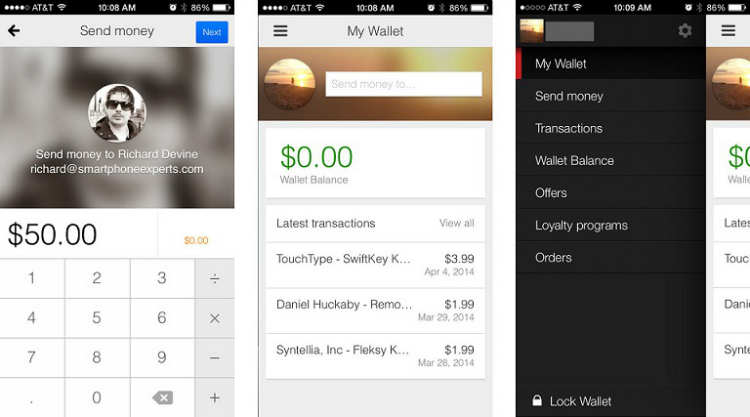
    Launched in 2011 and available on iPhone and Android, Google Wallet gives you the ability to make purchases in stores and online, as well as withdraw cash from ATMs with your phone or a card.

    • Shop and save in stores with all your loyalty and offers in one place. Send money to friends and family and they can spend it instantly with the Google Wallet Card.
    • Store your loyalty programs and leave the plastic cards behind. Carry all of your Google offers on your phone when you shop. Redeem easily at checkout.
    • Send money to any friend in the US with an email address while on-the-go. It’s easy, fast, and free to send directly from your bank account or Wallet Balance.
    • Look for the Buy with Google button on your favorite apps and mobile sites. Also buy easily on Google Play, Drive, YouTube and other Google properties.
    • Google Wallet comes with 24/7 fraud monitoring as part of Google Wallet Fraud Protection. If your phone/card is lost or stolen, either can be disabled from your Google Wallet account.

    Passbook

    Replaces: Travel & entertainment tickets, loyalty and rewards cards

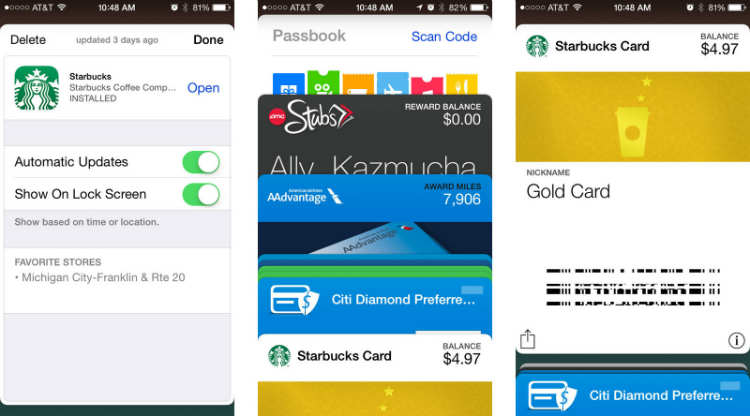
    Apple’s Passbook come up in iOS 6 and with scanning 2D barcodes to help managing your movie, concert and airline tickets as well as loyalty cards and coupons for selected merchants.

    This app let you store and scan almost any type of coupon or ticket. So instead of actually carrying the coupons like grocery coupons or stacks of loyalty cards store it with Passbook.
    passbook_iphone_best_apps_screens_payments

    Unlike Google Wallet, you cannot use your debit or credit card for purchases in-store, however you can use BillGuard to view bank balance.


    Venmo

    Replaces:  Credit and Debit cards

    Venmo is an app available for BlackBerry, iOS and Android . Once you have an account, you can link a bank account, credit or debit card to it. It works similar to PayPal but only between two parties with Venmo accounts.

    All you need to do is write an email to friend and the amount you want to transfer. You can even share the transaction with a message on Facebook, Twitter or Foursquare.
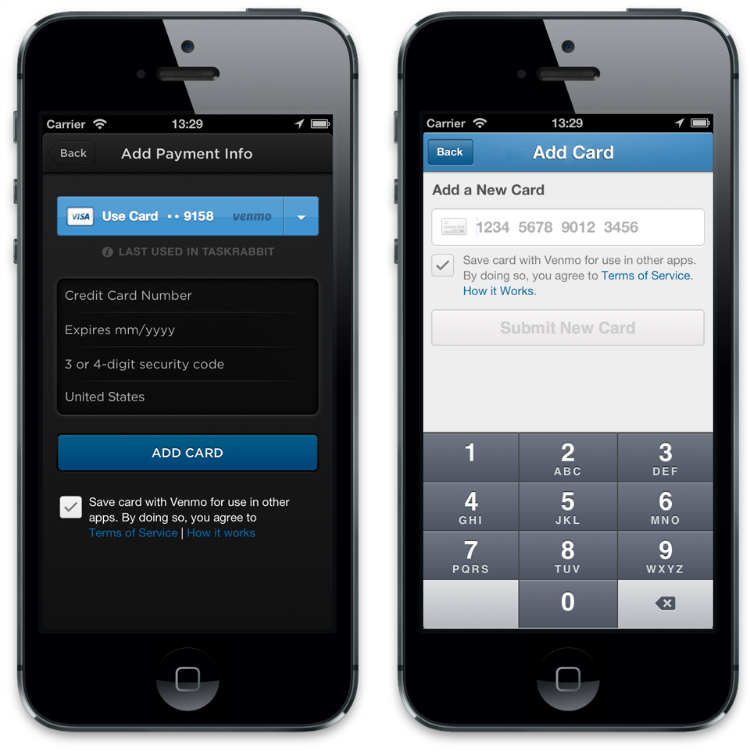
    venmo

    User can simply access their account via website and makes transaction more handy via smartphones. Venmo also works via SMS with a few simple SMS commands. Venmo is a free app but only currently works with major US banks and phone numbers.


    Square Wallet

    Replaces : Credit card , gift voucher

    Square wallet another similar app available on iOS and Android and works similar to Lemon Wallet, But it comes with additional cool features. This app links your credit card to the app but it requires the use of merchant cards which is why Square works only with their list of merchants.

    Because it is locality, the store knows you’re ordering something and will charge it to the card linked on your Square account.
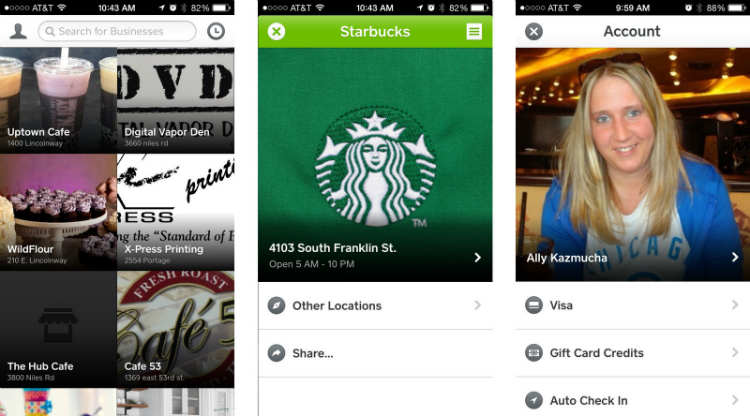
    square_wallet_iphone_best_apps_screens

    It comes with feature of Hands-free Checkout through user can favorite the merchant. Providing interesting discount offers and earns rewards.


    PayPal

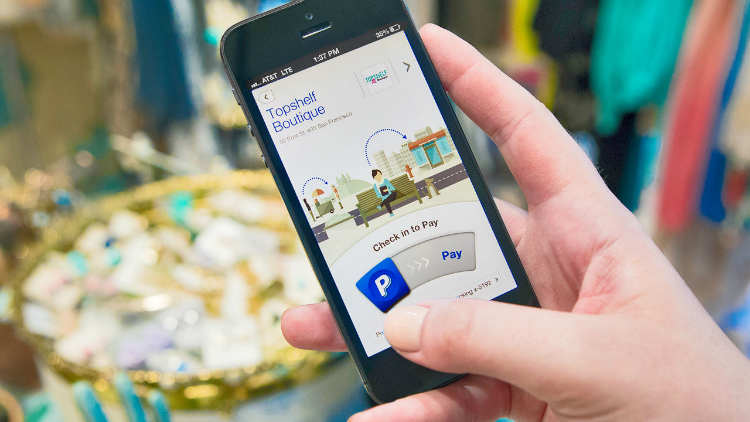
    Nowadays PayPal is very famous service that can transact money between other PayPal users and friends. This app Available for both platforms iOS and Android,
    pp

    It lets you send money to other users and shows you your transaction history. It can be also done by using their website.

    In future PayPal planned to add feature of mobile payment via a care reader.


    Bump Pay

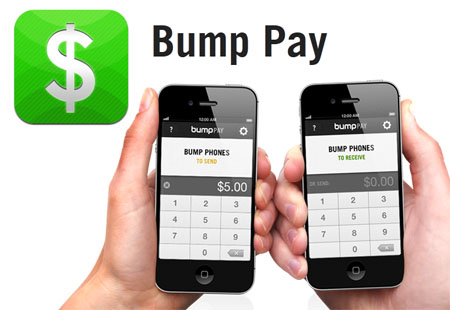
    Bump was an iOS and Android application that enabled Smartphone users to transfer contact information, photos and files between devices. Similarly Bump Pay is a free app only available for the iPhone platform.
    bump_pay_tn

    It allows you to ‘bump’ (transfer) money from iPhone to iPhone with your existing PayPal account.


    Geode by iCache

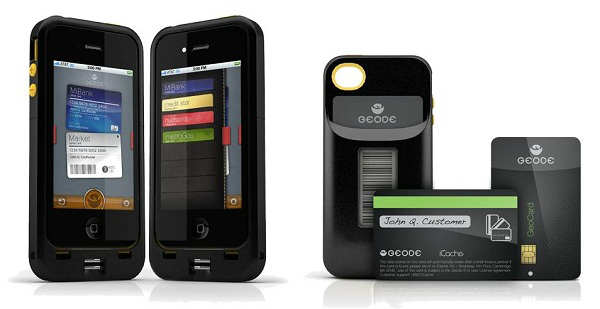
    Geode is an iPhone case that come up with very interesting alternative. Geode is replacement of your credit card and loyalty cards.
    icache

    In this app , all you have to do is take a picture of barcode of each card then the barcode will be displayed will be displayed in E-ink quality for scanning purposes.

    The app has a biometric scanner that takes your fingerprints for authentication for more secure transaction.


    Isis Mobile Wallet

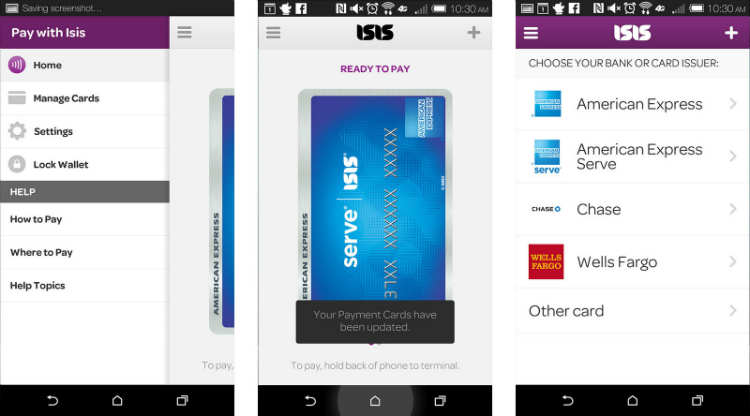
    Isis is available to both AT&T and Verizon customers and offers the same tap to pay functionality Android users currently enjoy with NFC. The only catch? You’ll need to buy an accessory case to make Isis work. After that you can add all your payment cards, including American Express Serve and Chase bank cards, and start tapping to pay at literally thousands of merchants with tap to pay terminals.
    isis_mobile_wallet_android_screens

    If you don’t mind buying a case in order to get the same tap to pay treatment Android customers already enjoy, get Isis Mobile Wallet.

  • Adobe launched Photoshop Express for Windows Phone

    Adobe launched Photoshop Express for Windows Phone

    ps

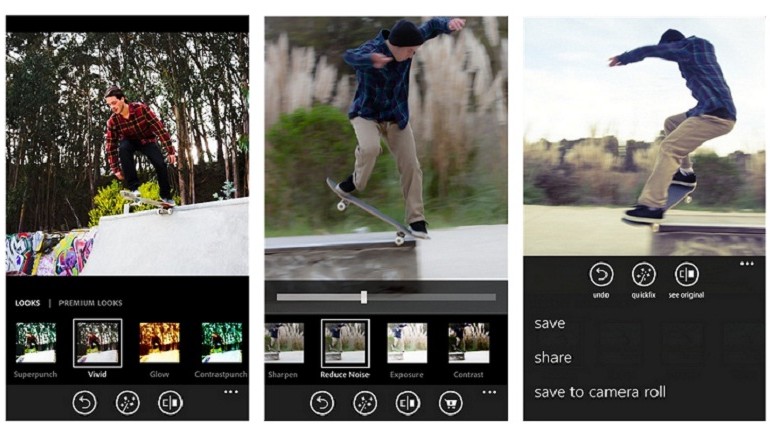
    Adobe launched Photoshop Express for Windows Phone , finally bringing its first image-editing app to the mobile platform.

    The app will follow the same freemium model as the iOS and Android version of Photoshop Express, with basic editing features available for free and more advanced effects available through in-app purchases.


    Now, Get your pictures to pop! And after sharing, you’ll be the talk of your friends. further are features details :

    • Basics: Crop, Straighten, Rotate, and Flip 
your photos. Remove red eye.
    • Auto-Fix: One-touch adjustment for Brightness, Exposure and Shadows.
    • Color: Slider controls for Exposure, Contrast, Clarity, Vibrance and more.
    • One-touch filters “Looks”: Choose from over 20 eye-catching effects!
    • Get creative by adding the Looks Pack* and Noise Reduction Pack*
    • Share easily to social sites like Instagram and Facebook, and via SMS text.

    Photoshop Express makes it really easy to edit photos you take on your Windows Phone device really quickly and comes with the basic photo-editing features you would expect like crop, straighten, rotate, flip, and red-eye removal. You can also alter the color of your photos through slider controls that let you adjust exposure, contrast, clarity, vibrancy, and more. But one of the best things about Photoshop Express is its one-touch filters – called “Looks”. You can choose over 20 Looks for your photos and purchase a Looks Pack and Noise Reduction Pack within the app if you want to really get creative.

    adobe-photoshop-express-app-770x440

    Adobe showed off a new version of Photoshop CC optimized for Surface tablets at Microsoft’s Surface Pro 3 launch last month, but Photoshop Express is the company’s first creative app to make it to Windows Phone.

    The iOS version of Photoshop Express rolled out in 2009, and the Android version followed in 2011.

  • Welcome the Whyd’s new streaming App That Saves Songs from across the Web

    Welcome the Whyd’s new streaming App That Saves Songs from across the Web

    whyd_main

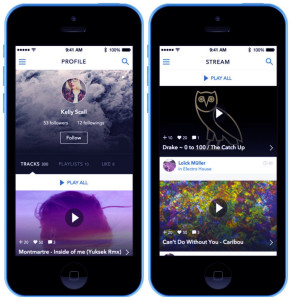
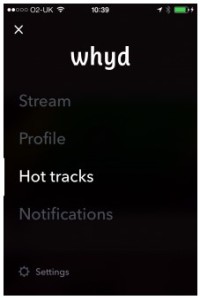
    The new music start up  just launched its social music streaming iOS app. This app provides a centralized music streaming service by pulling songs from other platforms around the web. Providing its users to play and share nearly any song almost instantly.

    Whyd-app.jpg

    The app functions similarly like the company’s web-based social streaming service which is first launched in 2012. Allowing users to collect and share songs culled from other streaming services, including SoundCloud, Vimeo, YouTube and Spotify without leaving the app.

    “The significance might be lost on some people, who just assume that everything should also come in app form,” the company wrote in a blog spot.


    2

    After creating a profile the app search for individual songs or playlists created by other users. You can simply stream songs individually or collect tracks into playlists of your own, which get shared on your profile. In this app tracks load surprisingly quickly. Most search results come from more indie-centric sources like Soundcloud and music blogs, meaning that even more obscure tracks are easy to find.

    After making the web version of its service available to the public after an extended closed beta the Paris-based start up raised $700,000 in funding.

    Whyd claims it is already working on an Android app, but Windows Phone users “might have to wait a little bit longer.”

  • Smartphones with more RAM by Samsung

    Smartphones with more RAM by Samsung

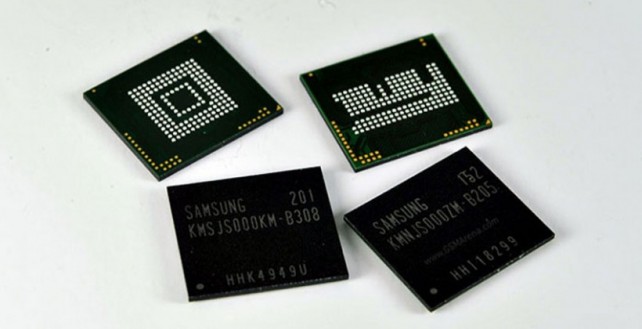
    Samsung has simply declared a record breakthrough in Random Access Memory technology that might pave the approach for smartphones and tablets with 4K UHD screens. The South Korean technology big same on weekday that it’s developed the primary LPDDR4 RAM. this implies that the RAM can use less power than traditional DDR4 RAM, however it’s the power to manage double the quantity of information.

    According to Samsung, this implies it’s currently possible from a technological stand a minimum of, to develop tablets and smartphones with radical High Definition (UHD) 4K screens. “With the new chip, Samsung can specialize in the premium mobile market as well as large-screened UHD smartphones, tablets and ultra-slim notebooks that supply fourfold the resolution of Full HD,” the corporate same during a statement.

    4K Supported RAM

    If the corporate will turn out the RAM in high enough quantities, that I little question assume that they’ll be able to, it might imply that a Samsung Galaxy S5 with 4GB of powerful RAM may be on the horizon. Well, chip designer ARM has already confirmed that Samsung are unveiling a 64-bit Exynos chip before long and mix this with the new LPDDR4 RAM, it might mean the Samsung Galaxy S5 becomes the foremost powerful Smartphone on the market by a protracted margin.

    In addition to higher resolution displays, this RAM technology would additionally result in quicker and a lot of powerful applications, a considerably longer battery life and even a lot of advanced options that aren’t nevertheless obtainable with current handsets.

    There ar rumours floating around that Samsung is attending to unveil the new model of the Galaxy series, the Galaxy S5, at Mobile World Congress in February 2014.

  • Motorola Announces “Project Ara”.Pick your own Hardware now.

    Motorola Announces “Project Ara”.Pick your own Hardware now.

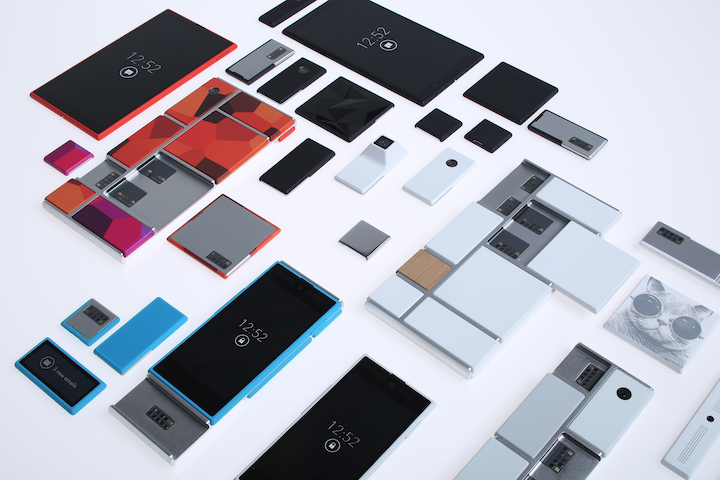
    Motorola has declared a autonomous gaping instrumentation construction for smartphones titled “Project Ara.” The goal is to create a modular smartphone that would portion users to exchange instrumentation components at give. Motorola says it wants to “do for element what the Android platform has finished for software: create a spirited third-party developer ecosystem, lower the barriers to entry, process the rate of creativity, and substantially tighten utilisation timelines.”

    Cast Ara consists of an “endoskeleton” soul and various element modules. Quasi to a screen computer slip, the endoskeleton would cater slots for opposite modules. According to Motorola, “a module can be anything, from a new usage processor to a new pass or keyboard, an actor bombardment, a pulse oximeter-or something not yet mentation of!” Pictures pretence a someone with spots for perpendicular inserts. Each interval has element contacts that infix the attach to the set of the phone.

    Motorola is teaming up with Phonebloks, a companionship with a quasi idea, to accomplish this a reality. Motorola is letting enthusiasts clue up to be “Ara Observe.” Scouts are involved members of the accord who can afford feedback and get ideas virtually the design. The most acrobatic members faculty get aweigh devices when Contrive Ara launches, which Motorola says should be nigh a gathering from now.

    When Google bought Motorola a period and a half ago, everyone wondered what the look colossus would do with a constituent visitant. It looks equivalent its big guidance has been revealed. If the purpose takes off, modular radiotelephone phones could difference the business. Motorola has a lot of win to do prototypal, though.

  • First Firefox OS Smartphone ZTE Open on Sale Today in Spain

    First Firefox OS Smartphone ZTE Open on Sale Today in Spain

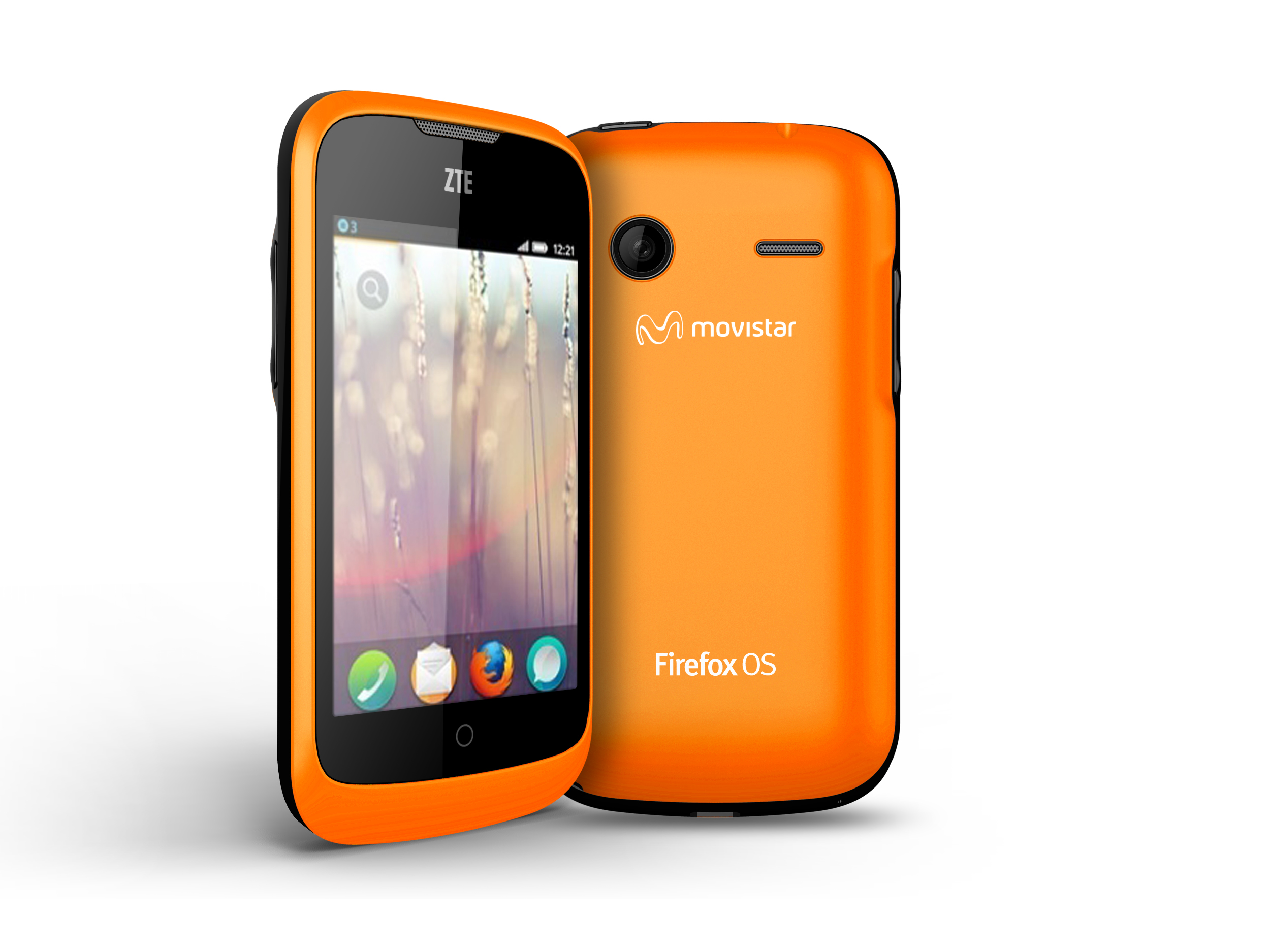
    Mozilla’s first commercial Firefox OS smartphone, the ZTE Open, released this month, but so far it’s only available in Spain with a few other countries coming soon. The specifications hardly compare to high-end smartphones, but you really can’t beat the price. The ZTE Open retails for €69, or about $88. The company also launched the Firefox OS simulator, in an effort to help developers test out new apps intended for the open-source operating system.

    The ZTE Open comeZTE-Open-Orange-white-20130129s equipped with a 3.5-inch TFT display with a resolution of 320 x 480 pixels, 2GB of memory upgradeable to 32GB via microSD card, 265MB of RAM, a Qualcomm MSM7225A Snapdragon processor, FM radio, GPS, a 1,200 mAh battery and a 3.15-megapixel rear camera. No front-facing camera is included. The handset comes in either blue or orange.

    Only time will tell how this phone fares in a market dominated by Apple and Google whose iOS and Android programs are in 90 percent of smartphones.

  • MWC 2013: Asus Fonepad

    Asus announced the Fonepad on Monday at MWC along with its third generation Padfone, a 7in tablet that can make phone calls.

    Following its announcement, all were confused, and questioned whether a 7in tablet should double up as a smartphone.

    The first thing that struck us about the Fonepad was its design, in particular its similarities to the Nexus 7 tablet built by Asus. From the front, you’d be forgiven for confusing the Fonepad for Google’s tablet, since its glossy black bezel and dimensions are almost identical to those of the Nexus 7.

    However, when you flip the device over the Asus Fonepad starts to show its uniqueness.

    The Asus Fonepad runs Android 4.2 Jelly Bean

    Unlike the plasticky Nexus 7, the Fonepad features a metallic back panel, which will be made available in both silver and gold hues. Although it’s not quite as easy to grip as the textured back panel of the Google Nexus 7, it certainly delivers a more high-end feel, despite the tablet’s budget price tag. Not to mention it looks great, especially the silvery hued model.

    A 7in 1280×800 screen sits within this metallic casing, and for us this is one of the device’s highlights. The IPS screen technology that Asus has used means that the device offers excellent viewing angles, and text was legible even when we held the device under the bright MWC lights.

    Not only that, the 7in multitouch display also delivers extremely vivid colours, and despite the similar screen specifications it easily outperforms the Nexus 7 display.The Asus Fonepad features a metallic design

    The Asus Fonepad is quite responsive too, thanks to the 1.2GHz Intel Atom processor under the bonnet. It”s not a fancy quad-core chip, but it certainly offers an all-around slick and fluid experience.

    The latest version of Google’s mobile operating system, Android 4.2 Jelly Bean is onboard too, which Asus has supplemented with its own custom software shell. However, unlike the user interface that you’ll find on a Samsung or HTC device, Asus’ skin is very stripped back, a feature that should appeal to those who prefer a vanilla Android experience.

    The Asus Fonepad features a 7in 1280x800 HD screen

    Of course, the most quirky feature Asus has added to the device is its ability to make calls. Much like the Samsung Galaxy Note 8.0, you can make calls straight from the device – a feature that will confuse some, including us. However, when we used the Fonepad’s dialpad we immediately recognised the the thought process behind it. Sure, we wouldn’t walk around London with a 7in tablet pressed against our face, but the device boasts a built-in speakerphone and can be used with headphones.

    There’s also the ability to make video calls, thanks to the Fonepad’s front-facing camera. This has a 1.2MP sensor, and while it doesn’t produce high quality images, its good enough for video calling.

    That’s not all the Asus Fonepad has to offer. It also comes with 16GB of internal storage expandable to 32GB via microSD, alongside a large 4,270mAh battery.

  • MWC 2013: Asus announces Padfone Infinity combo tablet/phone

    After weeks of teasing their MWC announcements, Asus has officially unveiled the PadFone Infinity. The new phone/tablet combo comes with improved internals to make for a package that competes directly with other 2013 flagships and brings the unique PadFone experience to a high-end smartphone.

    The PadFone Infinity is two devices bundled into one. We will start with the good news. The Infinity ships with Android 4.2, so at least the software experience should be on par with the rest of flagships around. The display has grown from the 4.7-inch one in the PadFone 2 to a 5-inch Super IPS+ LCD, and the full HD tag means you get 441 pixels per inch. It matches the likes of the Xperia Z and HTC Butterfly and brings a 1080p resolution to the table.

    The Asus PadFone brings two full HD displays in one retail package

    The Asus PadFone brings two full HD displays in one retail package

    The PadFone Infinity’s tablet component, or what Asus calls the Infinity Station, retains the 10.1-inch screen, but there’s full HD resolution here too: it now has a resolution of 1920 x 1200 pixels, up from 1280 x 800 pixels in the last model.
    The Infinity’s insides have been upgraded too. It packs a quad-core Snapdragon 600 chip clocked at 1.7GHz and an Adreno 320 GPU, a combination that is gracing more and more flagships. The RAM has also been increased from 1GB to 2GB.
    Buyers can choose to get the 32GB or the 64GB version of the PadFone Infinity. However, there is no microSD card slot, which is an odd decision considering one could have been fitted into the PadFone’s tablet component without much issue.
    You get the usual connectivity options such as WiFi, Bluetooth 4.0, NFC, A-GPS and even GLONASS. The device uses a nano-SIM rather than micro-SIM.
    On the back, Asus has added a 13 megapixel auto-focus camera, an LED flash, a five-element f/2.0 lens and burst shooting at 8fps. The front-facing camera on both the tablet component and the phone is a 2 megapixel one. When docked, the PadFone uses the phone’s primary camera to take rear shots.
    Besides running Android 4.2 Jelly Bean, the PadFone Infinity comes with come Asus-exclusive apps. These include SuperNote for note taking, Story for creating a more immersive photo album and ASUS Echo for voice control.
    Battery life on the PadFone Infinity sounds promising. The 2,400mAh battery within the phone is good enough for about 10 hours of real-world use. The company claims the device can give you up to 19 hours of 3G talk time and 40 hours when docked into Infinity Station. The dock also has enough juice (5000 mAh) to fully recharge the docked PadFone Infinity up to three times, according to the company.
    Here are the key specifications of the PadFone Infinity:

    • 5-inch Super IPS+ full HD display (phone) and 10.1-inch display with 1920 x 1200 resolution (tablet)
    • 4G, LTE Cat3 up to 100Mbps DL, 3G, DC-HSPA+ up to 42Mbps, GSM, EDGE
    • Wi-Fi 802.11 a/ac/b/g/n, Wi-Fi Direct, dual-band, Wi-Fi hotspot
    • Bluetooth 4.0 with A2DP
    • GPS with A-GPS support and GLONASS
    • 13 megapixel primary camera with LED flash and 2 megapixel front camera
    • 32 or 64GB internal storage
    • MicroUSB 2.0 with MHL link and USB Host support

    And now for the bad news: the combined price of the Asus PadFone Infinity and the Infinity Station will be around £800 (approx Rs 65,000). The PadFone will arrive in Europe first, followed by Asia. Those looking to buy will have grey, gold and pink colour options to choose from.

  • MWC 2013: Nvidia Shows smartphone ‘Phoenix’

    Nvidia might make your next smartphone. The Nvidia Phoenix – pictured here – is a reference phone for the time being, but the company has already shown it’s not afraid to make its own kit with Project Shield and now it could be setting its sights on the smartphone and tablet market.

    Nvidia is keeping schtum about the particulars, but reckons that with its components facing tougher market conditions (the unlikely phrases ‘increasingly vertical’ and ‘commoditisation’ were used) a move to make its own smartphones and tablets will pay off in the long run.

    While won’t be able to grab of these devices, be sure you you take a good look at the Phoenix, as it’s going to be a while before we see anything else like it. Nonetheless, this reference design rocks the NVIDIA Tegra 4i, which we’ve most recently seen it tearing the competition to pieces in some recently released benchmarks.

    While the Phoenix itself isn’t for the end consumer, it certainly doesn’t mean that we don’t want one. The device shows off just what the NVIDIA Tegra 4 can do, and that’s good enough for us. The reference design ships with a 5 inch 1080p HD display, 13 megapixel camera, and more.

    The Tegra 4 family is leaps and bounds more powerful than the NVIDIA Tegra 3, and will offer up some great native features, like always-on HDR.

  • MWC 2013: NVIDIA shows off 5 new Tegra 4 optimized games

    MWC 2013: NVIDIA shows off 5 new Tegra 4 optimized games

    With the announcement of the new Tegra 4 processor and devices, NVIDIA is looking to showcase what it is capable of by highlighting 5 new Tegra 4 optimized games in TegraZone. Burn Zombie Burn, Carie: Blood Mansion, CODEX: The Warrior, Dead on Arrival 2 and RU Golf have all been updated with enhanced graphics to show off just what makes Tegra 4 so much more appealing over other processors when it comes to playing games. NVIDIA is well known for partnering with game developers to release these high-end titles via the TegraZone, and these will kick it off for Tegra 4.

    More about Tegra 4

    Burn Zombie Burn

    Developer: Tick Tock Games

    Burn Zombie Burn blasts onto the mobile scene for the first time with fast-paced, console-quality action that has you striving to survive against a never-ending horde of zombies. With a slew of weapons available for your zombie-blasting pleasure, you’ll master the art of eradicating the undead.


    Carie: Blood Mansion

    Developer & Publisher: Neowiz

    Tegra device users will get an exclusive map in Carie: Blood Mansion, with even more immersive graphics on Tegra 4 devices. You’ll guide Carie through bloody battles in this action adventure title. Keep an eye on the high-res textures, enhanced physics simulations and optimized fire and smoke effects in the below video.


    CODEX: The Warrior

    CODEX: The Warrior.

    Head-to-head fighting in this RPG title shows off what Tegra 4 is capable of with HDR (High Dynamic Range) lighting throughout.


    Dead on Arrival 2

    Dead on Arrival 2.

    A follow-up to the original, Dead on Arrival 2 adds full map destruction and high resolution models.


    RU Golf

    Developer & Publisher: Nutgee

    RU Golf swung onto the mobile scene last year for Tegra 3-powered devices and will follow through with Tegra 4. Experience mano-a-mano multiplayer online battles with dynamic specular lighting, soft shadows, and bloom and lens flare effects. With various levels and character customizing features, get ready to tee off with RU Golf.

    As you can see from the games above, there’s a lot to look forward to. Now we’ll just patiently (or impatiently) wait for Tegra 4 devices to arrive so we can promptly throw our cash at these upcoming titles!