
Tag: google

  • Google’s Latest Ambitions with Project Tango

    Google’s Latest Ambitions with Project Tango

    project_tango_logoProject Tango is an attempt by Google to create a mobile device that understands and perceives the world the same way as we do and that shares our sense of space and movement. It is an Android-based prototype 5” phone and developer kit with advanced 3D sensors out of its Advanced Technology and Projects (ATAP) hardware skunk works group. Using its sensors, the phone tracks motion. It can actually build a visual map of rooms using 3D scanning. Google is quite ambitious about this discovery and hopes the combination of these sensors with advanced computer vision techniques will open new windows for indoor navigation, immersive gaming and many more such things.

    With Project Tango Google wants to see what kinds of applications developers will dream of for this technology. It will unfold new kinds of smart, vision-based applications based on the 3D sensing and vision technology that is available in the phone. Human beings will be able to create applications that were so far impossible. These phones have a compass and gyros like other phones. Besides that they appear to be Kinect-like visual sensors that can scan the room around the phone. It is also possible to locate where exactly the phone is in space.

    Google uses Movidius Myriad 1 vision processor platform for Project Tango. These sensors were incredibly expensive in the past, they drain the phone’s batteries fast since they are computationally demanding. The latest vision processors use less power and hence Google was able to come up with this project. The ambitious Project Tango is heading to the International Space Station. Two of the Tango phones which would be launched in May 2014 would take supplies to the International Space Station. The phones will be used as part of a NASA project that is developing robots that could one day fly around the inside or outside of the space station, or be used in NASA’s planned mission to land on an asteroid.project-tango
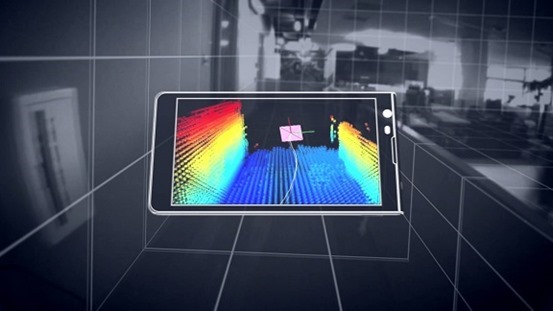
    These phones have several cameras and infrared range-finding which helps the phone build a three dimensional model of its surroundings. This is the major difference Tango phones have from the other phones which can see only a two dimensional world through a single camera. Tango pulls together a few companies which work on cutting-edge technology. It includes a low-powered, vision-processing chip called the Myriad 1 with custom-designed architecture by Movidius. The Myriad 1 is able to power the complex algorithms needed for computer vision without draining the smart phone’s battery. The current smart phone chips cannot do it.

    Google is soon putting Tango in the hands of developers starting with 200 devices. Tango, indeed, has the potential to change many of our lives. This combination of hardware and software would be highly beneficial to vision-impaired human beings. It could also change the state of indoor 3D modeling. Tango video is able to paint the real world in a rainbow-colored 3D map in real time. Tango is a research project which is just launched and there is no clear indication of what the invited developers will do with these sensors. There are many upcoming opportunities and career prospects which would be made use of with this technology. For example, if someone creates a wearable holder that puts Tango on your chest and points out its sensors, it could alert you to danger ahead. It would see an oncoming car or out-of-control bicyclist in front of you and it would vibrate to warn you.

    Google has obtained a lot of coverage by putting the sensor technology in what people recognize- that is, a phone. There are more opportunities which can be developed out of this technology for which people have to spend more time staring at the screen. Tango is precisely a research project this way.

    Author Bio:

    I Harvey, from past years I am really concerted on writing help for students with buy legit essays online with good online support. My experience and expertise have indeed lent a hand for me to write academic coursework such
  • Google launches ‘Google Tips’ for ease of use

    Google launches ‘Google Tips’ for ease of use

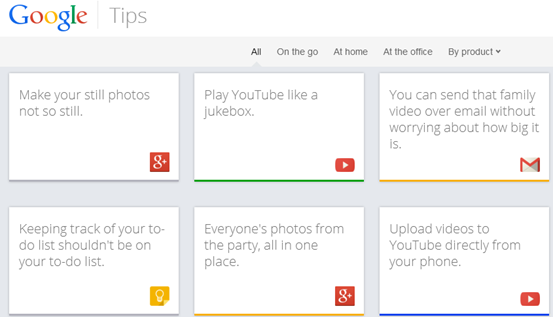
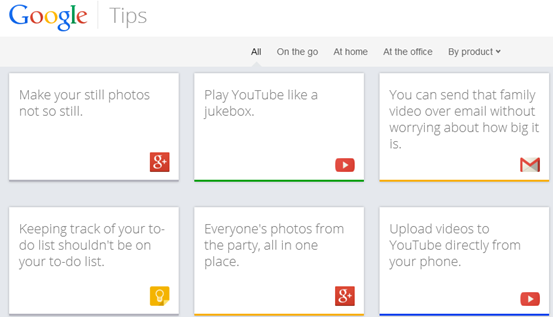
    Though we’re sure Google tries to keep its products like Now and Docs as easy to use as possible, who has the time to learn every single feature? That’s likely why Google just launched Tips, a site that uses its info card trope to help you dive more deeply into all 13 of its consumer products. For instance, if you choose Google+, one card suggests you can “make your still photos not so still,” and reveals step-by-step instructions when you flip it along with each device it supports.
    The site is broken into cards, Google’s latest design style of choice, each of which offers a quick description and the option to flip over to learn more. Every card can be shared to Google+, Twitter, Facebook, and via email.google_tips_coverThe site currently spans 13 products: Search, Gmail, Chrome, Android, YouTube, Maps, Docs, Drive, Play, Calendar, Keep, News, and Google+. All of them either require you to be signed in, or work better when you are, which is exactly the message Google wants to send. There are just over four pages of tips, and on the fifth page (as well as on the bottom) there’s a suggestion box where you can tell Google what you think it should add.
    You can even submit your own idea for a tip, though to do that and other functions, you’ll need a Google account. It’s only available on desktop browsers for now, but if you want to give it a spin and see all the supported products, hit the source.

  • All you need to know about Nexus 5

    All you need to know about Nexus 5


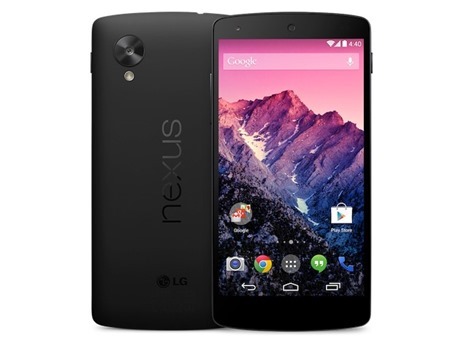
    nexus-5-lookAfter weeks of speculation, Google and LG have officially announced the Google LG Nexus 5.
    LG-Google Nexus 5’s technical specifications –
    4.95-inch 1920×1080 display (445 PPI) – Corning Gorilla Glass 3 – Android 4.4
    KitKat – Qualcomm Snapdragon 800, 2.3GHz quad-core processor – Adreno 330,
    450MHz GPU – 8 megapixel rear camera with optical image stabilisation – 1.3
    megapixel front camera – 16GB or 32GB internal storage (actual formatted
    capacity will be less) – 2GB RAM – 130 grams weight – 69.17×137.84×8.59 mm –
    Dual-band WiFi (24G/5G), 3G/4G LTE – NFC (Android Beam) – Wireless charging –
    2300 mAh battery – Standby time up to 300 hours – 16GB for Rs 28,999, 32GB for
    Rs 32,999

    Read more at: http://ibnlive.in.com/news/google-nexus-5-with-android-44-kitkat-launched-16gb-for-rs-28999-32gb-for-rs-32999/431647-11.html?utm_source=ref_article

    Google Nexus 5 is the first to run Android 4.4, which brings a new dialer that automatically suggests people the most likely call while Caller ID by Google matches an incoming phone number to a business even if that number isn’t stored in the contact list. Users can send and receive text messages directly from Hangouts, and Hangouts for Android now supports location sharing.
    The 5-inch display makes it suitable to fit in the palm of your hands, but while carrying it in my pocket while walking through San Francisco, it sort of felt like it was out of place — perhaps I’ve grown too accustomed to the fact that I’ve had 3- to 4-inch phones for the past few years. Although you can hold the device in one hand, it doesn’t immediately feel comfortable enough size to manage all your affairs as such. Trying to type out emails or using certain apps required the use of both hands.
    Price tag of Rs. 28,999 for the 16GB variant ($349 in the US) and Rs. 32,999 for the 32GB variant ($399 in the US).

    Google Nexus 5 technical specifications
    Processor: Qualcomm Snapdragon 800 with 2.26GHz Quad-Core Krait CPU
    Operating System: Android 4.4, KitKat
    Display: 4.95-inch full-ID IPS (1920 x 1080 pixels)
    Network: CDMA/1xRTT/EVDO, GSM/GPRS/EDGE, WCDMA/HSPA+, LTE
    Internal storage: 32GB / 16GB
    RAM: 2GB
    Camera: Rear 8.0-megapixel with OIS / Front 1.3-megapixel HD
    Battery: 2,300mAh Li-Polymer (embedded)
    Size: 137.84 x 69.17 x 8.59mm
    Weight: 130g
    Others: Wireless charging, NFC


    • The soft touch backside gets fingerprint-tastic, and fast. I had to wipe it almost constantly for our hands on photos. For reference, I’m using the black device and don’t have particularly oily hands.
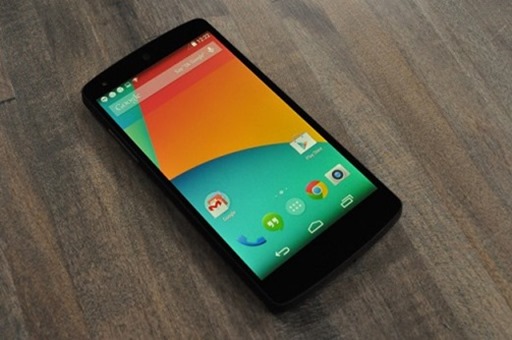
    • With Android 4.4, Google Search is now automatically integrated into every single page of homescreen launcher, and can be triggered by voice through an “Okay, Google” hot keyword. Search is always just there. It’s quite nice.


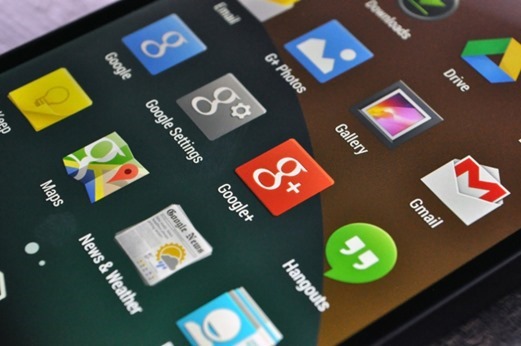
    • Google Now is now always the left-most screen on your homescreen, which is a smart move on Google’s part.icons
    • It’s smooth. Really smooth. Every transition, every fade in – it’s like butter.
    • The camera seems above average, but not mind blowing. 
    • Android 4.4 overhauls the dialer, with the main feature being a knowledge of nearby businesses. Just type a business name into the same field where you’d normally type the first few letters of your friends name, and it pulls up the details for nearby locations. In my early tests, this feature works very well. Typing “Starbucks” pulled up 8+ locations near me (hey, it’s San Francisco), broken down by their location, each offering their phone number at a click. It works in reverse, too; I had one of those Starbucks locations call me, and the phone identified the caller as such. Google says all this data is piped in from Google Maps


    • In Google’s HDR+ mode (which takes photos in rapid succession and combines the best parts of each into one photo), the camera can be slow.
    • While Android 4.4 is largely focused on optimizations that allows it to run on lower-end devices, there are a number of lil’ subtle changes that really spruce up the place. The top bar and bottom nav bar are both translucent now, allowing the homescreen background to go fullbleed across the screen . The widgets drawer has been moved out from the pop-up app drawer (which always seemed like a weird location), and back to being behind a long press on the home screen (like it was in Android of yesteryear). google_nexus_5
  • Design your own smartphone with Moto X

    Design your own smartphone with Moto X

    Moto-X-ad-designGoogle with its Motorola–are releasing a brand new smartphone sometime in the near future. And beyond the revelation domestic models of the Moto X will be assembled entirely in the United States, Motorola is now claiming the consumer will have some type of say in the smartphone’s design. As reported by a new ad touts the Moto X as the first smartphone designed by you. As ad says
    “The first smartphone that you can design yourself. Because today you should have the freedom to design the things in your life to be as unique as you are.”

    Pushing the “made in the USA” theme, the newspaper ad evokes images of the July 4th holiday and summer. Citing the Moto X as “something new,” the ad seems to state you’ll have some opportunity to have input in the Moto X model you purchase. Granted, what the means precisely is still pretty unclear. But the possibilities are interesting, nonetheless.

    A spokesman for Motorola said that by keeping its assembly work in the U.S. instead of Asia, it didn’t need to fly its engineers out to far flung locales to check on production.

    What would you want in a customizable smartphone? Let us know what kind of hardware or software you would pack into a smartphone from Motorola in comments.

  • Say GoodBye to Google Reader : Alternatives

    Say GoodBye to Google Reader : Alternatives

    INTERNET GIANT Google’s Reader is no more, with the firm having closed the doors on its popular RSS news reader on Monday.

    We know, it’s a tough day for all of us. As of today, 1 July, Google Reader has gone the way of services such as Google’s Buzz and SMS services, and is no longer operating.

    “We launched Google Reader in an effort to make it easy for people to discover and keep tabs on their favorite website, While the product has a loyal following, over the years usage has declined.”

    Fortunately, there’s an afterlife. Google has made it easy to move your list of sites you follow, known as feeds, to another service. And many of those rival services have made it easy to accept those feeds, especially after Google said in March that it would retire Reader.

    Alternatives to Google Reader

    RSS feeds – for really simple syndication – used to be a popular way to keep track of multiple websites without having to visit each and every one. Content comes to you, through readers such as Google Reader. More recently, though, Twitter and Facebook have performed a similar role in discovering content.

    Feedly – Feedly excels in highlighting the most popular items from all your feeds, based on sharing and other interactions on Feedly and elsewhere. Simply visit a page called “Today.” Under the default layout, you see headlines and the first sentence or two of each item. You can click on any item for more.

    You can also share the item on a number of social networking sites. That freedom isn’t available on Reader, which confines sharing to Google’s own Plus service.

    The Old Reader – For those users seeking just the basics, The Old Reader is a strong choice. Designed to look very similar to Google Reader, The Old Reader is simple and easy to use. Importing and adding feeds is easy, but it seems sharing is limited to the service. So, it’s tough to directly share to social networks. But for users who want feeds on the go, Old Reader will work with the iOS app Feeddler.

    Flipboard – The mobile app for iOS and Android opts for a more visual approach to story syndication, presenting feeds in a magazine-style format. Along with RSS feeds, users can add updates from social networks such as Facebook, Twitter and Tumblr, “flipping” pages with simple swipes on the touchscreen. Similar to note taking app Evernote, Flipboard allows users to clip content from the Web to display in a digital magazine for their mobile devices. The big drawback to Flipboard is users can’t read their feeds on a desktop or laptop. It’s for smartphones and tablets only.

    AOL Reader One of two new entrants into the RSS reader market, AOL Reader has promise. Several views are available, from a traditional list to a pane view similar to the Microsoft Outlook email client. Users can share stories to Facebook, Twitter, Google+ and LinkedIn, as well as star items for later reading. However, I couldn’t find any options for saving to offline services such as Pocket. Also, feeds didn’t seem to update as quickly as other options, but that should improve over time. A native Android and iOS app is coming soon, the reader still functions nicely on a mobile browser. Among other options AOL plans to add soon: Search, Notifications and sharing with other AOL Reader users.

    Digg Reader – The newest RSS reader from Digg is a clean, simple choice. Sharing is limited to Twitter and Facebook, but users can set up connections to Pocket, Instapaper or Readability to view content later. Users can “Digg” stories, which bolsters a cool Popular section that breaks down the most popular stories appearing on your RSS. There are some important functions missing, such as “Mark as Unread” and “View Unread Items Only” options, but Digg says they plan to add those features quickly.

  • Google Launches ‘Loon’ to Deliver Internet Access With Balloons

    Google Launches ‘Loon’ to Deliver Internet Access With Balloons

    You know what’s awesome? The Internet. What’s not so great: The utter pain it is to find a fast, reliable Internet connection in so many parts of the world. With its latest moonshot, Google[x] is fighting that headache with creativity, attempting to make an awesome thing, well, even more awesome by spreading the Internet to the furthest reaches of the earth.
    The delivery method? High-flying, Internet-spewing balloons.

    Eighteen months in the works, the top-secret project was announced in New Zealand, where up to 50 volunteer households are already beginning to receive the Internet briefly on their home computers via translucent helium balloons that sail by on the wind 12 miles above Earth.

    While the project is still in the very early testing stages, Google hopes eventually to launch thousands of the thin, polyethylene-film inflatables and bring the Internet to some of the more remote parts of the globe, narrowing the digital divide between the 2.2 billion people who are online and the 4.8 billion who aren’t.

    If successful, the technology might allow countries to leapfrog the expense of installing fiber-optic cable, dramatically increasing Internet usage in places such as Africa and Southeast Asia.

    “It’s a huge moonshot, a really big goal to go after,” said project leader Mike Cassidy. “The power of the Internet is probably one of the most transformative technologies of our time.”

    The so-called Project Loon was developed in the clandestine Google X lab that also came up with a driverless car and Google’s Web-surfing eyeglasses.

    Want to see the high-flying, potentially world-changing chicanery in action? The Project Loon’s Google+ page packs plenty of behind-the-scenes photos of the endeavor. Residents of the southern hemisphere may just get an up-close view of the balloons before long: Google is hoping to bring Project Loon to other countries on the same latitude as New Zealand.

  • Google Nexus 7 Tablet Launches In India @ Rs 19,990

    Google Nexus 7 Tablet Launches In India @ Rs 19,990

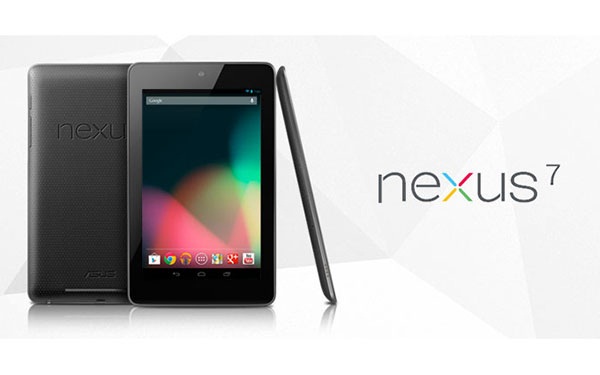
    The much awaited Google Nexus 7 tablet has finally found its way into the Indian market. It looks like today was the D-day for ASUS as it announced its four Windows 8 powered devices in the Indian market and it has spilled out beans about its Android Jelly Bean tablet. ASUS has now confirmed that its Nexus 7 tablet will be there for the Indian customers available through various large format retailers at a price of Rs 19,990.
    Unaez Quareshi, sales and distribution director, ASUS India said that the tablet has been priced at Rs 19,990 and will be available through Chroma, a Tata group electronics retailer, and other large format retailers, reports Mobile Indian.
    Google Nexus 7 is a 17.78-cm (7-inch) tablet featuring an IPS display along with 10 finger multi-touch support. The device runs on Google’s Android 4.1 aka Jelly bean and is powered by 1.2GHz quad-core Nvidia Tegra 3 processor. The tablet is incorporated with 1 GB of RAM which will smooth out the functions carried out on the device. Nexus 7 will be available in two variants- 8GB and 16GB storage.
    Though, Nexus 7 has received a remarkable response worldwide, still the competition is high with a few other Android tablets like Samsung Galaxy Tabs and Kindle Fire. iPad continues to be the market leader with 50 per cent shares in the global tablet market.
    Also, Google recently launched a 32GB version of the Nexus 7 tablet which sports a 1.2 MP front camera and connectivity options like WiFi, Bluetooth and NFC.

    Google updated the Nexus 7 tablet released earlier this year. It increased the storage on the $199 version of the device to 16GB from 8GB, and introduced a new $299 version of the Nexus 7 with a cellular data service option. Google also unveiled a new Nexus 4 smartphone, made in partnership with LG Electronics, that features a quad-core processor and a 4.7-inch display.

    Nexus 7 specs
    Operating System: Android Jelly Bean (4.1)
    RAM: 1GB DDR3L
    Storage: 16GB

    Connectivity: Wi-Fi :- 802.11 b/g/n, Bluetooth 3.0
    Camera: 1.2MP (front)
    Battery: 4325mAh Li-polymer
    Display: 7" WXGA (1280 X 800) LED IPS panel, 10 finger multi-touch
    Interface: 1x Headset jack, 1x micro-USB, 2x digital microphone, 2x speakers, 1x docking PIN
    Sensor: G-sensor, light sensor, gyroscope, e-compass, GPS, NFC, hall sensor
    CPU: NVIDIA Tegra 3 T30L Quad-Core @1.3Ghz
    GPU: GeForce 12-core, 3D stereo

    MORE ABOUT THE NEXUS 7
    Google selling a million Nexus 7 tablets per month
    Asus, the Taiwan-based technology company responsible for manufacturing Google’s Nexus 7 tablet, claims the device has just hit the 1 million sales a month milestone.

    Released in July to universal critical acclaim, the Nexus 7 was Google’s first tablet and until now, there have been no official figures as to how well it has performed in relation to its competitors.

    Google Nexus 7 becomes ‘best-selling tablet’
    Google Nexus 7 has become the highest selling Android tablet just three months after its launch, a media report said Monday. Google’s first tablet went on sale July 27. Its main selling point has been its affordable 159-pound price tag, The Telegraph reported.

    Google Nexus 7 named Gadget Of The Year
    Google’s Nexus 7 by ASUS was honored as the ‘Gadget Of The Year’ and also named the ‘Tablet Of The Year’ at the T3 Gadget Awards 2012. Taiwanese multinational tech giant, ASUS, was the big winner of the night at London’s Old Billingsgate, scooping no fewer than five accolades. The awards recognise and honour the gadgets, software and personalities which have intrigued, inspired and wowed the world over the past 12 months.