Category: Featured

  • Smart watches are on a roll as Sony unveils SmartWatch 3, and HTC eyes for MWC

    Smart watches are on a roll as Sony unveils SmartWatch 3, and HTC eyes for MWC

    A phone earlier used to be for calling purpose only. Time has changed, and making calls is a secondary task to perform through the phones. In the same way, watch is not just a product to know time. The smartwatches have evolved today that can handle multiple jobs like a calculator, playing game like a smartphone, and many others.

    sony-smartwatch-3-hands-on

    These smart watches can deal with the mobile applications, and even some can play directly with the mobile platforms. In terms of connectivity as well, they are efficient enough through Bluetooth. Looking at such usability of the concept, the manufacturers are showing increasing interest towards it. Apparently, two big names in manufacturing arena are in buzz on this regard.

    Sony makes the smart wearables, SmartWatch 3 and SmartBand Talk available

    Japanese leading manufacturer Sony has made its latest SmartWatch 3 and SmartBand Talk available. Through the process, Sony enters into the smart wearable territory along other leading manufacturers.

    SmartWatch 3 is a fantastic product specifically made for present Android Wear trends. Through the process it has managed to become the opening smartwatch of its range. The other name SmartBand is also a great stuff that can let users handle calls and voice control functionalities through their wearable devices.

    Talking of the other specs, the device has native microphone, accelerometer, Gyro, GPS, etc.

    HTC to enter into Smartwatch this MWC

    Here we come up with another leading manufacturer HTC in smartphone arena that is very soon going to start its quest. Reportedly, HTC will be putting the wraps off for this range of product at Mobile World Congress this March. There will be another much buzzed product One M9 flagship unveiled during the occasion as well.

    htc-logo-1

    Expected specs

    The latest SmartWatch reportedly will be sporting fitness tracking application service. Anyway, nothing much could have been gathered regarding design or specs of the product. However, everyone knows that keeping rumor mills tight lipped is just impossible. Believing the sources, the latest HTC smartwatch will come with extensive connectivity options.

    There are many parts unclear regarding the product as well. HTC is said to be stepping into the trend carefully looking at the competitors. There is no specification as well whether it will be applying same concept as a wearable platforms as of competitors or anything else. Still, maximum chances are there it to be a very good Android wearable.

    Sony has also worked for native SmartWatch platform, but finally prefers to play with Android only. Hence, nothing surprising will be there if HTC repeats the same pattern. In fact, there is no alternative for it.

    HTC Smartwatch to carry an excellent design

    However, sources say HTC is planning to make the Smartwatch available with a great piece of design. There are many chances hold for it to be real as its M9 is reportedly going to carry a trendy design and manufacture would certainly love to blend the concept with its upcoming Smartwatch as well. We all know M8 from HTC was a great device in terms of its design and display, and HTC would never mind implementing the same concept here that can make it go for a dream start with smartwatch.

    Availability

    There are no official details made available regarding the product’s availability or price tag. Now all eyes are certainly on March 1st that has been scheduled for HTC’s press meet for Mobile World Congress. We hope things will be clear on the day. Stay Tuned!

    About the Author

    Abhilash Thakur is the founder of weararena.com who keeps eye on news, rumors and all the unusual stuff that happens around wearable devices .

  • Motorola just showed off new Moto E with LTE and bigger screen

    Motorola just showed off new Moto E with LTE and bigger screen

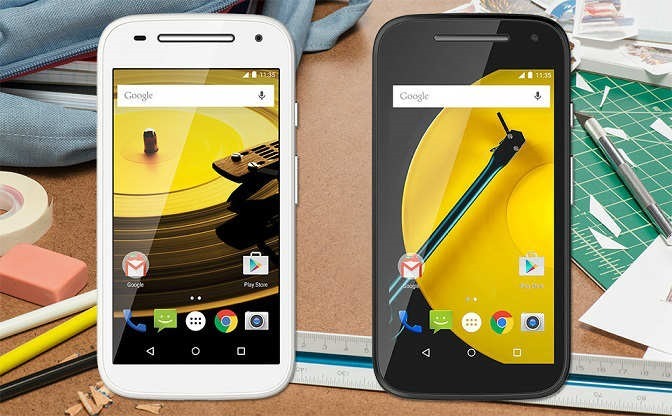
    Moto-E_2nd-Gen

    Motorola showed off a brand new Moto E second generation which looks similar to the last year’s Moto E in design. But with a bigger display and addition of LTE with a lot of new things make it looks interesting. It’s the most affordable entry level smartphone in the market (LTE for $149.99 and 3G for $119).

    Motorola has also added its Quick Capture feature, which lets you launch the camera with just a twist of your wrist and the Active Display feature that wakes the screen up with notifications or when you pull it out of your pocket. Addition of a 0.3 MP front camera is a plus point as the previous Moto E was lacking that.

    Under the hood, the processor is upgraded to faster Qualcomm Snapdragon 410 with 1.2 GHz quad-core CPU, Adreno 306 with 400 MHz GPU (4G LTE) and Snapdragon 200 processor with 1.2 GHz quad-core CPU, Adreno 302 with 400 MHz GPU (3G). The battery in the 2nd Gen. Moto E is also bigger with 2390 mAh and motorola is claiming that it can last upto a full day.

    The screen is also bigger this time with 4.5 inch compared to 4.3 inch of previous model. You will get Android lollipop installed on the new 2nd gen Moto E.

  • How to Find A Great Laptop

    How to Find A Great Laptop

    buying-laptop

    When you’re ready to buy a new laptop, your selection deserves plenty of careful thought. You need to consider a ton of information. Fortunately, the article below was written to help you with that. Read more to find some tips you can use.

    Read through testimonials and reviews prior to buying a laptop. You may think that a budget computer is your best option, but later on you may wish you had chosen a different computer. That is why you need to see what real buyers are saying.

    To save money, buy a laptop that does not have word processing software already installed. Preloaded software can be more expensive, whereas buying it separately and installing it yourself is usually much cheaper. Instead, shop online for a discount vendor for your software. You will end up saving a large percentage.

    Consider buying a laptop on the Internet. Check there before buying at a store. You can get great Internet deals using online coupons that are not found offline. Look online before buying one in the store.

    Before purchasing a laptop, consider the type of work you will be doing on it. That should dictate your budget. If you’re basically a web surfer, then a super pricy laptop with uber-powerful chipset is not necessary at all. When you’re trying to figure out what the laptop will be doing for you, it will allow you to get yourself a machine with the right price.

    Once you decide on a budget for a laptop, consider bumping it up just a bit. Technology is always changing and a simple laptop will become outdated quickly. Just a small spec bump can make a difference between the laptop that only lasts one year and one that will last more.

    Buy-Laptop

    Be gentle with your laptop when you are traveling with it. Get a sturdy, firm bag that does not bang or bump into you when you walk. This can cause damage to the components on your computer.

    Think about a tablet for mainly entertainment applications. Tablets have apps that allow for easy software downloads. You can even connect the tablet to a keyboard so that you can write emails or take class notes.

    When you’re going to be purchasing a laptop, try to shop smartly. Check out traditional stores and play with the laptops a bit. Play around with different ones so that you can find one that you’re comfortable with. Once you’ve figure out which model you enjoy, you can get on the Internet to see if there are any deals.

    When you’re going laptop shopping, don’t decide on a laptop just because of the brand. Lesser known companies often have great deals. Understand the hardware inside the laptop, so you can determine if the less expensive models offer the same level of technology. It is often easy to find a comparable product with a less recognized company.

    There are many things to consider prior to buying a laptop. Whether you’re buying a new machine, or upgrading it, you needed some basic information and that has now been provided to you. Use the helpful information you received in the above article to assist you in making the right purchase.

  • Blogging Tips That Can Help You Out

    Blogging Tips That Can Help You Out

    Blogging is a fast and fun way to increase your business or personal presence on the Internet. In recent times, blogging has become common in society, especially since it can increase one’s popularity. But, some people still do not use blogging. Use the following article to help you begin this beneficial form of communication.

    keyboard-and-hand

    Be careful to never copy content from anywhere. People take a dim view of plagiarism, and your reputation will be ruined immediately if people find out you are doing this. It’s not necessary to work as a professional writer, as long as you are passionate about your subject.

    Try to be authentic. Don’t appear like a “know-it-all.” Be honest, transparent and open to new ideas. Do this always. Blogging is about expression and uniqueness. Reaching for perfection is probably a waste of time, so focus on improving your site instead. Everyone makes mistakes, and if you make one, it’s not the end of the world. You are unique and no one is like you.

    Focusing on your content ensures that you gain traffic through well written blog posts. If your blog contains high quality and useful information, chances are high that readers will come back often.

    Don’t just write large paragraphs for the content of your blog. Conduct plenty of research so that your blog postings are all informative and intelligent. If you simply write on all the wrong things, you will never succeed. The quality of your blog’s content will determine its success.

    Whenever you can, make lists that include your keywords. Emphasizing your keywords properly will improve your blog’s search engine performance. This in turn will rapidly expand your reader base. This tip should definitely be remembered because it is very helpful.Blogging

    Sticking with a simple routine may not be the best idea for maintaining your blog. Instead, look at it from a business perspective and continually grow your knowledge in the field. Learn new tricks from experienced bloggers, and change your blog to reflect the new techniques you have learned. Always seek to improve your blog through new methods and techniques.

    Use a variety of social media and informative techniques, but don’t overwhelm your visitors with too much. If everything you tweet is a link to your blog, people will not pay attention to them after a while. The main content should be interesting and informative on its own. The links can then reinforce this content.

    Putting together lots of relevant, quality posts will increase your chances of showing up in search engine listings. The more people that can find you and your blog, the larger readership you will have. Follow this advice to see a powerful increase in your readership.

    It is of the utmost importance that you make your blog fun, not only for the reader, but for yourself. Avoid boring writing by paying attention to the topics you choose to write about. Always choose topics that actually interest you rather than writing something because you feel you should be writing something. Whatever topics you love, blog about them. Blogging should be fun. Put a smile on your face, be original and love what you do, and readers will look forward to reading your remarks.

    With this article’s advice in hand, you should be better prepared to share your opinions with the world through a well-made blog. Always remember that the possibilities for your blog are limitless. Always try to stay updated with the newest information and your blog will remain successful.

  • How to Use WhatsApp on your PC Using Chrome

    How to Use WhatsApp on your PC Using Chrome

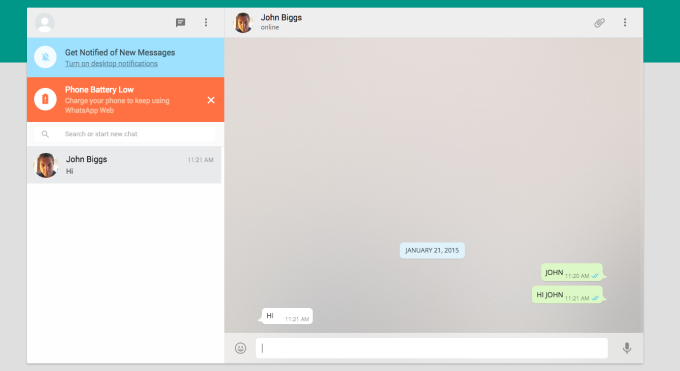
    WhatsApp Web new feature launched by the company which is not a replacement for mobile client as you still need. The official mobile app must be installed on your phone to make use of it as.

    In a recent blog post they said “Today, for the first time, millions of you will have the ability to use WhatsApp on your web browser.”

    The web client will mirror conversations and messages from the mobile device.

    whatsapp-webHow to access Whatsapp in web browser?

    WhatsApp can be connected by https://web.whatsapp.com in a Google Chrome browser (more browser coming soon).

    You must have updated version of WhatsApp app on your phone.

    Choose WhatsApp Web from the menu.

    You will see a QR code, scan the code inside of WhatsApp, and you’re ready to go. Your mobile app and web client are now connected.

    Your phone needs to stay connected to the internet for our web client to work. (WiFi recommended)

    This service is currently available to Android, Windows and Blackberry users. (Sadly not available on iOS)

    Also Read: How To Make Your Smartphone Work For You

  • How To Make Your Smartphone Work For You

    How To Make Your Smartphone Work For You

    smartphone_users

    It is hard to know all the ins and outs of various cell phone models. There are so very many options that it’s difficult to know how to find a good cell phone and then how to optimize it. The article below will provide some great tips that will help you maximize your options to improve your cell phone experience.

    Restart your phone periodically to purge the memory of programs like Facebook and Twitter. This ensures it runs quickly and correctly.

    There is no need to update to a new phone so quickly. Many times, it’s not necessary. Though many providers make consistent changes, they usually are not big ones. Make sure you read up on the phone prior to buying it to determine if it is something you want. You often won’t.

    Top 5 Best Battery Saver Apps for Android Smartphones

    It’s likely that your cell phone is used multiple times daily. But be sure to restart it every so often. Smart phones work like computers. If you periodically restart the device, your smartphone operates more efficiently and without consuming excess memory. Even if you only restart your phone once or twice weekly, you are likely to see improvements.

    Be wary when it comes to extended warranty protection. They’re often just a waste of money. If a cellular phone is about to fail, it mostly happens on the year it is covered by its basic warranty. Many people get new phones every year, so it’s not worth the money.

    The longer you own your smartphone, the more it will slow down. That is why updating is harder as time goes by. There are times where you will need to choose. You can choose the features you already have, or upgrade to a more advanced version.

    Use your smartphone as your wallet

    Be sure that you actually need a smartphone before you buy one. They cost quite a bit, but they also offer many different features. However, not everyone requires the latest, most innovative features — just a simple means of calling others. Smartphones not only cost more up front, but require a higher fee each month. They are not the best investment for everyone.

    Be sure you observe what others have and speak to them before purchasing your next cell phone. They will have great reviews for you. They will be able to help you pick out a phone, making the shopping process easier.

    smartphone-user

    If your sole purpose for getting a phone is for talking, you do not need a smartphone. Many people own a smartphone, but they tend to use it for going online or checking emails. There are many extra things that you would be paying for if you get a smartphone.

    Don’t let your phone’s battery die before recharging it. Batteries need to be recharged from time to time. If you always let the battery get low, it will have trouble holding a charge. Just get into the habit of doing it before it goes dead.

    If you don’t know much about cell phones, it’s normal. Things are always getting bigger and better. Use what you have read here to get more from your cell phone.

  • Firefox 35 releases with improved cross-browser video chat ‘Hello’

    Firefox 35 releases with improved cross-browser video chat ‘Hello’

    Mozilla launched new Firefox 35 for all major platforms. Big additions to the browser include room-based Firefox Hello conversations, H.264 (MP4 files) playback on OS X, and integration with the Android download manager.

    Firefox Hello

    Firefox ‘Hello’ works across WebRTC-supported browsers including Google Chrome and Opera. To use it, you just have to click the Hello button on your toolbar and select ‘Start a conversation’ and then just copy and share the link with a contact to begin video chatting straight in your browser.
    Each conversation window has its own unique URL and you can easily create multiple conversations and name them for different topics. You don’t need any account for this to work.

    Firefox Marketplace for Desktop

    Mozilla has opened up the Firefox Marketplace for the desktop, currently in beta.

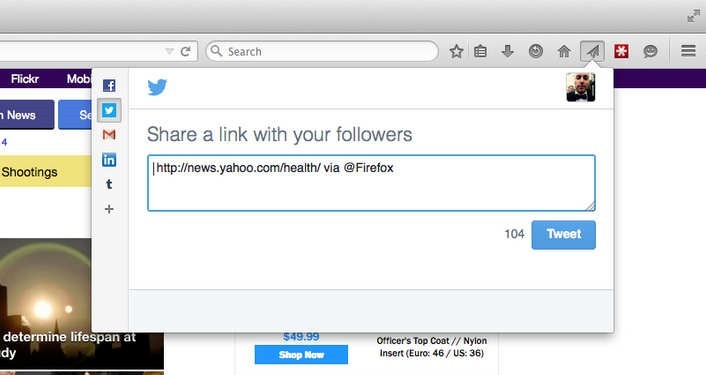
    Firefox Share

    Now you can share to your favorite social network any link straight from your browser.

    2015-01-13_0911

    Here’s the full Firefox 35 changelog:

    • New: Firefox Hello with new rooms-based conversations model.
    • New: New search UI improved and enabled for more locales.
    • New: Access the Firefox Marketplace from the Tools menu and optional toolbar button.
    • New: Built-in support for H264 (MP4) on Mac OS X Snow Leopard (10.6) and newer through native APIs.
    • New: Improved handling of dynamic styling changes to increase responsiveness.
    • New: Implemented HTTP Public Key Pinning Extension (for enhanced authentication of encrypted connections).
    • New: Use tiled rendering on OS X.
    • New: Improved high quality image resizing performance.
    • HTML5: Changed JavaScript ‘let’ semantics to match the ES6 specification.
    • HTML5: Resource Timing API implemented.
    • HTML5: CSS filters enabled by default.
    • HTML5: Added support for the CSS Font Loading API.
    • Developer: Support for inspecting ::before and ::after pseudo elements.
    • Developer: Computed view: Nodes matching the hovered selector are now highlighted.
    • Developer: Network Monitor: New request/response headers view (more info).
    • Developer: Added support for the EXT_blend_minmax WebGL extension.
    • Fixed: Show DOM Properties context menu item in inspector.
    • Fixed: Reduced resource usage for scaled images.
    • Fixed: PDF.js updated to version 1.0.907.
    • Fixed: Non-HTTP(S) XHR now returns correct status code.

    Download: Mozilla Firefox Offline installer (Standalone) download

  • Annoyed of Screen Turn off while reading ? We Have Solution.

    Annoyed of Screen Turn off while reading ? We Have Solution.

    We all know the feeling of reading awesome article or book on your phone or tablet and the screen suddenly turns off after a minute or two. Annoying, right ? Yes, you can fix it (somewhat) by increasing the sleeping settings for a longer period of time, but this is not that effective solution as often it can interfere with the usability of the device. But not to worry, there are some handy yet useful apps that does the job pretty well.

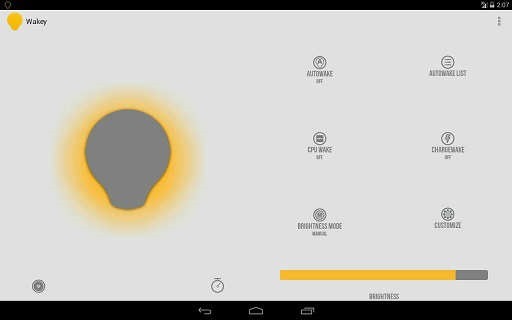
    Wakey: keep your screen awake

    Wakey is an app thought for people that want to use their devices without the hassle of the screen turning off constantly. It is memory and battery friendly.

    Features:

    • AutoWake
    • ChargeWake
    • CpuWake
    • Brightness controller
    • Ability to dim the screen while awake

    wakey


    Gravity Screen – On/Off

    One of the most popular app out there. It turns automatically your screen off when you put your phone into your pocket or onto a table and turn the screen on when you take it out or up. No need to touch any button and you are ready to go.

    Features:

    • Pocket Sensor
    • Table Sensor
    • Turn Screen Off by Proximity
    • Turn Screen On by Motion
    • Keep Screen On by Motion

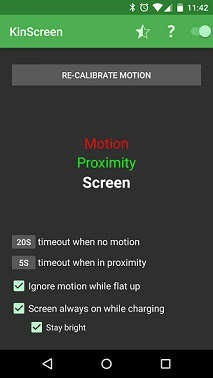
    KinScreen

    KinScreen is a lightweight application that automatically manages the screen time-out. It keeps your screen on when you need it (convenient) and turns it off when you don’t (battery savings).

    Features:

    • Works in the dark
    • Keep your screen on while charging
    • Battery friendly
    • Simple, without a ton of confusing options

    kinscreen


    KeepItOn

    New to the market.It detect any small movements and prolongs the time to turn off the screen, like if you have touched the screen. Even if the screen turns off, you can always shake to wake you up during a time set by you, default is 5 seconds.

    You can follow application thread of KeepItOn on xda.

    keepiton

    Hope these apps help you. Do you use any other apps for this purpose ? Share it in comments.

  • 6 Website Design Ideas to Improve the Engagement on your site

    6 Website Design Ideas to Improve the Engagement on your site

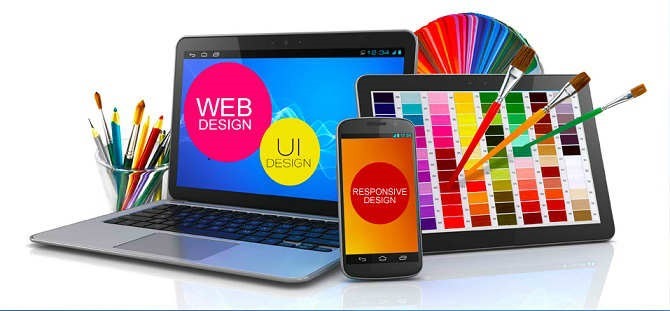
    Getting an overwhelming response from your website is not a piece of cake. Internet is although flooded with information on how to innovatively create a website that drives a significant volume of traffic towards your site, but sources that provide trustworthy and accurate information are close to zero. Regardless of tons of experience you have in web designing, unless you have some special skills at your behest, it is highly unlikely that you will receive positive upshots. webdesign

    Therefore, rather than pondering over the internet and getting befuddled, you should probably check out these 5 innovative website design ideas to improve the engagement on your website.

    5 Ideas to Improve Website Traffic

    1. Minimize the Loading Time

    No one wants to keep eyeing that incessantly revolving loading icon for long. The online domain necessitates a paced approach. Visitors have become more impatient than ever, therefore unless you have something breathtaking in your arsenal; people will choose to move on to other sources rather than waiting up on your website to load. Complexity in a website often leads to this unnecessary loading time. Therefore it is advised to keep things simple but precise.

    2. Easy Interface and Navigation

    Remember, an agitated visitor is certainly no good. Make sure you don’t give a chance to your visitors to get annoyed or irritated just because a landing page was too complicated to get through. Ease up the navigation on your website and design it in a manner such that the visitor requires minimal number of clicks to get to the desired page.

    3. Visual Scheme

    Website is after-all a readable presentation of your services. Therefore making it visually soothing, attractive and at the same time informative is something you require the most. Ensure the usage of appropriate colors and convenient options to attract more visitors. Avoid an imprudent approach that will eventually drive the visitors away from your domain.

    web design

    4. Over Use of Pop-ups – Bad Idea

    Pops are though touted to be sale booster, but it is entirely the other way around. It is normally contemplated that frequently appearing pop-ups will compel a customer to make a purchase, but the reality carries with itself a disparity. A pop up can be exasperating that might lead to losing a potential customer. Therefore it is advised not to go overboard with pop-ups.

    5. Stay Focused towards the Objective

    Every single aspect of your website should be designed keeping in mind the objective. It has been observed that designers get too much carried away sometimes with their work that they get deviated from the original motive. There might be the case, where visitors might get attracted with the overall finish of the website, but in the end your motto is to sell, not to impress.

    6. Keep in Mind the Compatibility

    Compatibility is the need of the hour. Your website should be adaptable to different browsers or operating systems. You shouldn’t force people to install updates just to navigate your website. Different platforms and operating systems are being introduced by day. You don’t expect a visitor to upgrade to your websites specifications every time an update is rolled out.

    Smartphones are hugely popular these days. People chose to have instant access to everything right from their cellphones which is why it becomes crucial to have your website optimized for cellphone use.

    Website designing is all about motivating customers to make a purchase. Therefore it becomes crucial to design a website that converts a potential visitor in to a customer. All these website design ideas to improve the engagement on your website will definitely help in getting the job done. Therefore start making changes to your website now.

  • Micromax launches Yu Yureka with CyanogenMod 11, Snapdragon 615 SoC, 4G LTE for Rs. 8999

    Micromax launches Yu Yureka with CyanogenMod 11, Snapdragon 615 SoC, 4G LTE for Rs. 8999

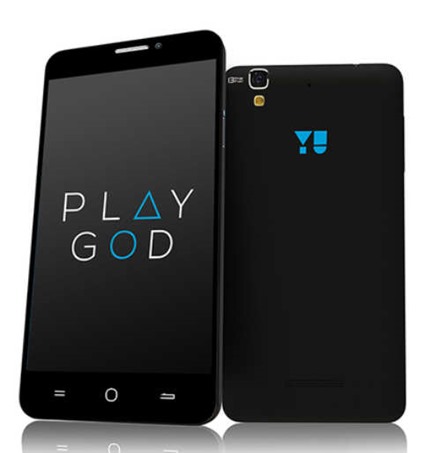
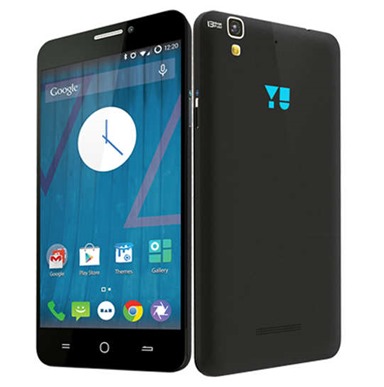
    micromax-yurekaThe Yureka is the first smartphone under the new Yu brand which is owned by Micromax. The device runs on customizable CyanogenMod 11 and has a pretty attractive entry-level price. It will be exclusively available on Amazon India, and it will go on sale in the second week of January. And registrations will begin tomorrow on Amazon India.
    Rahul Sharma said “The future is moving from an app driven experience to a services drive experience and YU in partnership with Cyanogen is a platform that is going to lead that transformation. We will work directly with developers’ community and brands to build services right on the OS layer and offer a differentiated consumer experience.”

    YU-YUREKA

    It is sported with a 13-megapixel rear camera with Sony Xmor sensor, and features like time-lapse mode, and support for 720p slow mo video recording at 60fps, and a 5-megapixel shooter upfront.

    As far as battery is concerned, it can go up to seven hours on LTE, and up to 210 hours on standby mode.

    The CyanogenMod 11 based on Android 4.4.4 OS includes some features with increased focus on personalization and security.

    Micromax Yu Yureka specs at a glance

    • 5.5-inch (1280 x 720 pixels) IPS HD display with Corning Gorilla Glass 3
    • Octa-Core 64-bit Qualcomm Snapdragon 615 processor with Adreno 405
    • 2GB DDR3 RAM
    • 16GB internal memory, expandable memory up to 32GB with microSD
    • Dual SIM Support
    • CyanogenMod 11 based on Android 4.4
    • 13MP rear camera with LED Flash, Full HD recording
    • 5MP front-facing camera
    • 4G LTE support, 3G HSPA+, Wi-Fi 802.11 b/g/n, Bluetooth 4.0, GPS
    • 3.5mm audio jack, FM Radio
    • 2500mAh battery