Category: Featured

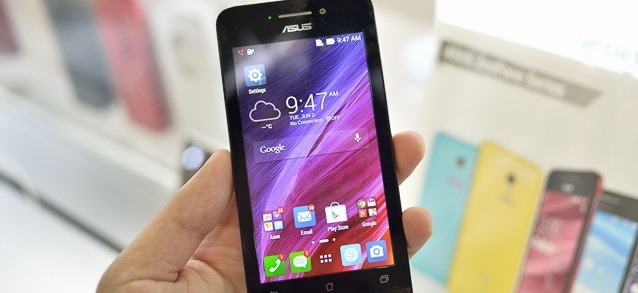
  • The 4.5-inch Asus ZenFone 4 available for Rs.6,999

    The 4.5-inch Asus ZenFone 4 available for Rs.6,999

    2503812_Asus_ZenFone_4_2014-2

    Competing with Motorola and Xiaomi, Asus has taken the Indian smartphone market by storm by adding a new phone to its ZenPhone series. The 4.5-inch Asus ZenFone 4 will be available for pre-order on Flipkart for Rs.6,999 starting midnight of Sunday, August 24th.

    The phone is equipped 1.2GHz dual-core Intel Atom processor alongwith 1GB RAM and 8GB of internal memory. You can also use a microSD card up to 64 GB.

    The design and build remains the same as other phones in the Zenfone series. Another visible difference is the addition of LED Flash. The rear camera now incorporates an 8 MP camera which brings noticeable improvement in photography. Battery capacity has been bumped up to 1750 mAh as compared to Zenfone 4. We don’t have stats for how long this will last but you can expect it to last one day with moderate usage.

    The company had already announced both the 4-inch and 4.5-inch models of the Zenfone 4, but the laterA450CG variant wasn’t available for purchase till now. The Zenfone 4 A450CG will be taking on the hugely popular Moto E and Redmi 1S, with similar prices.

    Asus Zenfone 4 A450CG(ZenFone 4.5) Specs

    • Display Size: 4.5 Inch LCD, 854 x 480 resolution, 217 PPI, Corning Gorilla Glass 3 protection
    • Processor: 1.2  GHz dual Core Intel Atom Z2520 processor with PowerVRSGX 544 GPU clocked at 300 MHz
    • RAM: 1 GB
    • Software Version: Android 4.4.2 KitKat (customized)
    • Camera: 8 MP
    • Secondary Camera: VGA
    • Internal Storage:  8 GB
    • External Storage: MicroSD support up to 64 GB
    • Battery: 1750 mAh, Non Removable
    • Dual SIM (Both MicroSIM)
  • Spice Launches Firefox OS smartphone at Rs 2299 in india

    Spice Launches Firefox OS smartphone at Rs 2299 in india

    firefox

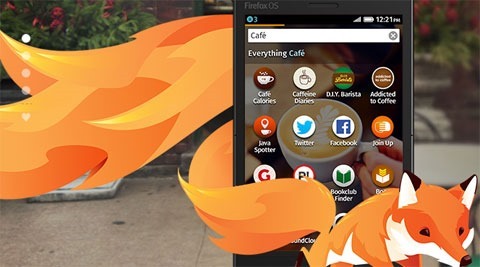
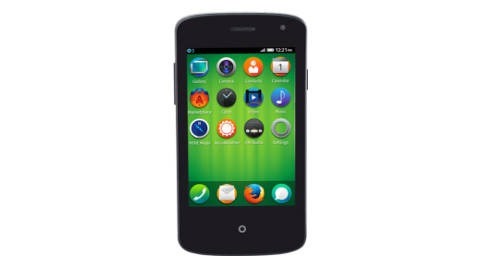
    It was just a few months ago that Firefox announced that it would be bringing its Firefox OS smartphones to the Indian market. And now, Spice has finally announced the country’s most economical smartphone Fire One Mi – FX 1.

    Mr. Prashant Bindal, Chief Executive Officer, Spice Mobility Ltd, said, “This is a step towards enabling the dreams of the small town masses of connecting with their aspirations through affordable smartphones. With the ultra-low cost Spice Fire One, we at Spice, aim to convert the feature phone users into smartphone users, thereby, aiding them with the power of internet.”

    The smartphone comes with a 3.5-inch HVGA capacitive touch screen along with a 2 MP rear camera and 1.3 MP front camera. Backed with a 1 GHz processor, it also supports dual-SIM functionality with 2.5 G connectivity. However, it doesn’t support 3G connectivity.spiceff

    Some unique features include Adaptive App Search or the Single Window Search and allows users to find all relevant information and apps available on the web together at a single click. This device also supports multiple Indian languages like Hindi, Tamil and Bangla.

    This economic device is targeted to the users who are switching from feature phone to smartphone.The phone is available exclusively on snapdeal from July 29, for a while, after which it will be sold through major retail stores including Spice HotSpot and Spice’s own online portal saholic.

    Following to this, Intex is also looking forward to launch its first Firefox smartphone called Cloud FX on August 25. The price of Cloud FX could be under Rs. 2000.

  • Flappy Bird developer is back with new frustrating game ‘Swing Copters’

    Flappy Bird developer is back with new frustrating game ‘Swing Copters’

    swingcopter

    Dong Nguyen, the developer of addictive Flappy Bird game today launched his new game ‘Swing Copters’ for iOS and Android. Is it addictive? Absolutely, we’ve tried it already.

    In this very exciting game rather than navigating a bird sideways, you are tasked with guiding a cute little helicopter’s upward flight while avoiding pairs of hammers that swing from each gate. Just same as the Flappy Bird, you will get a point for each gate that you pass.

    The little copter flies from left-right automatically, and you have to control its direction with a tap. That is lots of tapping to get up the series of gates and hammers. Once the copter gets moving in a particular direction, it becomes harder to regain control of its flight path.

    Also Read: How to download Flappy Bird on Android and Hack the score !

    The iOS and Android smartphone game is available for free, with an optional $0.99 in-app purchase if you want to remove advertising. Dong has written on Twitter that it will soon be available in more countries.

    The Vietnamese developer pulled Flappy Bird after its popularity became too much to handle. He claims he had problems sleeping, as he was worried that so many people are spending their time on this.

    Download Swing Copters: iOS | Android

  • Xiaomi unveiled MIUI 6: Looks Inspired by Apple’s iOS 7 UI

    Xiaomi unveiled MIUI 6: Looks Inspired by Apple’s iOS 7 UI

    clom0i9xhmzzroijdhi2

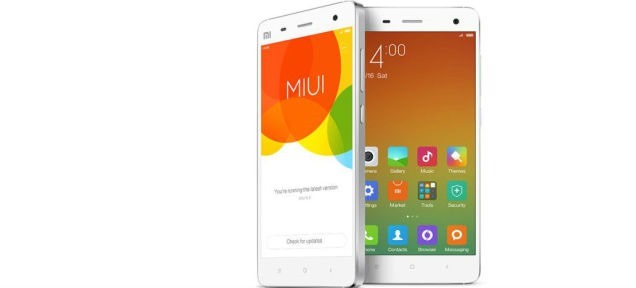
    MIUI 6 includes more colourful, minimalist interface with enhanced security features. Upcoming Xiaomi, Mi 4 and best selling Mi 3, will receive the MIUI 6 official update soon after another round of developer testing.Xiaomi, is taking its “Apple of china” title too literally. As its latest version of UI is looking very similar to Apple’s iOS 7.

    MIUI 6, which is Xiaomi’s upcoming UI for its latest phones and tablets, looks almost exactly like Apple’s iOS. It includes the same bright color palette and a flat design. It even does away with app drawer and puts all apps on your home screen. Xiaomi used big white spaces accented with bright colors within its core apps, very much similar to iOS 7.

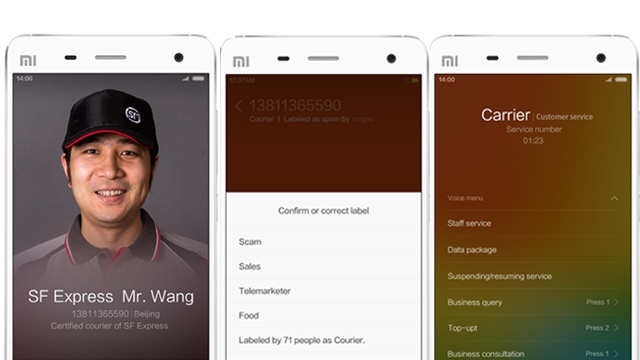
    Despite the changes in the looks, there are few enhancements. The dialer app for example will show you caller ID for unknown numbers. three

    Other major changes include lockscreen display. You can see the number of pending notifications straight from the lock screen and get to the app showing it directly by pulling up on the number.The Notification Center has also been revamped to show floating pop-up notifications at the top of the screen without compromising with the whole display. The notifications are interactive, allowing you to do things like answer a phone call from the notice.

    It is not surprising that many people are calling MIUI 6 a straight iOS rip-off, but it also have features exclusive to MIUI such as customizable notification toggles, MIUI themes and the permissions manager.

    Also Read: iOS 8 features that are inspired by android

  • Xiaomi unveils its new flagship smartphone Mi4

    Xiaomi unveils its new flagship smartphone Mi4

    X4.006-520x292

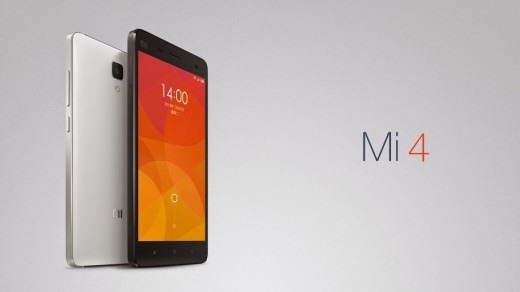
    Xiaomi recently revealed its next flagship smartphone Mi4 featuring a metal framework. The on-paper specs of this killer smartphone will leave you amazed. The Mi 4 will be available approx. $322 for the 16GB model and 64GB version will cost $400.

    The phone was unveiled in Beijing by Xiaomi CEO Lei Jun. The phone will only be available in the Asian Pacific region (mainly China, Hong Kong, Taiwan, Singapore, Malaysia, the Philippines & India), the design of Mi4 shows that the company is targeting the ‘premium’ market which is currently dominated by Apple and Samsung.
    The device runs on custom MIUI android operating system which is a skinned version of Android that allows great customization and favors apps on home screen rather than on App Drawer.

    10368309_735232783178984_4637519619487739069_o

    Coming to the inside specs of this phone, the Mi4 features a 5-inch full-HD display, a Quad-core 2.5GHz processor, 2GB RAM, a 13 MP rear-facing camera and 16/64GB of internal space.

    Lei said that the Mi4 is the fastest smartphone over the globe. He also mentioned the changes in design of the Mi4 with such battery power. The phone also makes use of speedy charging, which helps the phone to charge up to 60 percent in just an hour.

    During the Mi4 presentation, the company had a “One more thing…” showcase, something Apple was famous for when they had a surprise announcement.

    Xiaomi Mi4 Specs at a glance

    • 5-inch 1080p display,
    • 2.5GHz Qualcomm Snapdragon 801 quad-core processor
    • 3GB RAM
    • 13 MP rear camera and 8 MP front-facing camera
    • 16/64 GB internal memory
    • 3080 mAh battery
    • 3G/4G support

    Lei previously expected and stated that the company will ship 40 million smartphones this year, but the figure could reach to 60 million.

    Also Read: Xiaomi Mi 3 launched at just Rs. 14,999 in India

  • Want to share big size data ? Here’s how.

    Want to share big size data ? Here’s how.

    Do you want to share large size files over internet and facing problem? Mostly there are two ways – you can attach file in email attachment but sometimes files are too large send through email, else simply upload them to file hosting websites and share their download links.

    urdgsl

    HJ-split : Mostly Web email services like Gmail and Outlook allow you to send files up to 25 MB in size. You can use HJ-split utility to break file into parts of 25 MB and send them using email. Recipient can restore file by joining them.

    Further are few best online storage services:

    Microsoft OneDrive : lets you upload single files up to 2 GB in size while the individual size limit is 1 TB (yes 1000 GB) in the case of Google Drive. For even bigger files, you can use Dropbox – here the files have no size limit if you upload them to Dropbox through the desktop application.

    WeTransfer : WeTransfer is a cloud-based file transfer service based in Amsterdam designed to send small to large files. WeTransfer users can send files up to 2GB in the free version for time period of 7 days.

    JustBeamIt : using this peer-to-peer app for file transfers can be done between your computer and the recipient’s computer directly. JustBeamIt website will instantly create a shareable download link.

    Infinit : is another impressive desktop application to share your large size files available for both Windows and Mac platform. All you have to do is drag the file on to the Infinit app, choose any recipient from your contacts and the transfer will begin once they accept the incoming file request. Its best feature is it support resumable download.

    SpiderOak : SpiderOak online backup tool to back up, share, sync, access and store data using an off-site server. accessible through an app for Windows, Mac and Linux computer platforms, and Android, N900 Maemo and iOS mobile platforms. SpiderOak uses encrypted cloud storage and client-side encryption key creation
    SpiderOak offers two account types, a free 2 GB version and a paid subscription for capacity above the free account limit. Users can also create a referral link, and each time the link is used to sign up for an account, an extra 1GB will be allotted to both accounts. The maximum account size that can be attained in this manner is 10GB.

    Skype drive: app can also be used for sending documents, photos, videos and other large files of any format to your Skype contacts. Just initiate a chat session or a audio / video call with a contact and choose the Send File option to initiate a transfer. The service imposes no limit to the size or number of the files you can send or receive using Skype and since it is peer-to-peer, no centralized server is needed for the file transfer.

    OwnCloud : Files and other data (such as calendars, contacts or bookmarks) can also be accessed using a web browser without any additional software. Any updates to files are pushed between all computers or mobile devices connected to a user’s account. File storage in conventional directory structures or via WebDAV
    Impressive Features like Encryption of user files, support different Operating systems, music streaming, online file viewer,etc

    SugarSync: Access All Your Files. Anytime. Anywhere.
    SugarSync stood out for one reason: It let you choose any folder on your computer to back up to the cloud automatically. sugarSync switched to a paid-only model, killing off its free 5 GB plan. SugarSync’s paid plans start at $7.49 per month or $75 per year for 60 GB of storage. Existing users won’t get to keep their free plans, but SugarSync is offering a 75-percent discount on its basic plan.

    Tonido :
    Access and Share ALL your files, photos, music and videos on your PC (Win, Mac or Linux) from anywhere using Tonido Desktop Software. Access, Sync and Share ALL your docs, photos, music and videos on USB and SATA drives using a TonidoPlug. On-Premises file storage, mobile access and sync solution for your business using FileCloud

    SparkleShare :
    SparkleShare creates a special folder on your computer. You can add remotely hosted folders (or “projects”) to this folder. These projects will be automatically kept in sync with both the host and all of your peers when someone adds, removes or edits a file.
    Great

    • Frequently changing project files, like text, office documents, and images
    • Tracking and syncing files edited by multiple people
    • Reverting a file to any point in its history
    • Preventing spying on your files on the server using encryption

    Not so great

    • Full computer backups
    • Storing your photo or music collection
    • Large binary files that change often, like video editing projects

    Team Drive :
    The software is available for Windows, Mac OS X, Linux, Android and IOS with four account levels: Free, Personal, Professional and SecureOffice. Each account starts with 2 GiB of free cloud storage but can be upgraded either for free via a customer referral program (an additional 250 MiB per referral and up to 10 GiB total) or via upgrade packages.

  • Xiaomi Mi 3 launched at just Rs. 14,999 in India

    Xiaomi Mi 3 launched at just Rs. 14,999 in India

    Xiaomi-Mi3-India-Launch

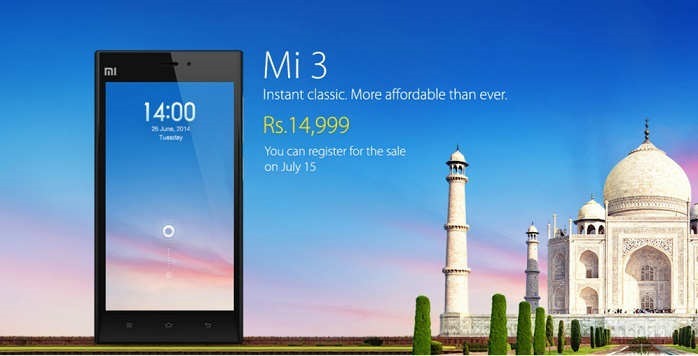
    Chinese phone company Xiaomi (pronounced as Shiao-Me) announced the launch of its first smartphone in India, Xiaomi Mi 3. The phone will be available on 15th july. It uses a customized version of Google’s Android OS, is priced at Rs14,999.

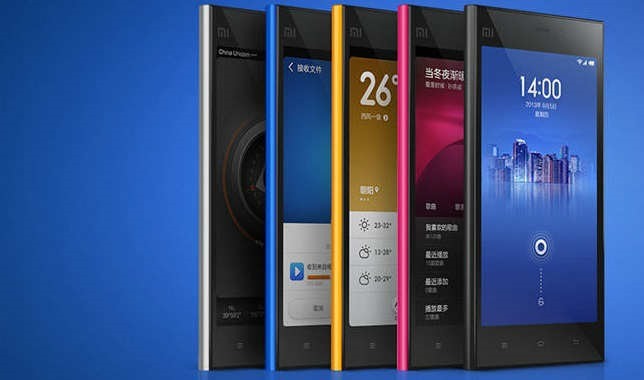
    The phone operates on a customized interface of dubbed MIUI which is a very different take on Android. Although the User Interface might not be appealing to all, but it adds a lot of functionality to the handset.

    The company is also planning to launch its Power Bank (portable battery pack to charge devices) in two variants, 5,200mAh and 10,400mAh, in India.

    Xiaomi was established in 2010 by serial entrepreneur Lei Jun, who is often known as “the Chinese Steve Jobs.”

    Xiaomi already outsells Apple in China, and two of its handsets RedMI and Mi3 were among the world’s top 10 bestselling smartphones in April.

    xiaomi-mi3-16

    With its 5 inch Full HD IPS display, Xiaomi has also put in some effort to the pressure sensitivity which allows users to operate the phone even when the hands are wet or the user is wearing gloves.

    Xiaomi Mi 3 Specifications at a glance

    • 5-inch Full HD(1920×1080 px) IPS display with 441 PPI resolution and Corning Gorilla glass protection
    • 2.3 GHz quad-core Snapdragon 800 (MSM 8974AB) Processor
    • MIUI V5 on top of Android v4.2.1 (Jelly Bean)
    • 13MP rear camera with LED Flash, and full HD video recording
    • 2MP front camera and full HD video recording
    • 2 GB RAM
    • 16 GB internal storage
    • 3050mAh battery

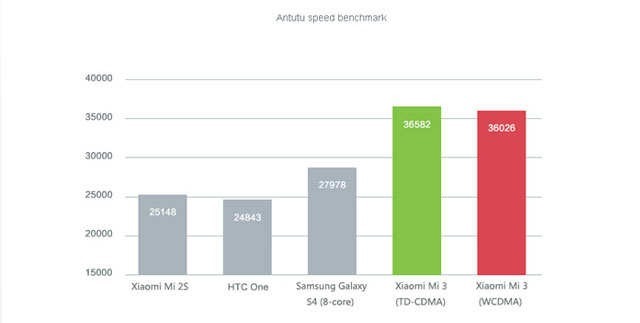
    Benchmarks

    xiaomimi3_01

    As per the specs, the Xiaomi Mi 3 can be the best value for money smartphone not only under Rs 15k, but also under Rs 20k and Rs 25k. The main issue could be that it is an unknown Chinese brand to Indian consumers and they have to gain the trust in the market.

  • Use your smartphone as your wallet

    Use your smartphone as your wallet

    Nowadays, we find ourselves carrying cold hard cash less and less because you can just as easily make your purchase with payment cards, and track your spending online. Certain payment or loyalty cards also let you earn rewards or entries to contests, but they do add up. They make your wallet unnecessarily thick and heavy.

    here are some apps that makes your phone as your Wallet :

    Google Wallet

    Replaces: Cash, credit cards, loyalty cards , coupons
    google_wallet_iphone_best_apps_screens

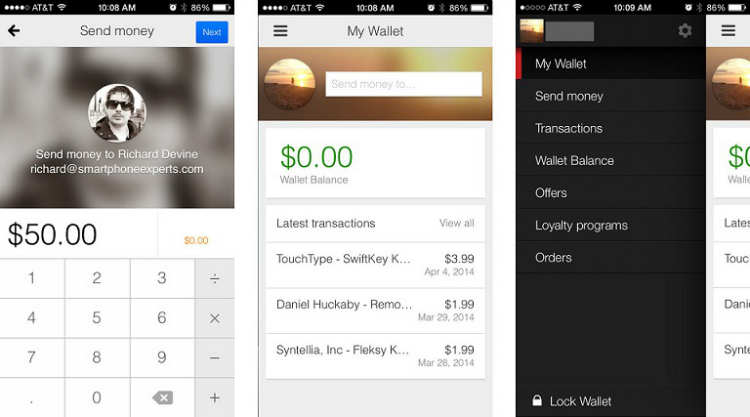
    Launched in 2011 and available on iPhone and Android, Google Wallet gives you the ability to make purchases in stores and online, as well as withdraw cash from ATMs with your phone or a card.

    • Shop and save in stores with all your loyalty and offers in one place. Send money to friends and family and they can spend it instantly with the Google Wallet Card.
    • Store your loyalty programs and leave the plastic cards behind. Carry all of your Google offers on your phone when you shop. Redeem easily at checkout.
    • Send money to any friend in the US with an email address while on-the-go. It’s easy, fast, and free to send directly from your bank account or Wallet Balance.
    • Look for the Buy with Google button on your favorite apps and mobile sites. Also buy easily on Google Play, Drive, YouTube and other Google properties.
    • Google Wallet comes with 24/7 fraud monitoring as part of Google Wallet Fraud Protection. If your phone/card is lost or stolen, either can be disabled from your Google Wallet account.

    Passbook

    Replaces: Travel & entertainment tickets, loyalty and rewards cards

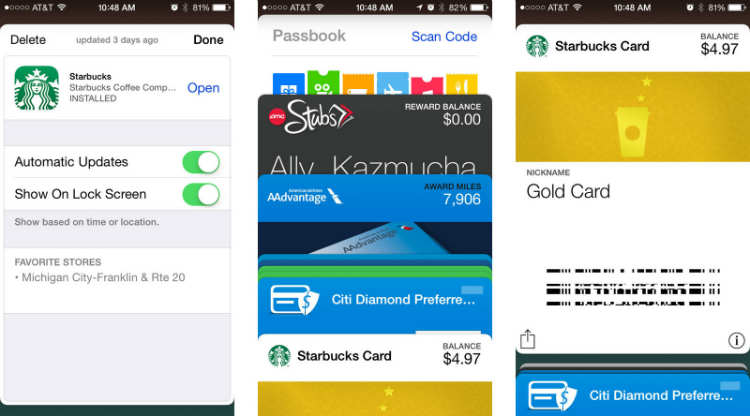
    Apple’s Passbook come up in iOS 6 and with scanning 2D barcodes to help managing your movie, concert and airline tickets as well as loyalty cards and coupons for selected merchants.

    This app let you store and scan almost any type of coupon or ticket. So instead of actually carrying the coupons like grocery coupons or stacks of loyalty cards store it with Passbook.
    passbook_iphone_best_apps_screens_payments

    Unlike Google Wallet, you cannot use your debit or credit card for purchases in-store, however you can use BillGuard to view bank balance.


    Venmo

    Replaces:  Credit and Debit cards

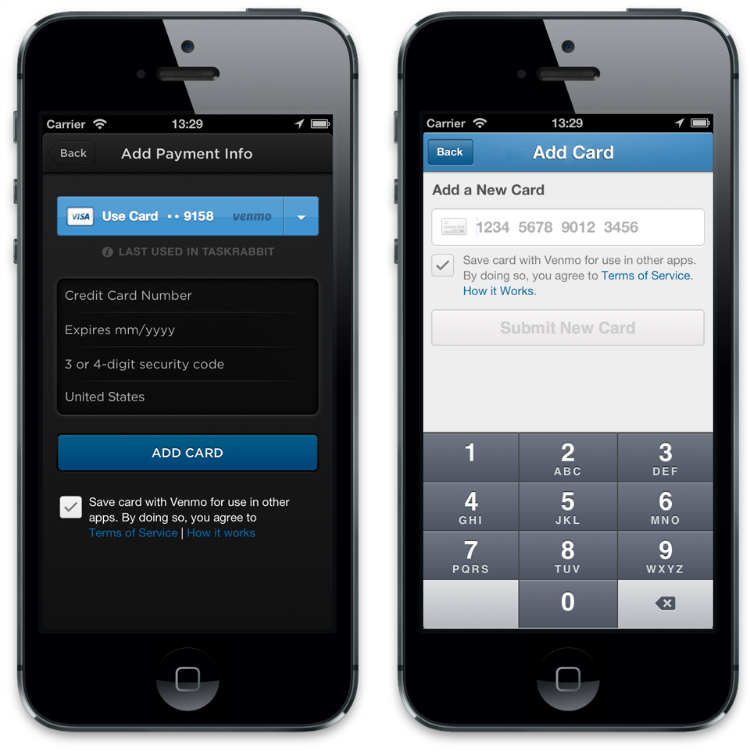
    Venmo is an app available for BlackBerry, iOS and Android . Once you have an account, you can link a bank account, credit or debit card to it. It works similar to PayPal but only between two parties with Venmo accounts.

    All you need to do is write an email to friend and the amount you want to transfer. You can even share the transaction with a message on Facebook, Twitter or Foursquare.
    venmo

    User can simply access their account via website and makes transaction more handy via smartphones. Venmo also works via SMS with a few simple SMS commands. Venmo is a free app but only currently works with major US banks and phone numbers.


    Square Wallet

    Replaces : Credit card , gift voucher

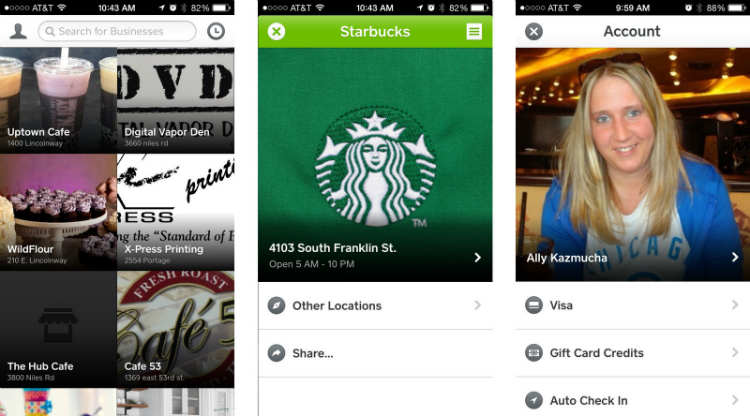
    Square wallet another similar app available on iOS and Android and works similar to Lemon Wallet, But it comes with additional cool features. This app links your credit card to the app but it requires the use of merchant cards which is why Square works only with their list of merchants.

    Because it is locality, the store knows you’re ordering something and will charge it to the card linked on your Square account.
    square_wallet_iphone_best_apps_screens

    It comes with feature of Hands-free Checkout through user can favorite the merchant. Providing interesting discount offers and earns rewards.


    PayPal

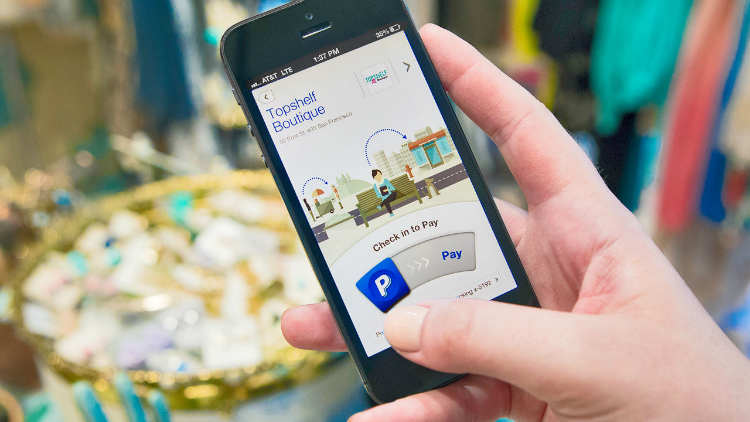
    Nowadays PayPal is very famous service that can transact money between other PayPal users and friends. This app Available for both platforms iOS and Android,
    pp

    It lets you send money to other users and shows you your transaction history. It can be also done by using their website.

    In future PayPal planned to add feature of mobile payment via a care reader.


    Bump Pay

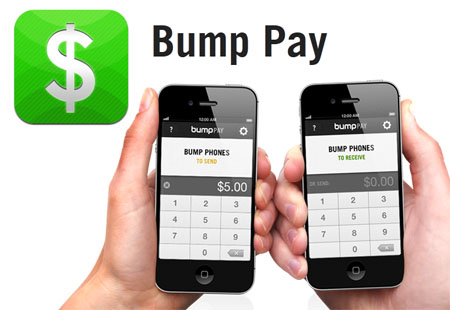
    Bump was an iOS and Android application that enabled Smartphone users to transfer contact information, photos and files between devices. Similarly Bump Pay is a free app only available for the iPhone platform.
    bump_pay_tn

    It allows you to ‘bump’ (transfer) money from iPhone to iPhone with your existing PayPal account.


    Geode by iCache

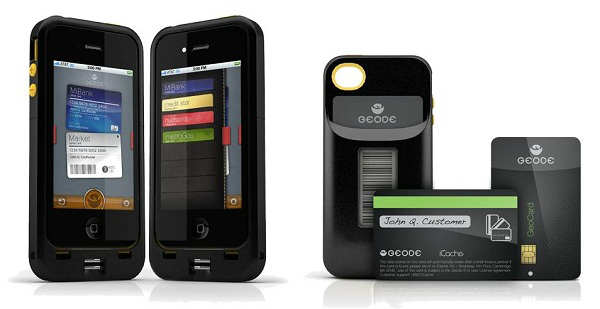
    Geode is an iPhone case that come up with very interesting alternative. Geode is replacement of your credit card and loyalty cards.
    icache

    In this app , all you have to do is take a picture of barcode of each card then the barcode will be displayed will be displayed in E-ink quality for scanning purposes.

    The app has a biometric scanner that takes your fingerprints for authentication for more secure transaction.


    Isis Mobile Wallet

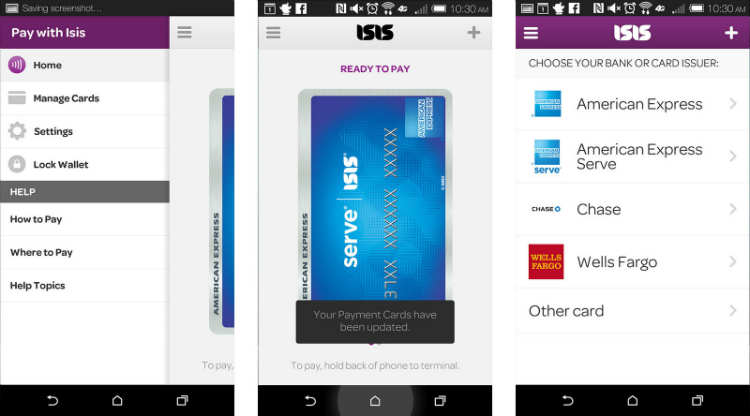
    Isis is available to both AT&T and Verizon customers and offers the same tap to pay functionality Android users currently enjoy with NFC. The only catch? You’ll need to buy an accessory case to make Isis work. After that you can add all your payment cards, including American Express Serve and Chase bank cards, and start tapping to pay at literally thousands of merchants with tap to pay terminals.
    isis_mobile_wallet_android_screens

    If you don’t mind buying a case in order to get the same tap to pay treatment Android customers already enjoy, get Isis Mobile Wallet.

  • Make your own movies with Movavi Video Editor

    Make your own movies with Movavi Video Editor

    Did you ever wished to create your own movies but you think video editing is a tedious task and it needs too much knowledge? Then, we have an easy to use tool for you. Just try out, Movavi Video Editor for Windows. It comes with a new ultra-intuitive interface. You can create a demo, a tutorial with a video and your own voice, record and send videos for your family, or make a slideshow or animation for your friends in no time – the best thing is its ease of use. It is also available in multiple languages.

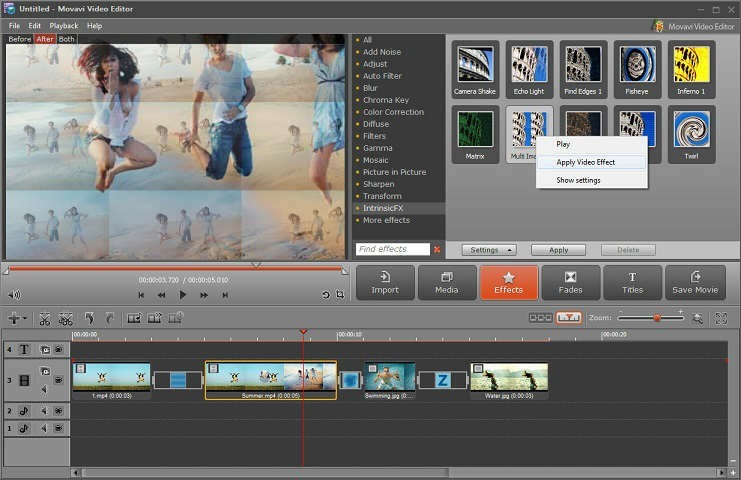
    You can achieve a unique combination of colors, light, and contrast with automatic filters. Apply several special effects like Finding Edges, Twirl and others to your videos to make them artistic with a click.

    apply-effects

    With the new built-in splitting program you can slice your movies into multiple scenes and play them around the video timeline in the order you like. You can also add music of your own choice to the videos. Create your own animated titles to make it look like a pro!

    But that’s not all, you can even make amazing slideshows in 5 minutes. Just add images to the panel and the software will automatically turn them into a slideshow with exciting video effects and stunning transitions. After that you can add music and titles to make it more stunning.

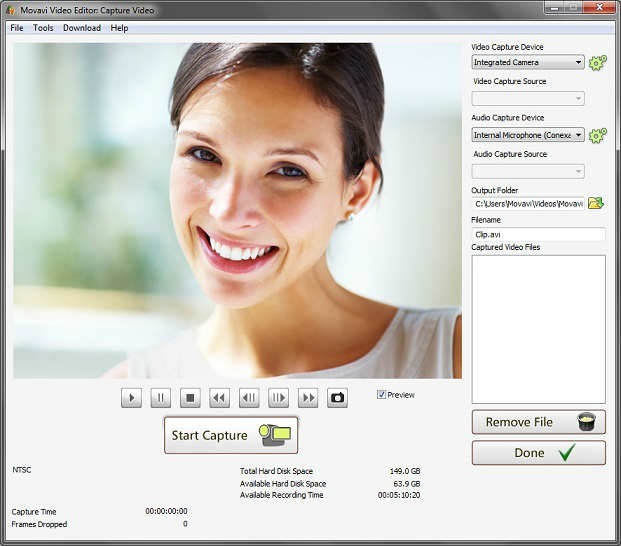
    video-capture

    The video editing software supports all the most popular formats of video and audio, including AVI, MPEG4/MP4, MKV, FlashVideo (FLV), VOB, MP3. You can also capture videos and record audio.

    For your convenience, Tutorials and guides with step by steps methods are available along with the software.

  • Adobe launched Photoshop Express for Windows Phone

    Adobe launched Photoshop Express for Windows Phone

    ps

    Adobe launched Photoshop Express for Windows Phone , finally bringing its first image-editing app to the mobile platform.

    The app will follow the same freemium model as the iOS and Android version of Photoshop Express, with basic editing features available for free and more advanced effects available through in-app purchases.


    Now, Get your pictures to pop! And after sharing, you’ll be the talk of your friends. further are features details :

    • Basics: Crop, Straighten, Rotate, and Flip 
your photos. Remove red eye.
    • Auto-Fix: One-touch adjustment for Brightness, Exposure and Shadows.
    • Color: Slider controls for Exposure, Contrast, Clarity, Vibrance and more.
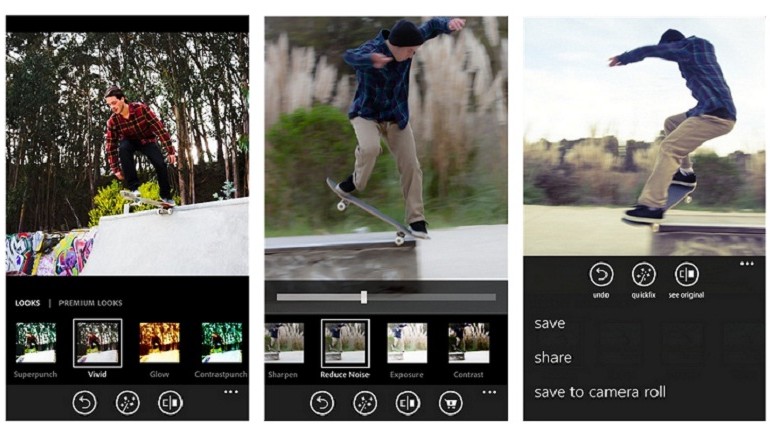
    • One-touch filters “Looks”: Choose from over 20 eye-catching effects!
    • Get creative by adding the Looks Pack* and Noise Reduction Pack*
    • Share easily to social sites like Instagram and Facebook, and via SMS text.

    Photoshop Express makes it really easy to edit photos you take on your Windows Phone device really quickly and comes with the basic photo-editing features you would expect like crop, straighten, rotate, flip, and red-eye removal. You can also alter the color of your photos through slider controls that let you adjust exposure, contrast, clarity, vibrancy, and more. But one of the best things about Photoshop Express is its one-touch filters – called “Looks”. You can choose over 20 Looks for your photos and purchase a Looks Pack and Noise Reduction Pack within the app if you want to really get creative.

    adobe-photoshop-express-app-770x440

    Adobe showed off a new version of Photoshop CC optimized for Surface tablets at Microsoft’s Surface Pro 3 launch last month, but Photoshop Express is the company’s first creative app to make it to Windows Phone.

    The iOS version of Photoshop Express rolled out in 2009, and the Android version followed in 2011.