Category: Tech

  • MWC 2014: Huawei launched its first Firefox OS phone Y300

    MWC 2014: Huawei launched its first Firefox OS phone Y300

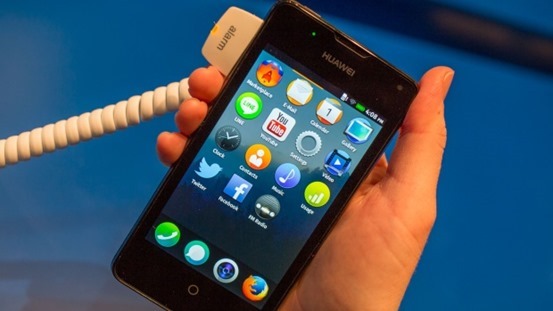
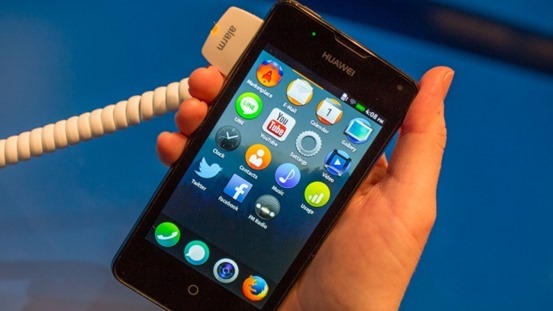
    Firefox_OS_Huawei_Y300Huawei made its debut in world of Firefox OS with Y300. The phone was showed at MWC 2014. The device runs FFOS 1.1 with its focus on stability. Regardless, the Y300 looks like much like its sibling FFOS devices in software and general build quality. The FFOS UI appeared mostly same on the Y300,

    It’s the first Firefox OS device to have dual cameras: a 5 megapixel camera on back and VGA for the front.The Huawei Y300 has a black, all made up of plastic with a power button up top and the headphone jack, volume keys on the right edge and a micro-USB port at the base.

    Donot confuse with Huawei Ascend Y300, the android smartphone its Huawei Y300 with FFOS. It seems Huawei is using the same basic spec as the earlier Android smartphone for its Firefox debut.

    Features of Huawei Y300:

    • 1GHz dual-core Snapdragon 8225 processor
    • 4-inch WVGA display
    • 512MB RAM
    • 1,950mAh battery
    • 5 megapixel camera on back & front VGA. camera
    • Firefox OS v1.1

    There’s no specific release date for Huawei’s Y300 yet, but expected a retail launch within the next couple of months. Price tag is also yet to be unveiled , But it would a affordable phone

  • How to fix Windows 7 Not Genuine Error

    How to fix Windows 7 Not Genuine Error

    Windows-7-fixIf you are not using a genuine version of Windows 7 or other using a pirated copy. You will notice “This copy of Windows is not genuine “displayed at the bottom of the screen, If you are also facing the same problem then no need to worry about, we have an easy guide that will help you to fix . By providing this guide we are not encouraging or promoting piracy. So, The best way to solve this problem is to buy a genuine copy of windows 7. This guide for the people who can not for any reason are unable to buy brand new windows.

    How to fix‘Windows 7 Not Genuine Error’

    Method 1: Fix Not Genuine Error using Command Prompt

    1, Go to Start menu, type cmd and then right click on cmd and click on the Run as Administrator

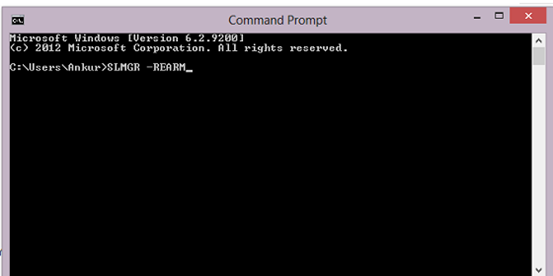
    2: Now in the command prompt (cmd) window type “SLMGR –REARM”fix Windows-7-Not-Genuine-error

    3: Press  Enter and wait till it executes

    4: Now a dialogue message box will appear asking you to restart your system. Click Ok to restart your system.

    5: That’s it. When you restart your system you’ll not see any message like “ Not genuine error” anymore

    Method 2: Fix not genuine Error using Remove WAT Utility

    1: Download this WAT utility and Extract it

    2: Now. Right click on “WAT Remover” and select run as Administrator

    3: Now click on Remove WAT

    4: Then click on OK to confirm

    5: Wait for the process to complete and then restart the computer. .

    NOTE : Do not download and install the “KB971033” Windows update as it will nullify the WAT Remover action. It is recommended to disable the Windows Update feature in your PC.

    Hope this guide will help you fix the Windows 7 not genuine error. If you face any problem then report to us. We will be very much happy to guide you.

  • Best Rainmeter Skins for a customized Desktop Experience

    Best Rainmeter Skins for a customized Desktop Experience

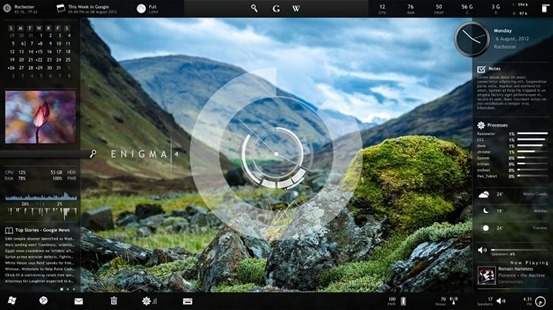
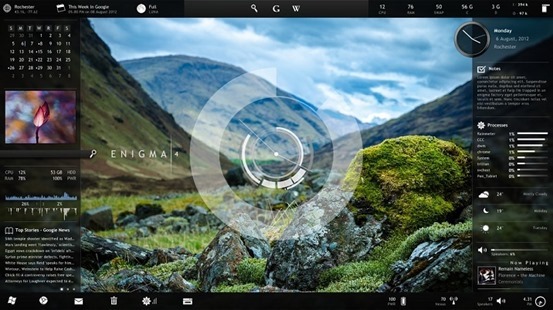
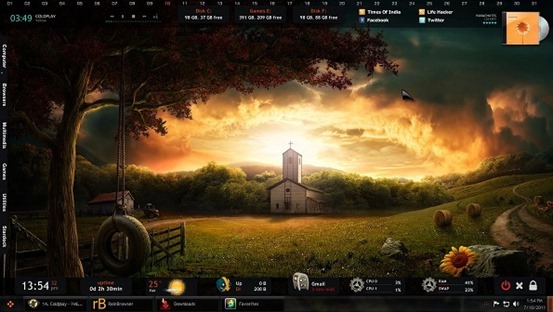
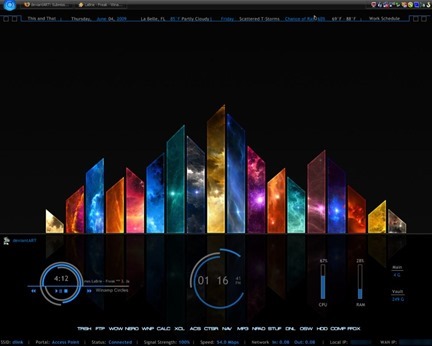
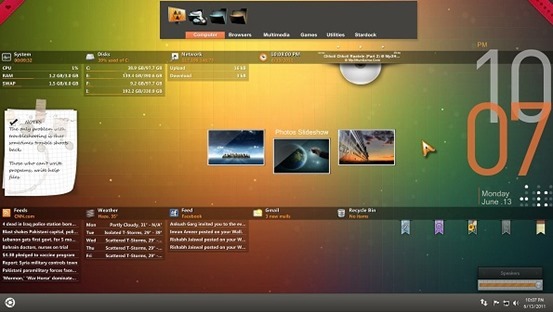
    enigma_by_kaelriWindows Desktop customization app Rainmeter has a pool of various configuration options, informational tools, and settings that let you customize almost every square pixel of your desktop exactly how you like it—plus it looks fantastic. It’s powerful and effective once set up.

    Rainmeter can take a bit of time to set up, so it’s not clear how awesome your desktop can really be if you put your mind to it.

    The primary purpose of this program is to run skins that come in various styles, sizes, user interfaces and levels of complexity with sometimes-interactive window, which appears over the desktop normally, collects and displays information such as RSS feeds, weather forecasts, battery power, control media player and applications etc.; like widgets on an Android run device.

    How to Install Rainmeter and its Skins:

    1) Download Rainmeter.

    2) After installing download Rainmeter skins according to your wish.(or choose from skins given below)

    3) After that press right click and copy all the documents remaining on the desktop but be careful about that all the files should kept in a zipped folder.

    4) Then Copy and paste all those files in the skins folder which will be available to you in the document folder.

    5) Restart the app and then do right click on the tray icon.

    6) Further, select the ‘configuration’ option and enjoy the special experience of new downloaded skins.

    7) Or, you can also right click on the tray icon of Rainmeter and after right click there will be a option of layouts, it will show every installed skins name you can just click anyone you like to apply and after that restart the Rainmeter.

    Here are the best Rainmeter Skins:


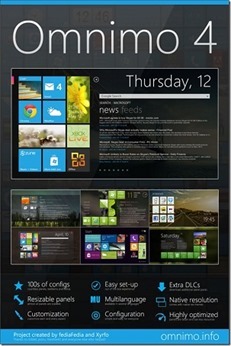
    Omnimo

    OmnimoUIforRainmeter_thumb

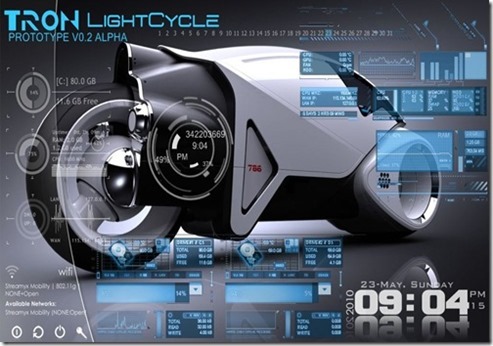
    Tron

    TRON_Theme_Rainmeter_by_oneazam_thumb

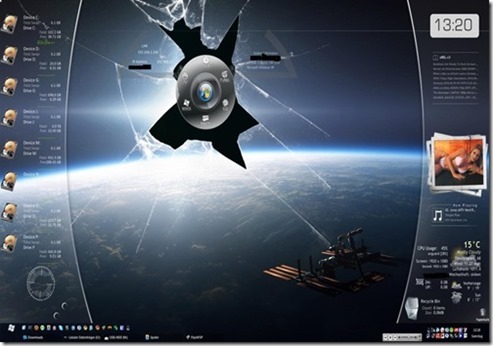
    Rainmeter Desktop

    Rainmeter_Desktop_by_Foxy889_thumb

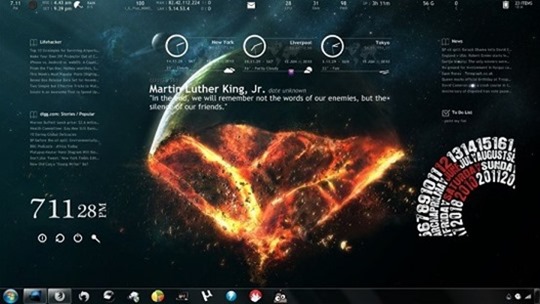
    End of The World

    End_of_The_World_for_Rainmeter_by_dracul91

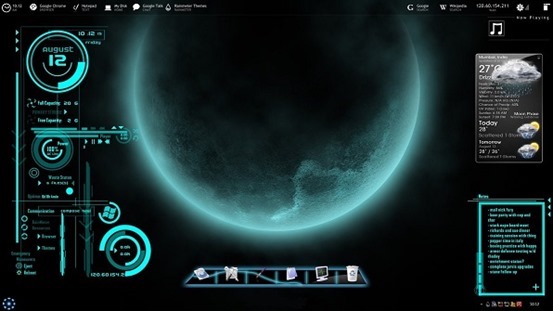
    Futuristica

    futuristica_rainmeter_skin_by_jawzf-d46237r

    Darkness Falls

    rainmeter___darkness_falls_by_iamshobhit-d3lkqv2.png

    Electric Space

    E_lectric_Space_by_Gerguter.png

    Orange Glow

    rainmeter_orange_glow_by_iamshobhit-d3is2kt.png

    There are many other rainmeter skins and themes available. Go, Explore.

    Share your favorite skin with others.

  • Intel “Ivy Town” 15 Core Xeon E7 Processors Specs Revealed

    Intel “Ivy Town” 15 Core Xeon E7 Processors Specs Revealed

    Intel has revealed details about its upcoming microprocessor for enterprise servers at the International Solid State Circuit Technology Conference. The chip will feature up to 15 cores, all-new topology as well as enhanced RAS [reliability, availability, scalability] features.
    The yet to be launched “Ivy Town” Intel CPU series is one of the chips that makes such high performance and capacity levels possible.
    Known as Xeon E7-8800v2, it is made for business servers and other enterprise applications, particularly high-end workstations.
    The chip is a 15-core model (64-bit Ivy-Bridge cores), which means that the system can use 30 threads, thanks to Hyper-Threading technology.
    The cache memory is a massive 35.7 MB (shared L3 cache), and the overpowered spec sheet continues with a high-speed serial I/O interface.

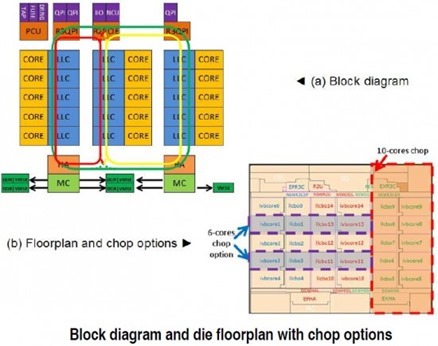
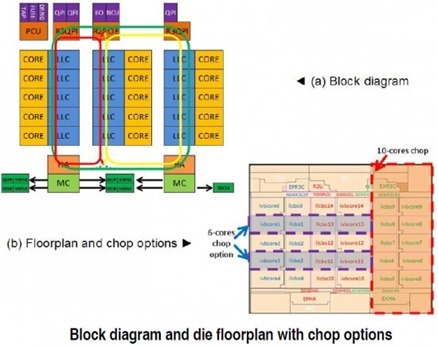
    The Ivy Town processor’s high-speed serial I/O’s includes of 40 lanes of PCI Express (2.5/5.0/8.0Gbps), four lanes of direct media interface (DMI) (2.5/5.0Gbps), and 60 lanes of QPI (6.4/7.2/8.0Gbps) interface to connect with other central processing units (CPUs).ivy-townThe floor plan of the Ivy Town chip is considerably different compared to today’s multi-core chips and is driven by the ring bus routability and latency, as well as the chop requirements to different core counts. The cores and associated L3 cache are organized in columns of five with the ring bus segment embedded.

    Also Read: Intel Haswell : 4th Gen. core CPUs

    The DDR3 memory controllers (and there are two of them) bear mentioning as well, each featuring two memory channels with 800MT/s – 1867MT/s effective frequencies (normal DDR3 modules) or 2667MT/s speeds (to connect to a memory extension buffer using voltage-mode single-ended / VMSE interface).

    The processor includes 4.31 billion transistors and is manufactured using 22nm process technology. The design supports a wide array of product offerings with thermal design power ranging from 40 to 150W and frequencies ranging from 1.4 to 3.8GHz.

    The Intel Ivy Town LGA 2011 Xeon E7-8800v2 CPU should be released at some point this year.

    Intel ‘Ivy Town’ Specs

    15 Cores (64-bit Ivy-Bridge cores)

    30 Threads

    Cache Memory: 35.7 MB (shared L3 cache)

    4.31 billion transistors

    22nm process technology

    Power: 40 to 150W

  • Here’s why we like Maxthon Cloud Browser !

    Here’s why we like Maxthon Cloud Browser !

    Banner4Maxthon Cloud Browser is nothing new on the market but it struggled with “the Internet Explorer clone label” but it has been long lost thanks to the interesting multiple features and improvements implemented over the development.

    With version 4.2, Maxthon integrates a tweaked Blink rendering engine in order to infuse increased browsing speeds and faster startup and file download times. With Modern Looks and essential buttons readily available in the toolbar, a multifunctional address bar, and the less used features hidden under the menu button.

    The browser is available both as a desktop version as well as a portable download for Windows PC. Also available for various platforms including Android, Mac, iPhone and Windows Phone.

    So, What we Like about Maxthon ? 

    Maxthon Cloud Services

    Maxthon offers many cloud services in-built with the browser such as:


    • Cloud Push: Supports sending text, images, websites/links and tabs to Mac, Android and Windows operating systems.
    • Cloud Share: Supports sharing text, images, websites/links and files with friends.
    • Cloud Download: Supports downloading files in various formats and uploading them to ‘My Cloud’ for backup on any device.
    • My Cloud Tabs: Lets you pick up where you left off by automatically syncing your tabs to Android, iOS or Mac devices.
    • Cloud Sync: Syncs account data (Favorites, Settings and Magic Fill data) to other devices.

    Also Read: Improve and visualize sleeping habits with Sleep as Android


    Easy Reading Features

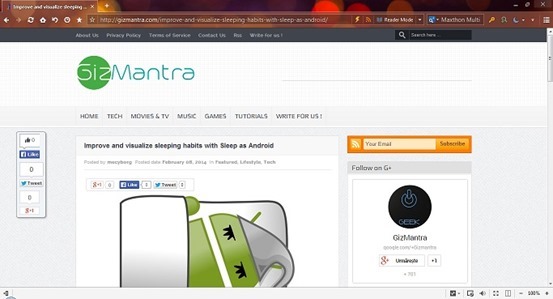
    Reader Mode: Makes it easy to view articles by adjusting font sizes and removing ads and other distractions. It automatically detects long texts in the page and offers the possibility to switch to a view that hides distractions and focuses on content. There are tweaking options as far as the page width, color and font go.

    Night Mode: Adjusts the brightness of the screen for low-light reading. It changes the page colors to fit the contrast between the display and a darker environment. It can be also be scheduled to activate in between specific times.

    screenshot

    More Convenient Browsing

    • Magic Fill: Securely saves the names and passwords of websites you visit and then fills in that information when you return.
    • Ad Hunter (Ad-block): Maxthon removes advertisements with one click, and automatically blocks annoying pop-up windows.
    • New Session: Users and gamers can simultaneously log into the same website with different accounts.
    • Source Sniffer: Extract all photos, embedded videos and audio files from a web page and download them with one click.
    • SkyNote: Save and access text notes anywhere, anytime. You can also sync them across Windows and Android.
    • Snap: Click the camera button in the toolbar to easily and quickly capture a screenshot of the entire web page in one click!
    • “Do Not Track” protects your privacy by preventing ad networks from tracking you.

    Also Read: How to install Ubuntu on your Phone or tablet

    Extension Center

    Maxthon has a diverse selection of extensions for entertainment, information and social media.

    Extensions are easy to install and manage with just one click.


    Security and Privacy

    • Safe site technology identifies websites you are about to visit and lets you know if they are safe and secure.
    • Maxthon blocks malicious websites and phishing attempts for you, automatically.
    • Easily launch a private browsing session that does not track history.

    Free Download

    Maxthon for Windows

    Maxthon for Mac

    Maxthon for iPhone/iPad

    Android Browser

    Windows Phone Store

  • Improve and visualize sleeping habits with Sleep as Android

    Improve and visualize sleeping habits with Sleep as Android

    sleep_as_android_logoSleep as Android is an accelerometer-based sleep cycle tracking app that provides a nice set of helpful ‘sleep tools’, including lullaby mode, sleep noise recording, lucid dreaming detection audio and a Captcha test. But more interesting feature is sleep cycles, by which it knows just the right time to wake you up.

    Previously, people used to huge amount of money on devices that would track and improve their sleeping habits, but now you can do this by just using an application that you can get from the Google Play Store: Sleep as Android. There are many such apps, for both Android & iOS devices, but Sleep as Android is one of the best on the market. There is a ‘free 14-day trial’. There is also a pro version with all the features Sleep as Android has, we believe it’s very good value for money.

    Sleep Tracker

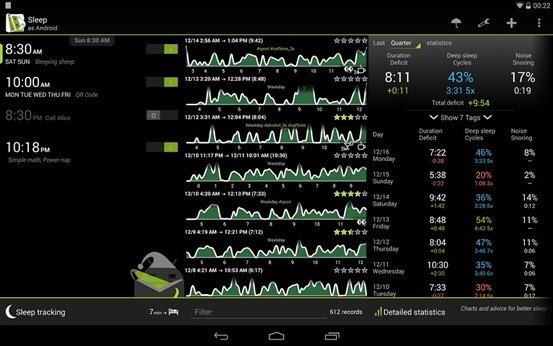
    sleep-trackerLet’s talk about the most useful feature ‘Sleep Tracker’: each night, before sleeping, put the app into a mode that uses your phone’s gyroscope, then lay your phone on your bed near you and just go to sleep.

    How it Works: The app will then track your movements in the night and plot them on a nice graphical view for you, times of inactive movement are referred to as “deep sleep” (or rapid-eye-movement cycles) as opposed to times when you’re more active.  It is helpful to wake you up during a period of light sleep, making it easier to get out of bed.

    Trying this on subsequent nights can get you interesting and useful results. You can see comparisons of nights across a span of time, and figure out exactly how much you slept. You can set ‘ideal sleep range’ from preferences menu so the app can tell your cumulative sleep different from ideal.

    Lullaby and time-to-bed notification

    Sleeping aids such as lullabies are also included.

    Aids also include an insistent time-to-bed notification — For the set alarm, the app will also notify you the ideal time for bed so that you get the ideal sleep as you want..

    Other Features:

    • Gentle alarms
    • Sleep noise recording;
    • Special lucid dreaming detection audio
    • Captcha test.

    Sleep as an Droid is available on Google Play

  • Firefox 27 now Available with extended SocialAPI

    Firefox 27 now Available with extended SocialAPI

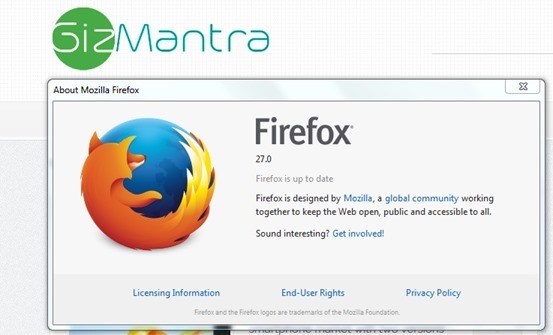
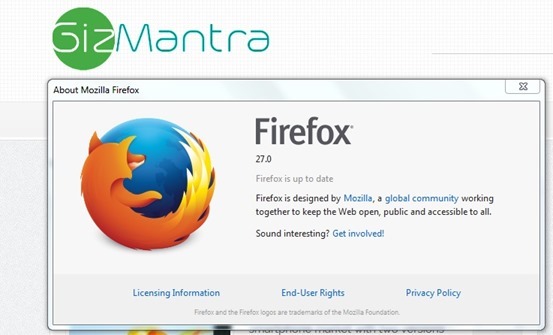
    Mozilla has released the latest version of its open-source, cross-platform web browser with the launch of Firefox 27 for Windows, Mac and Linux.

    One major new feature of in this latest release – the SocialAPI, which allows providers to provide social networking updates directly from within the browser, can now handle multiple providers simultaneously.

    So, moving forward, lets look at the other new features:firefox-27

    Firefox 27 What’s New

    Support for TLS 1.2 implemented

    Firefox 27 supports TLS (that is Transport Layer Security) 1.2 now. TLS is like successor of SSL, and version 1.2 is the most recent cryptographic protocol that Firefox supports.

    Up until now, that meant to see if TSL 1.0 is supported, and if it is, it would be used. If not, browser and server would fallback to SSL v3 instead.

    With TLS 1.2 support in Firefox 27, TLS 1.2 is now used if supported by the server.

    You can change the minimum requirements (or maximum but that is not suggested) so that TLS is always used. This may mean however that connections to some servers, those that only support SSL 3 but not TLS, cannot be established anymore.

    Also Read: How to turn off Images and Javascript in Firefox 23 and above

    SocialAPI supports multiple providers

    Firefox’s SocialAPI enables webmasters to offer services that make use of it in the browser.

    Up until now, only one social provider could be active at the same time in the browser. Firefox 27 changes this as you can now receive notifications and other information from multiple social providers.

    Social features are not enabled by default, and activate only once at least one social provider has been added to the browser.

    Support for SPDY 3.1 added

    SPDY 3.1 is only supported by some servers, Google’s servers support it for say, while many others not.

    For checking any service supports SPDY protocol, load Spdycheck in your browser.

    Other Changes:

    • DEVELOPER CHANGES
    • Ability to reset style sheets using ‘all:unset’
    • You can now choose to deobfuscate javascript in the debugger (see 762761)
    • Added support for scrolled fieldsets (see 261037)
    • Implemented allow-popups directive for iframe sandbox, enabling increased security (see 766282)
    • CSS cursor keywords -moz-grab and -moz-grabbing have been unprefixed (see 880672)
    • Added support for ES6 generators in SpiderMonkey (see blog post)
    • Implemented support for mathematical function Math.hypot() in ES6 (see 896264)
    • HTML5
    • Dashed line support on Canvas (see 768067)
    • FIXED
    • Get Azure/Skia content rendering working on Linux (see 740200)
    • 27.0: Security fixes can be found here
  • Nokia Lumia 1320 vs Nokia Lumia 625 – The Big Screen War

    Nokia Lumia 1320 vs Nokia Lumia 625 – The Big Screen War

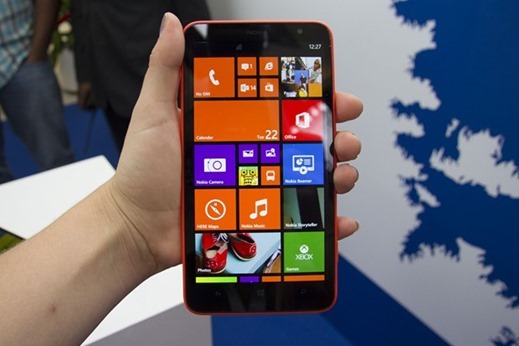
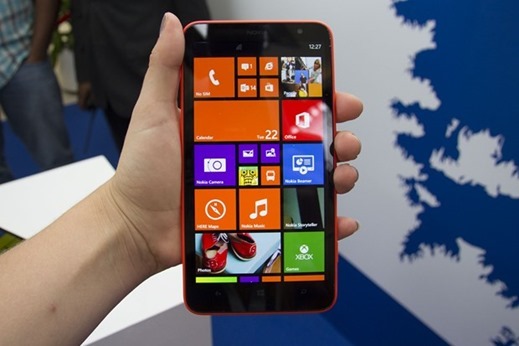
    nokia-lumia-1320The Phablet war is getting extreme day by day in the Indian marketplace. If you are out to buy a smartphone with an extra large display, you can get many offerings around. The Indian smartphone marketplace offers many Phablets by the Indian as well as International manufacturers at various price brackets. It is well known that the South Korean, Samsung is leading the Phablet segment and is closely followed by the Indian brand Micromax. However, both of them use Google’s Android as their OS.

    If you want a Phablet offering something other than Android OS, here is something really good for you. The Finnish manufacturers, Nokia has launched their latest Phablet naming as Nokia Lumia 1320 in Indian market at a price tag of Rs.23, 999. This smartphone sports an extra large 6-inch display which is a treat to your smartphone’s multimedia experience. Earlier, Nokia launched an affordable phablet naming as Nokia Lumia 625 sporting a 4.7-inch display.

    The Nokia Lumia 625 is available at an affordable price tag of around Rs. 15,000, which is much cheaper than Nokia Lumia 1320. But what makes Nokia Lumia 1320 a worth upgrade over Lumia 625, let’s find out here in a quick comparison between Nokia Lumia 1320 and Nokia Lumia 625.

    Display

    Nokia Lumia 1320 sports a brilliant 6-inch ClearBlack IPS LCD Touch Screen, producing a resolution of 1280 x 720 pixels at 244 ppi. Whereas Nokia Lumia 625 sports a 4.7-inch IPS LCD Capacitive touch screen display which produces a resolution of 480 x 800 pixels at 199 ppi. Both these smartphones feature Corning Gorilla Glass 2 protection.

    Hardware configuration & OS

    Nokia Lumia 1320 houses a Qualcomm Snapdragon S4 chipset, Dual Core processor clocked at 1.7GHZ and added with 1GB of RAM. While, Nokia Lumia 625 is powered by a 1.2GHz Qualcomm Snapdragon Dual Core processor coupled with 512MB of RAM. Both these smartphones run on latest Microsoft’s Windows Phone 8 operating System. The Windows Phone Store features many useful applications and addictive games which enhance the Windows Phone experience.

    Camera

    For photography on the go, both Nokia Lumia 1320 and Lumia 625 houses a standard 5 Megapixels Autofocus Rear Camera supported with LED Flash. This rear camera is capable to record Full HD 1080p videos. You can enhance the camera results by downloading useful camera applications by Nokia. These smartphones also carry a VGA camera on their front for video calls.

    Storage

    Nokia Lumia 1320 and Nokia Lumia 625 offer similar 8GB of internal storage memory, which can be expanded further up to 64GB using a MicroSD card.

    Connectivity

    The connectivity features of both these smartphones are almost same including 3G, Bluetooth 4.0, GPS with A-GPS, GLONASS, WI-Fi, WI-Fi hotspot (Internet Sharing), USB 2.0, MicroUSB and 3.5mm audio jack.

    Battery

    Nokia Lumia 1320 is fuelled by a 3400mAH non-removable battery, while Nokia Lumia 625 is fuelled by a comparatively weaker 2000mAH battery. Nokia Lumia 1320 features wireless charging options which is absent on Nokia Lumia 625.

    Verdict

    In the end, it can be clearly stated that Nokia Lumia 1320 is a clean winner because of its bigger & better display, powerful processor, RAM and battery. But on the same time camera, storage memory and connectivity features of both Nokia Lumia 1320 and Lumia 625 are similar.

    The final decision remains in the hands of the buyer. Nokia Lumia 1320 is a perfect buy for those who want an extra large touch screen on their smartphones. It is a complete entertaining device as well. And Nokia Lumia 625 is for them who can adjust their multimedia usage in a 4.7-inch display at an affordable pocket friendly price tag.

  • Dell launches Windows 8.1 and android powered ‘Venue’ tablets

    Dell launches Windows 8.1 and android powered ‘Venue’ tablets

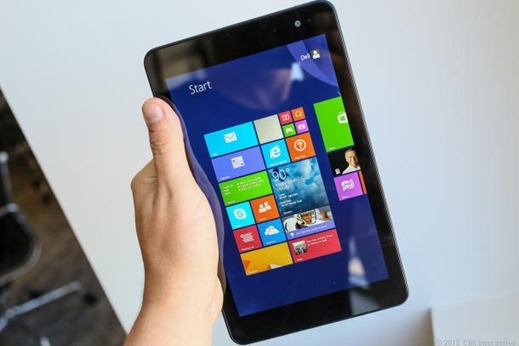
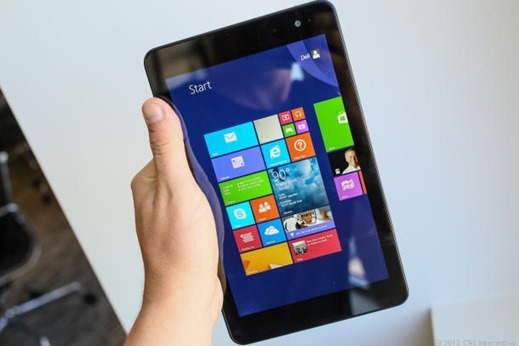
    Dell-Venue-8-Pro-Price-In-IndiaDell has launched the 8-inch Venue 8 Pro as well as the 11-inch Venue 11 pro tablets that run on Microsoft Windows 8. 1 pertaining to Indian markets. This company via tablets is targeting buyers who need a device for entertainment as well as for professional work.

    Whilst Venue 8 Pro may have an price label connected with Rs 26, 499, company has not exposed the buying price of the actual Venue 11 Pro.Dell Venue 8 Pro is available in red as well as black.

    “India is one of our top 10 markets and it was important that we bring our latest offering here. With our versatile range of tablets, we want to be a leading player in this market, which is witnessing strong growth,” Dell India Executive Director and GM (Consumer and Small Business) P Krishnakumar.

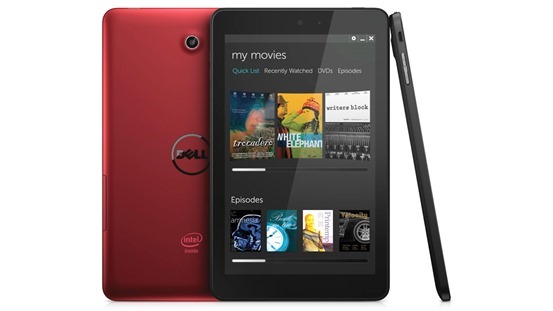
    Available from today, the Android-based Dell Venue 7 and 8 tablets are priced at Rs 10,999 and Rs 17,499, respectively. Dell will sell the Windows 8-based Venue 8 Pro at Rs 26,499 from next month. Dell 8 Android Tablets

    Dell Venue 8 Pro features

    • 1280×800-pixel HD IPS screen
    • Quad-core 1.8GHz Intel Atom processor
    • 2GB of RAM
    • 5-megapixel (rear)/ 1.2-megapixel (front)
    • 32GB/64GB storage expandable via microSD card slot
    • Weight 395g
    • 9mm thick
    • battery lasting 9.9 hours

    The Venue 11 Pro features

    • Full-HD 1920×1080-pixel screen
    • 10-finger simultaneous touch
    • 2.4 GHz Intel Atom processor
    • 64 GB/128 GB storage
      8-megapixel (rear)/2-megapixel (front)
    • full-sized USB 3.0 host port
    • mini-HDMI video port
    • Wi-Fi 802.11n, Bluetooth 4.0 and NFC
    • battery lasting 8 and 10 hours.

    The Venue 8 Pro will be offered with a keyboard case and the Venue 11 Pro with an attachable keyboard with an additional battery. 


    Dell also launched Venue 7 and Venue 8 Android tablets priced at Rs. 10,999 and Rs. 17,499 respectively. The devices are available through the online store.

    Their features include the 2GHz dual-core Intel Atom Z2760 (Clover Trail) processor, IPS Display with HD (WXGA 1280 x 800), Intel HD Graphics, 2GB of DDR2 RAM, Wi-Fi, Bluetooth 4.0 and an integrated 4100mAh 1-Cell Battery. Available in only Black color variant.

  • Samsung Galaxy Grand 2 : The Grandeur in High Definition

    Samsung Galaxy Grand 2 : The Grandeur in High Definition

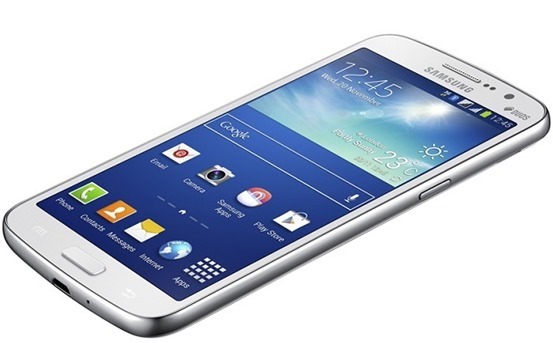
    The much awaited sequel to the popular Galaxy Grand series from Samsung is finally here and quite pleasantly, it lives up to the hype. The Grand series phones from Samsung that can be accommodated in all different price brackets and yet offer the grandeur and power of some big, high end models like the S-series and the Note. samsung galaxy grand-2-02
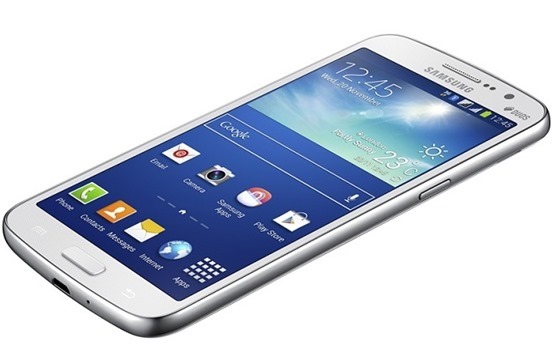
    The Galaxy Grand 2 sets the ball rolling with advanced and enhanced hardware as well as improved software. It also sports a much identical faux leather look as seen in Galaxy Note 3. The Galaxy Grand 2 packs in a 5.25-inch HD display with a screen resolution of 1280×720 pixels. It is powered by a 1.2 GHz quad-core CPU and packs in RAM cache of 1.5 GB. It runs on Google’s Android 4.3 OS an also comes with S Travel, Story Album, S Translator, Group Play, Sound & Shot, Samsung Link and Samsung Hub. The device’s further details are highlighted below.

    Better display

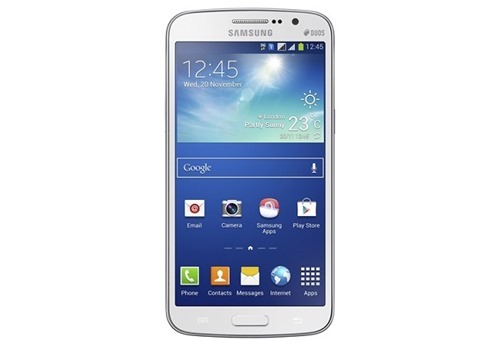
    If there is one thing that truly stands about the Galaxy Grand 2, then it has to be its better and bigger display. With a 5.25-inch screen, the Galaxy Grand 2 gets a bigger screen than the previous version. Its screen is also bigger than the Galaxy Grand Quattro that was launched in May. The Galaxy Grand 2’s display features a 720p display with a 1280×720 pixels screen resolution. Samsung had released news about the launch of this phone and it did not mention the inclusion of a screen protector. samsung galaxy grand-2-01
    Processor

    The Galaxy Grand 2 from Samsung comes powered by a dual-core 1.2 GHz processor. It also packs in massive RAM cache of 1.5 GB which is an advancement over the Galaxy Grand’s 1 GB RAM. However, the Korean handset manufacturer has kept the same internal memory capacity of 8 GB with the Galaxy Grand 2. The internal memory remains the same for all Galaxy Grand devices. With the Galaxy Grand 2, the user can expand the memory capacity up to 64 GB with a micro SD card.

    Design

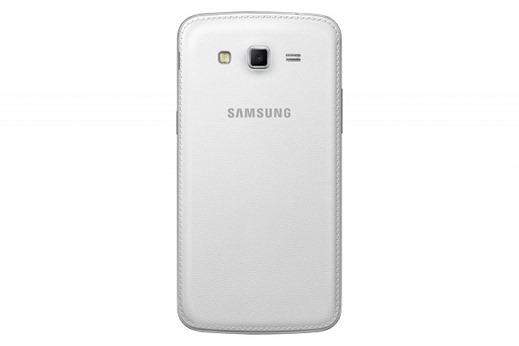
    Out of all the phones in the Galaxy Grand series, the Galaxy Grand 2 is the thinnest of all. It is only about 8.9 mm thick and is lesser than the Galaxy Grand, which is thin at 9.6 mm while the Galaxy Grand Quattro measures 9.7mm in thickness. The Galaxy Grand 2 gets a stitched leather look on the rear panel that was first seen on the Galaxy Note 3 phablet. The leather texture also renders it a smooth touch feel which is lacked by the other Galaxy Grand phones.

    What comes as even more interesting is that the enhanced display size and the much powerful processor of the Galaxy Grand 2 do not lead to a rise in its weight. The Galaxy Grand 2 weighs only 1 grams more than the earlier Grand. The Galaxy Grand 2 will be sold in trendy pink color options, as was seen with the Galaxy Note 3, apart from white and black.

    Camera and battery

    Samsung’s Galaxy Grand 2 gets the same camera as seen in the Galaxy Grand. It features a 8 megapixel primary shooter apart from a 1.9 megapixel front camera for video calling. The front-facing camera of the device can be utilized for clicking self-portraits as well as recording 720p HD videos.

    The primary snapper also has features like Continuous Shot, Best Photo and Best Face. Samsung also provides an improved battery with the Galaxy Grand 2. It gets a 2600 mAh battery pack for supporting the enhanced processing power and the big screen of the device. samsung galaxy grand 2-03
    Connectivity

    The Galaxy Grand 2 get slotted as a mid-range phablet and features a host of connectivity options, both wireless and wired. It has dual SIM card slots, WiFi Direct, Wi-Fi b/g/n, GLONASS A-GPS, Bluetooth v4.0, 3.5 mm audio jack and MicroUSB V 2.0. The 2600 mAH Li-ion battery back up provides enough charge to use the device for a complete day for low to normal usage.

    Operating System

    The Galaxy Grand 2 really impresses with its OS. It is running on Android 4.3 Jelly Bean OS and sports similar features as seen in Galaxy Note 3. The 4.3 Jelly Bean is the latest version of Android and comes with an interface that well complements the premium and advanced features of the device. Samsung Link, Group Play, Samsung Hub, Sound & Shot, S Travel, S Translator, Story Album are some of the premium features that make way in the Grand 2.

    Samsung is also offering three months free access to Club Samsung that features music, movies, entertainment lives shows content and gigs.

    Price

    It was expected that Samsung would be launching the Galaxy Grand 2 at a price of about Rs. 21,500. This was the same price at which Galaxy Grand was launched. However, Samsung maintains a Rs. 22,990- Rs. 24,990 price bracket for the Galaxy Grand 2. Samsung is also providing some freebies with the phone. The Galaxy Grand 2 went on sale in India last week of December, 2013. Also, the Canvas 5 and the Intex i17 were also launched in the market. The Intex i17 Octa-Core comes at a price of Rs. 20,000 and the Canvas 5 also carries a similar price, thus giving stiff competition to the Galaxy Grand 2. It remains to be seen whether Galaxy Grand 2 makes its presence felt in the market and beats its competitors.

    The Galaxy Grand 2 also features dual SIM (GSM + GSM) functionality. It comes in three exciting colors- Pink, Black and White and gets Samsung’s exclusive S Translator, Story Album, Sound & Shot, S Travel and other software. Samsung also launched a one-stop destination –Club Samsung for its India-based infotainment content.

    The Samsung Galaxy Grand 2 faces cut-throat competition from home-grown handset makers like Karbonn, Xolo and even Micromax. All these manufacturers have launched their flagship devices like the Karbonn Titanium SD, Xolo Q3000 and the Micromax Canvas Turbo. What remains interesting is that all these devices pack in better specs than the Galaxy Grand 2 but come at a price below Rs. 20,000.