Category: Tech

  • Google Chrome Offline installer (Standalone) download

    Google Chrome Offline installer (Standalone) download

    The online process for downloading Google chrome is not preferred and even most of you might not. To download Google chrome, you will need to download a small online installer first and then you will need to run the installer, after which the installer will download and install Chrome from Google’s servers. It can be a time consuming process if you have a slow internet connection.Google-chrome-offline

    Along with many other benefits, following are the two main benefits of using the Google Chrome offline installer when installed on Windows PC. Foremost is the fact that you may download the complete package altogether and then use it anytime you want to. In case you are installing the Firefox with online installer, then disconnection of internet connection means that the installation will be stopped. When you will resume the internet connection, you will have to start the installation process all over again.

    Like most other programs, its always better to install programs from a Full standalone offline installer. Once you download a offline installer, you can easily save it, share it or use it for installing the program once again in the future..

    Features of Google chrome:

    Chrome is designed to be fast in every possible way. It’s quick to start up from your desktop, loads web pages in a snap, and runs complex web applications lightning fast.

    Chrome’s browser window is streamlined, clean and simple. For example, you can search and navigate from the same box and arrange tabs however you wish — quickly and easily.

    Chrome is designed to keep you safer and more secure on the web with built-in malware and phishing protection, auto-updates to make sure you have all the latest security fixes, and more.

    Chrome puts you in control of your private information while helping protect the information you share when you’re online.

    There are tons of ways to customize Chrome and make it yours. It’s easy to tweak your settings and add apps, extensions, and themes from the Chrome Web Store.

    Mozilla Firefox Offline Installer (standalone) download

    Download Link for Chrome Offline installer (for single user account)

    Download Link for Chrome Offline installer (for all user accounts)

    After downloading Full standalone offline installer for Google chrome, you can save it on your computer and use later to install Google Chrome without an internet access.


  • Mozilla Firefox Offline installer (Standalone) download

    Mozilla Firefox Offline installer (Standalone) download

    firefox-bannerThe common thread that runs throughout Mozilla is our belief that, as the most significant social and technological development of our time, the Internet is a public resource that must remain open and accessible to all. With this in mind, our efforts are ultimately driven by our mission of encouraging choice, innovation and opportunity online.


    To achieve these goals, we use a highly transparent, extremely collaborative process that brings together thousands of dedicated volunteers around the world with our small staff of employees to coordinate the creation of products like the Firefox web browser. This process is supported by the Mozilla Corporation, which is a wholly-owned subsidiary of the non-profit Mozilla Foundation.
    In the end, the Mozilla community, organization and technology is all focused on a single goal: making the Internet better for everyone.

    This post is about how to get Mozilla Firefox Offline Installer (standalone)download in an easy manner.

    Along with many other benefits, following are the two main benefits of using the Mozilla Firefox offline installer when installed on Windows PC. Foremost is the fact that you may download the complete package altogether and then use it anytime you want to. In case you are installing the Firefox with online installer, then disconnection of internet connection means that the installation will be stopped. When you will resume the internet connection, you will have to start the installation process all over again.

    From the Mozilla website you may install loads of extensions and addons. These will offer you specific functionalities to the Mozilla Firefox.

    In order to keep your data synchronized, you can create your own account. The Mozilla Firefox also enables its users to go for multi-tasking. The browser is better, faster and more secured as compared to any other web browser.

    Mozilla Firefox Offline Installer (standalone) download

    Download Link for Firefox Offline installer

    Download Link 2

    GO and grab the best internet browser.

  • Is Technology Really Changing Education?

    Is Technology Really Changing Education?

    Whenever it is asked how technology is going to change education, the first thing that comes to majority of people’s mind are mobile devices such as iPads, notebooks and etc. The reason people think of these devices is that they believe in the near future tablets and computer devices will replace books. Perhaps they are not wrong, as most of the educational institutions in Pakistan have introduced mobile devices in their campuses with the same aim. However, future of technology in education is not just about introducing students to latest tablets and computers or using them as replacement for books and note books. Don’t’ take me wrong. I am certainly not against tablets or other mobile devices. In fact, I am one of the tech geeks who love to get their hands on a new device as soon as it hits the market.

    clip_image002

    In spite of it I believe that mobile devices are not the future because it is the nature of technology that it changes very rapidly. Thus, it will be a challenge for institutions and stakeholders to make the new devices available to teachers and students every so often. More importantly, tablets and other mobile devices are just tools which are used by students and teachers to gain education, which has a limited scope. Future of technology, on the other hand, means unlimited possibilities or achieving something that was not achievable before. For instance giving access to anyone, anywhere for both learning and collaboration. It means that future educational institutions will not only have usual cohorts of pupils, but they will also have online students, who are accessing the class by sitting in another country.

    Actually, things have already started moving in this direction, as massive open online courses (MOOCs) are swiftly gaining popularity all over the world. These massive open online courses have really made the world a global village, as they allowed anyone from anywhere in the world to gain high quality knowledge without breaking any geographic barriers. The emergence of MOOCs has increased the importance of smartphones, tablets and computers as well as cloud. The cloud is more like SkyDrive that has enabled students and teachers to find their required data, information like course material, lectures and grade work at any time and from anywhere by simply accessing it. Above all, the MOOCs are offering quality education at very low prices, which is more like a rare commodity that is hard to find now a days.

    clip_image004

    Now that is what I call future of technology that has today completely change the way we use to receive education. It is because of this revolution that now even people in Pakistan can gain international certifications without spending a single penny on visa or passport. Thanks to ninthd (9th D), a Lahore based private concern that has launched international certifications in Pakistan for the very first time. In partnership with UKCET and iCarnegie Global Learning that is a subsidiary of prominent US University Carnegie Mellon.

    These fast track training programmes will be delivered in blended model. It means students can take online lectures and access course materials at anytime from anywhere by simply using tools like smartphones, tablets or PCs. Whereas for collaboration with international and local students small satellite campuses or learning hubs will be setup by ninthd in different parts of Pakistan. On top of it, ninthd has offered economically viable skills (EVS) programmes at unbeatable prices, thanks to technology.

  • Firefox 29 redesigned with Australis

    Firefox 29 redesigned with Australis

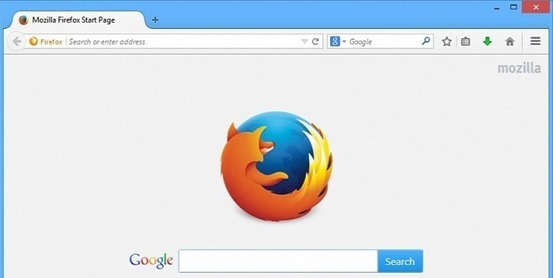
    Australis is one of the most important redesigns in the history of Firefox, as Mozilla has redesigned its browser with a whole new look after a long time. mozilla-firefox-29

    Firefox customization options now have the ability to drag and drop features and tools to easily accessible places, eg. for checking your RSS feeds instantly, or moving the new tab button..

    These customization options also applied to the Firefox add-ons you can download so whether you want to scrap the default options and use just your Add-ons.

    To use this mode, just head to the menu, then choose Customize. You can position your favorite shortcuts to the area directly right of the search box or by clicking on the drop down menu, identified by three horizontal lines on the far right of the toolbar.

    The bookmark manager icon has been moved next to the bookmark star so it’s easier to add the current page as a bookmark in one click.

    Other new tweaks include an onboard tour to help users navigate through the new interface and a new gamepad API, allowing a gamepad to be used for web gaming.

    New Features

    • A set of new improvements to the Firefox user interface
    • An interactive onboarding tour to guide users through new interface changes
    • A redesigned and improved customization mode
    • The ability to set up Firefox Sync by creating a Firefox account
    • Gamepad API finalized and enabled
    • Malay [ma] locale added
    • navigator.plugins is no longer enumerable, for user privacy
    • Clicking on a W3C Web Notification will switch to the originating tab

    • ‘box-sizing’ (dropping the -moz- prefix) implemented

  • Motorola aiming high with latest MOTO X

    Motorola aiming high with latest MOTO X

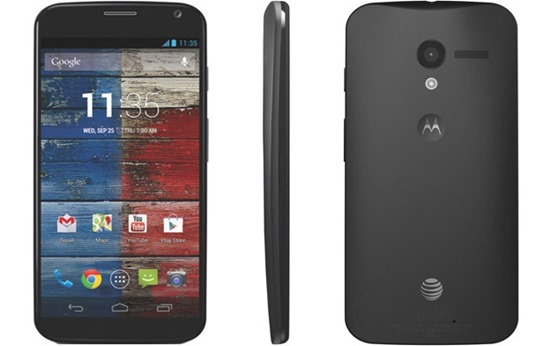
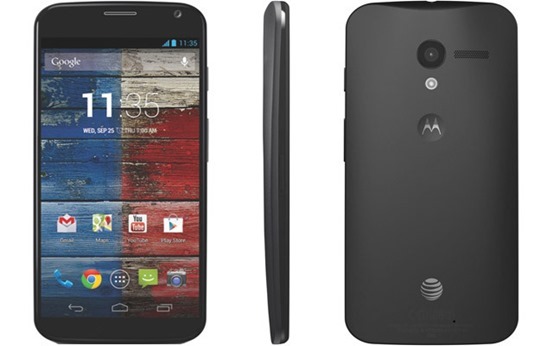
    After tasting a huge bite of success in the form of Moto G, Motorola has launched its second smartphone in the Indian marketplace. The launch of new smartphone naming as Moto X, is a very brilliant step by the manufacturers to conquer the mid-budget smartphone segment which is currently ruled by Samsung Galaxy Series. The Moto X is smartly priced at Rs. 23, 999 for the 16GB variant, which makes it a tough rival to various popular and best selling smartphones including the Samsung Galaxy S3, Samsung Galaxy Mega and recently launched Samsung Galaxy Grand 2.Moto-X

    Moto X boasts a very fresh and unique look. The look & feel of this smartphone is well enough to make you stand different in the crowd. This smartphone targets the young Indian buyers, who want to look stylish and want to own stylish & vibrant gadgets. With the launch of Moto X, Motorola seems aiming very high in the Indian market. A huge success in the Indian marketplace will directly help the manufacturers in expanding their reach on the global level.

    Moto X sports a brilliant 4.7-inch AMOLED Capacitive Touch Screen display, which is capable of producing a HD resolution of 720 x 1280 pixels at a rate of 312 ppi. It is protected by Corning Gorilla Glass and also boasts Active Display feature. This smartphone is powered by a Dual Core Krait Processor, clocked at 1.7GHz, and is coupled with Adreno 320 GPU and 2GB of RAM. Moto X runs on Android 4.3 Jelly Bean operating system, which can be updated to latest Android 4.4 KitKat OS.

    Moto X houses a 10 Megapixels rear camera featuring LED flash, HDR, face detection, touch focus, Panorama, Geo-tagging and more. It also packs a 2 Megapixels front camera for video calls. You can record 1080p Full HD videos with the rear camera. Moto X is available in two variants boasting 16GB & 32GB of internal memory, but both of them lack an external MicroSD card slot.

    The connectivity features on Moto X includes 3G, GPRS with EDGE, Wi-Fi, WI-Fi Hotspot, DLNA, Bluetooth 4.0 with A2DP, EDR, LE, GPS with A-GPS, GLONASS and more. This smartphone is fuelled by a 2200mAH Li-ion battery, which promises up to 576 hours of stand-by and 13 hours of talk time.

    Also Read: Moto G : The Budget Smartphone review

    Moto X is a very brilliant package for those buyers, who are looking for a well finished, stylish and vibrant smartphone which is powerful in terms of hardware specifications as well. The combination of processor & RAM on Moto X is well enough to run huge applications and HD games very easily. If you love clicking pictures on the go, the rear camera of 10 Megapixels on Moto X will help you in capturing your moments in a better way.

    The only issue with Moto X we found is the absence of external MicroSD card slot. However, if it doesn’t really matters for you, go ahead and making Moto X your next buy.

    Author Bio – The Author have great interest in writing about technology and handset reviews. Currently he is working with 91mobiles.

  • Best android apps to overcome the iPhone’s Craze

    Best android apps to overcome the iPhone’s Craze

    Partly due to the Apple’s strict guidelines and partly due to Google’s open approach, presently Android is ruling the app market. Some of the Android apps offer functionality that your iPhone and iPad can’t have (at least not for now). There are many amazing things only an Android app can do and is missing on an iOS device. 4 such amazing apps are explained below. Read them and know for yourself.

    AirDroid

    clip_image002

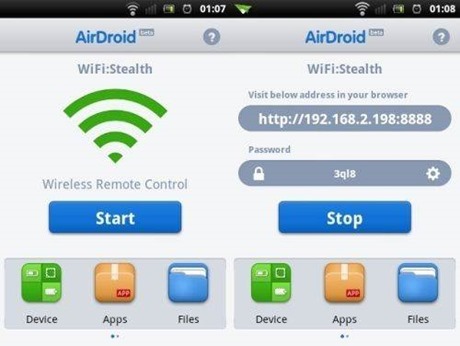
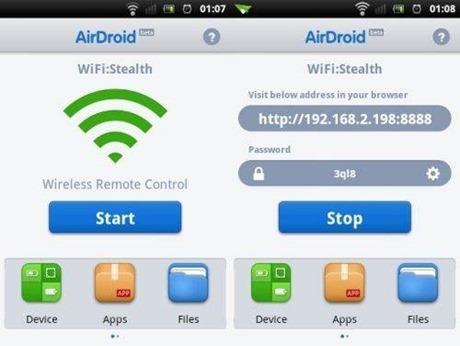
    Airdroid is free software that supports wireless transfer of files to a computer. Not only this it help in maintaining files, ringtones, contacts, images, videos, music and more.

    Key features:

    • · Works on Mac, Windows, Linux and Chromebook
    • · Receive and send SMS – individually or in groups
    • · View and manage photos on Android. Transfer them between computer and android
    • · Play and manage music on android. Transfer them between computer and android
    • · Export and import apps
    • · Export and set any ringtone
    • · Supports flashlight. View through both front and back camera
    • · Push url to Android and open it with Android Browser
    • · Share clipboard content between Android and computer
    • · Requires Android 2.2 and up
    Cover

    clip_image004

    No more hunting for the required app on the various screens you have on your smartphone. Cover puts the app required by you automatically on your lock screen for easy access whether you are at home, office or car. It makes a kind of geofence around the places you visit.

    Key features:

    • · Allows app switching
    • · “Peek” feature allows viewing apps from the lockscreen
    • · Have different ringtones or ringer volumes
    • · Have separate wallpapers for home, office or car
    • · Requires Android 4.1 and up

    Tasker

    clip_image006

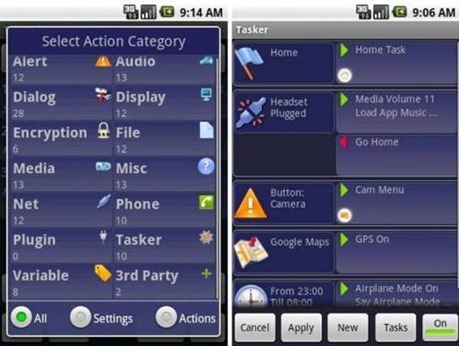
    Tasker carries out some tasks on the basis of contexts such as date, time, event, location, gesture and application in pre-defined profiles or in home screen widget.

    Key features:

    • · Passcode-lock application
    • · Alter home icons and wallpaper every day or in a specific location
    • · To return to the home screen: turn the phone upside down, turn 90 degrees to the left and back to toggle speakerphone during a call
    • · Zip/unzip file data on the fly
    • · Display a pop-up when an SMS arrives
    • · Verify battery levels to a file or SD card
    • · Record automatically you say over the phone to SD card
    • · Create home widget start wireless settings dialog, send an SMS with your GPS location.
    • · It supports Android 2.3 and above.
    Smart launcher

    clip_image008

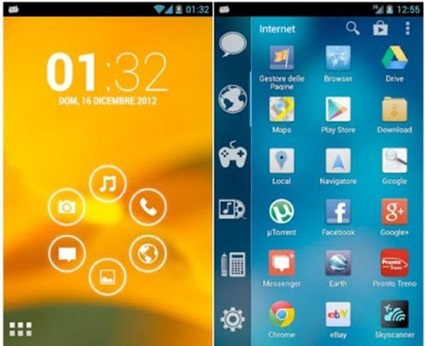
    Smart launcher has minimalist design and user friendly user interface which allows you to launch any applications in a few keys.

    Key features:

    • · Customizable lock screen with lot more colors
    • · Live wallpaper support
    • · Supports every screen and device
    • · Fast search
    • · Easy access to apps information
    • · Hide any app by long pressing an app, then selecting menu – hide.
    • · Widget (PRO version only)
    • · Drawer organized by categories
    • · Change single icon in the drawer
    • · Ready to use without special configurations
    • · New release compatible with API
    • · Requires android 2.1 and up

    Do you know any iOS app that does what these apps do? I am sure “no” is the answer. Install them on your Android devices today.

    Author Bio:

    Simon is a Mobile app developer by profession and writing-enthusiast at heart. He mainly covers topics related to Technology, Android and iOS Apps, and now days he is passionate to cover and write reviews or issues faced by iPhone and android application development services. He prefers and loves to read about the Changing technology trends and review them of his own.

  • Heartbleed, The Trendy Security Bug

    Heartbleed, The Trendy Security Bug

    The Heartbleed Bug is a serious vulnerability in the popular OpenSSL cryptographic software library. heartbleed1-665x385

    Experts which provide maintenance to OpenSSL library have patched a serious vulnerability (CVE-2014-0160) that allows an attacker to gain the access to 64 KB of memory to any client or server that was connected.

    “The Montgomery ladder implementation in OpenSSL through 1.0.0l does not ensure that certain swap operations have a constant-time behavior, which makes it easier for local users to obtain ECDSA nonces via a FLUSH+RELOAD cache side-channel attack,” reports the CVE record for the vulnerability.

    The OpenSSL project is managed by a worldwide community of volunteers, which provides support OpenSSL library and related documentation. OpenSSL is the most popular open source cryptographic library and TLS implementation for traffic encryption.

    The Heartbleed bug allows anyone on the Internet to read the memory of the systems protected by the vulnerable versions of the OpenSSL software. This compromises the secret keys used to identify the service providers and to encrypt the traffic, the names and passwords of the users and the actual content. This allows attackers to eavesdrop on communications, steal data directly from the services and users and to impersonate services and users.

    Why it is called the Heartbleed Bug?

    Bug is in the OpenSSL’s implementation of the TLS/DTLS (transport layer security protocols) heartbeat extension (RFC6520). When it is exploited it leads to the leak of memory contents from the server to the client and from the client to the server.OpenSSL-Heartbleed-vulnerability-CVE-2014-0160

    What is being leaked?

    Encryption is used to protect secrets that may harm your privacy or security if they leak. In order to coordinate recovery from this bug we have classified the compromised secrets to four categories:

    1) primary key material

    2) secondary key material

    3) protected content

    4) collateral

    How widespread is this?

    Most notable software using OpenSSL are the open source web servers like Apache and nginx. Furthermore OpenSSL is used to protect for example email servers (SMTP, POP and IMAP protocols), chat servers (XMPP protocol), virtual private networks (SSL VPNs), network appliances and wide variety of client side software. Fortunately many large consumer sites are saved by their conservative choice of SSL/TLS termination equipment and software. Ironically smaller and more progressive services or those who have upgraded to latest and best encryption will be affected most. Furthermore OpenSSL is very popular in client software and somewhat popular in networked appliances which have most inertia in getting updates.

    What versions of the OpenSSL are affected?

    Status of different versions:

    • OpenSSL 1.0.1 through 1.0.1f (inclusive) are vulnerable
    • OpenSSL 1.0.1g is NOT vulnerable
    • OpenSSL 1.0.0 branch is NOT vulnerable
    • OpenSSL 0.9.8 branch is NOT vulnerable

    Bug was introduced to OpenSSL in December 2011 and has been out in the wild since OpenSSL release 1.0.1 on 14th of March 2012. OpenSSL 1.0.1g released on 7th of April 2014 fixes the bug.

    Has my private information been stolen as a result of the bug?

    We don’t know. Tests showed that eavesdropping via the bug left no trace.

    To make matters worse, the bug-affected code has been used by internet services for more than two years.

    Can the bug be fixed?

    A fixed version of OpenSSL was released on Monday, April 7. Websites and other services can be secured by using it or by disabling the affected part of the code. Then it needs to be incorporated into their software and the fixed software needs to be installed. That isn’t always easy, especially for certain kinds of devices

    How can I protect myself?

    a number of sites have have been set up where you can check if the web services you’re using are vulnerable, set up by Italian security researcher Filippo Valsorda.

    Heartbleed Test Site

    You might want to stay away from sites identified as “vulnerable” for now.

  • Google’s Latest Ambitions with Project Tango

    Google’s Latest Ambitions with Project Tango

    project_tango_logoProject Tango is an attempt by Google to create a mobile device that understands and perceives the world the same way as we do and that shares our sense of space and movement. It is an Android-based prototype 5” phone and developer kit with advanced 3D sensors out of its Advanced Technology and Projects (ATAP) hardware skunk works group. Using its sensors, the phone tracks motion. It can actually build a visual map of rooms using 3D scanning. Google is quite ambitious about this discovery and hopes the combination of these sensors with advanced computer vision techniques will open new windows for indoor navigation, immersive gaming and many more such things.
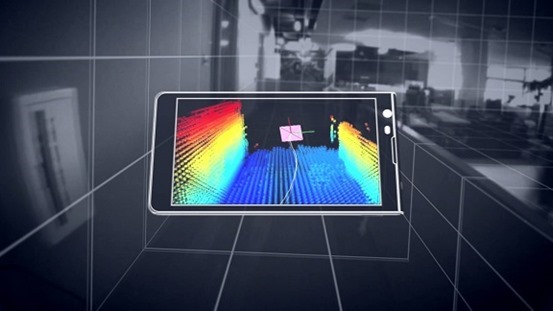
    With Project Tango Google wants to see what kinds of applications developers will dream of for this technology. It will unfold new kinds of smart, vision-based applications based on the 3D sensing and vision technology that is available in the phone. Human beings will be able to create applications that were so far impossible. These phones have a compass and gyros like other phones. Besides that they appear to be Kinect-like visual sensors that can scan the room around the phone. It is also possible to locate where exactly the phone is in space.

    Google uses Movidius Myriad 1 vision processor platform for Project Tango. These sensors were incredibly expensive in the past, they drain the phone’s batteries fast since they are computationally demanding. The latest vision processors use less power and hence Google was able to come up with this project. The ambitious Project Tango is heading to the International Space Station. Two of the Tango phones which would be launched in May 2014 would take supplies to the International Space Station. The phones will be used as part of a NASA project that is developing robots that could one day fly around the inside or outside of the space station, or be used in NASA’s planned mission to land on an asteroid.project-tango

    These phones have several cameras and infrared range-finding which helps the phone build a three dimensional model of its surroundings. This is the major difference Tango phones have from the other phones which can see only a two dimensional world through a single camera. Tango pulls together a few companies which work on cutting-edge technology. It includes a low-powered, vision-processing chip called the Myriad 1 with custom-designed architecture by Movidius. The Myriad 1 is able to power the complex algorithms needed for computer vision without draining the smart phone’s battery. The current smart phone chips cannot do it.

    Google is soon putting Tango in the hands of developers starting with 200 devices. Tango, indeed, has the potential to change many of our lives. This combination of hardware and software would be highly beneficial to vision-impaired human beings. It could also change the state of indoor 3D modeling. Tango video is able to paint the real world in a rainbow-colored 3D map in real time. Tango is a research project which is just launched and there is no clear indication of what the invited developers will do with these sensors. There are many upcoming opportunities and career prospects which would be made use of with this technology. For example, if someone creates a wearable holder that puts Tango on your chest and points out its sensors, it could alert you to danger ahead. It would see an oncoming car or out-of-control bicyclist in front of you and it would vibrate to warn you.

    Google has obtained a lot of coverage by putting the sensor technology in what people recognize- that is, a phone. There are more opportunities which can be developed out of this technology for which people have to spend more time staring at the screen. Tango is precisely a research project this way.

    Author Bio:

    I Harvey, from past years I am really concerted on writing help for students with buy legit essays online with good online support. My experience and expertise have indeed lent a hand for me to write academic coursework such

  • The Hiwe uses Map of the World to let you chat with people

    The Hiwe uses Map of the World to let you chat with people

    Times when map was just a big book with pretty drawings depicting locations are long gone and so are times when chat was just a website with many lines of text written above one another. The Hiwe found a way how to interlace these two together into maybe the most sophisticated chatting environment you have ever seen.map-of-world

    The Hiwe gives you a map of the entire world and lets you roam freely to any location you find interesting. Once you decide on your location be it Lower Manhattan, Paris or say India your virtual chat room will display conversations going on only within bounds of your currently viewed area. How precise you want to be when selecting location is up to you, for more general conversations you zoom out to view bigger portion of the world for more targeted conversations you can go to your home town and see who is already there.

    Luckily the overall layout has deviated a lot from classical old time chats so you no longer see stack of sentences, instead messages are displayed in Memos. Memo is their name for a profile picture with custom message pasted over it. That way each message or Memo as they call it is far more engaging to other people present in or near your current location of choice to leave a comment or start a private talk conversation.sceenshot

    You are probably going to ask about geo-location. Desktop version of The Hiwe does not include geo-location facilities because quoting their words “Its pointless to restrict users into their physical position. We want to give people freedom to go and meet new people just anywhere.” A native smartphone app is on its way which will according to some sources have an opt in option to enable geo-location hence use its potential.

    To sum up, The Hiwe sure did a great job in attempt to bring a great communication tool back from old times in terms of allowing strangers to communicate together. Back in the day you sure liked to chat with strangers over the internet as well right? Whatever happened to chats going extinct for a while there is always a way back and honestly they found it.

  • How to Root Nokia X and Install Google Play Store

    How to Root Nokia X and Install Google Play Store

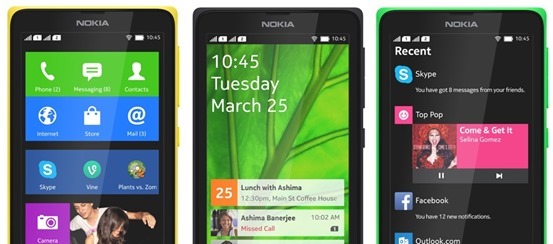
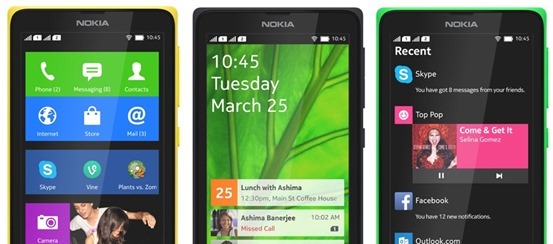
    If you just got your Nokia X and very much like to Install Google Play Store, Google Apps and Google Now Launcher in Nokia X, then are at the right place, this article will guide you on how to root Nokia x and install Google Play store on it. You cannot download apps directly from Play Store on Nokia X as the operating system on the phone is not a ‘pure’ android but is a forked version of android. Therefore, the phone is missing the google apps and it has microsoft apps pre-installed with it. Google Play Store is also replaced with Nokia Android Store.X-screens

    Also: Nokia launched its first android phone series X, X+ and XL at MWC 2014

    How to root Nokia X and install Google Play Store

    The unofficial method is from XDA Developers senior member Kashamalaga. Hence, all thanks to him for bringing this so early.

    This method is not same as conventional rooting and please take care while rooting your phone. Follow all the instructions step-by-step and carefully.

    Requirements

    Steps to follow

    1) You will need a rooted device, So Use Gandalf Exploit included in Framaroot app for rooting.

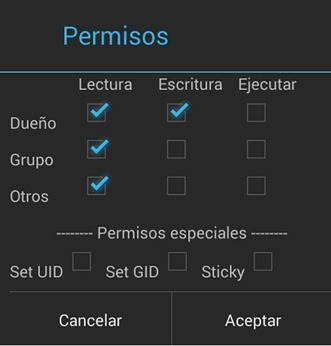
    2) Extract and copy all apks from “NokiaX_Gapps_KashaMalaga_28.02.2014.zip” to /system/app and change permissions for this files using your file explorer.

    3) Set the permissions for the APKs to “read” for all and “write” for just the first one from top, as below.PPBaJre

    4) Reboot your device.

    5) Extract and install as usaul every single needed apk include in “NokiaX_SomeGoogleApps.zip“. (If want to use Google Now Launcher, open it after install it)

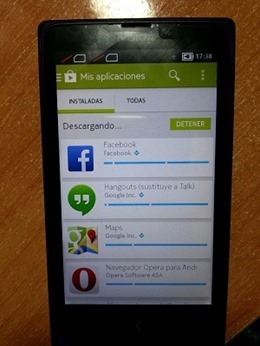
    6) Now launch Google Play Store and login to your Google account and you are Done.nokia-x-root

    That’s all, now your Nokia X device has all the Google Apps and by doing this you will be able to download all the app from Google Play Store.

    Love flappy bird ? Read: How to download Flappy Bird on Android and Hack the score !

    For more information and support, you can also check the thread on xda.

    UPDATE: How to root the new v11.1.1 Nokia x update

    • Download the required files click here and extract the files.
    • Enable debugging mode in Nokia by going into Settings.
    • Connect Nokia X to the PC.
    • Now update ADB drivers.
      • Go to desktop on PC
      • Right click on computer and click manage
      • Select Device manager
      • In the list, Nokia X will be listed with a Question mark icon.
      • Right click and select update driver, then select Browse my computer for driver option.
      • Now select the path of above extracted folder, in the folder select driver file.
      • Now drivers are updated.
    • Now Reconnect the Nokia to the PC.
    • Open kingroot app from the extracted folder.
    • Now kingroot will detect Nokia X as Android device. Now root the device using the App.
    • Now your device is rooted.
    • For installing Play Store and apps, follow the steps same as above.

    For more information and support for rooting v11.1.1 Nokia X update, you can also check the thread on xda.