Category: Tech

  • Lenovo Announces K990 Smartphone

    Lenovo Announces K990 Smartphone

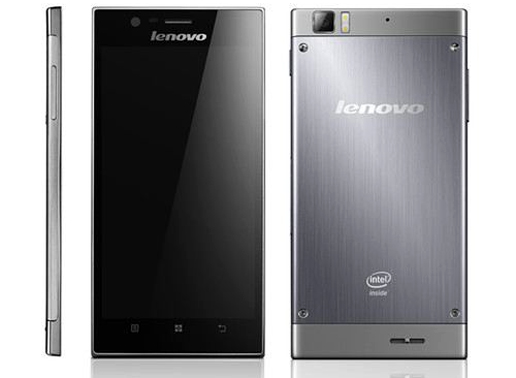
    Lenovo K990 Smartphone

    Lenovo recently at the 2013 edition of Consumer Electronics Show unveiled its latest flagship smartphone, the K900, which sports a 5.5-inch IPS screen and a super slim 6.9mm profile, all running on an Intel Atom processor.

    With the K900, our team has broken down the key functions of the smartphone and redesigned them from the ground up, said Liu Jun, president, Mobile Internet Digital Home, and senior vice president, Lenovo.

    Rather than focus on specifications that look good on a datasheet, weave zeroed in on what consumers want and proved that for smartphone users, top performance doesn’t require a thick profile. The K900 is a game-changer that looks as good as it performs.

    7 tips for saving your smartphone’s battery life

    The K900 resets the bar on these aspects. At 6.9mm, the K900 is the thinnest phone in its class by a wide margin and weighs in at a mere 162g (5.7 ounces), making it a device that unobtrusively slips into a jacket pocket or handbag.

    Made from a composite of stainless steel alloy and polycarbonate in a Unibody mold, the K900 manages to stay strong and look sharp while maintaining its slim profile.

    The K900 is one of the first smartphones in the world to combine a 5.5-inch IPS display with 1080p full high-definition resolution performance at 400+ pixels-per-inch, all under the latest, touch-capacitive Gorilla Glass 2.

    Centered on the forthcoming Intel Atom processor platform for smartphones, the K900 is very responsive, especially for key functions such as web-browsing and application-loading.

    How To Make Android Faster: What Works, And What Doesn’t

    Megapixels is the first specification that many users recognize for digital cameras, and with 13MP, the K900 ranks at the top of its class in this aspect and combines this with an industry-leading, SonyExmor BSI sensor for what would already be considered outstanding performance.

    The K900 smartphone will be available from April in China and in select regional markets soon thereafter. Pricing for the K900 will be announced at a later date.


  • Firefox Gets Faster with Version 18

    Firefox Gets Faster with Version 18

    "The Firefox of today is significantly better than the Firefox of a year ago in every way," wrote Mozilla vice president of engineering Johnathan Nightingale in a recent blog post. There are good cases to be made for that statement, including the browser’s better security, faster startup, a social network API, and more efficient memory use.

    With Tuesday’s release of Firefox 18, the independent Web browser gets a boost from a new JavaScript compiler, called IonMonkey, which the organization claims can speed up Web applications like online games by a whopping 25 percent. The new release also adds support for high-resolution Apple MacBook Retina displays, as spelled out in a release announcment on the Mozilla Blog.

    The Android version of Firefox has also been updated with search suggestions and new protections against phishing and malware.

    To demonstrate the browser’s new speedup, Mozilla developers have created BananaBread, a 3D first-person shooter Web game coded using the open WebGL, HTML5, CSS3, and JavaScript standards. Keep in mind, though, that the WebGL graphics capability isn’t actually part of HTML5 and it’s not supported in Internet Explorer, though it is found in all other major browsers.

    We also ran a couple of JavaScript browser benchmarks to compare the new version with the old. While the well-known SunSpider benchmark produced puzzling results, with the time taken to run the benchmark increasing on each subsequent run, Mozilla’s own measure of JavaScript performance, the Kraken benchmark, did show a significant boost. On a 3.16GHz dual-core PC running Windows 7, Firefox 17 delivered a score of 3124ms compared with 2409ms for the new Firefox 18—an improvement of 23 percent.
    The new version also adds preliminary support for WebRTC, which among other things, allows Web pages to access a computer’s webcam and microphone without the need for plugins such as Adobe Flash or Microsoft SilverLight. Other performance improvements and new standards support show up in Firefox 18, including support for W3C touch events—very useful on tablets. According to Mozilla’s release notes, startup time has been improved by "smart handling of signed extension certificates."

    What’s New

    • NEW
      Faster JavaScript performance via IonMonkey compiler
    • NEW
      Support for Retina Display on OS X 10.7 and up
    • NEW
      Preliminary support for WebRTC
    • CHANGED
      Experience better image quality with our new HTML scaling algorithm
    • CHANGED
      Performance improvements around tab switching
    • DEVELOPER
      Support for new DOM property window.devicePixelRatio
    • DEVELOPER
      Improvement in startup time through smart handling of signed extension certificates
    • HTML5
      Support for W3C touch events implemented, taking the place of MozTouch events
    • FIXED
      Disable insecure content loading on HTTPS pages (62178)
    • FIXED
      Improved responsiveness for users on proxies (769764)

    For All Fans

  • Sony introduces 5-inch Xperia Z smartphone

    Sony introduces 5-inch Xperia Z smartphone

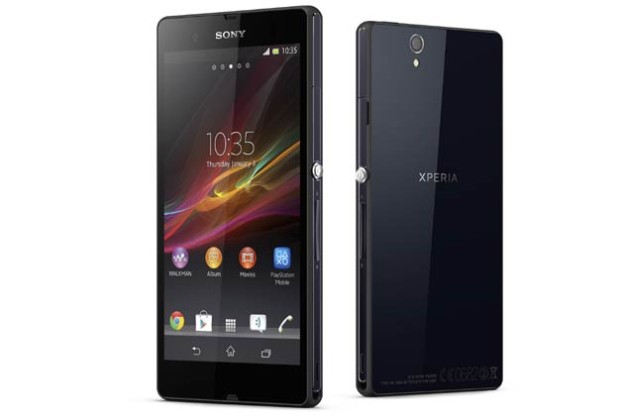
    Sony Mobile Communications introduced its new flagship Android smartphone, Xperia Z. The phone has a 5-inch full HD 1080p Reality Display, and is powered by a Snapdragon S4 Pro quad-core processor. Sony Xperia Z’s Reality Display is powered by Mobile Bravia Engine 2.

    The phone sports a 13 megapixel camera and includes 4G LTE. The Sony Xperia Z will launch globally in the first quarter of 2013.

    According to the company, the Xperia Z also includes Battery Stamina Mode that is said to improve the standby time by four times or more by automatically shutting down battery-draining apps whenever the screen is off and starting them up again when the screen is back on.

    • Video
    • Photo
    • Gallery

    Sony introduces 5-inch Xperia Z smartphone with 13 megapixel camera, quad-core processor

    Despite its slim 7.9 mm body, Xperia Z is said to be durable with tempered glass and anti-shatter film on the front and back. It is a dust-resistant and water-resistant smartphone.

    In selected markets, a design variant of Xperia Z – Xperia ZL – will also be released in Q1 2013. Xperia ZL delivers the same experiences as Xperia Z but in a smaller form factor.

    Xperia Z and Xperia ZL will launch on Android 4.1 (Jelly Bean) and will be upgraded to 4.2 shortly after launch for the latest Android user experience.

  • Samsung India officially launches Galaxy Music Duos

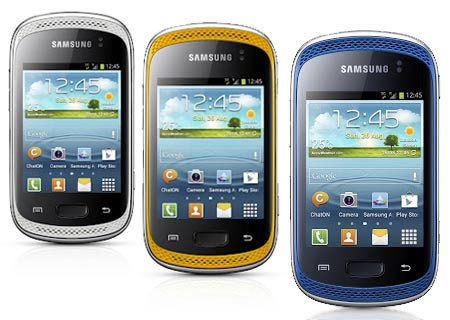
    Samsung India officially launches Galaxy Music Duos

    Samsung seems to have silently launched Galaxy Music Duos smartphone in the Indian market. The company had unveiled it internationally in October 2012 and begun taking pre-orders in India in the first week of December. The official cost of the device in India is Rs 9,199, though the street price is Rs 8,990.


    The all-new Galaxy Music Duos is a dual-sim smartphone aimed at music lovers and comes with two speakers in the front, a dedicated music key and audio technologies like Sound Alive and SRS. This device has a 3-inch LCD touchscreen with 240×320-pixel resolution and runs on an 850MHz processor with 512MB RAM. It has 4GB internal memory and supports 32GB microSD cards for expansion.

    Powered by a 1,300mAh battery, the device comes with a 3MP camera without flash and also misses a front-facing snapper. For connectivity, Samsung Galaxy Music Duos has features like Wi-Fi, 3G, 2G, Bluetooth 3.0 and microUSB.


    Galaxy Music Duos features Always On technology, which allows users to take calls on one sim, while keeping calls on the other sim on waiting.


    Key specs of Samsung Galaxy Music Duos:

    Display: 3-inch LCD touchscreen with 240×320-pixel resolution;
    Operating system: Android 4.0 (Ice Cream Sandwich);
    Processor: 850MHz;
    RAM: 512MB;
    Memory: 4GB internal, support for 32GB microSD card;
    Camera: 3MP rear camera;
    Connectivity: Wi-Fi, 3G, 2G, Bluetooth 3.0 and microUSB;
    Battery: 1,300mAh;
    Misc: Dedicated music key, Sound Alive and SRS audio technologies, dual frontal speakers, Always On

  • Mozilla Firefox – Different by Design

    Mozilla Firefox – Different by Design

    firefoxsandstonered


     Download 1920×1080 wallpaper

    Meet the world’s best browser, made just the way you like it! Get Firefox: http://mzl.la/downloadfx

    Mission

    The common thread that runs throughout Mozilla is our belief that, as the most significant social and technological development of our time, the Internet is a public resource that must remain open and accessible to all. With this in mind, our efforts are ultimately driven by our mission of encouraging choice, innovation and opportunity online.
    To achieve these goals, we use a highly transparent, extremely collaborative process that brings together thousands of dedicated volunteers around the world with our small staff of employees to coordinate the creation of products like the Firefox web browser. This process is supported by the Mozilla Corporation, which is a wholly-owned subsidiary of the non-profit Mozilla Foundation.
    In the end, the Mozilla community, organization and technology is all focused on a single goal: making the Internet better for everyone.

    Try out the new Future Fox : Australis

    Mozilla Firefox 22 Stable Released

    Mozilla announces Nightly build of Metro Firefox for Windows 8


  • Firefox 17 launches with click-to-play plugin blocks for old Adobe Reader, Flash, and Silverlight

    Firefox 17 launches with click-to-play plugin blocks for old Adobe Reader, Flash, and Silverlight

    As expected, Mozilla on Tuesday officially launched Firefox 17 for Windows, Mac, and Linux. Although the new version was already available yesterday on the organization’s FTP servers, it has now also been released over on Firefox.com. If you’re looking for Firefox for Android version 17, that was also released on Monday.

    The biggest addition in this release, in my opinion, is click-to-play plugins, announced back in October. In short, the addition means Mozilla will now prompt Firefox users on Windows with old versions of Adobe Reader, Adobe Flash, and Microsoft Silverlight (more will be added eventually).

    Mozilla is essentially merging together the idea of click-to-play plugins (don’t load plugins until they’re clicked) with the concept of a blocklist (a list of addons and plugins that are disabled). As such, click-to-play blocklisted plugins consist of a list of plugins that Mozilla deems unsafe for its Firefox users. Instead of completely disabling what’s on the list, however, the company will prevent them from running when the page loads: you’ll have to click first.


    Here’s how the feature looks:

    The prompt tells you that the plugin is vulnerable and thus Firefox has stopped it from loading automatically. If there is an update available, you will be prompted to update the plugin, but you will still also be able to use it, if you want to, by clicking on the blocked grey box.

    Additionally, if plugins are blocked on the currently-viewed Web page, Mozilla will feature a blue icon to the left of the address bar for more information. Here’s how the menu looks when opened up:

    Although this feature is enabled by default, you can set it to work for all plugins, not just old ones, in the about:config preference “plugins.click_to_play” (set to true). While this is not an all-purpose plugin management system, it should still be useful as a prevention mechanism against drive-by attacks (such as urging users to click on a video link that is almost never what it claims to be or hiding in ads on a legitimate website) targeting plugins that are known to be vulnerable.

    There are of course other Firefox 17 features worth noting; here’s the official changelog:

    • NEW: Click-to-play blocklisting implemented to prevent vulnerable plugin versions from running without the user’s permission.
    • CHANGED: Updated Awesome Bar experience with larger icons.
    • CHANGED: Mac OS X 10.5 is no longer supported.
    • DEVELOPER: JavaScript Maps and Sets are now iterable.
    • DEVELOPER: SVG FillPaint and StrokePaint implemented.
    • DEVELOPER: Improvements that make the Web Console, Debugger and Developer Toolbar faster and easier to use.
    • DEVELOPER: New Markup panel in the Page Inspector allows easy editing of the DOM.
    • HTML5: Sandbox attribute for iframes implemented, enabling increased security.
    • FIXED: Over twenty performance improvements, including fixes around the New Tab page.
    • FIXED: Pointer lock doesn’t work in web apps (769150).
    • FIXED: Page scrolling on sites with fixed headers (780345).

    Apart from the usual performance improvements, and the sandboxing of iframes, the next most important thing is that support for OS X 10.5 Leopard has been dropped. This follows in Google Chrome’s footsteps, which did the same back in September.

    If you’re a Web developer, you may want also to check out Firefox 17 for developers.

  • Aakash-2 Android ICS Tablet Launched At Rs 1130

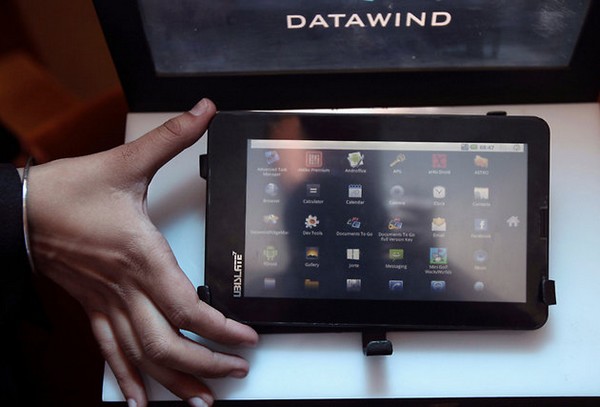
    Aakash-2 Android ICS Tablet Launched At Rs 1130

    The Aakash 2 student-friendly tablet was finally launched yesterday by the first citizen of the country, President Pranab Mukherjee, and with him, Union HRD Minister M M Pallum, on the occasion of National Education Day. The Union Minister of Communications and IT, Kapil Sibal, had announced a month ago that a new version of the beleaguered low-cost tablet would be launched this month. Datawind, the manufacturer, will supply 100,000 units of the Android 4.0 tablet with a 7" capacitive touchscreen to IIT Bombay in the first phase. These will be made available to engineering and other college students, with the goal of benefiting 220 million students in the coming years.
    In terms of performance, the new variant is a leap ahead of the original. The CPU is 1 GHz, as opposed to the earlier, wimpy 366 MHz. However, the 512 MB of RAM is still a bottleneck on the ICS platform. It hasn’t been stated whether Google Play is supported, so we don’t yet know whether students can install apps and games from the online store without restrictions. Here are the full specifications of the Aakash 2:

    • Android 4.0 (Ice Cream Sandwich).
    • ARM Cortex A8 1 GHz with 512 MB of DDR3 RAM.
    • 4 GB internal storage, 32 GB microSD support.
    • 7", 4-point capacitive multi-touch display with pixel dimensions of 800×480.
    • 0.3 megapixel front camera.
    • Wi-Fi 802.11 b/g/n
    • Mini-USB port with OTG, 3.5 mm audio jack, G-sensor.
    • 3200 mA Li-ion battery with up to 3 hours of backup.
    • Package Contents: Wall charger, USB adapter, USB cable, 4-port USB hub.

    Aakash 2 can run Linux distributions along with Android 4.0 Ice Cream Sandwich operating system. The device can also do Aadhar authentication and can even control a robot from a distant place, according to HRD Ministry officials. The tablet will be primarily used for classroom teaching and over 15,000 teachers at 250 colleges across the country have been provided training.

    While Datawind will charge the HRD Ministry Rs 2263 per tablet, students will get a much-subsidised pricing of Rs 1130. In case you are wondering, the Aakash 2 is the same tablet that is commercially available as the UbiSlate 7Ci, launched in September this year and priced at Rs 3500.

    The original Aakash was launched in October last year. It has been mired in controversy due to delayed shipments, with pre-order payments having been made months in advance. We really hope the subsidised tablet, which was meant for students, will reach its intended users this time around. Do you think it will? Sound off below!

  • How to stream your Windows Audio to an Android device

    How to stream your Windows Audio to an Android device

    I was wondering whether I could stream my PC’s audio to my tablet. After a lot of research I found that it is possible to stream your Windows PC’s audio to your Android based phone/tablet. So in this post I will tell you how you can actually stream your PC audio to your Android device within LAN.

    Now you might wonder, what are the benefits of this! Listed below are some benefits that you may enjoy after following this tutorial:

    • You can simply create a wireless music system within your home or at any other place.
    • You can connect your android device to large speakers and stream your Windows audio to rock a party.
    • Some large speakers might not fit into your PC desk, you can create a wireless speaker system that don’t needs to kept around your PC every time.

    Stream Windows Audio to Android device

    Things you’ll need: An internet connection, Windows PC, Android device.

    Step 1: Click here to go to Georgie Labs and download Soundwire. Choose your Windows version and download the setup file. After install Soundwire on your PC you need to install it on your Android device. You may search for “soundwire” on Google Play Store or you can simply click here.

    Note: When you run Soundwire on Windows, your firewall would prompt you to grant access for Internet and Network. Click on ‘Allow’ to run the software without any problems.

    Step 2: Run Soundwire Server on Windows. Under the “Input Select” menu choose the device you want to stream to your phone. Here I am using default multimedia device because it will let me stream all the audio including system sounds, log on sounds and etc. Note down the Server Address mentioned in the Soundwire window.


    Step 3: On your Android device, run the installed Soundwire app. In the text box enter Server Address you noted down in the previous step and now tap on the above large soundwire button and you would be successfully connected to your server.

    Note: To complete the above step your device and Windows PC needs to be connected to the same network.


    Now you will able to easily stream your Windows Audio to an Android device and you can connect the same device to external speakers to make your own wireless sound system.

  • Google Nexus 7 Tablet Launches In India @ Rs 19,990

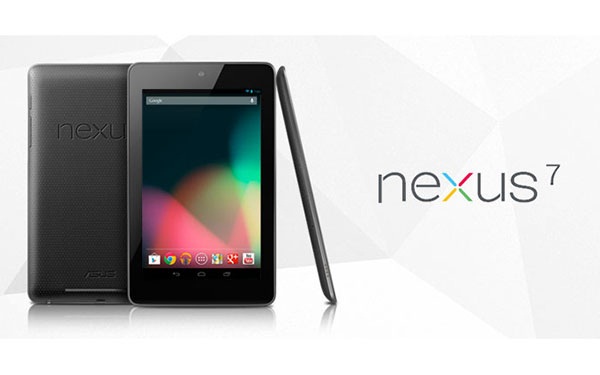
    Google Nexus 7 Tablet Launches In India @ Rs 19,990

    The much awaited Google Nexus 7 tablet has finally found its way into the Indian market. It looks like today was the D-day for ASUS as it announced its four Windows 8 powered devices in the Indian market and it has spilled out beans about its Android Jelly Bean tablet. ASUS has now confirmed that its Nexus 7 tablet will be there for the Indian customers available through various large format retailers at a price of Rs 19,990.
    Unaez Quareshi, sales and distribution director, ASUS India said that the tablet has been priced at Rs 19,990 and will be available through Chroma, a Tata group electronics retailer, and other large format retailers, reports Mobile Indian.
    Google Nexus 7 is a 17.78-cm (7-inch) tablet featuring an IPS display along with 10 finger multi-touch support. The device runs on Google’s Android 4.1 aka Jelly bean and is powered by 1.2GHz quad-core Nvidia Tegra 3 processor. The tablet is incorporated with 1 GB of RAM which will smooth out the functions carried out on the device. Nexus 7 will be available in two variants- 8GB and 16GB storage.
    Though, Nexus 7 has received a remarkable response worldwide, still the competition is high with a few other Android tablets like Samsung Galaxy Tabs and Kindle Fire. iPad continues to be the market leader with 50 per cent shares in the global tablet market.
    Also, Google recently launched a 32GB version of the Nexus 7 tablet which sports a 1.2 MP front camera and connectivity options like WiFi, Bluetooth and NFC.

    Google updated the Nexus 7 tablet released earlier this year. It increased the storage on the $199 version of the device to 16GB from 8GB, and introduced a new $299 version of the Nexus 7 with a cellular data service option. Google also unveiled a new Nexus 4 smartphone, made in partnership with LG Electronics, that features a quad-core processor and a 4.7-inch display.

    Nexus 7 specs
    Operating System: Android Jelly Bean (4.1)
    RAM: 1GB DDR3L
    Storage: 16GB

    Connectivity: Wi-Fi :- 802.11 b/g/n, Bluetooth 3.0
    Camera: 1.2MP (front)
    Battery: 4325mAh Li-polymer
    Display: 7" WXGA (1280 X 800) LED IPS panel, 10 finger multi-touch
    Interface: 1x Headset jack, 1x micro-USB, 2x digital microphone, 2x speakers, 1x docking PIN
    Sensor: G-sensor, light sensor, gyroscope, e-compass, GPS, NFC, hall sensor
    CPU: NVIDIA Tegra 3 T30L Quad-Core @1.3Ghz
    GPU: GeForce 12-core, 3D stereo

    MORE ABOUT THE NEXUS 7
    Google selling a million Nexus 7 tablets per month
    Asus, the Taiwan-based technology company responsible for manufacturing Google’s Nexus 7 tablet, claims the device has just hit the 1 million sales a month milestone.

    Released in July to universal critical acclaim, the Nexus 7 was Google’s first tablet and until now, there have been no official figures as to how well it has performed in relation to its competitors.

    Google Nexus 7 becomes ‘best-selling tablet’
    Google Nexus 7 has become the highest selling Android tablet just three months after its launch, a media report said Monday. Google’s first tablet went on sale July 27. Its main selling point has been its affordable 159-pound price tag, The Telegraph reported.

    Google Nexus 7 named Gadget Of The Year
    Google’s Nexus 7 by ASUS was honored as the ‘Gadget Of The Year’ and also named the ‘Tablet Of The Year’ at the T3 Gadget Awards 2012. Taiwanese multinational tech giant, ASUS, was the big winner of the night at London’s Old Billingsgate, scooping no fewer than five accolades. The awards recognise and honour the gadgets, software and personalities which have intrigued, inspired and wowed the world over the past 12 months.

  • Top 10 IDM Tips and Tricks

    Top 10 IDM Tips and Tricks

    Internet Download Manager is what most people generally use for better and faster downloads. You almost always find yourself getting more speeds when you are using IDM, especially if it is your first download manager.

    By all means, many believe IDM is the best of the pack out there and the fame is well deserved for it not only boosts your speeds but also hosts a lot of features which you may not know about.

    Here are the best ever IDM tricks. When you are done reading, you will possibly be making better use of IDM.


    1. Adding new file extensions

    Add MKV, DOCX, XLSX, APK, IPA and other extensions so that IDM can automatically detect these files and download them immediately. Go to Downloads > Options and click on the File Types tab. Type in the new extensions into the text box that already shows the list of file types that IDM is tracking.


    2. Batch download files from a site

    If you want to download a list of files which have similar file names, choose Batch download from Tasks and enter the URL in the Address field. Use the asterisk symbol wisely and you will be able to queue downloads easily.


    3. Manage downloads using queues

    Queues let you manage downloads easily and group them together to perform tasks on all of them. Right click Queues on the categories pane and Create a new queue. Once done, add downloads to it and resume and stop them all together whenever needed.


    4. Resume broken downloads

    Another life-saving feature of IDM is the capability to resume downloads after they’ve been broken. Even if resuming is not supported, you can attempt to do it by right clicking on the download and choosing Refresh Download Address. Though it may not work all the time, make sure you try it whenever a popup similar to the one above shows up.


    5. Download anything from any site

    Ever wanted to download everything from a site? The Site Grabber let’s you do it. Click on the Grabber button from the navigation bar and enter the URL of the website and assign the condition. With some luck, you might just save a lot of time.


    6. Assign special keys

    Special Keys are used to let you prevent IDM from downloading a file. You can also use them to force into IDM downloading a particular file. Go to Downloads > Options and click on Keys button from the General tab. You can configure it to be any of the following keys : Alt, Shift, Ctrl, Insert.


    7. Address Exceptions

    Some web browsers automatically downloads files when you have not requested for it. For example, IDM might download pling.mp3 when you receive a chat message on Facebook or download a video file when you want it to be played on the browser. You can add exceptions to prevent such behaviour from the File Types tab in the Options dialog.


    8. Schedule downloads and auto-shutdown after completion

    Scheduling is a great way to manage your internet connection and downloads. You can assign particular queues to start and stop at particular times and also ask your computer to shutdown automatically. Hit the Scheduler button from the Navi bar to get started.


    9. Quickly open multiple URLs

    One of the most irritating aspects of the internet is that large files are always split up into many parts. Bigger the file size, larger the number of parts. What makes this worse is that you need to open each of these links one by one. With URLOpener, you don’t have to because it opens you all the links you enter in a text field in new tabs with a single click.


    10. Quick Downloads

    Let us take a particular example. I want to download a 50 part file from MediaFire and I do not want to spend too much time on it.

    By default, what you will do is open each of these pages, click on the download link, click on ‘Start download’, then minimize the window. Now that is 4 tasks for one part and 4×50 makes 200 clicks, not to mention the dragging and loading times.

    By changing a few options, you can make this task twice as easy. Go to Options and hit the Downloads tab. Choose Don’t show from the Download progress box and uncheck both the options towards it’s right.

    Now let’s try that again.

    1. Use URL Opener to open all the 50 parts at once
    2. Right Click on the IDM icon in the task bar and click show target. Move the drop box near the download link.
    3. Drag and drop the download link into the drop box.
    4. Use a shortcut key to move to the next tab: ( Ctrl + Tab in Firefox)
    5. Drag and drop the links in each tab till you get finished.
    6. Have a look at your watch.

    A software is more useful when you really know how to use it properly. Enjoy using the tricks and please do leave your feedback.