Category: Tech

  • Want to share big size data ? Here’s how.

    Want to share big size data ? Here’s how.

    Do you want to share large size files over internet and facing problem? Mostly there are two ways – you can attach file in email attachment but sometimes files are too large send through email, else simply upload them to file hosting websites and share their download links.

    urdgsl

    HJ-split : Mostly Web email services like Gmail and Outlook allow you to send files up to 25 MB in size. You can use HJ-split utility to break file into parts of 25 MB and send them using email. Recipient can restore file by joining them.

    Further are few best online storage services:

    Microsoft OneDrive : lets you upload single files up to 2 GB in size while the individual size limit is 1 TB (yes 1000 GB) in the case of Google Drive. For even bigger files, you can use Dropbox – here the files have no size limit if you upload them to Dropbox through the desktop application.

    WeTransfer : WeTransfer is a cloud-based file transfer service based in Amsterdam designed to send small to large files. WeTransfer users can send files up to 2GB in the free version for time period of 7 days.

    JustBeamIt : using this peer-to-peer app for file transfers can be done between your computer and the recipient’s computer directly. JustBeamIt website will instantly create a shareable download link.

    Infinit : is another impressive desktop application to share your large size files available for both Windows and Mac platform. All you have to do is drag the file on to the Infinit app, choose any recipient from your contacts and the transfer will begin once they accept the incoming file request. Its best feature is it support resumable download.

    SpiderOak : SpiderOak online backup tool to back up, share, sync, access and store data using an off-site server. accessible through an app for Windows, Mac and Linux computer platforms, and Android, N900 Maemo and iOS mobile platforms. SpiderOak uses encrypted cloud storage and client-side encryption key creation
    SpiderOak offers two account types, a free 2 GB version and a paid subscription for capacity above the free account limit. Users can also create a referral link, and each time the link is used to sign up for an account, an extra 1GB will be allotted to both accounts. The maximum account size that can be attained in this manner is 10GB.

    Skype drive: app can also be used for sending documents, photos, videos and other large files of any format to your Skype contacts. Just initiate a chat session or a audio / video call with a contact and choose the Send File option to initiate a transfer. The service imposes no limit to the size or number of the files you can send or receive using Skype and since it is peer-to-peer, no centralized server is needed for the file transfer.

    OwnCloud : Files and other data (such as calendars, contacts or bookmarks) can also be accessed using a web browser without any additional software. Any updates to files are pushed between all computers or mobile devices connected to a user’s account. File storage in conventional directory structures or via WebDAV
    Impressive Features like Encryption of user files, support different Operating systems, music streaming, online file viewer,etc

    SugarSync: Access All Your Files. Anytime. Anywhere.
    SugarSync stood out for one reason: It let you choose any folder on your computer to back up to the cloud automatically. sugarSync switched to a paid-only model, killing off its free 5 GB plan. SugarSync’s paid plans start at $7.49 per month or $75 per year for 60 GB of storage. Existing users won’t get to keep their free plans, but SugarSync is offering a 75-percent discount on its basic plan.

    Tonido :
    Access and Share ALL your files, photos, music and videos on your PC (Win, Mac or Linux) from anywhere using Tonido Desktop Software. Access, Sync and Share ALL your docs, photos, music and videos on USB and SATA drives using a TonidoPlug. On-Premises file storage, mobile access and sync solution for your business using FileCloud

    SparkleShare :
    SparkleShare creates a special folder on your computer. You can add remotely hosted folders (or “projects”) to this folder. These projects will be automatically kept in sync with both the host and all of your peers when someone adds, removes or edits a file.
    Great

    • Frequently changing project files, like text, office documents, and images
    • Tracking and syncing files edited by multiple people
    • Reverting a file to any point in its history
    • Preventing spying on your files on the server using encryption

    Not so great

    • Full computer backups
    • Storing your photo or music collection
    • Large binary files that change often, like video editing projects

    Team Drive :
    The software is available for Windows, Mac OS X, Linux, Android and IOS with four account levels: Free, Personal, Professional and SecureOffice. Each account starts with 2 GiB of free cloud storage but can be upgraded either for free via a customer referral program (an additional 250 MiB per referral and up to 10 GiB total) or via upgrade packages.

  • Xiaomi Mi 3 launched at just Rs. 14,999 in India

    Xiaomi Mi 3 launched at just Rs. 14,999 in India

    Xiaomi-Mi3-India-Launch

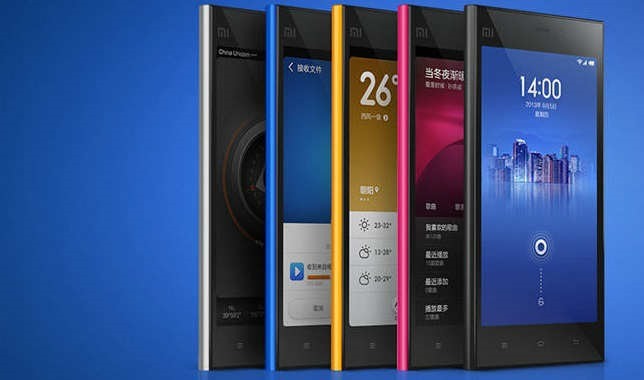
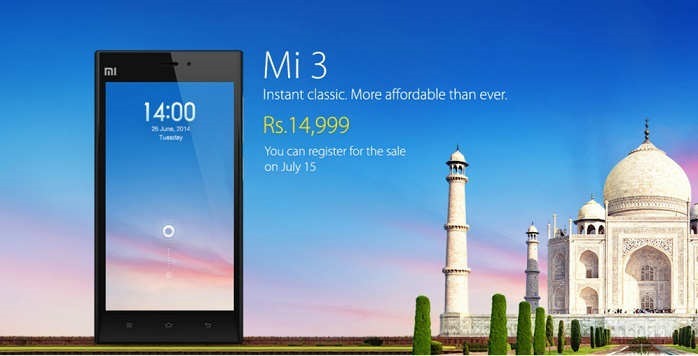
    Chinese phone company Xiaomi (pronounced as Shiao-Me) announced the launch of its first smartphone in India, Xiaomi Mi 3. The phone will be available on 15th july. It uses a customized version of Google’s Android OS, is priced at Rs14,999.

    The phone operates on a customized interface of dubbed MIUI which is a very different take on Android. Although the User Interface might not be appealing to all, but it adds a lot of functionality to the handset.

    The company is also planning to launch its Power Bank (portable battery pack to charge devices) in two variants, 5,200mAh and 10,400mAh, in India.

    Xiaomi was established in 2010 by serial entrepreneur Lei Jun, who is often known as “the Chinese Steve Jobs.”

    Xiaomi already outsells Apple in China, and two of its handsets RedMI and Mi3 were among the world’s top 10 bestselling smartphones in April.

    xiaomi-mi3-16

    With its 5 inch Full HD IPS display, Xiaomi has also put in some effort to the pressure sensitivity which allows users to operate the phone even when the hands are wet or the user is wearing gloves.

    Xiaomi Mi 3 Specifications at a glance

    • 5-inch Full HD(1920×1080 px) IPS display with 441 PPI resolution and Corning Gorilla glass protection
    • 2.3 GHz quad-core Snapdragon 800 (MSM 8974AB) Processor
    • MIUI V5 on top of Android v4.2.1 (Jelly Bean)
    • 13MP rear camera with LED Flash, and full HD video recording
    • 2MP front camera and full HD video recording
    • 2 GB RAM
    • 16 GB internal storage
    • 3050mAh battery

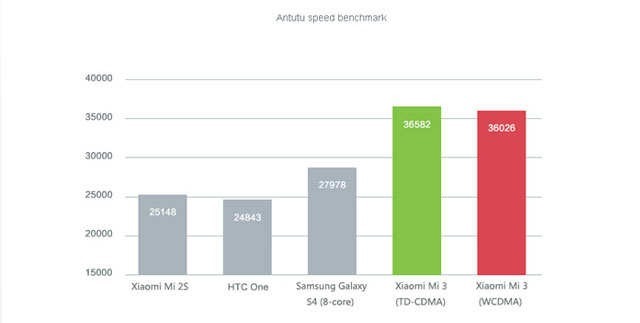
    Benchmarks

    xiaomimi3_01

    As per the specs, the Xiaomi Mi 3 can be the best value for money smartphone not only under Rs 15k, but also under Rs 20k and Rs 25k. The main issue could be that it is an unknown Chinese brand to Indian consumers and they have to gain the trust in the market.

  • Android 4.4.4 KitKat update for Moto G, E and X in India

    Android 4.4.4 KitKat update for Moto G, E and X in India

    android_4.4.4_update_india

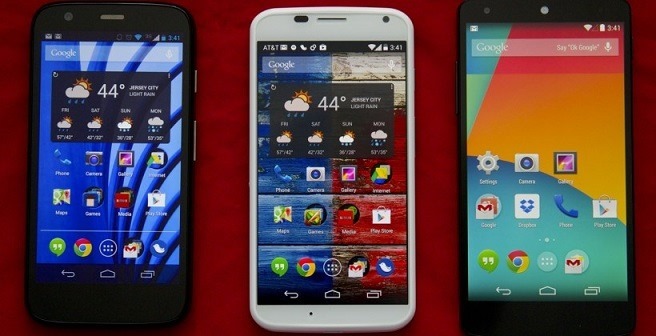
    Motorola India has confirmed they will be rolling out the latest Kitkat update, Android 4.4.4, for Moto E, Moto G and Moto X. The company announced this on twitter

    It will be a phased-rollout and you will receive notifications to update the OS but you can also access be accessed through the settings menu. This release continues to reinforce Motorola’s commitment to offering its users a pure, bloat ware-free and seamless Android experience.

    Steps for updating Moto G, E or X to Android 4.4.4 KitKat:

    1. Go to Settings of your device.

    2. Select “About phone” and then go to “System updates”.

    3. Select “Download”. After the download is complete, click “Install”.

    4. After the software is installed, your phone will re-start automatically.

    This update from 4.4.3 to 4.4.4, is mostly a security update.It will fix several bug fixes and have a new look dialer, alongwith the security enhancements and bug fixes for OpenSSL-related activities.

    The Moto E is available at Rs 6,999 in India, while the Moto G is selling at Rs 12,499 for the 8 GB model and Rs 13,999 for the 16 GB variant. The Moto X is Motorola’s flagship product priced at Rs 23,999. All these moto phones are available exclusively on Flipkart.

  • Use your smartphone as your wallet

    Use your smartphone as your wallet

    Nowadays, we find ourselves carrying cold hard cash less and less because you can just as easily make your purchase with payment cards, and track your spending online. Certain payment or loyalty cards also let you earn rewards or entries to contests, but they do add up. They make your wallet unnecessarily thick and heavy.

    here are some apps that makes your phone as your Wallet :

    Google Wallet

    Replaces: Cash, credit cards, loyalty cards , coupons

    google_wallet_iphone_best_apps_screens

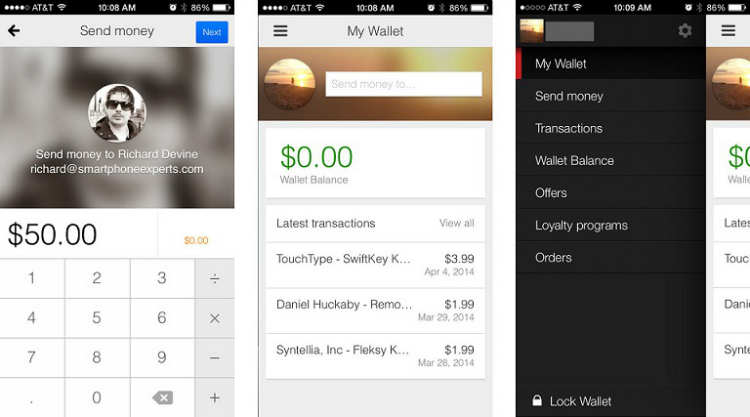
    Launched in 2011 and available on iPhone and Android, Google Wallet gives you the ability to make purchases in stores and online, as well as withdraw cash from ATMs with your phone or a card.

    • Shop and save in stores with all your loyalty and offers in one place. Send money to friends and family and they can spend it instantly with the Google Wallet Card.
    • Store your loyalty programs and leave the plastic cards behind. Carry all of your Google offers on your phone when you shop. Redeem easily at checkout.
    • Send money to any friend in the US with an email address while on-the-go. It’s easy, fast, and free to send directly from your bank account or Wallet Balance.
    • Look for the Buy with Google button on your favorite apps and mobile sites. Also buy easily on Google Play, Drive, YouTube and other Google properties.
    • Google Wallet comes with 24/7 fraud monitoring as part of Google Wallet Fraud Protection. If your phone/card is lost or stolen, either can be disabled from your Google Wallet account.

    Passbook

    Replaces: Travel & entertainment tickets, loyalty and rewards cards

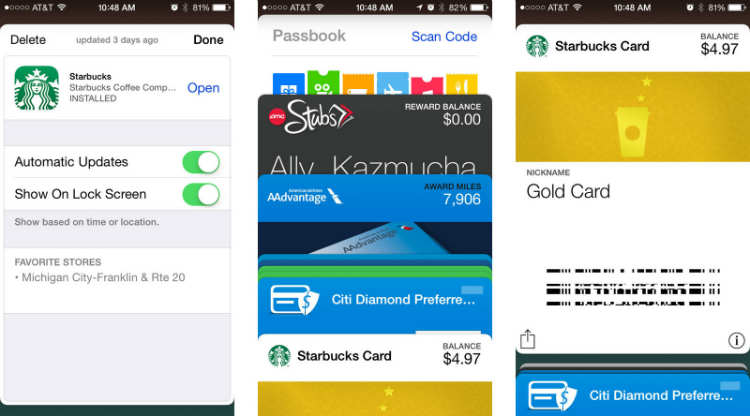
    Apple’s Passbook come up in iOS 6 and with scanning 2D barcodes to help managing your movie, concert and airline tickets as well as loyalty cards and coupons for selected merchants.

    This app let you store and scan almost any type of coupon or ticket. So instead of actually carrying the coupons like grocery coupons or stacks of loyalty cards store it with Passbook.

    passbook_iphone_best_apps_screens_payments

    Unlike Google Wallet, you cannot use your debit or credit card for purchases in-store, however you can use BillGuard to view bank balance.


    Venmo

    Replaces:  Credit and Debit cards

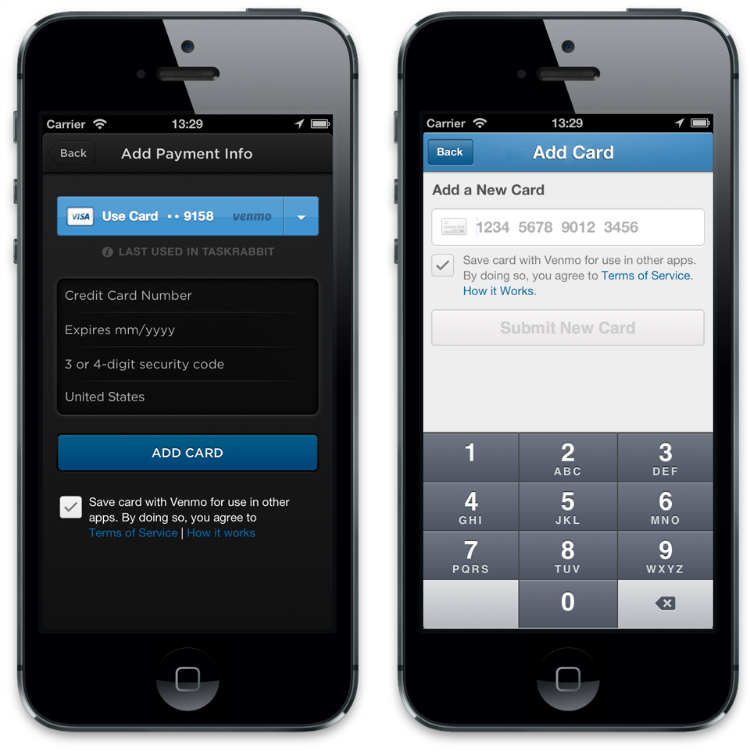
    Venmo is an app available for BlackBerry, iOS and Android . Once you have an account, you can link a bank account, credit or debit card to it. It works similar to PayPal but only between two parties with Venmo accounts.

    All you need to do is write an email to friend and the amount you want to transfer. You can even share the transaction with a message on Facebook, Twitter or Foursquare.

    venmo

    User can simply access their account via website and makes transaction more handy via smartphones. Venmo also works via SMS with a few simple SMS commands. Venmo is a free app but only currently works with major US banks and phone numbers.


    Square Wallet

    Replaces : Credit card , gift voucher

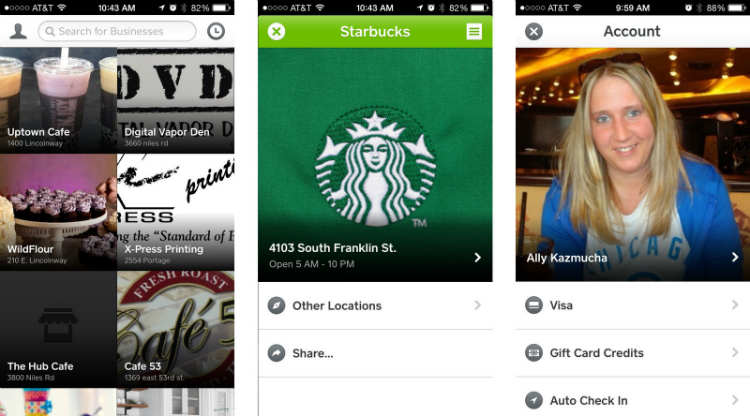
    Square wallet another similar app available on iOS and Android and works similar to Lemon Wallet, But it comes with additional cool features. This app links your credit card to the app but it requires the use of merchant cards which is why Square works only with their list of merchants.

    Because it is locality, the store knows you’re ordering something and will charge it to the card linked on your Square account.

    square_wallet_iphone_best_apps_screens

    It comes with feature of Hands-free Checkout through user can favorite the merchant. Providing interesting discount offers and earns rewards.


    PayPal

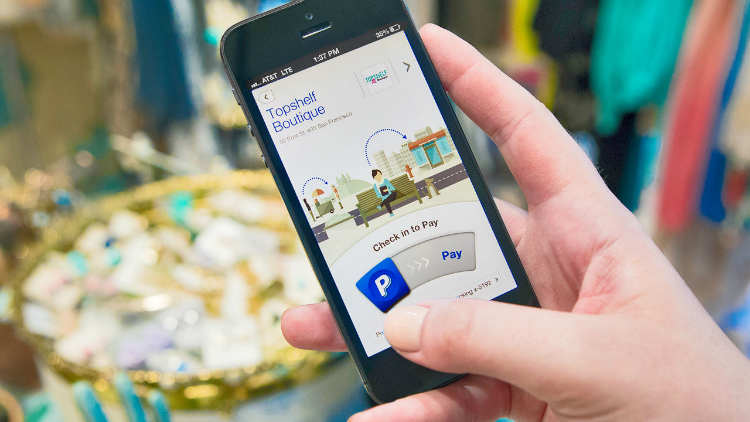
    Nowadays PayPal is very famous service that can transact money between other PayPal users and friends. This app Available for both platforms iOS and Android,

    pp

    It lets you send money to other users and shows you your transaction history. It can be also done by using their website.

    In future PayPal planned to add feature of mobile payment via a care reader.


    Bump Pay

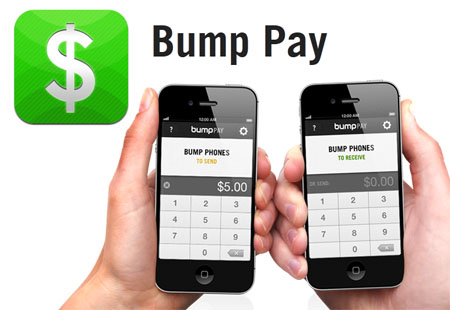
    Bump was an iOS and Android application that enabled Smartphone users to transfer contact information, photos and files between devices. Similarly Bump Pay is a free app only available for the iPhone platform.

    bump_pay_tn

    It allows you to ‘bump’ (transfer) money from iPhone to iPhone with your existing PayPal account.


    Geode by iCache

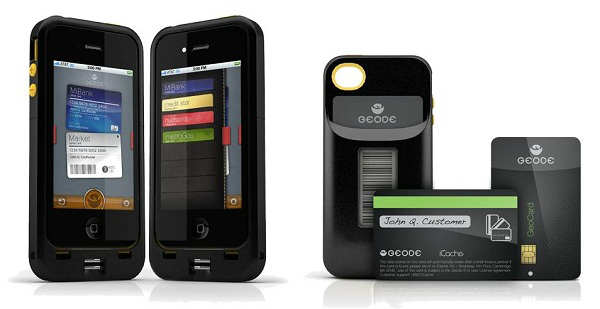
    Geode is an iPhone case that come up with very interesting alternative. Geode is replacement of your credit card and loyalty cards.

    icache

    In this app , all you have to do is take a picture of barcode of each card then the barcode will be displayed will be displayed in E-ink quality for scanning purposes.

    The app has a biometric scanner that takes your fingerprints for authentication for more secure transaction.


    Isis Mobile Wallet

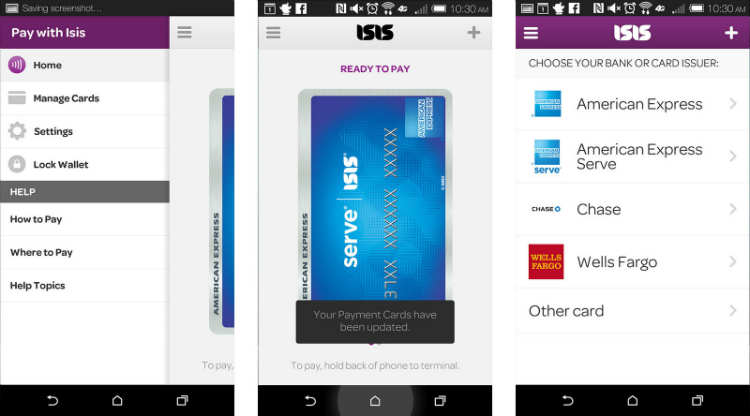
    Isis is available to both AT&T and Verizon customers and offers the same tap to pay functionality Android users currently enjoy with NFC. The only catch? You’ll need to buy an accessory case to make Isis work. After that you can add all your payment cards, including American Express Serve and Chase bank cards, and start tapping to pay at literally thousands of merchants with tap to pay terminals.

    isis_mobile_wallet_android_screens

    If you don’t mind buying a case in order to get the same tap to pay treatment Android customers already enjoy, get Isis Mobile Wallet.

  • Make your own movies with Movavi Video Editor

    Make your own movies with Movavi Video Editor

    Did you ever wished to create your own movies but you think video editing is a tedious task and it needs too much knowledge? Then, we have an easy to use tool for you. Just try out, Movavi Video Editor for Windows. It comes with a new ultra-intuitive interface. You can create a demo, a tutorial with a video and your own voice, record and send videos for your family, or make a slideshow or animation for your friends in no time – the best thing is its ease of use. It is also available in multiple languages.

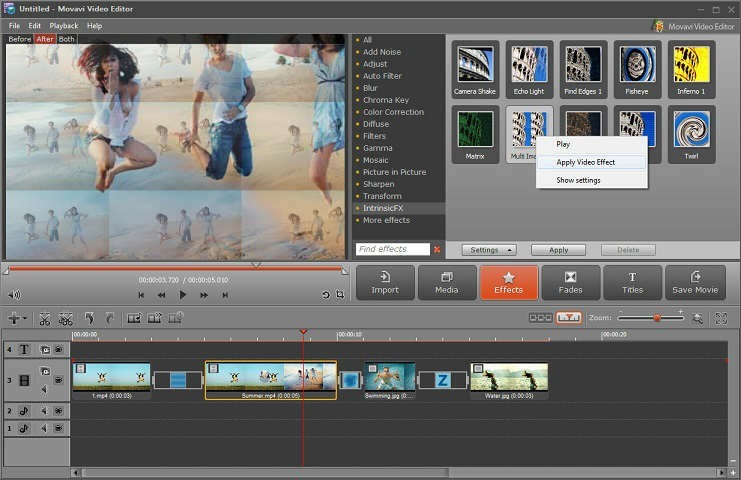
    You can achieve a unique combination of colors, light, and contrast with automatic filters. Apply several special effects like Finding Edges, Twirl and others to your videos to make them artistic with a click.

    apply-effects

    With the new built-in splitting program you can slice your movies into multiple scenes and play them around the video timeline in the order you like. You can also add music of your own choice to the videos. Create your own animated titles to make it look like a pro!

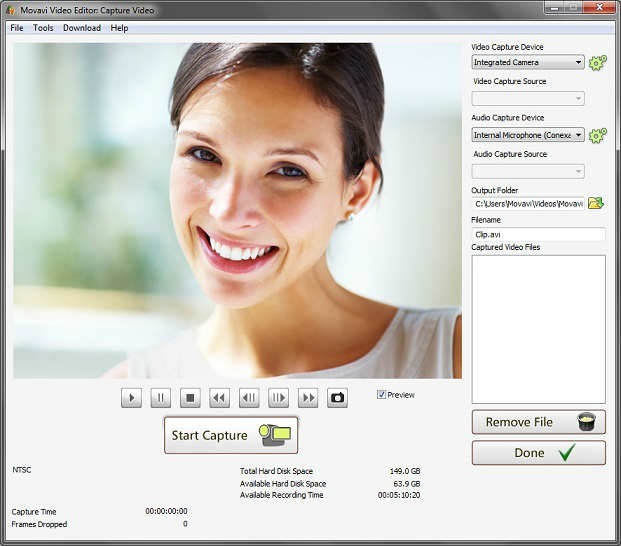
    But that’s not all, you can even make amazing slideshows in 5 minutes. Just add images to the panel and the software will automatically turn them into a slideshow with exciting video effects and stunning transitions. After that you can add music and titles to make it more stunning.

    video-capture

    The video editing software supports all the most popular formats of video and audio, including AVI, MPEG4/MP4, MKV, FlashVideo (FLV), VOB, MP3. You can also capture videos and record audio.

    For your convenience, Tutorials and guides with step by steps methods are available along with the software.

  • Adobe launched Photoshop Express for Windows Phone

    Adobe launched Photoshop Express for Windows Phone

    ps

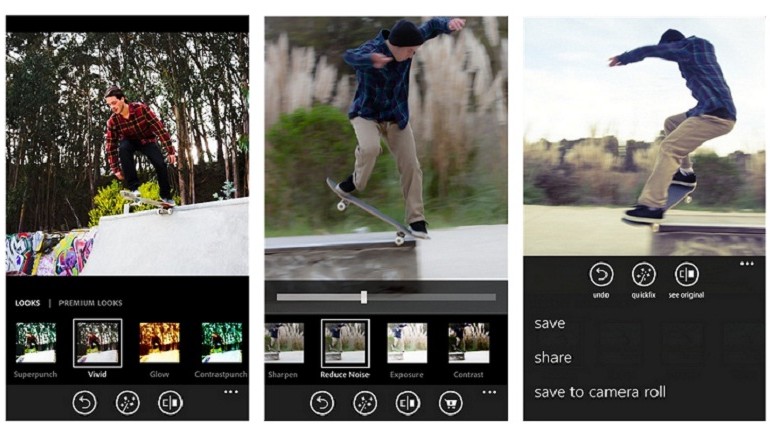
    Adobe launched Photoshop Express for Windows Phone , finally bringing its first image-editing app to the mobile platform.

    The app will follow the same freemium model as the iOS and Android version of Photoshop Express, with basic editing features available for free and more advanced effects available through in-app purchases.


    Now, Get your pictures to pop! And after sharing, you’ll be the talk of your friends. further are features details :

    • Basics: Crop, Straighten, Rotate, and Flip 
your photos. Remove red eye.
    • Auto-Fix: One-touch adjustment for Brightness, Exposure and Shadows.
    • Color: Slider controls for Exposure, Contrast, Clarity, Vibrance and more.
    • One-touch filters “Looks”: Choose from over 20 eye-catching effects!
    • Get creative by adding the Looks Pack* and Noise Reduction Pack*
    • Share easily to social sites like Instagram and Facebook, and via SMS text.

    Photoshop Express makes it really easy to edit photos you take on your Windows Phone device really quickly and comes with the basic photo-editing features you would expect like crop, straighten, rotate, flip, and red-eye removal. You can also alter the color of your photos through slider controls that let you adjust exposure, contrast, clarity, vibrancy, and more. But one of the best things about Photoshop Express is its one-touch filters – called “Looks”. You can choose over 20 Looks for your photos and purchase a Looks Pack and Noise Reduction Pack within the app if you want to really get creative.

    adobe-photoshop-express-app-770x440

    Adobe showed off a new version of Photoshop CC optimized for Surface tablets at Microsoft’s Surface Pro 3 launch last month, but Photoshop Express is the company’s first creative app to make it to Windows Phone.

    The iOS version of Photoshop Express rolled out in 2009, and the Android version followed in 2011.

  • Moto 360 : The new Smartwatch by Motorola

    Moto 360 : The new Smartwatch by Motorola

    moto360

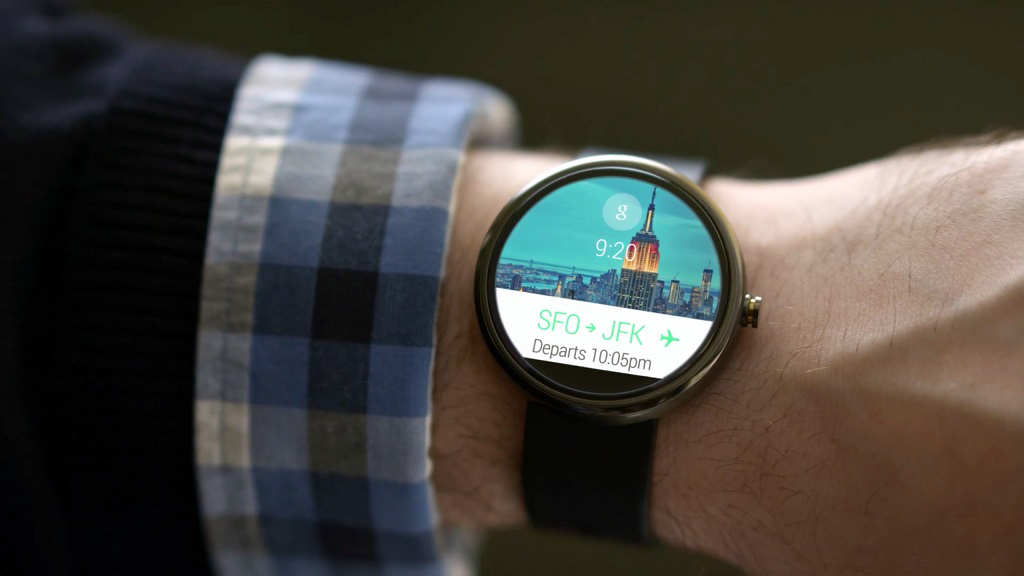
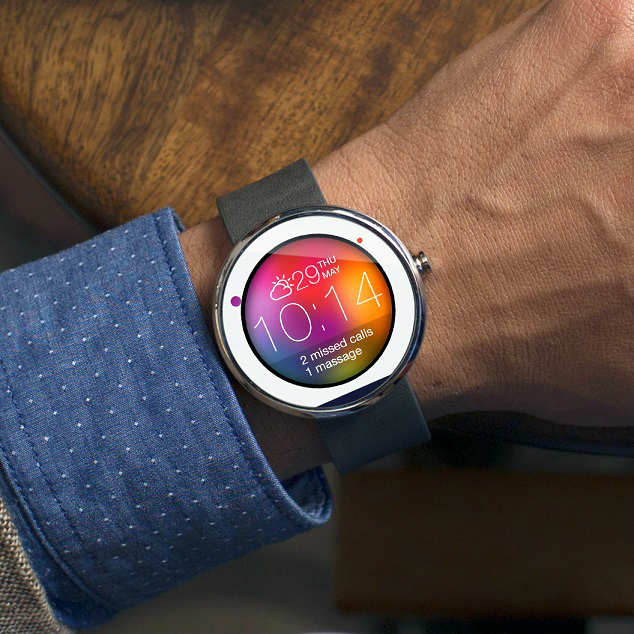
    The new Moto 360 is what smart watches should be. It’s something beautiful, big & most importantly it matches the expectations of a wristwatch.
    Moto 360 is come up with unique circular design . When you see it, you see something familiar with intriguing qualities, not some gadget that happens to fit on your wrist. The Moto 360 strikes a stunning pose on your wrist, particularly in its stainless steel (as opposed to black) garb. Fit and finish of the devices we saw was top notch. The chamfered edges of both the glass covering the screen and that metal housing lend it a luxurious look and feel, and the thick, split leather strap is premium, too.

    The Moto 360 won’t go on sale until later this summer, and Motorola hasn’t announced a price. The unit I tried out at Google I/O was locked in retail mode, basically showing only sample cards but still interactive. I could swipe and tap on the notification cards, but they weren’t “real.”

    Moto-360

    The circular notifications worked just like the ones on the near-identical LG G Watch and Samsung Gear Live except there, you know, circles. Danger’s part of the game is when you’re fashion-forward.

    And its fashion that makes the Moto 360 such a sensation. While the Android Wear smart watches from Samsung and LG are cute gadgets, Motorola’s smart watch is a piece of technology you covet. In that way it reminding me of what I felt when I first touched an iPad: It may do some useful things, but the feeling of desire went beyond having a convenience. What I wanted was a trophy.

    Like LG and Samsung, Motorola had the 360 running a demo mode of Android Wear, so we couldn’t get a feel for how the watch actually will work. That said, Motorola’s on its way to proving that sometimes, it’s not hip to be a square !

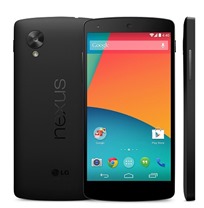
  • Have a Nexus 5 or 7 ? – Install ‘Android L’ Right Now

    Have a Nexus 5 or 7 ? – Install ‘Android L’ Right Now

    Android-L-images.jpg

    Google just released its first ever developer preview of the upcoming version of Android. But If you can’t wait for official release, then there is a chance to install Android L on your Nexus 5 or Nexus 7 (2013). You can download the relevant OS file from Google servers and install them on your device. These versions are meant for developers.

    Requirements

    google-nexus-5-011

    An Unlocked Nexus 5 or Nexus 7 (2013-Wifi)

    Android L OS file (Download)

    ADB and Fastboot installed on computer (Install Now)

    Must Read: Google IO 2014: Everything Google Announced

    How to turn on USB Debugging ON

    Open developer options on your Nexus device. These options are hidden by default. You have to go to Settings > About Phone and then tap on the build number 7 times. After doing that you can access the developers options. Now make sure to enable USB Debugging.

    NOTE: Installing Android L will erase all your data on the phone, so first have a backup of photos, music, files or any other data before proceeding.


    How to install Android L Developer Preview on Nexus 5 or Nexus 7

    Step 1: Download the Android L OS file for your device from the above link.

    Step 2: Unzip/Extract the downloaded file.

    Step 3: Connect your device to your computer via USB cable and turn on USB debugging ON (see above).

    Step 4: On your computer, Open up a command line/terminal for ADB.

    Step 5: Type the following command to access your device’s bootloader.

    adb reboot bootloader

    Step 6: Go to the folder containing the Android L OS file.

    Step 7: Now, Enter following command to run the installation script.

    flash-all

    Step 8: Now just wait for the process to complete. If you have done everything right, Android L Developer Preview will be installed on your phone. It may take upto 10-15 minutes. Have a snack !

    Warning: Installation of this may void your warranty.Also, if something goes wrong during the installation process, we are not responsible. This process is tested and worked fine.

    Instructions from google (https://developers.google.com/android/nexus/images#instructions).

  • Awesome Firefox Tricks You Might Not Know

    Awesome Firefox Tricks You Might Not Know

    firefox-banner

    Yes, we know you love firefox. It’s the most customizable browser ever. You can add great extensions available out there. But we are going to give you some cool tricks that will make you love even more.

    Use Firefox as Notepad

    Open new tab, type the following (without quotes) in address bar :

    "data:text/html, <html contenteditable>"

    And the best thing is you can even customize it using html styles. Come, on where’s your geeky mind ! Here’s one example for you.

    data:text/html, <title>I love Firefox!</title><style>html,body{margin: 0; padding: 0;}</style><textarea style="font-size: 1.5em; line-height: 1.5em; background: %23000; color: %233a3; width: 100%; height: 100%; border: none; outline: none; margin: 0; padding: 90px;" autofocus placeholder="Say Hi..." />

    pic53

    Go on, copy and paste the above code in a new tab. (It works in other modern browsers as well)

    Now, you can use the page as a quick notepad to carry your notes while browsing.


    Add ‘Search Keywords’ For Your Favorite Websites In Just A Few Clicks

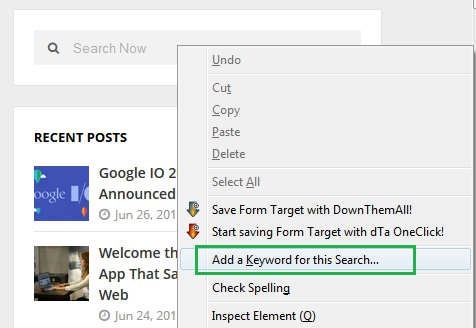
    This a tip most of you might not be knowing, you can add any search box on any website to the Firefox URL address bar in a very handy way. Just go to the any Search Box and simply right-click on it, then click “add a keyword for this search”.

    pic_11


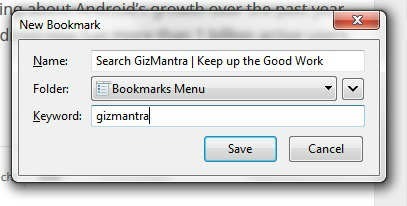
    Then you’ll get a prompt, just name the bookmark, then type in a simple short keyword you can remember.

    pic_1


    Now you can search your favorite site of choice anytime by typing the keyword, followed by what you want to search in the Navigation Bar.

    pic2


    It can save up lots of your time.


    Switch tabs with Keyboard shortcuts

    Instead of moving the mouse and select different tabs that you have open, use the keyboard. use these simple shortcuts:

    • Ctrl+Tab (rotate forward among tabs)
    • Ctrl+Shift+Tab (rotate to the previous tab)
    • Ctrl+1-9 (choose a number to jump to a specific tab)


    Quickly Delete Items from Address Bar History

    When you start typing in the address bar, firefox automatically show previous URLs you’ve visited as drop-down list. But if you want to quickly delete them (You know why?), Go to the address bar, start typing an address, and the drop-down menu will appear with the URLs of pages you’ve visited. Use the down-arrow key to go down to an address you want to delete, and press the Delete key to make it disappear.


    Auto Complete URL

    Most of you as geeks might know this one. Oh ! yeah.  Go to the address bar (Ctrl+L) and type the name of the website without the “www” or the “.com”. Then hit Ctrl+Enter, and it will automatically fill in the “www” and the “.com”. similarly for “.net” addresses, press Shift+Enter, and for “.org” addresses, press Ctrl+Shift+Enter.


    Mouse shortcuts

    These are some simple but useful shortcuts

    • Middle click on link (opens in new tab)
    • Shift+scroll down (previous page)
    • Shift+scroll up (next page)
    • Ctrl+scroll up (decrease text size)
    • Ctrl+scroll down (increase text size)
    • Middle click on a tab (closes tab) [Really useful]


    Open Previously Closed Tab

    If you have closed a tab by mistake, don’t panic! Hit Ctrl+Shift+T. This will open up the last tab you closed. If you keep clicking the shortcut, all your recently closed tabs will open.

    That’s it for now. We’ll keep adding more.

  • Google IO 2014: Everything Google Announced on Day 1

    Google IO 2014: Everything Google Announced on Day 1

    Google-IO-2014

    Google began the announcement as usual by talking about Android’s growth over the past year. Sr. Vice President at Google Sundar Pichai said Android now has more than 1 billion active users per month. The company showed off new design style for all of its products, alongwith Android version codenamed “L” that may be arriving this fall.

    Android One

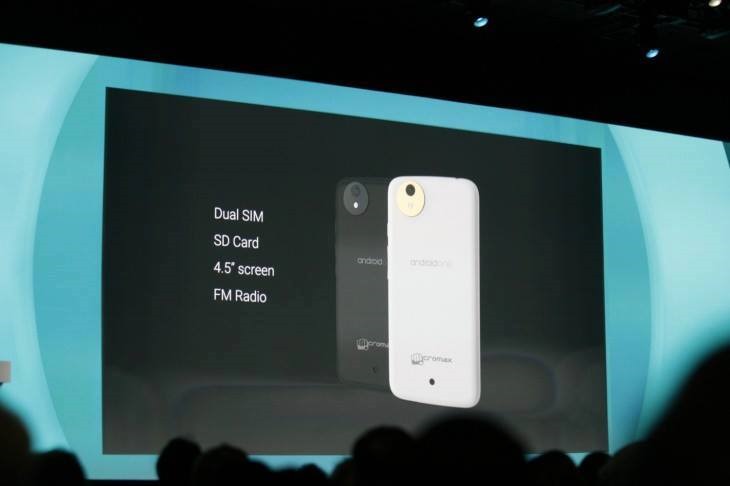
    Google is making its efforts to reach people who so far haven’t been able to afford a smartphone with Android One, which is a new pool of hardware reference platforms designed specifically for developing markets, using stock Android and low-cost parts. The first devices will arrive this fall in India brands like Micromax and Karbonn, starting at less than $100.

    google_android_on

    Android ‘L’ Developer Preview

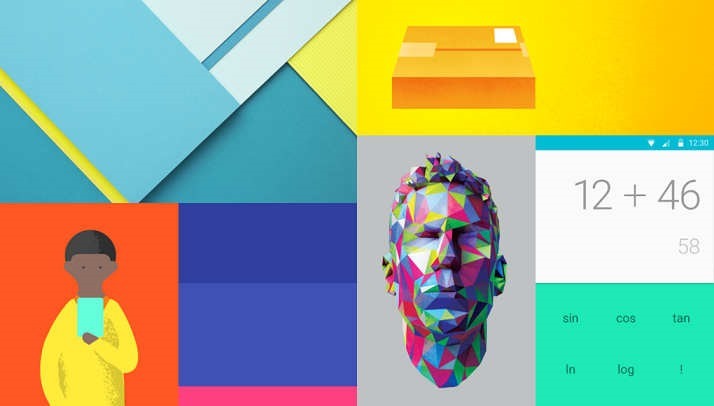
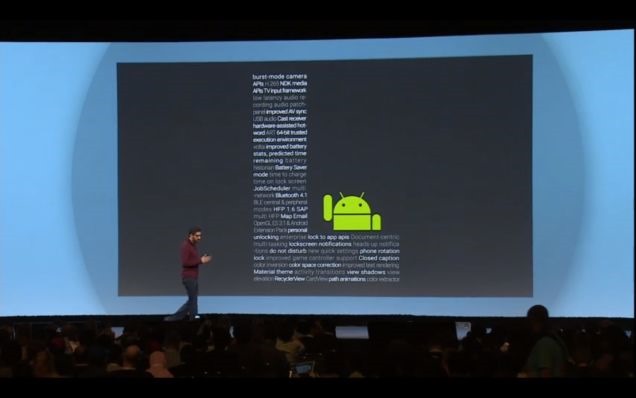
    Android’s upcoming version L release features a new cross platform UI named Material Design, which offers app developers more precise tools to make customized typography, grid and color changes.
    One of the more prominent changes is to the notification system. Now, you’ll be able to access your collection of notifications directly from the lock screen. This new version of android will also improve performance by making the ART engine the default, alongside a new Battery Saver mode. The multitasking interface is also getting improved with a new card-based design.

    androidl

    Google’s New Makeover ‘Material Design’

    This new design is an evolution of the conventional flat, card-oriented interface with added depth and animation to every UI element. Each individual piece of the design is being treated like it’s a virtual object that exists in 3D space. Despite being flat and digital, they have behaviors, layers, and react when touched. This looks like a cool and a nice idea.. It is expected to see this design on all Google products soon. Have a look.


    Android TV

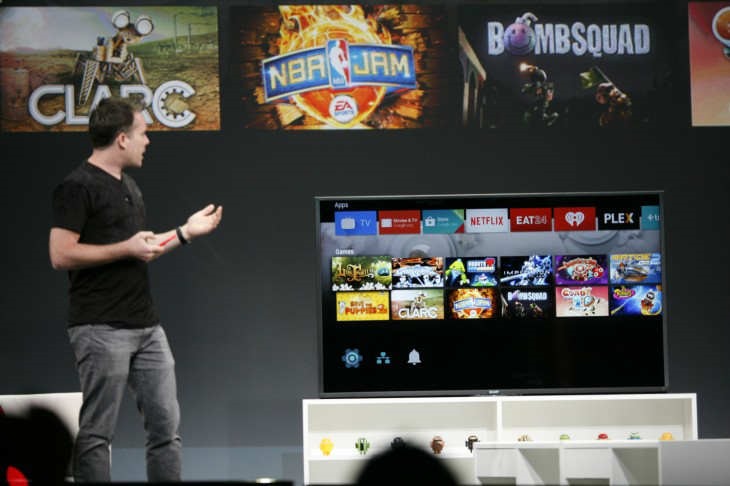
    Google back within TV entertainment with Android TV, which lets users watch live TV or stream content. As you may aware of Google earlier attempt in this sector with Google TV. This time, with Android TV you can also enjoy gaming by bringing Play store games to the big screen. Content from Android device to the Android TV can be easily casted. You can use voice queries to search for content.

    android_tv_googleio

     Android Wear

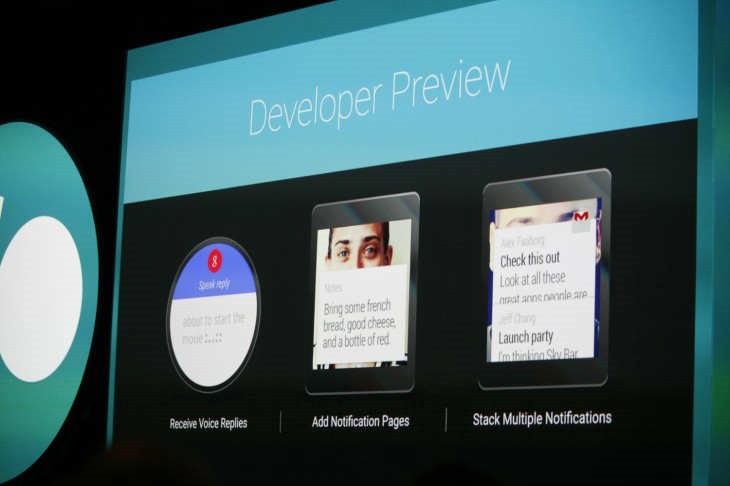
    Google demonstrated its Android Wear SDK which is now available to download. With touchscreen UI you can easily swipe across Google Now cards and access the supported apps from the connected smartphone. You can also create notes, reminders, alarms with ‘OK Google’.When you install an app from the Play store on the phone, a wearable addon will also be installed synced with the main app.

    android_wear_preview

    Android Auto for Cars

    Google is bringing some of its best features to your car. Android Auto is a platform which will allow you to plug your phone into your vehicle and car-friendly controls for key apps. The UI will cast on the car’s screen with quick shortcuts to location searches, suggestions and navigation.Use your voice commands and get information on your car completely hands-free !


    Google Fit Platform

    Nowadays, Health and fitness are trending all over the tech world with many other companies launching new platforms. By jumping into this with Google Fit platform which will allow users to track fitness data and sync it across all devices. It is an open, multi-OS API for fitness apps and devices. Partners include Nike, Adidas and Withings.
    google_fit


    Also, there were some chromecast updates.

    That’s almost all major from Day 1 at Google IO 2014. Excited for Day 2.