Category: Featured

  • Heartbleed, The Trendy Security Bug

    Heartbleed, The Trendy Security Bug

    The Heartbleed Bug is a serious vulnerability in the popular OpenSSL cryptographic software library. heartbleed1-665x385

    Experts which provide maintenance to OpenSSL library have patched a serious vulnerability (CVE-2014-0160) that allows an attacker to gain the access to 64 KB of memory to any client or server that was connected.

    “The Montgomery ladder implementation in OpenSSL through 1.0.0l does not ensure that certain swap operations have a constant-time behavior, which makes it easier for local users to obtain ECDSA nonces via a FLUSH+RELOAD cache side-channel attack,” reports the CVE record for the vulnerability.

    The OpenSSL project is managed by a worldwide community of volunteers, which provides support OpenSSL library and related documentation. OpenSSL is the most popular open source cryptographic library and TLS implementation for traffic encryption.

    The Heartbleed bug allows anyone on the Internet to read the memory of the systems protected by the vulnerable versions of the OpenSSL software. This compromises the secret keys used to identify the service providers and to encrypt the traffic, the names and passwords of the users and the actual content. This allows attackers to eavesdrop on communications, steal data directly from the services and users and to impersonate services and users.

    Why it is called the Heartbleed Bug?

    Bug is in the OpenSSL’s implementation of the TLS/DTLS (transport layer security protocols) heartbeat extension (RFC6520). When it is exploited it leads to the leak of memory contents from the server to the client and from the client to the server.OpenSSL-Heartbleed-vulnerability-CVE-2014-0160

    What is being leaked?

    Encryption is used to protect secrets that may harm your privacy or security if they leak. In order to coordinate recovery from this bug we have classified the compromised secrets to four categories:

    1) primary key material

    2) secondary key material

    3) protected content

    4) collateral

    How widespread is this?

    Most notable software using OpenSSL are the open source web servers like Apache and nginx. Furthermore OpenSSL is used to protect for example email servers (SMTP, POP and IMAP protocols), chat servers (XMPP protocol), virtual private networks (SSL VPNs), network appliances and wide variety of client side software. Fortunately many large consumer sites are saved by their conservative choice of SSL/TLS termination equipment and software. Ironically smaller and more progressive services or those who have upgraded to latest and best encryption will be affected most. Furthermore OpenSSL is very popular in client software and somewhat popular in networked appliances which have most inertia in getting updates.

    What versions of the OpenSSL are affected?

    Status of different versions:

    • OpenSSL 1.0.1 through 1.0.1f (inclusive) are vulnerable
    • OpenSSL 1.0.1g is NOT vulnerable
    • OpenSSL 1.0.0 branch is NOT vulnerable
    • OpenSSL 0.9.8 branch is NOT vulnerable

    Bug was introduced to OpenSSL in December 2011 and has been out in the wild since OpenSSL release 1.0.1 on 14th of March 2012. OpenSSL 1.0.1g released on 7th of April 2014 fixes the bug.

    Has my private information been stolen as a result of the bug?

    We don’t know. Tests showed that eavesdropping via the bug left no trace.

    To make matters worse, the bug-affected code has been used by internet services for more than two years.

    Can the bug be fixed?

    A fixed version of OpenSSL was released on Monday, April 7. Websites and other services can be secured by using it or by disabling the affected part of the code. Then it needs to be incorporated into their software and the fixed software needs to be installed. That isn’t always easy, especially for certain kinds of devices

    How can I protect myself?

    a number of sites have have been set up where you can check if the web services you’re using are vulnerable, set up by Italian security researcher Filippo Valsorda.

    Heartbleed Test Site

    You might want to stay away from sites identified as “vulnerable” for now.
  • Google’s Latest Ambitions with Project Tango

    Google’s Latest Ambitions with Project Tango

    project_tango_logoProject Tango is an attempt by Google to create a mobile device that understands and perceives the world the same way as we do and that shares our sense of space and movement. It is an Android-based prototype 5” phone and developer kit with advanced 3D sensors out of its Advanced Technology and Projects (ATAP) hardware skunk works group. Using its sensors, the phone tracks motion. It can actually build a visual map of rooms using 3D scanning. Google is quite ambitious about this discovery and hopes the combination of these sensors with advanced computer vision techniques will open new windows for indoor navigation, immersive gaming and many more such things.
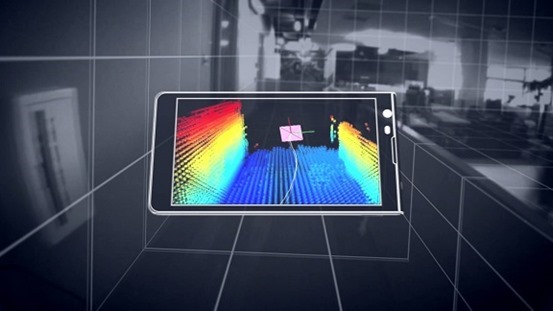
    With Project Tango Google wants to see what kinds of applications developers will dream of for this technology. It will unfold new kinds of smart, vision-based applications based on the 3D sensing and vision technology that is available in the phone. Human beings will be able to create applications that were so far impossible. These phones have a compass and gyros like other phones. Besides that they appear to be Kinect-like visual sensors that can scan the room around the phone. It is also possible to locate where exactly the phone is in space.

    Google uses Movidius Myriad 1 vision processor platform for Project Tango. These sensors were incredibly expensive in the past, they drain the phone’s batteries fast since they are computationally demanding. The latest vision processors use less power and hence Google was able to come up with this project. The ambitious Project Tango is heading to the International Space Station. Two of the Tango phones which would be launched in May 2014 would take supplies to the International Space Station. The phones will be used as part of a NASA project that is developing robots that could one day fly around the inside or outside of the space station, or be used in NASA’s planned mission to land on an asteroid.project-tango

    These phones have several cameras and infrared range-finding which helps the phone build a three dimensional model of its surroundings. This is the major difference Tango phones have from the other phones which can see only a two dimensional world through a single camera. Tango pulls together a few companies which work on cutting-edge technology. It includes a low-powered, vision-processing chip called the Myriad 1 with custom-designed architecture by Movidius. The Myriad 1 is able to power the complex algorithms needed for computer vision without draining the smart phone’s battery. The current smart phone chips cannot do it.

    Google is soon putting Tango in the hands of developers starting with 200 devices. Tango, indeed, has the potential to change many of our lives. This combination of hardware and software would be highly beneficial to vision-impaired human beings. It could also change the state of indoor 3D modeling. Tango video is able to paint the real world in a rainbow-colored 3D map in real time. Tango is a research project which is just launched and there is no clear indication of what the invited developers will do with these sensors. There are many upcoming opportunities and career prospects which would be made use of with this technology. For example, if someone creates a wearable holder that puts Tango on your chest and points out its sensors, it could alert you to danger ahead. It would see an oncoming car or out-of-control bicyclist in front of you and it would vibrate to warn you.

    Google has obtained a lot of coverage by putting the sensor technology in what people recognize- that is, a phone. There are more opportunities which can be developed out of this technology for which people have to spend more time staring at the screen. Tango is precisely a research project this way.

    Author Bio:

    I Harvey, from past years I am really concerted on writing help for students with buy legit essays online with good online support. My experience and expertise have indeed lent a hand for me to write academic coursework such

  • The Hiwe uses Map of the World to let you chat with people

    The Hiwe uses Map of the World to let you chat with people

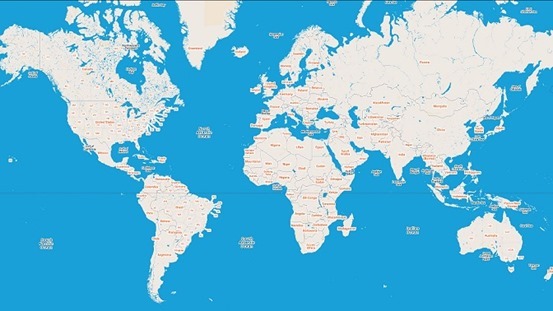
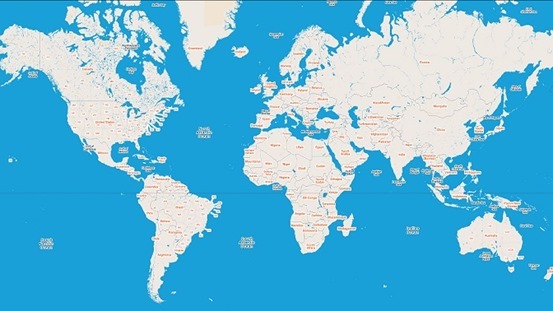
    Times when map was just a big book with pretty drawings depicting locations are long gone and so are times when chat was just a website with many lines of text written above one another. The Hiwe found a way how to interlace these two together into maybe the most sophisticated chatting environment you have ever seen.map-of-world

    The Hiwe gives you a map of the entire world and lets you roam freely to any location you find interesting. Once you decide on your location be it Lower Manhattan, Paris or say India your virtual chat room will display conversations going on only within bounds of your currently viewed area. How precise you want to be when selecting location is up to you, for more general conversations you zoom out to view bigger portion of the world for more targeted conversations you can go to your home town and see who is already there.

    Luckily the overall layout has deviated a lot from classical old time chats so you no longer see stack of sentences, instead messages are displayed in Memos. Memo is their name for a profile picture with custom message pasted over it. That way each message or Memo as they call it is far more engaging to other people present in or near your current location of choice to leave a comment or start a private talk conversation.sceenshot

    You are probably going to ask about geo-location. Desktop version of The Hiwe does not include geo-location facilities because quoting their words “Its pointless to restrict users into their physical position. We want to give people freedom to go and meet new people just anywhere.” A native smartphone app is on its way which will according to some sources have an opt in option to enable geo-location hence use its potential.

    To sum up, The Hiwe sure did a great job in attempt to bring a great communication tool back from old times in terms of allowing strangers to communicate together. Back in the day you sure liked to chat with strangers over the internet as well right? Whatever happened to chats going extinct for a while there is always a way back and honestly they found it.

  • Cut the Rope 2 arrives on android

    Cut the Rope 2 arrives on android

    cut-the-rope-2

    Just after its App Store debut in December 2013, developer ZeptoLab has released Cut the Rope 2 on Android. It’s currently available for free download in the Google Play store and will be launching on the Amazon Appstore on March 30. Although on app store the game is priced at $0.99.

    Also, ZeptoLab announced that the its Cut the Rope series got over 500 million overall downloads. The original has spawned a few sequels now, including Cut the Rope: Time Travel and Cut the Rope: Experiments.

    Om Nom breaks out of his box and travels through lush forests, busy cities, junkyards and underground tunnels, all in pursuit of one goal – CANDY! Along the way, he encounters the Nommies, the cutest candy collecting helpers a little green monster could wish for!

    Familiar to play, yet challenging to master, Cut the Rope 2 brings fresh challenges and unanticipated obstacles to the candy crunching, physics-based phenomenon that has delighted millions of players around the world!

    Don’t waste any time – exciting surprises await! Help Om Nom find his way home…out of the forest, through a pond and a junkyard, into the city and beyond!

    ALL NEW LOCATIONS TO EXPLORE! Travel through an interactive map to discover new locations filled with candy collecting, rope cutting action.

    ALL NEW CHARACTERS TO MEET! Find 5 new characters, the Nommies, to help you on your unexpected journey.

    ALL NEW HATS TO BRAG ABOUT! Customize Om Nom, choose your favorite candy and select your finger traces.

    ALL NEW ADVENTURES FOR OM NOM! Experience completely new graphics, sound and gameplay elements, including the ability to move Om Nom.

    ALL NEW MISSIONS! Collect the perfect number of stars and strategically gather fruit to complete the mission in each level.

    MEET OM NOM’S NEW FRIENDS, THE NOMMIES!

    • Roto can carry Om Nom to the best candy catching locations
    • Lick can make small bridges with his tongue to help Om Nom reach his goal
    • Blue can lift Om Nom to new levels of candy hunting fun
    • Toss can throw objects, including candy
    • Boo can scare Om Nom to jump to new heights

    Download Cut the rope 2 for android

  • How to Root Nokia X and Install Google Play Store

    How to Root Nokia X and Install Google Play Store

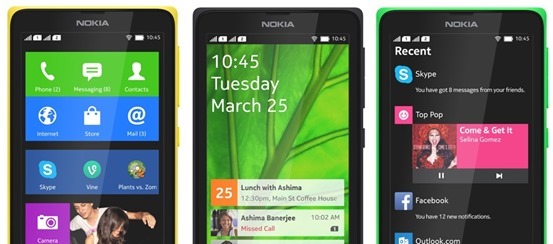
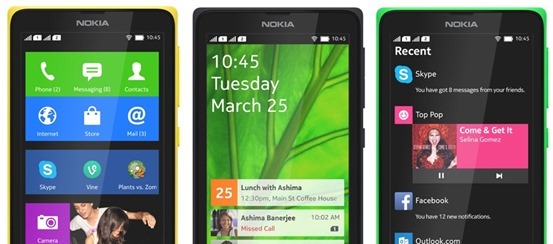
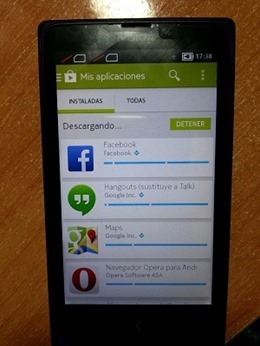
    If you just got your Nokia X and very much like to Install Google Play Store, Google Apps and Google Now Launcher in Nokia X, then are at the right place, this article will guide you on how to root Nokia x and install Google Play store on it. You cannot download apps directly from Play Store on Nokia X as the operating system on the phone is not a ‘pure’ android but is a forked version of android. Therefore, the phone is missing the google apps and it has microsoft apps pre-installed with it. Google Play Store is also replaced with Nokia Android Store.X-screens

    Also: Nokia launched its first android phone series X, X+ and XL at MWC 2014

    How to root Nokia X and install Google Play Store

    The unofficial method is from XDA Developers senior member Kashamalaga. Hence, all thanks to him for bringing this so early.

    This method is not same as conventional rooting and please take care while rooting your phone. Follow all the instructions step-by-step and carefully.

    Requirements

    Steps to follow

    1) You will need a rooted device, So Use Gandalf Exploit included in Framaroot app for rooting.

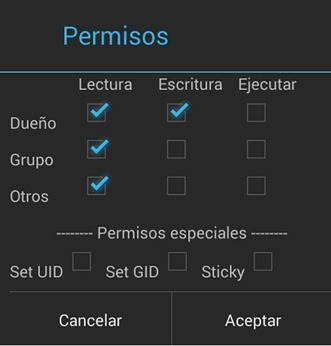
    2) Extract and copy all apks from “NokiaX_Gapps_KashaMalaga_28.02.2014.zip” to /system/app and change permissions for this files using your file explorer.

    3) Set the permissions for the APKs to “read” for all and “write” for just the first one from top, as below.PPBaJre

    4) Reboot your device.

    5) Extract and install as usaul every single needed apk include in “NokiaX_SomeGoogleApps.zip“. (If want to use Google Now Launcher, open it after install it)

    6) Now launch Google Play Store and login to your Google account and you are Done.nokia-x-root

    That’s all, now your Nokia X device has all the Google Apps and by doing this you will be able to download all the app from Google Play Store.

    Love flappy bird ? Read: How to download Flappy Bird on Android and Hack the score !

    For more information and support, you can also check the thread on xda.

    UPDATE: How to root the new v11.1.1 Nokia x update

    • Download the required files click here and extract the files.
    • Enable debugging mode in Nokia by going into Settings.
    • Connect Nokia X to the PC.
    • Now update ADB drivers.
      • Go to desktop on PC
      • Right click on computer and click manage
      • Select Device manager
      • In the list, Nokia X will be listed with a Question mark icon.
      • Right click and select update driver, then select Browse my computer for driver option.
      • Now select the path of above extracted folder, in the folder select driver file.
      • Now drivers are updated.
    • Now Reconnect the Nokia to the PC.
    • Open kingroot app from the extracted folder.
    • Now kingroot will detect Nokia X as Android device. Now root the device using the App.
    • Now your device is rooted.
    • For installing Play Store and apps, follow the steps same as above.

    For more information and support for rooting v11.1.1 Nokia X update, you can also check the thread on xda.

  • Source Code Available To The Public For MS-DOS

    Source Code Available To The Public For MS-DOS

    Amazement, shock! It does appear that Microsoft is truly experiencing significant progressions. Not just have we caught wind of gossipy tidbits around a free form of Windows 8.1, however now, Microsoft has discharged the MS-DOS source code to the overall population. Free AND Microsoft? Weird associates, huh?

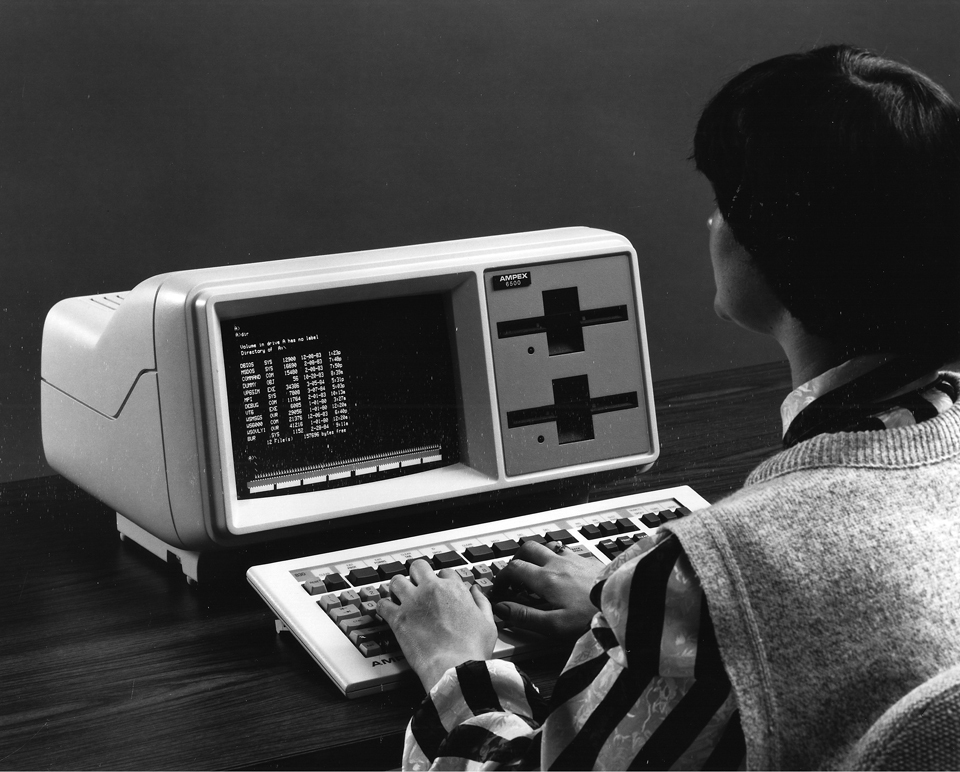
    Ostensibly, MS-DOS is the establishment that Microsoft based its reality on, and I assume nobody truly ever imagined that the organization might make the MS-DOS source code open, however yes, it is not an early trick for April’s Fools Day. Also not just that, notwithstanding the MS-DOS source code, the same thing has been discharged for Word for Windows.

    Particularly, the source codes for MS DOS 1.1 and 2.0, and additionally Microsoft Word for Windows 1.1a are presently available to any individual who needs it. There are, obviously, “runs” to take after. The source codes are under a non-business permit, and re-distribution anyplace online is not permitted.

    Microsoft designer and executive of Research Roy Levin is snappy to highlight exactly how significant this is – not that we don’t understand that, isn’t that right?

    “It’s mind-boggling to think of the growth from those days when Microsoft had under 100 employees and a Microsoft product (MS-DOS) had less than 300KB (yes, kilobytes) of source code. From those roots we’ve grown in a few short decades to become a company that has sold more than 200 million licenses of Windows 8 and has over 1 billion people using Microsoft Office. Great things come from modest beginnings, and the great Microsoft devices and services of the future will probably start small, just as MS-DOS and Word for Windows did.

    Thanks to the Computer History Museum, these important pieces of source code will be preserved and made available to the community for historical and technical scholarship.” 

    In reality, in the event that you contemplate past times worth remembering of MS-DOS, the green font against a dark foundation, and the flickering cursor… that makes one nostalgic, isn’t that right?

    You can look at the MS-DOS source code (and Word for Windows) here.

  • Mobile App Development with Its New Level

    Mobile App Development with Its New Level

    Due to the wide usage of the Internet and related Electronic devices, the platform for Applications are taking into a next level of thinking where mobile Apps are no longer remaining as Mobile Apps with us. Gone are the days when we only have a phone with the purpose of making calls and Texts, then came a time of Multimedia and other related things, the current one is considered to be most sophisticated device in the field of communication called Smartphones.

    With the increasing usage of Apps and numerous technology aspects of Smartphones shown up a way to take it to the next level of Communication called wearable devices. Along with the advancement of Technologies and Apps, the mindset of people is getting improvised and broaden to the level of perceiving things which were unimagined once!

    Now, using the Smartphones are not as flexible as it was once. Tech geeks and majority of the Smartphone users are very much anticipation for the next level of communications and its ways.

    Mobile Apps were developed based on the platform and the nature of the devices and Companies manufacturing it. Because, the Apps developed for Android may not be supported in the devices manufactured by companies doesn’t provide devices for the same.

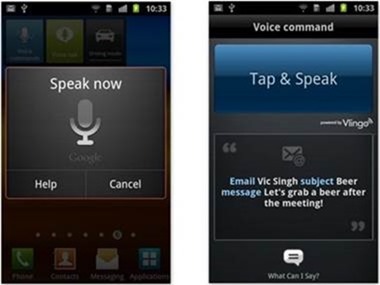
    App developers should explore the ideas of taking the Apps work to the next level by giving more important to voice-command feature. Developing Apps which is a voice – command oriented will be greatly welcomed as the Smartphones are going into the next level of wrist phones and Glasses in the place of phones. Devices with such nature of technologies will expect the Apps with more about Voice-command features in almost all the Apps. It should be developed in a way where more of Voice command should be used rather than Touch or Texting by using the device. This way, the usage of Smartphones will be reduced enormously in real time scenario and the Convenience of using the devices will take its transformation into the next level of easiness. On top of that, people with blindness will be benefited by it to an incredible level.

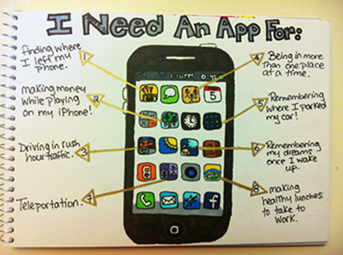
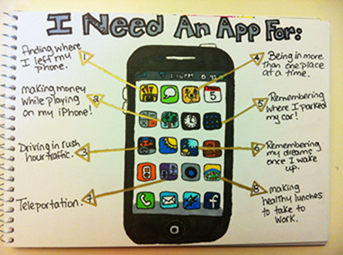
    One Effective way to develop the Apps to fulfill the expectations of users is to do an in-depth research over what the User really wanted in real time from the users’ perspective. An Image below would give an idea as a user simply needs on his phone in terms of Apps.

    clip_image002

    Imagine a feature of Technology, where all you must do is, asking the phone to open up the Apps and send the messages to right contacts or asking App to download the songs and store it in your favorite folder. It is more of “do it on your own” voice command to phones.

    clip_image004

    Siri was one of the initiatives of such in the industry. Developers can see that an example to develop more Apps of that nature.

    If the more sophisticated Apps are not developed in the near future as per the expectation and needs of the users, perhaps, it will create an option to adapt to other devices like Glasses and Wrist watches of Giant companies which will become the killer of Smartphones eventually.

    The Bottom line is, Nature of Mobile Apps should explore its ways to something we have never experienced, but at the same time, the Human mind has perceived in the subconscious mind. Developers must be keen on developing Apps which will have features and usages beyond the level of user expectations to keep a stand for the longest time in the industry.

    The Author Bio:

    Basheer Ahmed is a passionate technical writer, fervently obsessed with technologies. He is working for MSys Technologies as a senior technical content writer. MSys Technology is an innovator in the field of Test Automation and many other emerging technologies such as Storage, Virtualization, Cloud Computing, Enterprise Applications, Embedded Systems and Communications.

    Follow on Google+ ,Facebook, LinkedIn, Twitter

  • Firefox 28 launches With Support For VP9 Video

    Firefox 28 launches With Support For VP9 Video

    The latest version of the Mozilla Firefox web browser has been made available for download.

    The main feature in this release was originally supposed to be support for the Windows 8 Metro mode, but as the mozilla announced, they decided to drop this due to low user involvement during the beta process.

    Without Windows 8 support, the new features in this release are relatively minor. They include support for VP9 video decoding and the OS X notification center, so that notifications from web apps can now appear there. Also new is support for volume control for HTML5 audio and video and support for WebM Opus audio.Elsewhere, support for the spdy/2 protocol has been dropped, while developers gain a handful of new features, including support for the MathML 2.0 “mathvariant” attribute and background threat hang reporting.

    Mac users will find a bit more on offer, including Notification Centre support. Android users will find native text selection, cut, and copy items; more share buttons; and predictive lookup from the Awesome Bar.

    more: Try out the new Future Fox : Australis

    Firefox 29, scheduled for release next month, may be the first to feature Firefox’s new Australis user interface.

    What’s New

    • NEW – VP9 video decoding implemented
    • NEW – Mac OS X: Notification Center support for web notifications
    • NEW – Volume control for HTML5 audio/video
    • NEW – Support for Opus in WebM
    • CHANGED – Now that spdy/3 is implemented support for spdy/2 has been removed and servers without spdy/3 will negotiate to http/1 without any penalty
    • DEVELOPER – Support for MathML 2.0 ‘mathvariant’ attribute
    • DEVELOPER – Background thread hang reporting
    • DEVELOPER – Support for multi-line flexbox in layout
    • FIXED –  Various security fixes
  • Pop Culture Technologies that Came True

    Pop Culture Technologies that Came True

    Technology is moving at lightning speed, and the next generation of Western children will have no idea what it is like to grow up without the ability to constantly be “online”. But for the older generations, we remember the days of poking holes into two empty soup cans and attaching them with a string in order to talk to someone a few feet away.

    We also remember the films and television shows that conceptualized really cool technology ideas that we wrote off as utter malarkey. Here are some examples of when fiction becomes reality:

    Invisibility Cloak

    No matter how old you were when you read Harry Potter and the Philosopher’s Stone, you wanted to get an Invisibility Cloak too. You would be able to get into places you weren’t supposed to go and overhear conversations you weren’t meant to hear – it would be the perfect tool for mischief!

    image

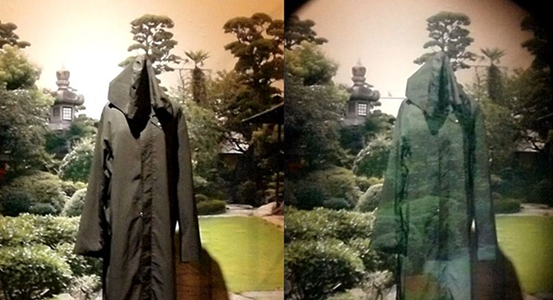
    It’s no longer just a pipe dream: the Tachi Laboratory at the University of Tokyo has developed Optical camouflage using a form of augmented reality, which adds computer-generated content to enhance sensory perceptions. To use this “invisibility cloak” the person who wants to be invisible must wear a special garment made of highly reflective material. A digital camera records what is the behind the subject and then reflects it into a mirror and projects it onto the front of the subject, allowing them to blend in with the background.

    Cloaking created by researchers at the University of Texas at Austin, uses meta-materials to bend light around the subject and return it to its original path. The problem with this method is that it only can be seen from one angle which would be difficult to achieve in natural light. However, it brings us closer to having the real thing.

    Wrap-around Transparent Monitors

    Avatar was one of those amazing films you had to see in theatre. Even if you don’t like 3D films, the way the film used 3D was to add depth of field rather than to throw things at you. It was completely groundbreaking. There is a really cool scene where the camera pans through the office they’re working from and you see the team of scientists and programmers working on a giant transparent screen.

    image

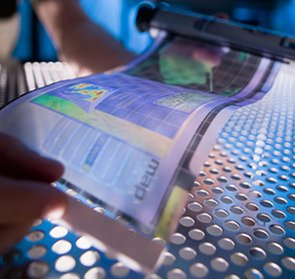
    In 2009, NEC released a model of a curved screen that allowed joining the screens together for a 180-degree (or 360 if you really wanted to) experience. Unfortunately, these monitors are no longer available but similar tech is likely on the way – Plastic Logic is a company that specializes in flexible and bendable displays and Samsung TV released a television that can convert from flat to curved.

    iPad/Kindle

    It’s true: the concept for the iPad had long been imagined well before Steve Jobs presented the idea to the world. In fact, it was British science fiction writer Sir Arthur C. Clarke who described the concept in his 1968 novel 2001: A Space Odyssey.

    He wrote:

    “When he tired of official reports and memoranda and minutes, he would plug in his foolscap-size newspad into the ship’s information circuit and scan the latest reports from Earth. One by one he would conjure up the world’s major electronic papers…Switching to the display unit’s short-term memory, he would hold the front page while he quickly searched the headlines and noted the items that interested him. Each had its own two-digit reference; when he punched that, the postage-stamp-size rectangle would expand until it neatly filled the screen and he could read it with comfort. When he had finished, he would flash back to the complete page and select a new subject for detailed examination…”

    He worked with Stanley Kubrick (director of A Clockwork Orange) to create the film in 1968 in which they produced the first visualization of an electronic pad that allowed users to read the newspaper and other documents. The device, pictured above, was referred to as Newspad. The Apple iPad and the new Kindle fire look an awful lot like it – coincidence?

    Interactive Windshield

    We saw it in Mission Impossible 4: Ghost Protocol – Tom Cruise and Paula Patton driving in the BMW i8 with futuristic user interface that allows you to get directions that are displayed directly on to your windshield. It was multi-touch and highly interactive – another example of augmented reality where a computer adds valuable information to what already exists.

    image

    Technology firm Harman released an augmented reality windscreen in 2013 at the Geneva Motor Show. The screen would provide important information to the driver in a way that is not distracting and can be moved away by swiping your hand. BMW also currently has a head-up display technology in their top-range vehicles that replaces the traditional dashboard by displaying data on the windshield. It isn’t touch screen and it doesn’t have a cool UI, but it’s color coded, interactive and it is on the windshield. 

    Video Conferencing

    It’s impossible to write one of these blog posts without referencing the quintessential futuristic technology film: Back to the Future II. This film takes place in 2015 and in the film older Marty McFly’s boss is Japanese and he meets with him via video conference, which was apparently a very popular thing for old television shows and movies to predict. In the cartoon The Jetsons, they used a giant video-phone system called the Visaphone – though that show was set in 2062.

    Skype was founded in 2003 – well ahead of 2062 and 2015 – and has become one of the most common forms of international communication.

    There are actually a lot of technology predictions Back to the Future II made and got right. The only question is: where is my hover board?!

    About the author

    Verena blogs about gadgets and technology, covering everything from the latest mobile advancements to display technology. When she’s not online Verena enjoys swimming, cycling and travelling the world.

  • LG G Pro 2 – Android v4.4.2 (KitKat) with Quad core 2260 MHz processor

    LG G Pro 2 – Android v4.4.2 (KitKat) with Quad core 2260 MHz processor

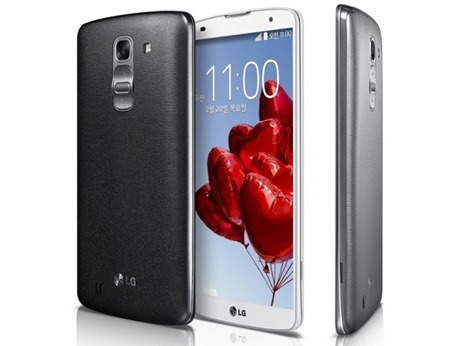
    lg-g-pro-2LG has been coming up with superb devices for a while now. We saw them launch the Optimus G, Nexus 4, G Pro, G2, Nexus 5 and various other devices that impressed us. This Korean manufacturer has working hard to give tough competition to the market leader. The recently launched LG G2 is a powerful device which brought some new hardware and software features with it. Now they have showcased another new device which would go against the popular phablets in the market. This new device is LG G Pro 2, the second iteration of their LG G Pro phablet.

    This device is slightly bigger than the previous device and has got some new hardware and software features. They have put the powerful Snapdragon 800 chipset in it that we saw on the LG G2 and Nexus 5. Also they have increased the display size and battery capacity over the G Pro. The camera has also been improved and you can do lot more than ever. So here is a closer look on this upcoming device.

    Design

    The device measures 157.9 x 81.9 x 8.3 mm and weighs 172 gms, exactly the same as G Pro. You can see already from the numbers that the device is huge, even bigger than the Samsung Galaxy Note 3. Using the device with one hand is something we humans can’t do. While the G Pro had a physical home key up front like older LG devices, this one follows the scheme we saw on the G2. The power and volume controls are on the back of the device. You can easily operate these controls using your first finger once you get accustomed to this setup.

    The build quality is pretty good though now we would love to see them use some premium materials. The device will be available in three colours: white, silver and titan. Just like the G2, the G Pro 2 has got a very slim bezel around the display. The display measures 5.9 inches measured diagonally. The LG logo sits below the display where the physical key used to be on the G Pro. Overall the design is neat and the device surely feels premium.

    Display

    The device, as we already said, has a 5.9 inch display. It is an IPS LCD display like on many other high end LG devices. It has a resolution of 1080 x 1920 which gives it a pixel density of 373 pixels per inch. It used to be almost 400 pixels per inch on the G Pro due to smaller display size. Being an IPS display, it has got superb colour replication and viewing angles. Sunlight readability should be good too as it has got decent brightness. Watching high definition videos would be an absolute treat on this device. To protect the display from scratches, they have gone for gorilla glass 3 protection on the display. So even if you put keys and coins in the same pocket as your phone, you won’t end up with scratches on the display.

    Hardware

    Like the Nexus 5 and G2, this device runs on the Qualcomm Snapdragon 800 chipset. This is one of the most powerful chipset powering many popular devices. The quad core processor runs at a clock speed of 2.26 GHz. The graphics are handled by an Adreno 330 GPU and it has got 3 GB of RAM. You get the storage option of 16 and 32 GB with a micro SD slot that can house storage up to 64 GB. They have switched the 3140 mAh battery in G Pro for a slightly bigger 3200 mAh battery in this one.

    For connectivity you get the usual options like USB 2.0, GPRS, EDGE, 3G, 4G LTE, Wi-Fi, Bluetooth 4.0 and Infrared.

    Camera

    The device has got a 13 megapixel camera. While the resolution is same as the G Pro, there have been a number of other improvements. It has got optical image stabilisation with the lens assembly mounted on springs. The competition is stiff with all the rivals boasting high end camera specs so they would have to live up to the expectations. You get the usual goodies like face detection and high dynamic range photography. They have added something called ‘magic focus’ which allows you to alter the depth of focus. The upgrade here is in the video section. Instead of 1080p, you can record videos in 2160p at 30 fps. You can also record slow motion videos at very high frame rate. It supports 1080p videos at 60 fps and 720p videos at 120 fps.

    They have done something fresh to the front camera as well. With the 2.1 megapixel front camera, they have added something to shoot selfies in dark. You can reduce the size of viewfinder and it would put a white border around it. This would illuminate your face in dim lit environments.

    Software

    The device runs android 4.4.2 Kit Kat with the LG UI on top of it. This is pretty standard but they have added some new features like the Knock Code. Some LG devices previously got the Knock-on feature which allowed people to turn on the display by tapping on it twice. On this device, the display is divided into four zones and you can set a combination to tap on the display. This would turn on the display and unlock the device as well. Also there is content lock which can be used to password protect certain files, photos and videos. There is also a mini view like on the Samsung Galaxy Note 3 which scales down the display for one handed operation.

    Verdict

    This device seems promising and with all the new software features, a tough rival to the Galaxy Note 3. We are yet to see when this device makes it to our market. If they price it well, it might sell in good numbers.

    Author Bio: The article has been written by Kundan Kumar, who is passionate about technology. He’s working at 91mobiles.com and writes about the latest in the tech domain, right from devices to innovations. You can follow me on Twitter