Category: Featured

  • Alcatel One touch IDOL X+ at Rs 16,999 only on Flipkart

    Alcatel One touch IDOL X+ at Rs 16,999 only on Flipkart

    Alcatel_One_TouchIdolX India

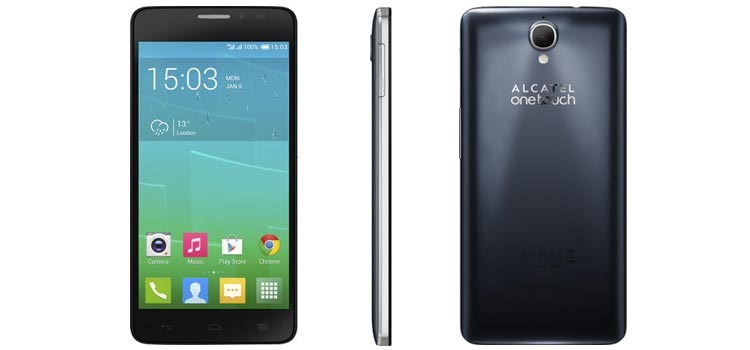
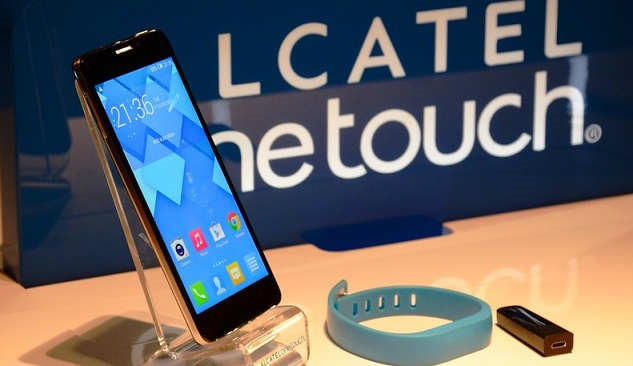
    Alcatel launched their new smartphone IDOL X+ for Indian market in a ‘Motorola kinda’ partnership with Flipkart.com. The device has a price tag of Rs.16,990 which includes a wearable fitness tracker known as Boomband and JBL headphones. It will be available from June 3 onwards.

    In the next four months, we will launch 5 smartphones and 2 feature phones. The Indian market has a lot of potential and is an important one for us,” Praveen Valecha, regional director said.

    The IDOL X+ sports a big 5-inch Full HD screen with a resolution of 1920×1080, and pixel density of 441ppi. The 5 point multi-touch capacitive display has a layer of Gorilla Glass 2 protection. The dual SIM handset is equipped with a 2GHz Octa-core MediaTek MT6592 chipset with ARM Mali450 GPU. It also features 16GB of built-in memory. With a 13.1-megapixel autofocus rear camera with LED flash and a 2-megapixel front-facing camera.

    Display offers 170-degree viewing angle and phone is powered by Android 4.2 (Jelly Bean) and not on Kit Kat. The device is 8.1mm thick and sports a brushed metallic look. A 2500mAh battery suggesting up to 27 hours of talk time and 650 hours of standby time on 2G and 16 hours of talk time and 600 hours of standby time on 3G.

    idolxplus

    The wearable BoomBand accessory is Bluetooth-enabled device which tracks all your workouts and exercise activity. It also acts as an alarm in case you leave the phone behind. It is only compatible with IDOL X+ for now and is not available separately in the market.

    Alcatel One Touch IDOL X+ Specifications

    • 5” Full HD IPS display (441 ppi)
    • 2GHz Octa Core processor
    • 2 Gb RAM
    • 16 GB internal memory
    • 13.1 Megapixal Full HD main camera
    • 2 Megapixal front camera
    • Dual Sim Supprot
    • 2500 mAh battery
  • Philips re-enters Indian handset market with three new smartphones

    Philips re-enters Indian handset market with three new smartphones

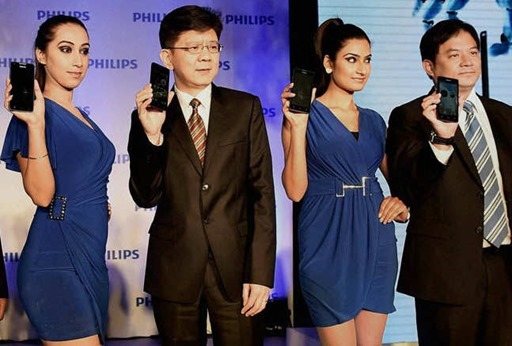
    Philips-phone-launchPhilips has re-entered the Indian mobile phone market with three Android smartphones and a feature phone aiming to be in top 6 among Indian mobile markets.

    Philips launched three Android phones, named Xenium W6610, W3500 and S308 priced at Rs 20,650,  Rs 16,195 and Rs 8,290 respecitvely.. All three smartphones run on Android 4.2 (Jelly Bean) operating system and support dual-sim functionality. Philips also launched a feature phone, the E130, for Rs 1,960.

    Sang Fei said, “We are glad to enter the Indian market with the latest models of Philips mobiles that are designed to suit the requirements of Indian consumers. With the launch of Philips mobile in India, we aim to offer best-in-class mobile experience at an affordable price.”

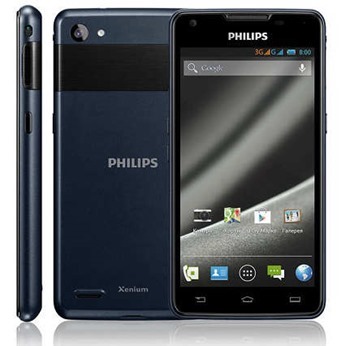
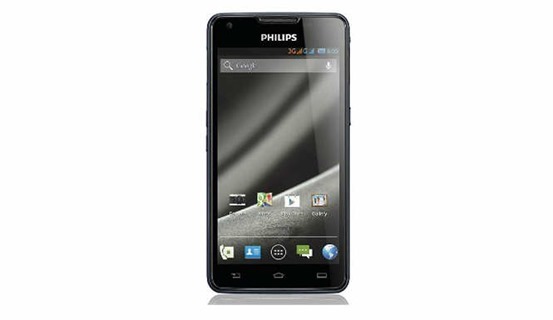
    The Xenium W6610 is the topmost handset launched by Philips. It sports a huge 5300mAh battery. Alongwith, a 1.3 Ghz quad core processor, Android 4.2 Jelly Bean OS, a 5-inch qHD IPS display with a resolution 540×960 pixels, and 1GB RAM.Philips-Xenium-W6610

    Xenium W6610 specifications

    • 1.3 GHz Quad Core Processor
    • 5 inch qHD IPS display (540×960 pixals)
    • 1 GB RAM
    • 8-megapixel autofocus rear camera with LED flash and CMOS sensor
    • 2-megapixel front camera
    • 4 GB internal storage with expandable size upto 32 GB
    • Dual Sim Support

    The mid range W3500 also have 5 inch FWVGA touchscren but 480×854 pixels resolution lower than W6610. It runs on Android 4.2 Jelly Bean but has a 1.3 Ghz quad core processor and 1 GB RAM. With a bigger 2200 mAh battery. The Philips W3500 comes with 5–MP rear camera along with a LED flash and 2MP camera in the front , dual SIM support, WiFi, Bluetooth, and GPS.philips-W3500

    Philips S308 is the most affordable among the three smartphones. S308 phone has a 4-inch WVGA display, 512MB of RAM and 4GB of internal memory with a microSD card slot. The phone has also equipped with a 5MP camera at the back and 0.3MP camera in the front. It runs on 1GHz dual-core MediaTek 6572M processor and has a 1,400mAh battery.philips-S308

    The feature phone of Philips that is E130, also features dual-SIM support and a digital camera. It supports features like FM radio, MP3 player, and an expandable memory card slot for a micro SD card of up to 32GB. It is priced at Rs 1,960.

  • Flipkart acquires Myntra for potential $300 million deal

    Flipkart acquires Myntra for potential $300 million deal

    flipkart-myntraFlipkart, India’s largest e-commerce firm, is buying rival Myntra,which specializes in fashion and casual lifestyle products in the largest-ever deal in the fast-growing Internet business, as Flipkart seeks to extend its lead over rivals and boost its valuation ahead of a potential initial public offering.

    Though the companies didn’t disclose the merger amount at a media briefing held on Thursday, the long-awaited cash-and-stock deal is likely to value online fashion retailer Myntra at more than $300 million, The deal is hugely significant, primarily because it combines two rivals into a bigger e-commerce player in India, Flipkart co-founder Sachin Bansal call that their operations will remain separate.

    Myntra sells products from over 650 brands like Nike, HRX by Hrithik Roshan, Biba and Steve Madden and clocked revenue of about Rs 1,000 crore in the previous financial year. Myntra has set a goal of generating Rs.20,000 crore in gross sales by 2020, for which the site would need more than $200 million in cash, co-founder and chief executive Mukesh Bansal said.

    Bansal will head the fashion business of both Myntra and Flipkart, and Myntra will operate as an independent entity and retain its website, while Flipkart will continue selling apparel on its site. Flipkart is currently India’s largest e-commerce website offering over 15 million products, with over 18 million registered users and 3.5 million daily visitors. It has raised over $540 million since it launched in 2007.

    Flipkart’s valuation jumped to $2-$2.5 billion following the Myntra deal, one person with direct knowledge of the matter said.

  • Get ready for Google Translate on smartphone’s camera

    Get ready for Google Translate on smartphone’s camera

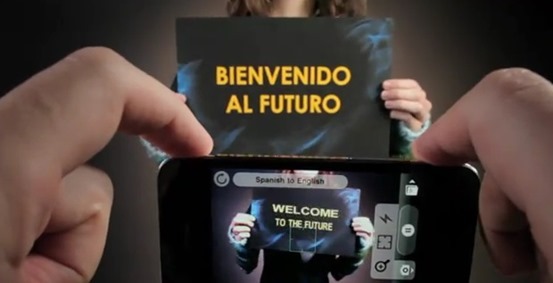
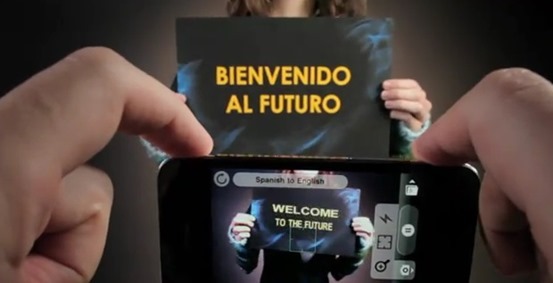
    Today, Google announced that it had acquired Quest Visual, the company who owns the Word Lens app which offers camera-based translation.wordlens1

    With the acquisition of Quest Visual, Google seems to utilize this technology for Google translate in the future. The Word Lens app developed by the company translates a text captured through the device camera into a language of your choice which is available on iOS, Android and Google Glass.

    What is Word Lens ?

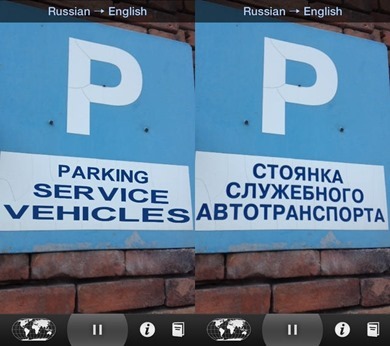
    Word Lens uses the built-in cameras on smartphones and similar devices to quickly scan and identify foreign text (such as that found in a sign or a menu), and then translate and display the words in another language on the device’s display. The words are displayed in the original context on the original background, and the translation is performed in real-time without connection to the internet. For example, using the viewfinder of a camera to show a shop sign on a smartphone’s display will result in a real-time image of the shop sign being displayed, but the words shown on the sign will be the translated words instead of the original foreign words.

    “By joining Google, we can incorporate Quest Visual’s technology into Google Translate’s broad language coverage and translation capabilities in the future”

    This is very handy for reading foreign language street signs or messages on business store fronts. The app is primary for going between English and a second language, and vice versa, as language packs tha are now free, after to the acquisition by the giant are all combinations of English and another language: Russian, Spanish, French, Italian, German, or Portuguese. The app also works without any kind of network signal, which is a a good news for those travelling.

    word_lens_ios

    Quest Digital’s app is one of the more compelling applications of virtual reality we’ve seen. Turning a foreign reality into a familiar one through the screen of a smartphone is pretty powerful stuff.

    The price Google is paying for Quest Digital has not been disclosed. Quest Digital, for its part, says it’ll be giving away its language packs as it transitions to Google.

    Quest Visual was founded in 2009, and the four-person team currently operates out of San Francisco. Quest Visual’s first product Word Lens 1.0 was released on December 16, 2010.

  • Best online storage and cloud applications for Android

    Best online storage and cloud applications for Android

    cloud storageWhen you start thinking about contemporary trends in the smartphone market, it is obvious that things are changing even more rapidly than they used to (and that seemed extremely fast). The newest craze is storing all sorts of data online, which has become known as cloud. To make our communication easier and more productive, prudent programmers and IT engineers started creating online hard disks, which enable all of us to keep our computers clean and fast working and makes our android-oriented mobile phones moving platforms for accessing the data we have stored online.

    The cloud storing providers are becoming more competitive, however. Many companies and individuals have shown interest for keeping their documents, files and whole business data online, which has lead to numerous service-providing companies, as well. The increasing number of cloud providers will definitely make the whole concept spread and expand, leading to improvements and a wider array of options for users, especially for business users.

    Use Box – think outside the box

    clip_image002

    It seems that the word box has become strongly connected with the notion of cloud. Apart from Dropbox, which has become one of the most famous cloud providers, another important provider with growing popularity is Box. Although many people still opt either for Dropbox or Google Drive, many new providers are arriving and Box is definitely among those whose name needs to be mentioned. It is popular with both individual users and business entrepreneurs, because it offers the initial space of 5 GB free storage, as well as the options of sharing data with your fellow Box companions, together with making links for sharing data from your cloud account outside Box. If you decide to upgrade the free version, you will also be able to increase the amount of storage space and get the feature which will enable you to see who has previewed or downloaded your data.

    Cubby – on the move in a cube

    clip_image004

    While Box was named after the idea of a box, can be considered its close relative, since its name is derived from the word cube. The essence is the same – you keep your documents, files, photographs, videos and music online and you can leech on your account from any part of the world where you have access to the Internet. Cubby offers 5 GB of free online storage space, as well. Wherever you are, you can edit and sync your data and share them with others. Cubby has the option of creating a special Cubby folder on your desktop and you can upload any folder or file to your cloud Cubby account just by dragging the icon to the Cubby folder on your desktop. Your data still remain in its original place, but now there is also a Cubby backup version of them.

    Crucial – on-the-go essential

    clip_image005

    As it has already been stated in this text, virtual hard disks, i.e. clouds are becoming very popular with businesspeople. The concept of having all the important data in one place and being able to access them from any spot on the world and from any device turns out to be extremely inviting for business people. This device has made the statement “Time is money” truer than ever before. When discussing most adequate cloud providers, Crucial is one of those who cannot be forgotten. They are focused on Australian market and provide a thorough and high-quality service via the Blaze virtual private server. Crucial also offers its own Crucial Mobile app by which you can launch, reboot or shut down your account on cloud. Also, you can share, edit and change any data that have been uploaded onto your account.

    IDrive

    clip_image007

    Although it has an “I” in its name, the IDrive cloud provider does not mean that it is made only for iPhones, but it is one of the most popular smartphone applications. It serves as a perfect backup app. You can easily export data from your mobiles to it, such as contacts, photos, various calendar arrangements and appointments and other documents that are important to you or your business. You can also make different files in which you can group your business partners, their contacts, important information about them etc. IDrive offers 5 GB of free cloud space and also backs up any data from your computer you wish to store on it.

    Author’s bio: Dan Radak is VPS security and Hosting generaly specialist. Currently employed as a consultant in couple of Web Hosting companies. In his free time, he likes fishing or making homegrown beer. You can reach him on Twitter.

  • Moto E: New Entry-level phone from Motorola

    Moto E: New Entry-level phone from Motorola

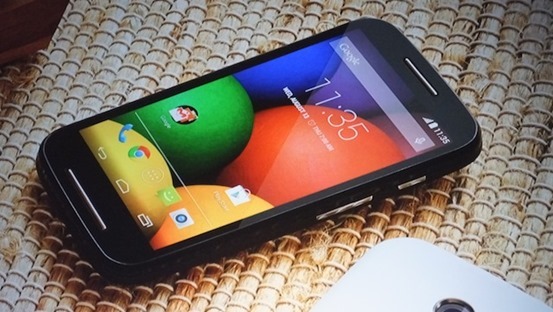
    moto-e-phoneMotorola’s Moto G is now one of the best-selling smartphones across the globe. The handset is popular due to its price range, its high performance and unbelievable hardware specification. Motorola launched a new phone for its Moto series, with an attractive price and added value for money. A phone that’s “made to last and priced for all”, the Moto E makes a great first impression. Its 4.3in display is sported in a smooth soft-touch curved chassis much like its big brother, the Moto X, and it immediately gives the phone a high-end feel that’s great to hold in the hand. Naturally, the Moto E isn’t quite as slim, as its thickest point measures 12.3mm, but this tapers to a snug 6.2mm at the edges.

    Moto G : The Budget Smartphone review

    Encased in tough Gorilla Glass and interchangeable multicoloured covers, the new Moto mobile phone runs Android 4.4 KitKat. A 1.2GHz dual-core Qualcomm Snapdragon 200 processor is backed by 1GB of RAM, with an Adreno 302 400MHz single-core graphics chip.

    The Moto E has a screen resolution of 960×540 pixels for a density of 256ppi, which is lower than the Moto G’s 326ppi. It also has a 5-megapixel camera on board. The Moto E packs a 1,980mAh battery and 4GB of storage for your music, movies and photos.

    Moto E Specs:
    • Android v4.4 (KitKat) OS
    • Wi-Fi Enabled
    • FM Radio
    • 1.2 GHz MSM8x10 Dual Core Processor
    • Dual Standby SIM (GSM + GSM)
    • 5 MP Primary Camera
    • 4.3-inch Touchscreen

    Motorola also revealed the 4G LTE-capable version of the Moto G. It features a microSD card slot, with support for cards up to 32GB.

  • Is Technology Really Changing Education?

    Is Technology Really Changing Education?

    Whenever it is asked how technology is going to change education, the first thing that comes to majority of people’s mind are mobile devices such as iPads, notebooks and etc. The reason people think of these devices is that they believe in the near future tablets and computer devices will replace books. Perhaps they are not wrong, as most of the educational institutions in Pakistan have introduced mobile devices in their campuses with the same aim. However, future of technology in education is not just about introducing students to latest tablets and computers or using them as replacement for books and note books. Don’t’ take me wrong. I am certainly not against tablets or other mobile devices. In fact, I am one of the tech geeks who love to get their hands on a new device as soon as it hits the market.

    clip_image002

    In spite of it I believe that mobile devices are not the future because it is the nature of technology that it changes very rapidly. Thus, it will be a challenge for institutions and stakeholders to make the new devices available to teachers and students every so often. More importantly, tablets and other mobile devices are just tools which are used by students and teachers to gain education, which has a limited scope. Future of technology, on the other hand, means unlimited possibilities or achieving something that was not achievable before. For instance giving access to anyone, anywhere for both learning and collaboration. It means that future educational institutions will not only have usual cohorts of pupils, but they will also have online students, who are accessing the class by sitting in another country.

    Actually, things have already started moving in this direction, as massive open online courses (MOOCs) are swiftly gaining popularity all over the world. These massive open online courses have really made the world a global village, as they allowed anyone from anywhere in the world to gain high quality knowledge without breaking any geographic barriers. The emergence of MOOCs has increased the importance of smartphones, tablets and computers as well as cloud. The cloud is more like SkyDrive that has enabled students and teachers to find their required data, information like course material, lectures and grade work at any time and from anywhere by simply accessing it. Above all, the MOOCs are offering quality education at very low prices, which is more like a rare commodity that is hard to find now a days.

    clip_image004

    Now that is what I call future of technology that has today completely change the way we use to receive education. It is because of this revolution that now even people in Pakistan can gain international certifications without spending a single penny on visa or passport. Thanks to ninthd (9th D), a Lahore based private concern that has launched international certifications in Pakistan for the very first time. In partnership with UKCET and iCarnegie Global Learning that is a subsidiary of prominent US University Carnegie Mellon.

    These fast track training programmes will be delivered in blended model. It means students can take online lectures and access course materials at anytime from anywhere by simply using tools like smartphones, tablets or PCs. Whereas for collaboration with international and local students small satellite campuses or learning hubs will be setup by ninthd in different parts of Pakistan. On top of it, ninthd has offered economically viable skills (EVS) programmes at unbeatable prices, thanks to technology.

  • Firefox 29 redesigned with Australis

    Firefox 29 redesigned with Australis

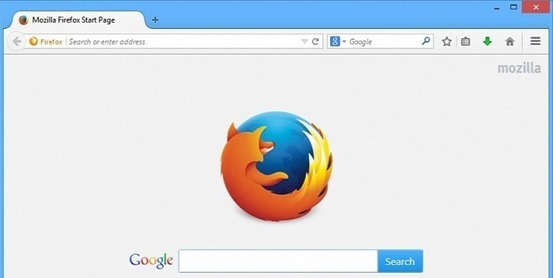
    Australis is one of the most important redesigns in the history of Firefox, as Mozilla has redesigned its browser with a whole new look after a long time. mozilla-firefox-29

    Firefox customization options now have the ability to drag and drop features and tools to easily accessible places, eg. for checking your RSS feeds instantly, or moving the new tab button..

    These customization options also applied to the Firefox add-ons you can download so whether you want to scrap the default options and use just your Add-ons.

    To use this mode, just head to the menu, then choose Customize. You can position your favorite shortcuts to the area directly right of the search box or by clicking on the drop down menu, identified by three horizontal lines on the far right of the toolbar.

    The bookmark manager icon has been moved next to the bookmark star so it’s easier to add the current page as a bookmark in one click.

    Other new tweaks include an onboard tour to help users navigate through the new interface and a new gamepad API, allowing a gamepad to be used for web gaming.

    New Features

    • A set of new improvements to the Firefox user interface
    • An interactive onboarding tour to guide users through new interface changes
    • A redesigned and improved customization mode
    • The ability to set up Firefox Sync by creating a Firefox account
    • Gamepad API finalized and enabled
    • Malay [ma] locale added
    • navigator.plugins is no longer enumerable, for user privacy
    • Clicking on a W3C Web Notification will switch to the originating tab

    • ‘box-sizing’ (dropping the -moz- prefix) implemented

  • Motorola aiming high with latest MOTO X

    Motorola aiming high with latest MOTO X

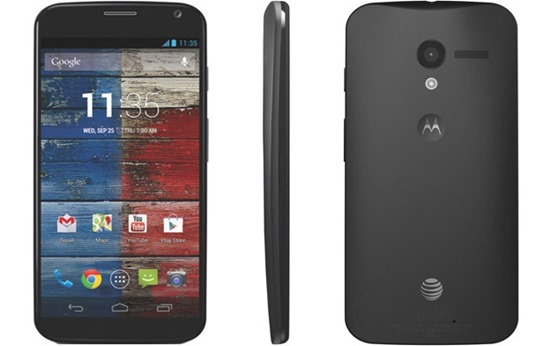
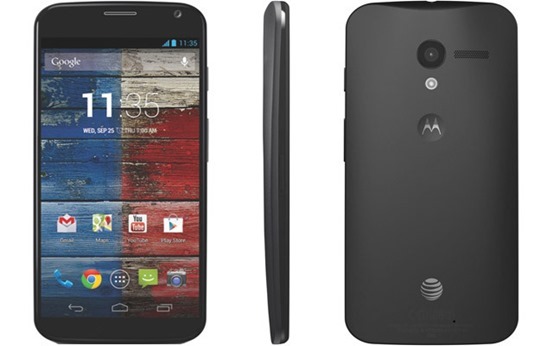
    After tasting a huge bite of success in the form of Moto G, Motorola has launched its second smartphone in the Indian marketplace. The launch of new smartphone naming as Moto X, is a very brilliant step by the manufacturers to conquer the mid-budget smartphone segment which is currently ruled by Samsung Galaxy Series. The Moto X is smartly priced at Rs. 23, 999 for the 16GB variant, which makes it a tough rival to various popular and best selling smartphones including the Samsung Galaxy S3, Samsung Galaxy Mega and recently launched Samsung Galaxy Grand 2.Moto-X

    Moto X boasts a very fresh and unique look. The look & feel of this smartphone is well enough to make you stand different in the crowd. This smartphone targets the young Indian buyers, who want to look stylish and want to own stylish & vibrant gadgets. With the launch of Moto X, Motorola seems aiming very high in the Indian market. A huge success in the Indian marketplace will directly help the manufacturers in expanding their reach on the global level.

    Moto X sports a brilliant 4.7-inch AMOLED Capacitive Touch Screen display, which is capable of producing a HD resolution of 720 x 1280 pixels at a rate of 312 ppi. It is protected by Corning Gorilla Glass and also boasts Active Display feature. This smartphone is powered by a Dual Core Krait Processor, clocked at 1.7GHz, and is coupled with Adreno 320 GPU and 2GB of RAM. Moto X runs on Android 4.3 Jelly Bean operating system, which can be updated to latest Android 4.4 KitKat OS.

    Moto X houses a 10 Megapixels rear camera featuring LED flash, HDR, face detection, touch focus, Panorama, Geo-tagging and more. It also packs a 2 Megapixels front camera for video calls. You can record 1080p Full HD videos with the rear camera. Moto X is available in two variants boasting 16GB & 32GB of internal memory, but both of them lack an external MicroSD card slot.

    The connectivity features on Moto X includes 3G, GPRS with EDGE, Wi-Fi, WI-Fi Hotspot, DLNA, Bluetooth 4.0 with A2DP, EDR, LE, GPS with A-GPS, GLONASS and more. This smartphone is fuelled by a 2200mAH Li-ion battery, which promises up to 576 hours of stand-by and 13 hours of talk time.

    Also Read: Moto G : The Budget Smartphone review

    Moto X is a very brilliant package for those buyers, who are looking for a well finished, stylish and vibrant smartphone which is powerful in terms of hardware specifications as well. The combination of processor & RAM on Moto X is well enough to run huge applications and HD games very easily. If you love clicking pictures on the go, the rear camera of 10 Megapixels on Moto X will help you in capturing your moments in a better way.

    The only issue with Moto X we found is the absence of external MicroSD card slot. However, if it doesn’t really matters for you, go ahead and making Moto X your next buy.

    Author Bio – The Author have great interest in writing about technology and handset reviews. Currently he is working with 91mobiles.

  • Best android apps to overcome the iPhone’s Craze

    Best android apps to overcome the iPhone’s Craze

    Partly due to the Apple’s strict guidelines and partly due to Google’s open approach, presently Android is ruling the app market. Some of the Android apps offer functionality that your iPhone and iPad can’t have (at least not for now). There are many amazing things only an Android app can do and is missing on an iOS device. 4 such amazing apps are explained below. Read them and know for yourself.

    AirDroid

    clip_image002

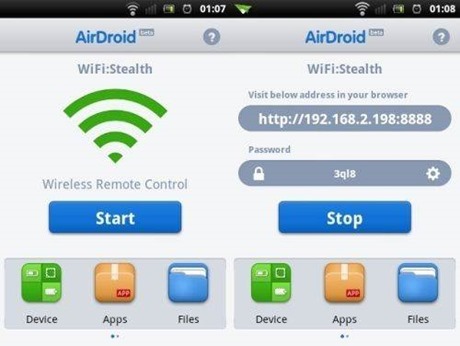
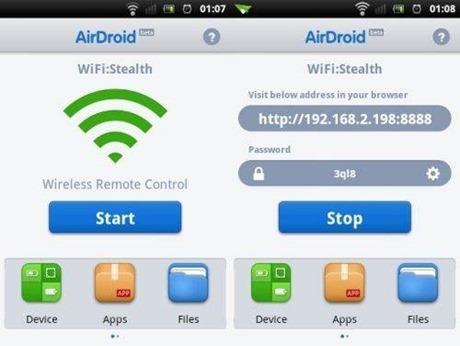
    Airdroid is free software that supports wireless transfer of files to a computer. Not only this it help in maintaining files, ringtones, contacts, images, videos, music and more.

    Key features:

    • · Works on Mac, Windows, Linux and Chromebook
    • · Receive and send SMS – individually or in groups
    • · View and manage photos on Android. Transfer them between computer and android
    • · Play and manage music on android. Transfer them between computer and android
    • · Export and import apps
    • · Export and set any ringtone
    • · Supports flashlight. View through both front and back camera
    • · Push url to Android and open it with Android Browser
    • · Share clipboard content between Android and computer
    • · Requires Android 2.2 and up
    Cover

    clip_image004

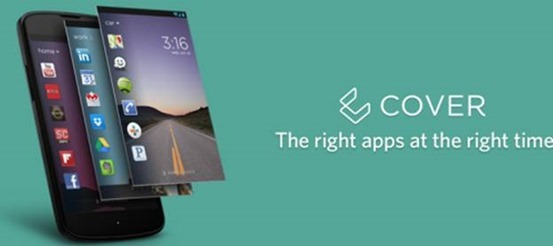
    No more hunting for the required app on the various screens you have on your smartphone. Cover puts the app required by you automatically on your lock screen for easy access whether you are at home, office or car. It makes a kind of geofence around the places you visit.

    Key features:

    • · Allows app switching
    • · “Peek” feature allows viewing apps from the lockscreen
    • · Have different ringtones or ringer volumes
    • · Have separate wallpapers for home, office or car
    • · Requires Android 4.1 and up

    Tasker

    clip_image006

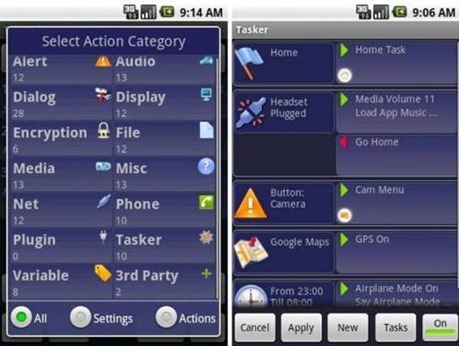
    Tasker carries out some tasks on the basis of contexts such as date, time, event, location, gesture and application in pre-defined profiles or in home screen widget.

    Key features:

    • · Passcode-lock application
    • · Alter home icons and wallpaper every day or in a specific location
    • · To return to the home screen: turn the phone upside down, turn 90 degrees to the left and back to toggle speakerphone during a call
    • · Zip/unzip file data on the fly
    • · Display a pop-up when an SMS arrives
    • · Verify battery levels to a file or SD card
    • · Record automatically you say over the phone to SD card
    • · Create home widget start wireless settings dialog, send an SMS with your GPS location.
    • · It supports Android 2.3 and above.
    Smart launcher

    clip_image008

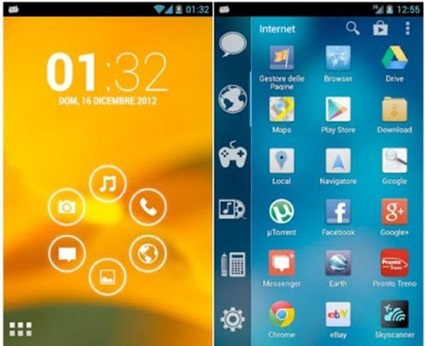
    Smart launcher has minimalist design and user friendly user interface which allows you to launch any applications in a few keys.

    Key features:

    • · Customizable lock screen with lot more colors
    • · Live wallpaper support
    • · Supports every screen and device
    • · Fast search
    • · Easy access to apps information
    • · Hide any app by long pressing an app, then selecting menu – hide.
    • · Widget (PRO version only)
    • · Drawer organized by categories
    • · Change single icon in the drawer
    • · Ready to use without special configurations
    • · New release compatible with API
    • · Requires android 2.1 and up

    Do you know any iOS app that does what these apps do? I am sure “no” is the answer. Install them on your Android devices today.

    Author Bio:

    Simon is a Mobile app developer by profession and writing-enthusiast at heart. He mainly covers topics related to Technology, Android and iOS Apps, and now days he is passionate to cover and write reviews or issues faced by iPhone and android application development services. He prefers and loves to read about the Changing technology trends and review them of his own.