Category: Featured

  • Mark your Calenders for Windows 8.1 Release

    Mark your Calenders for Windows 8.1 Release

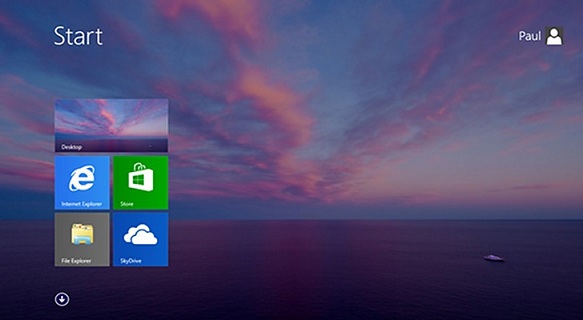
    Windows 8 users should circle October 17 on the calendar. On that day at 7 a.m. ET / 4 a.m. PT Microsoft will release Windows 8.1 as a free upgrade or download through the Windows Store. A day later on October 18, the new version of the operating system will also be available at retail stores and on new devices.

    The release of Windows 8.1 comes almost a year to the date after Microsoft released Windows 8 and the ARM-based Surface RT tablet.

    Senior marketing communications manager Brandon LeBlanc blogged the news on the official Blogging Windows blog: “It’s very exciting to be delivering Windows 8.1 to consumers just before Windows 8 celebrates its 1-year anniversary,” LeBlanc said.

    “Windows 8.1 brings many improvements in areas like personalization, Internet Explorer 11, search which is powered by Bing, built-in apps including a few new ones, an improved Windows Store experience, and cloud connectivity with SkyDrive (and much more) that people will enjoy,”

    LeBlack said.

    First Look at Windows 8.1 with Start Button

    Announcing the news, LeBlanc rehashed the rather hollow Redmond party line that Windows 8.1 “continues the vision that began with Windows 8.” In reality, Microsoft’s been forced to take a step back by re-introducing features familiar to users of Windows that were dumped or hidden in Microsoft’s rush to touch on Windows 8.

    That rush cost Microsoft some sales, as customers dodged the “unfamiliar” look-and-feel of the new operating system.

    Intrigued? Incredulous? Impatient? Just plain interested? Microsoft’s already offering a preview version of the Windows 8.1 update for those daring souls who don’t mind delving deep into unfinished software.

  • Pirate Bay Releases ‘Pirate Browser’ to fight Censorship

    Pirate Bay Releases ‘Pirate Browser’ to fight Censorship

    _69140121_birthdayThe Pirate Bay is taking a stand against the increased censorship efforts it faces in several European countries. On its 10th anniversary the infamous BitTorrent site is releasing its “Pirate Browser,” a fully functional web browser that allows people to access The Pirate Bay and other blocked sites just fine. The current release is Windows only but Mac and Linux versions will follow soon.

    The Pirate Bay is arguably the most censored website on the Internet.

    Courts in the UK, the Netherlands, Italy and elsewhere have ordered Internet providers to block subscriber access to the torrent site, and more are expected to follow.

    Up until now The Pirate Bay has encouraged users affected by the blackout to use proxy sites. However, on its 10th anniversary they are now releasing a special “PirateBrowser” which effectively bypasses any ISP blockade.

    “It’s a simple one-click browser that circumvents censorship and blockades and makes the site instantly available and accessible. No bundled ad-ware, toolbars or other crap, just a Pre-configured Firefox browser,”

    The Pirate Bay explains.

    PirateBrowser works like any other web browser and comes pre-loaded with several bookmarks for blocked sites, which aside from The Pirate Bay includes EZTV, KickassTorrents, Bitsnoop and H33T.

    The browser also lists the alternative .onion addresses for both TPB and EZTV as backups to access these sites.

    The Pirate Bay is not alone in its efforts to keep the Internet open and accessible. The Obama administration has spent millions of dollars on similar projects allowing citizens of oppressed regimes to access blocked websites, albeit for different reasons.

    In theory, this will allow sites to exist and update even without having a public facing website. As a result, it will be virtually impossible to block or shut them down. The first version of this new software is currently being tested but there is currently no firm launch date. More on that later.

  • Firefox 23 arrives with new logo and network monitor

    Firefox 23 arrives with new logo and network monitor

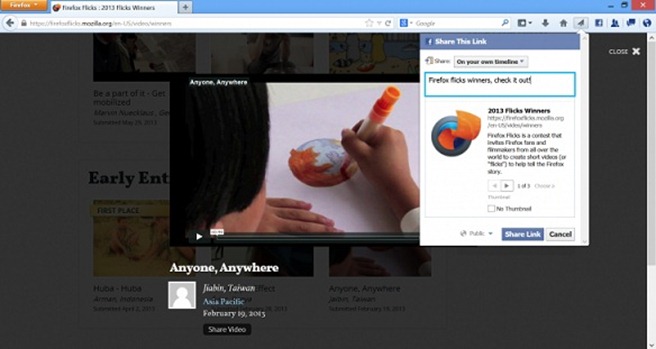
    firefox_logo-newMozilla today launched Firefox 23, which adds a couple of interesting features that extend the browser’s capabilities beyond just displaying websites. On the desktop, Firefox recently added the ability to integrate a number of social sites like Facebook, Cliqz and Mixi or new sites like msnNOW into a persistent sidebar in the browser. Now it is expanding this feature by adding a share button to the browser toolbar, too.

    This feature currently works with Facebook Messenger for Firefox and Cliqz and, as the Firefox team notes, allows you to “post an interesting article to your profile, share a recipe with your friends or send an idea for a gift in a private message or email, all without leaving the Web page you are visiting.”

    The new desktop version was available on the organization’s FTP servers last night, but that was just the initial release of the installers. Firefox 23 has now officially been released over on Firefox.com and all existing users should be able to upgrade to it automatically. As always, the Android version is trickling out slowly on Google Play.

    The biggest addition is no doubt the new share button and panel for the browser’s Social API. In short, developers can let users share content with friends in one click (Facebook users, for example, can use it to share content directly from Firefox, regardless of where they are on the Web).Facebook-Screenshot-730x388

    Next up is the mixed content blocker, which prevents non-secure (HTTP) content on a website from being read or modified by attackers by blocking the non-secure content from being compromised. In case you’re wondering, mixed content occurs when a webpage containing a combination of both secure (HTTPS) and non-secure (HTTP) content is delivered over a secure data channel to the browser. Here’s how it looks in action:

    Also in this release, developers can finally use the new Network Monitor. It breaks down individual website components, highlighting how long it takes for each to load.


    There are naturally other Firefox 23 features worth noting; here’s the official changelog:

    • NEW: Mixed content blocking enabled to protects users from man-in-the-middle attacks and eavesdroppers on HTTPS pages (learn more).
    • NEW: Options panel created for Web Developer Toolbox.
    • CHANGED: “Enable JavaScript” preference checkbox has been removed and user-set values will be reset to the default.
    • CHANGED: Updated Firefox Logo.
    • CHANGED: Improved about:memory’s functional UI.
    • CHANGED: Simplified interface for notifications of plugin installation.
    • CHANGED: Enabled DXVA2 on Windows Vista+ to accelerate H.264 video decoding.
    • CHANGED: Users can now switch to a new search provider across the entire browser.
    • CHANGED: CSP policies using the standard syntax and semantics will now be enforced.
    • CHANGED: input type=’file’ rendering improvements (see bug 838675).
    • CHANGED: Replace fixed-ratio audio resampler in webrtc.org capture code with Speex resampler and eliminate pseudo-44000Hz rate.
    • CHANGED: “Load images automatically” and Always show the tab bar” checkboxes removed from preferences and reset to defaults.
    • DEVELOPER: HTML5 input type=”range” form control implemented.
    • DEVELOPER: Write more accessible pages on touch interfaces with new ARIA role for key buttons.
    • DEVELOPER: Social share functionality.
    • DEVELOPER: Added unprefixed requestAnimationFrame.
    • DEVELOPER: Implemented a global browser console.
    • DEVELOPER: Dropped blink effect from text-decoration: blink; and completely removed element
    • DEVELOPER: New feature in toolbox: Network Monitor.
    • FIXED: Various security fixes.
  • How to manually Install/uninstall PunkBuster for any game

    How to manually Install/uninstall PunkBuster for any game

    punkbuster-logo

    These simple steps will solves your errors like “punkbuster not initialized” for games like COD 4 or Battlefield.

    The following method will uninstall, clean and reinstall punkbuster files:

    1) First of all, download pbsvc ( http://www.evenbalance.com/downloads/pbsvc/pbsvc.exe ), run it and select “un-install/remove punkbuster”.

    2) pbsvc is now uninstalling punkbuster and if everything is ok, you will have “OK ” in green at the end of every process pbsvc will do.

    3) Now, we’re going to clean the old punkbuster files by deleting the pb directory in your game directory. This way, they will have not any punkbuster files remaining on your computer
    delete the “PB” folder in your game directory
    example:
    Battlefield Bad Company 2 : C:\Program Files\EA Games\Battlefield Bad Company 2
    Call of Duty 4 Modern Warfare : C:\Program Files\Activision\Call of Duty 4 – Modern Warfare
    Call of Duty World at War : C:\Program Files\Activision\Call of Duty – World at War

    4) Now that your computer is clean, we’re going to install punkbuster by running pbsvc again by selecting this time “Install/Re-install Punkbuster service”. Click “Next”.

    5) everything should be ok, you will have “OK ” in green at the end of every process pbsvc will do. Just click “Next ” again.

    6) When it’s finished the following message appears “Tests completed successfully without error”. If you don’t get this message, go to your firewall settings and be sure to allow “pnkbstrA.exe ” and “pnkbstrB.exe ” ( Allowing these process in your firewall wil also solve problems like “PnkbstrB heartbeats stopped etc…”.

    7)Be sure to Restart your computer to finish the reinstallation process.

    Now if you are still having problem, just update manually your punkbuster:

    1) Download pbsetup.

    2) Extract pbsetup from the zip in a random folder( do it, psetup needs temporary files to work correctly )double-click pb setup, windows will probably ask you if you want to allow the program, just allow it and then click “I Agree” at the Punkbuster End user License Agreement.

    3) Click “Ok” at the update request.

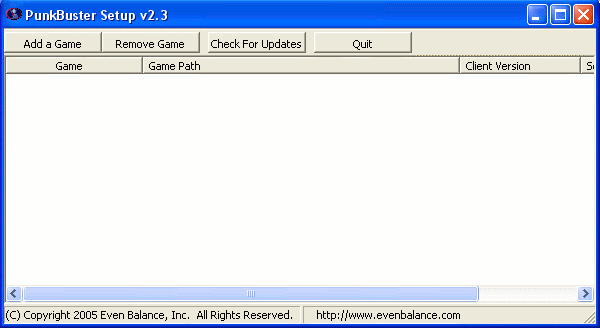
    4) The following windows appears:pbsetup1

    5) Click “Add a game “.

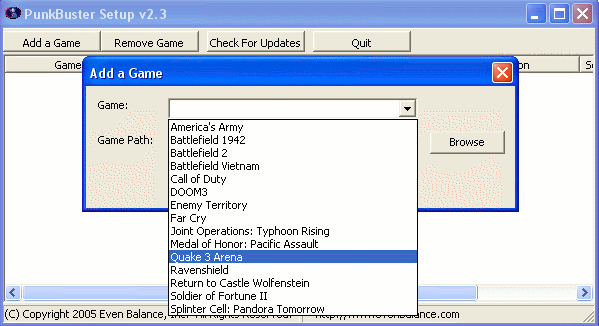
    6) Select a game in the games list ( Battlefield Bad Company 2 for example ), click “Browse ” to select the correct game path:pbsetup2

    7)Click “Add game “.

    8)Your game is now added to the list.

    9)Click “Check for updates”.

    10)PBsetup is now updating your punkbuster files, wait for a while, a windows will appear informing you that your punkbuster files are now updated.

    11)Click Ok, You can now close pbsetup.

  • Its all about Android 4.3

    Its all about Android 4.3

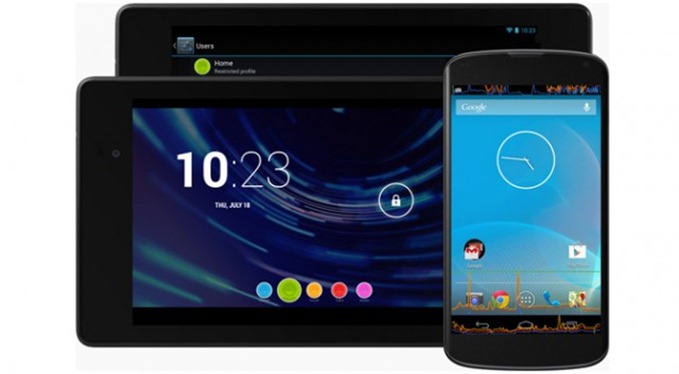
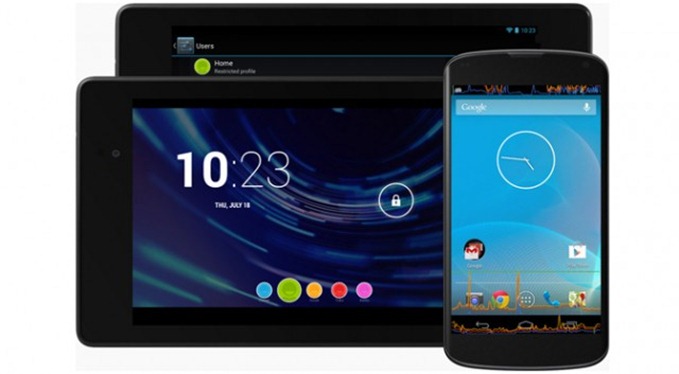
    Android-4.3-640x353Unlike previous versions of Android, 4.3 Jelly Bean leaked all over the place before the official announcement. A full system ROM was even extracted from a few internal Google devices and made available online.  Android 4.3 might not be the biggest update, but it’s still something to look forward to.

    Officially, Android 4.3 is still a version of Jelly Bean, which makes sense, considering the minor nature of its changes. But of course, this may disappoint Android fans whose mouths have been watering for Key Lime Pie since Google I/O in May.

    Performance Improvements

    With the first version of Jelly Bean, Google introduced us to Project Butter. This was a unified effort to streamline UI responsiveness with extra buffering and hardware acceleration. In 4.3, Project Butter has been enhanced with rewritten vsync timing, triple buffering, reduced touch latency, CPU input boost, and hardware-accelerated 2D rendering.

    Android 4.3 includes support for OpenGL ES 3.0, which makes Android the first mobile platform to support this standard. Game developers working with the native development kit (not running code through the Java virtual machine) will be able to take advantage of many new features.

    The new version of OpenGL allows apps to render higher-quality visuals and deeper textures on the same hardware. It should also make advanced native games run on a wider range of devices, assuming they are running Android 4.3 — which most won’t be.

    Multi-User Restricted Profiles

    The biggest addition to Android 4.3 is the Multi-User Restricted Profiles feature, which lets you control the usage of apps and other content on a user level. Multiple user profiles were already available in 4.2.2, but the ability to create restrictions has long been requested, so it’s sure to be a big hit.multiuser_lockscreen2_610x381
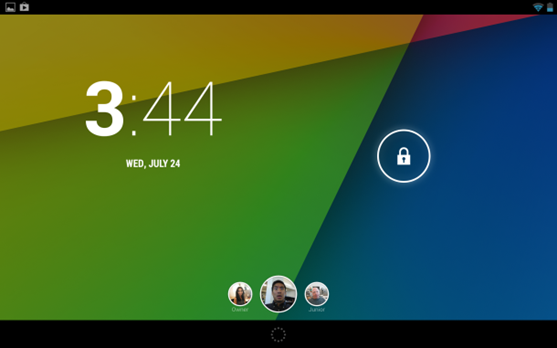
    The people most obviously to benefit from the new profile controls are parents. We saw this in Google’s demo; being logged into a restricted user profile caused an app to behave differently. Specifically, a freemium game showed up without all of the in-app purchasing functionality, which is clearly going to be useful for parents with young children who use the device.

    From the primary user’s Settings screen, it’s easy to configure a restricted account’s access using the sliders. And if an app offers in-app restrictions (such as the games mentioned above), then there’s a button for extra options next to it.

    With Restricted Profiles, Google is obviously trying to lure more users — specifically parents and businesses — away from iOS, a platform that still lacks a user profiles feature altogether. As well, the feature opens a number of doors to developers who can now create in-app restrictions.

    Open GL ES 3.0

    A big deal for gamers, Open GL ES 3.0 makes the new version of Android more efficient and just plain better at displaying graphics. Google’s demo showed us impressive textures, lens flares, and reflections that the older OS would have had trouble displaying. While the upgraded graphics might be indiscernible to the average user, Open GL ES support is still important because of the new possibilities it opens up for developers.

    Bluetooth Smart technology
    jb-btle-300x168Support for Bluetooth Smart technology is another addition to Android 4.3 that wasn’t all that unexpected, considering it’s been available on iOS since early 2012. With this, the updated Android now allows you to connect with the newer generation of power-efficient accessories that use Bluetooth Smart. And of course, the Smart connection should be less taxing on your Android device’s battery. During Google’s presentation, we saw an Android device connecting with a Bluetooth Smart-enabled heart-rate monitor that was being powered by the popular Runtastic fitness app.

    The update also came with Bluetooth AVRCP 1.3 support, which lets your device now transmit metadata, like a song’s title and artist, to Bluetooth controllers.

    New DRM

    Android is an open platform, but it also has to work in the real world. To those ends, Android 4.3 includes new media DRM APIs. App developers will be able to more easily integrate DRM standards into their streaming services, which are often required to provide high-resolution video.

    As if to prove to us that more DRM in Android can be a good thing, Google announced at the event that the first app to make use of this feature is Netflix. The new version, which was quietly pushed on Monday, has support for the advanced DRM in Android 4.3. This allows the app to stream 1080p video. On other devices, it will still stream in standard definition.

    Hindi support lands on Android 4.3

    Google has introduced native local language support to its operating system for Africaans, Amharic, Hindi, Swahili and Zulu. Hindi has finally reached the stock Android operating platform.

    With the update, Google has also added support for Hebrew and Arabic (right-to-left) in the home screen, Settings, Phone, People, and Keep apps.

    Additional

    First up, is Android’s dialer, which now has autocomplete for both phone numbers and names. I haven’t gotten to try the feature on a phone yet, but its presence in 4.3 is confirmed, and the added convenience is notable. That said, the reality is that most Android users may not even notice the upgraded dialer, since autocomplete has already come built into the custom operating systems by hardware manufacturers like Samsung.

    One feature that Google didn’t formally announce is the new Emoji keyboard, which comes stock with the OS and can be enabled through the Language & input menu under Settings. Once enabled, you can long-press the spacebar key to pull it up and emote to your heart’s content.

    When I will get it ?

    If you have a Nexus 4, GSM Galaxy Nexus, or original Nexus 7, the update is going to be rolling out over the air to your device very soon. The new Nexus 7 will ship with 4.3 pre-installed, but that’s not leaving warehouses until July 30.

    Android 4.3 root using SuperSU via xda

    If you’re using any other Android device, you’ll have to wait on your OEM and maybe the carrier to get around to developing and approving a new OS version. That could take a few months, or it might never happen. Owners of newer devices like the HTC One and Galaxy S4 will get the update at some point.

    If you don’t want to wait with fingers crossed, the code for 4.3 has already been pushed to the Android Open Source Project, where it will be picked up by ROM developers. Give them a week or two, and 4.3-based ROMs such as CyanogenMod will start hitting the web.
  • HTC launches Desire 500 with android 4.2

    HTC launches Desire 500 with android 4.2

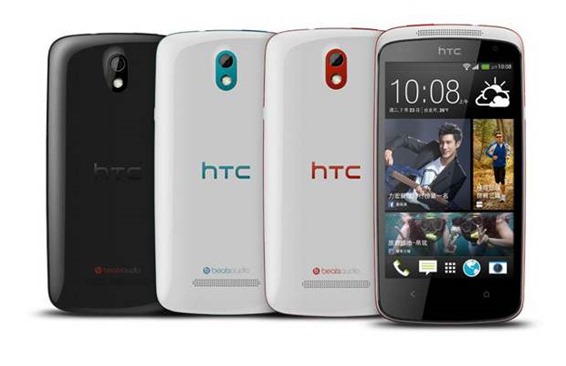
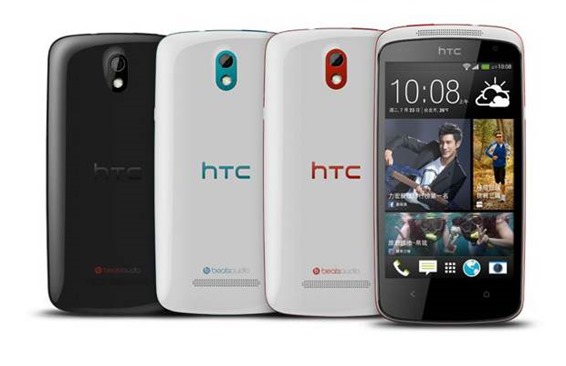
    htc-desire-500HTC has been aggressively launching smartphones all around the globe that include devices under its One and Desire series. Following the strategy, the company has launched Desire 500 in Taiwan. The device is said to be targeted at the younger consumers and is considered a mid-ranged smartphone.
    The quad core CPU based Desire 500 is likely to be priced under Rs 25,000 in India.

    The HTC Desire 500 is powered by 1.2GHz Qualcomm Snapdragon200 quad-core processor coupled with 1GB of RAM. It features a 4.3-inch WVGA display with a resolution of 480×800 pixels. The phone measures 131.8×66.9×9.9mm and weighs 123g. There is 4GB internal storage that can be further expanded up to 64GB with the help of microSD card. An 8-megapixel rear camera can be found at the back accompanied by an LED flash and a 1.6-megapixel front camera. The device can record videos at 720p and also features Beats Audio.

    HTC Desire 500 comes with a 1,800mAh battery that the company claims will deliver 17.8 hours of talk time and 401 hours of standby time. The HTC Desire 500 runs on Android 4.2 with Sense 5 on top and other features like BlinkFeed. However, the HTC Desire 500 does not include BoomSound which has been a part of HTC One series and features dual front speakers at the front panel.

    HTC Desire 500 is priced at NT$11,900 (approx. Rs. 24,000). There is no word yet about pricing and availability in markets other than Taiwan.

    HTC Desire 500 key specifications

    • 4.3-inch WVGA display with a resolution of 480×800 pixels
    • 1.2GHz Qualcomm Snapdragon200 quad-core processor
    • 1GB RAM
    • 4GB internal storage, expandable up to 64GB by microSD card
    • 8-megapixel rear camera with LED flash
    • 1.6-megapixel front facing camera
    • Android 4.2 Jelly Bean with HTC Sense 5
    • 1800mAh battery
  • ZTE debuts in India with six new smartphones

    ZTE debuts in India with six new smartphones

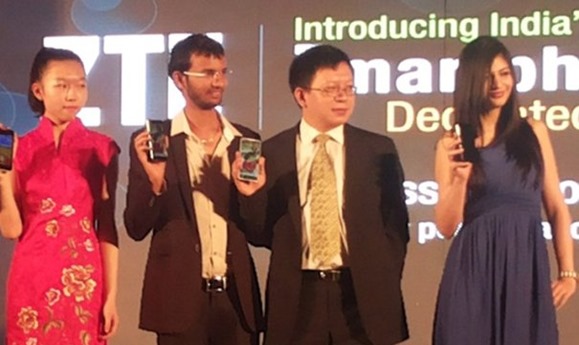
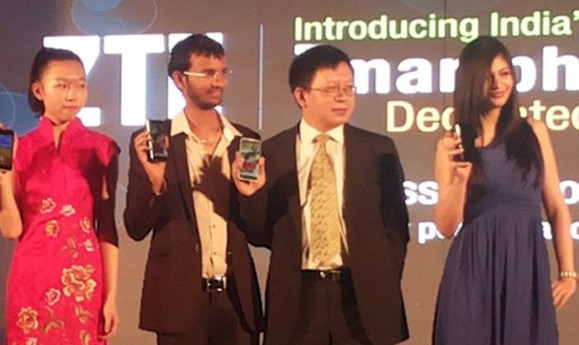
    zte-india-launchChinese handset giant ZTE on Friday made its debut in Indian handset market in a big way launching six new Android smartphones priced between Rs. 5,000 and Rs. 15,000.



    ZTE is a Chinese smartphone making company and is the fourth largest handset manufacturer in the world. It’s mid-range and low-range phones could be direct competition to direct players like Micromax, Karbonn, Xolo and others.

    They launched six smartphone models and four 3G datacards in the market today.

    The smartphones are all priced between Rs5,000 – Rs15,000.

    The six smartphones launched are:
    1. ZTE Grand X for Rs14,999
    2. ZTE Blade G2 for Rs 11,599
    3. ZTE Blade C for Rs7,599
    4. ZTE Blade L for Rs 12,599
    5. ZTE Kis Flex for Rs 5,799
    6. ZTE Blade E for Rs11,999

    Thr premium phone in the bag is the ZTE Grand X which comes with a 1.2 GHz quad core processor. It has a 1GB RAM and 4GB  of internal memory. External memory can be extended upto 32GB.

    It is priced at Rs14,999. It will not hit the stores immediately but will be available in the coming days.

    ZTE Grand X Quad Lite key specifications
    * 5-inch display with a resolution of 540×960 pixels
    * 1.2GHz quad-core processor
    * 1GB of RAM
    * 4GB of internal storage
    * 5-megapixel rear camera
    * VGA front-facing camera
    * 3G, Wi-Fi, Bluetooth 4.0, GPS and wireless charging
    * 2500mAh battery
    * Android 4.2 (Jelly Bean)

    All the six phones run on Google’s Android operating system.

    “In the first year, we will just demonstrate the products and introduce new devices in India. Going ahead, we are sure that we will have a 20-25 per cent share of the smartphone segment in the next 3-4 years, given the quality and features of our products,” ZTE India Vice-President (Handsets) Yuan Kang told PTI.

    Speaking on the launch, Xu Dejun, CEO of ZTE India, said, “We offer 214 service centres accross the country to address your greviances. We also have a full fledged Research and Development unit to stay up-to-date with the leading technologies. With in-house manufacturing and RnD, we aim to offer quality products at reasonable prices.”

    “By the year end, we aim to have our pan India presence with the smartphones and data cards,” he added.

  • What is Alexa and how it works

    What is Alexa and how it works

    alexa_rank_increase

    If you are anywhere in field of web development then you might have heard about alexa traffic rank. Ever wondered what is alexa and how it works? How to boost your alexa traffic rank? Here are few facts about Alexa.

    What is Alexa ?


    Alexa Internet, Inc.
    is a California-based subsidiary company of Amazon.com which provides commercial web traffic data. Founded as an independent company in 1996, Alexa was acquired by Amazon in 1999. Its toolbar collects data on browsing behavior and transmits it to the Alexa website, where it is stored and analyzed, forming the basis for the company’s web traffic reporting. As of 2013, Alexa provides traffic data, global rankings and other information on 30 million websites,and its website is visited by over 10 million people monthly.

    What Alexa do ?

    alexa-logoAlexa analyzes web usage from traffic data sources including their own Alexa Toolbar users to eventually create traffic rankings for websites. This essentially determines how popular a website is. Even though these scores are highly respected in certain circles, the traffic data isn’t a representative sample of the global internet population, but an extensive variety of statistics taken from Alexa Toolbar users.
    What is Alexa traffic rank ?

    The Alexa traffic rank is taken over three months from traffic data of millions of users taking into consideration both the number of users who visit that site and the number of pages which are viewed by that user. So this score can change quarterly depending on the views/visits at that time.  A lower Alexa number means a greater level of traffic.

    How Alexa traffic rank works ?

    The traffic rank is based on three months of aggregated historical traffic data from millions of Alexa Toolbar users and data obtained from other, diverse traffic data sources, and is a combined measure of page views and users (reach). As a first step, Alexa computes the reach and number of page views for all sites on the Web on a daily basis. The main Alexa traffic rank is based on a value derived from these two quantities averaged over time (so that the rank of a site reflects both the number of users who visit that site as well as the number of pages on the site viewed by those users). The three-month change is determined by comparing the site’s current rank with its rank from three months ago. For example, on July 1, the three-month change would show the difference between the rank based on traffic during the first quarter of the year and the rank based on traffic during the second quarter.

    What is the Alexa toolbar ?

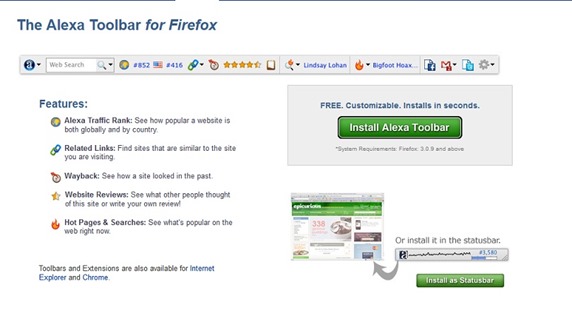
    This is a free tool which you can download that allows you to measure your own traffic and rankings and check out your competitors ranking. How to download and install the Alexa tool bar is very simple.

    Go to Alexa.com/Toolbar  to download the free toolbar for Firefox, Chrome and IE.

    alexa-toolbar-how-to

    This tool bar then shows you two rankings – a rank for the world and a rank for your country.

    This extention is useful because it also gives you a link for search analytics and way back machine link to see view past performances and also the average load time, this compare you to other sites to see how fast your site is loading right there on your toolbar.

    Toolbar Features:
    • Traffic Stats
    • Search Analytics
    • Audience
    • Contact Info
    • Reviews
    • Related Links
    • Clickstream
  • Try Firefox OS in your browser right now !

    Try Firefox OS in your browser right now !

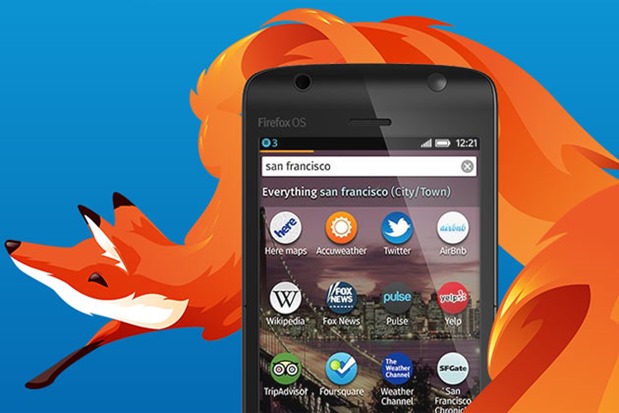
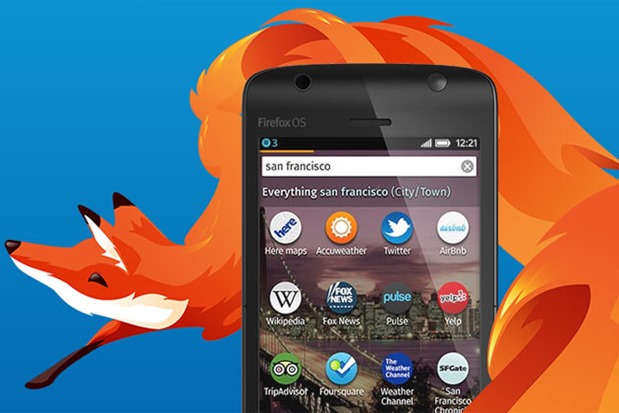
    firefox-os-250213So are you among the curious ones who are desperately waiting for Mozilla to launch the Mozilla OS based smartphone in your country? To cut short this wait, the organisation has now come up with a Firefox OS Stimulator by updating the Firefox OS simulator to version 4. 

    There is still a lot of time left for the Mozilla OS phones to arrive around the globe but you can still feel and test the platform!

    The add-on has the ability to test whether an app properly generates the receipt generated when an app is downloaded from the Firefox Marketplace. It has the ability to completely reset an app by typing Ctrl-R on Windows and Cmd-R on OS X. The command will wipe out all locally stored information.

    Try out the new Future Fox : Australis

    The stimulator is a Firefox browser based add-on which can be installed and used as a testing interface for the new interface. As written on the official blog post by Firefox OS developer advocate, Angelina Fabbro, the add-on have the ability to simulate touch-screen events with mouse clicks, the add-on is a style editor tool that lets programmers create and test CSS formatting.

    Though the browser module have certain limitations as the browser based OS environment can’t test some of the features which needs a real phone. Such as tilting features of phone.

  • Ubuntu 13.10 Wallpaper Contest is On

    Ubuntu 13.10 Wallpaper Contest is On

    ubuntu-wallpaperEver think that your clicked photograph can be on official release of next Ubuntu as wallpaper.?
    The bi-annual competition is open to everyone. So if you think that your photographic prowess or illustrative ideas are good enough to grace millions of users’ desktops this contest offers you the perfect opportunity to prove it.

    Guidelines

    As in the past, submissions are to be collected via a special Ubuntu Wallpaper pool on photo-sharing site Flickr, and only one entry is permitted per-user.

    With this limit in mind here are a few things to consider when taking or selecting an image for your submission:

    • Don’t create busy images, or fill them with too many shapes and colours
    • Use a single point of focus; a single area that draws the eye in
    • Avoid having anything on the left and top edges as this will clash with Unity interface elements
    • Test your image at different aspect ratios to make sure it ‘works’
    • Minimum resolution needs to be 2560 x 1600

    Further composition guidelines can be found on the Ubuntu Wiki.

    Summary
    • One entry per user
    • Entries should follow design guide
    • Enter via Flickr
    • Image must be your own
    • Images license needs to CC-BY-SA
    • Deadline: 16th August 2013
    • Final selection revealed on 23rd August