Category: Featured

  • First Verified! and now #hashtags Facebook ‘follows’ @twitter

    First Verified! and now #hashtags Facebook ‘follows’ @twitter

    Your nonsensical hashtagged status updates on Facebook will now, at last, have some meaning. The social network Facebook said hashtags will now be clickable and searchable, like they are on Twitter, Pinterest, Instagram, and, well, basically every other social network.
    “Hashtags will be clickable on Facebook. When you click on a hashtag in Facebook, you’ll see a feed of what other people and pages are saying about that event or topic,” the company said in a statement.

    You can search for a hashtag in the search bar if you want to participate in a larger conversation—like when “Game of Thrones” is airing or a political scandal erupts. When you search for a hashtag, like #GoT, you can write a post directly in the feed that pops up in that search. The feed will showcase results from both people and pages.

    Facebook’s basic privacy policy applies to hashtagged status updates—if you have your posts set to friends-only, then only your friends will be able to see your updates, even with hashtags.

    If you are in the mood for some micro-inspirations, here’s one. Twitter no longer asks you to tweet “What are you doing?” (it has switched to “What’s happening?” for quite some time now) and when Facebook went for a redesign in August 2008 it added prominence to its status update feature and began asking users, “What are you doing right now?”. Note the similarity?

    It’s not that Twitter didn’t seek inspiration elsewhere. It did and continues to do. So does Google+. The problem with this feature aping is that the competing social networks are slowly becoming clones of one another, feature by feature. Soon there might be little to tell them apart from their brand names.

  • Apple Unveils iOS 7 : How ‘Big’ it is ?

    Apple Unveils iOS 7 : How ‘Big’ it is ?

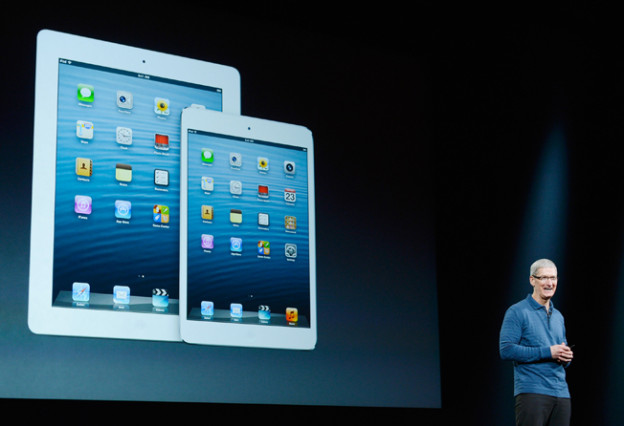
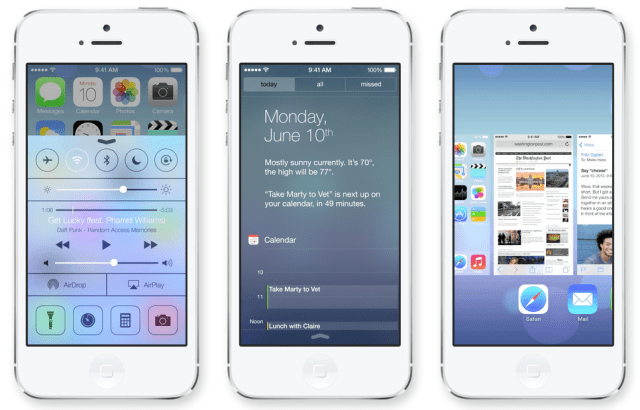
    Apple has officially taken the wraps off of iOS 7 at its Worldwide Developer Conference today. iOS 7 is the latest version of Apple’s mobile operating system that debuted back in 2007 on the original iPhone. According to Apple CEO Tim Cook, iOS 7 is the biggest change to the platform since the iPhone was introduced five years ago. The new design is evident in everything from sharper, flatter icons, slimmer fonts, a new slide-to-unlock function, and a new control panel that slides up from the bottom of the screen for frequently accessed settings. The stock apps have all been redesigned — including a major revamp of the weather app with new animations that are scarily reminiscent of Yahoo’s great-looking Weather app graphics.

    New Look

    • iOS 7 has a new font leading the way, which seems to be a sort of Helvetica Neue Ultra. It’s very skinny, clean, and it was hinted at in the iOS 7 banners that went up for WWDC yesterday.
    • Instead of white bars on a black background, Apple will now tell you what kind of service coverage you have with five little dots, which are white and grey depending on how strong the signal is across a translucent background.
    • The lock screen is changed for the first time in iOS’s history, with no more shine top or bottom bars for slide to unlock or the clock. Instead, Slide to unlock is translucent above the background image.
    • Default app icons are now flatter, but not quite flat, just as predicted.
    • Jony Ive’s hand has had its way with iOS notifications. The notifications panel isn’t laced with dark grey linen anymore, but actually has a very flat look to it. There is a today view, that lets you see friends birthdays, upcoming invitations, calendar, stocks, and a quick look at tomorrow.
    • The apps all seem to have a white base, except for the stocks app which has a black background and the weather app, which shows motion in the background to convey the current weather.
    • The keyboard is more white, than grey, with a translucency that lets you see what’s underneath the keyboard.
    • New Features

      2

      Control Center

      • Control Center is a pull-up tray that is available in your lock screen.
      • You can adjust brightness, volume, and other settings including Wifi, Airplane mode, rotation lock, or Bluetooth.
      • The Control Center even offers a flashlight, along with tabs for music, camera, and other quick-access apps.
      • The Control Center takes on the environment it’s in, so if you swipe up while you’re in mail, it will have the same blue and white coloring under that translucent panel.
      Multitasking
      • iOS 7 lets you multitask between all third-party apps with much better battery consumption.
      • You can double-tap the home button to enter into multi-tasking mode, just like always, but the interface for multitasking has been revamped. It appears to offer live previews, but Apple wasn’t clear about that.
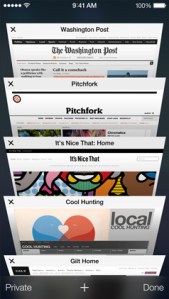
      safari_tab_screen

      Safari

      • Safari opens straight into full screen mode now, with the option to pull down to bring up the search bar at the top.
      • The search field has been improved to be a unified smart search field, which lets you have access to all your favorite websites with a single tap.
      • Tabs come with a totally new interface, scrolling in a vertical carousel, and there are no longer any limits. In other words, you can have as many tabs as you want, as opposed to just 8 like before. Swipe a tab off to the side to throw it away.
      • The new Safari is integrated with iCloud keychain from OS X Mavericks, and also comes with parental controls.

      AirDrop

      • You can share sharesheets with other people by simply tapping their name. No NFC required.
      • Airdrop supports iPhone 5, iPad 4th gen, iPad Mini

      Camera And Photos

      • The Camera app lets you swipe between your various camera types, such as panorama or HDR so you can quickly take a pic instead of fumbling around with settings.
      • Photos marks the first update to the photo gallery on iOS since it was introduced.
      • You can search based on date, and location, within the photos app.
      • Instagram must be flattered — Apple has introduced photo filters so you can add a little professionalism to the picture.
      • Users can share via AirDrop, iCloud photo-sharing, as well as shared Photo Streams.
      • You can even share video with iCloud photo-sharing.
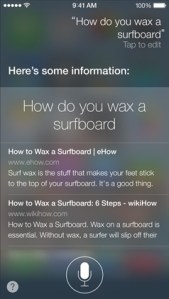
      siri_ask_screen

      Siri

      • Siri has a new voice! It sounds similar, but also weird. You can choose a male or female voice, if you like. Voices include languages like French, German, and other languages “over time.”
      • The visual UI has also been upgraded, with a sound wave going along the bottom.
      • Siri has also been integrated with settings, letting you tell her to turn on bluetooth, or lower the screen brightness.
      • The company has also added support for Twitter, Wikipedia, and shows web search results direct from Bing.

      iOS in the Car

      • iOS in the Car depends a lot on Siri.
      • It puts the iOS homescreen on the screen of your car, and lets you search for directions, listen to music, etc.

      App Store

      • You can now search for apps based on location. In other words, search for apps by the Louvre and see a lot of French museum apps.
      • The App Store also automatically updates apps for you in the background now. Hallelujah again!
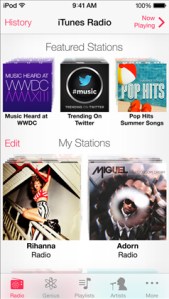
      itunesradio_mystations

      iTunes Radio

      • Apple has finally introduced the much-anticipated iTunes Radio, which gives a Genius-like experience to the entire 26-million title iTunes catalog.
      • You can see the full list of songs on each station by clicking history, with purchase and preview buttons built right in to send you to the iTunes store.
      • iTunes Radio also lets you customize each station by clicking a star to show that you want more of this type of music.
      • iTunes Match users will get an ad-free experience, but others will be able to use the app for free with a few audio and text ads.

      Activation Lock

      • This is for those of us who have had an iPhone stolen.
      • If a thief steals your phone and tries to turn off Find My iPhone, they can no longer turn the device back on without your iCloud password.
      • Users can also block messages and calls from other users.

    Coming This Fall

    • Developers will have access to iOS 7 on Monday and it will hit iOS devices this fall.
  • Apple’s iOS 7 Is Inspired By Android!

    Apple’s iOS 7 Is Inspired By Android!

    One common issue that many had with iOS was that the operating system is the same old for the past so many years. Though the company did release few updates here and there, nothing was exciting enough to satisfy tech enthusiasts. Putting that to rest, Apple released its revamped iOS 7. But, here’s a catch. Business Insider reported that, “Interestingly, if one compares the new look and features to what’s available on Android, it’s easy to see that Apple was “inspired” in no small part by Google’s mobile operating system.”


    Reasons why iOS 7 Is Inspired By Android

    1. Apple has now turned the iOS lock screen into a large digital clock, the date, and a “slide to unlock” area at the bottom, which is pretty much like Android.
    2. Similar to Android, users can now see a preview of each running application.
    3. iOS also offers quick access to settings like Wi-Fi and Bluetooth with a control panel. It has been a feature in Android for quite some time now.
    4. iOS also comes with a new colour scheme and interface in Music, which looks a lot similar to Google’s Music for Android.
    5. It also offers a much advanced and improved handling of notifications, right from the lock screen.
    6. Similar to Android’s Calendar, the new iOS Calendar has a bright white background along with a pastel colour scheme to represent allocated time slots.
    7. Safari’s tabs are more like 3D panels, just like Google’s Chrome browser for Android.

  • EA shows off NBA Live 14 at E3

    EA shows off NBA Live 14 at E3

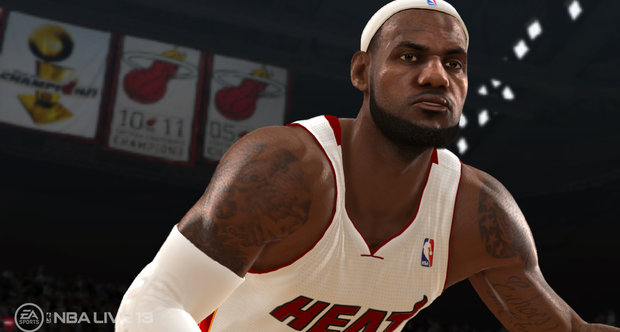
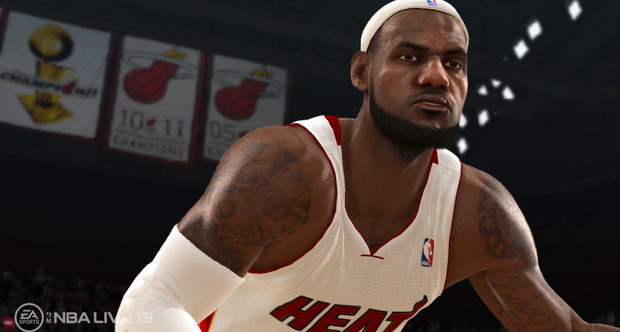
    Adding to the list of jargon terms applied to the tech in EA Sports games, NBA Live 14 includes “BounceTek” physics for dribbling, which apparently improves ball physics, instead of merely expressing them as part of the player character’s hand motions.
    More immediately understandable is the way the basketball game handles roster updates. In-game stats will be tweaked in near real time, “an hour after it happens” according to EA’s E3 presentation. From indefinite delays to instant updates! That’s a big promise for NBA Live.

    Platforms
    PlayStation 4, Xbox One

    Release date
    Q4 2013

    BounceTek

    Unlock the full potential of the dribble with all-new physics-based BounceTEK technology. Whether it’s Ricky Rubio’s wrap around or Kyrie Irving’s devastating hesitation dribble, NBA LIVE 14 puts the control b…

    CourtQ

    CourtQ is the brain of NBA LIVE 14. More than 70 unique statistics and tendencies power every single player on the court, utilizing the same data used by all 30 NBA teams. Players evolve and so does CourtQ, do…

    Live Worlds

    With fresh content and challenges on a daily basis, NBA LIVE 14 delivers a new experience each and every time you pick up the controller.

  • 7 Reasons to Root Your Android Device

    7 Reasons to Root Your Android Device

    To root or not to root? That is the question. Rooting your Android device definitely pushes you up a level or two in your geekdom. It requires a certain level of commitment, at least a little savvy, and even a modicum of risk. So, why would you want to trouble?

    We have great reasons for ya.


    What is Rooting ?

    We discuss about rooting plenty around here, but here’s the high-level look for the few remaining uninitiated. Rooting signifies gaining root access to your device. When you take your phone out of the package, while there are plenty of settings you can tweak, you can only alter what the manufacturer allows you to. By gaining root access you can modify the device’s software on the very deepest level. It takes a bit of hacking (some devices more than others), it voids your warranty, and there’s a small chance that you could completely break your phone forever. But you know what? It’s still totally worth it for all the goodies you get access in order to.

    1. The Latest OS Updates

    This may be the most common complaint among Android users, less than half of whom have made it as far as Ice Cream Sandwich. Between the Google, the carriers, and the hardware manufacturers, there are a whole lot of shenanigans behind closed doors that determines when (or if) your phone gets an upgrade. Who has the patience?

    Android’s developer community, on the other hand, is a hardcore bunch. They’re often able to get the new OS onto a phone months before the carrier releases the update, often along with a few bonus features. Once you’re rooted, you just have to find the OS version you want (optimized for your specific device), and it’s generally extremely easy to install the latest and greatest.

    2. Apps Aplenty

    If you’ve spent much time in Google Play, you know you’re not exactly hard-up for good apps. But why settle for good when you can have great. Once you’re rooted not only can you get more apps, but the apps you have access to can get way down deeper into your phone’s brains. In some cases you’ll be able to do things that carriers, manufacturers, and/or Google may not want you to do. Some will allow you to do things of questionable legality. For example, Network Spoofer uses your device to set up a fake wireless network. When your houseguests sign in, you can make ever image they see inverted, or all of the text fuzzy. It’s a harmless prank, but of course it could (but shouldn’t!) also be used for stealing passwords and other nefarious things.

    Where do you find all these root-only gems? Amazingly enough, many of them are still in the Google Play app store. Google’s much more relaxed about rooting than Apple is about jailbreaking. Some apps, like Tasker, work for factory-shipped devices as well, but get expanded superpowers when you root.

    3. Speed/Battery Life Boosts

    9 Reasons to Root Your Android Device

    Phone starting to get laggy? Or maybe you’re having trouble making it through the day on a single charge? Rooting allows you to install customized kernels (the software that enables the OS to talk to the hardware, basically) that are optimized differently. Some are made for low-power consumption, and some are built for speed. You can also use an app like Set CPU, which enables you to overclock or underclock your phone’s processor, and set rules for usage.

    For example, you can set your processors to go into overdrive when you’re playing a graphically intensive game, but have them draw the bare minimum power when the screen is off.

    4. Extreme Customization

    Android is already the most customizable mobile OS out there, which is one of its big draws, but if you root your phone you can really go nuts. If you want a total change, you can download custom ROMs that look nothing like Android at all. Want your device to navigable entirely by gestures? No problem, just install GMD Gesture Control.Prefer a sliding keyboard when you’re in portait mode, but a tapping, predictive keyboard when you’re in landscape. Keyboard Manager will automatically switch between your keyboards of choice whenever you rotate your phone. You can also add features like widgets in your notification bar, or can change the way certain features look or behave, like the lock screen, or notification bar. The sky’s the limit.

    5. Infinite Features

    Beyond just customizing your phone’s existing features, rooting helps you pile on all kinds of wonderful new weirdness. You’ll love it.

    Want to hook up your PlayStation controller to your phone for better gaming? You can. Want to set rules for callers to decide who can and can’t call you when? Why not. Maybe your carrier has blocked certain apps, or an app isn’t available for the country you live in? There are Market Enabler apps that trick your phone (and Google) into thinking it’s on another carrier or in a far off land. Nervous about connecting to the public Wi-Fi? Wifi Protector will keep you safe from all kinds of ARP, DOS, and MITM attacks. Or, you could put the new Android 4.2 camera on your non-Jellybean phone. Accidentally deleted something you wish you hadn’t? Undelete might just save your bacon. The possibilities are virtually limitless.

    6. Better Backup

    9 Reasons to Root Your Android Device

    There are apps out there that kinda back up your phone, but generally it’s pretty surface level stuff (contacts, pictures, music, etc.). Once rooted you can go way, way deeper. Grab an app called Titanium Backup. Not only can it back up all of your apps, but it can back up all of the information stored in those apps. So if you’ve been doing great in Temple Run but you want to wipe your phone and start fresh, you can use Titanium to back up and then restore the game, and you’ll be right where you left off. It’s a nice security blanket if you’re going to be messing around deep in your phone’s brain.

    In spite of all these benefits, only you know whether rooting is right for you. For some people it’s just not worth the time and effort. For others, it’s a godsend that allows them to use their phones in a better way and for a longer time. If you decide to take the plunge, read up and make sure you follow instructions carefully. After that, go hog wild. It’s your phone, after all.

    7. Ditching the Skin

    Android enthusiasts rightly hate the software skins that hardware manufacturers use to brand their devices. They’re often bulky, ugly, unwieldy, or just downright not as clean and functional as stock Android. They’re also a big reason those OS updates take so long. You’re almost always better off without. So root! Once you do, you can download and install any number of custom-built ROMs (different versions of the Android firmware). Some of them are highly customized and tweaked to add features, and others are basically just stock Android. Cleaning off an ugly skin can be like a breath of fresh air.

    –>How To Install A Custom ROM On Your Android <–

  • “Lucy In The Sky With Diamonds” by The Beatles – What they really mean !!

    “Lucy In The Sky With Diamonds” by The Beatles – What they really mean !!

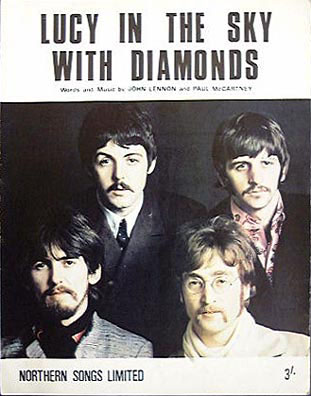
    Lucy In The Sky With Diamonds in fact took its name from a drawing of a schoolfriend by the four-year-old Julian Lennon. There can be little doubt, however, that the song was directly influenced by John Lennon’s continual experimentation with LSD, which hit a peak in 1967. However, in 1980 he claimed the main inspiration came from Alice In Wonderland. In November 1967 John Fred and his Playboy Band released a parody/tribute song called “Judy in Disguise (With Glasses)”which topped the US Billboard Hot 100 chart for two weeks and reached the number one spot in a number of other countries around the world.A fact ‘John Lennon’s handwritten lyrics for the 1967 Beatles song Lucy in the Sky with Diamonds have sold $237,132 (£145,644) at an auction in the US.’

    I had no idea it spelt LSD. This is the truth: my son came home with a drawing and showed me this strange-looking woman flying around. I said, ‘What is it?’ and he said, ‘It’s Lucy in the sky with diamonds,’ and I thought, ‘That’s beautiful.’ I immediately wrote a song about it. – John Lennon

    The song is structured in two distinct parts: the dreamlike verses in 6/8, with their gently psychedelic imagery; and the switch to 4/4 for the chorus.

    Lucy In The Sky With Diamonds was mostly written by Lennon, with a little help from Paul McCartney.

    I showed up at John’s house and he had a drawing Julian had done at school with the title ‘Lucy In The Sky With Diamonds’ above it. Then we went up to his music room and wrote the song, swapping psychedelic suggestions as we went. I remember coming up with ‘cellophane flowers’ and ‘newspaper taxis’ and John answered with things like ‘kaleidoscope eyes’ and ‘looking glass ties’. We never noticed the LSD initial until it was pointed out later – by which point people didn’t believe us. – Paul McCartney

    And the Lucy of the title? Her name was Lucy O’Donnell, and she attended Heath House, a private Weybridge nursery school, with Julian Lennon. She didn’t realise she had been immortalised in a Beatles song until she was 13, in 1976.

    In 1980 John Lennon criticised the arrangement and studio production, claiming it didn’t do justice to the song itself.

    I heard Lucy In The Sky With Diamonds last night. It’s abysmal, you know? The track is just terrible. I mean, it is a great track, a great song, but it isn’t a great track because it wasn’t made right. You know what I mean? I feel I could remake every fucking one of them better. But that’s the artistic trip, isn’t it? That it why you keep going, always trying to make that next one the best. – John Lennon

    –> 20 Reasons why ‘The Beatles’ are the ‘Greatest’ Band Ever <–

    Written by: Lennon-McCartney
    Recorded: 28 February; 1, 2 March 1967
    Producer: George Martin
    Engineer: Geoff Emerick

    Released: 1 June 1967 (UK), 2 June 1967 (US)

    John Lennon: vocals, lead guitar
    Paul McCartney: backing vocals, Lowrey organ, bass
    George Harrison: backing vocals, lead guitar, acoustic guitar, tambura
    Ringo Starr: drums, maracas

    “Lucy In The Sky With Diamonds” by The Beatles

    Picture yourself in a boat on a river
    With tangerine trees and marmalade skies
    Somebody calls you, you answer quite slowly
    A girl with kaleidoscope eyes
    Cellophane flowers of yellow and green
    Towering over your head
    Look for the girl with the sun in her eyes
    And she’s gone
    Lucy in the sky with diamonds..
    Follow her down to a bridge by a fountain
    Where rocking horse people eat marshmallow pies
    Everyone smiles as you drift past the flowers
    That grow so incredibly high
    Newspaper taxies appear on the shore
    Waiting to take you away
    Climb in the back with your head in the clouds
    And you’re gone
    Lucy in the sky with diamonds…
    Picture yourself in a train in a station
    With plasticine porters with looking glass ties
    Suddenly someone is there at the turnstile
    The girl with kaleidoscope eyes
    Lucy in the sky with diamonds…

  • Microsoft’s Xbox One launched with Kinect and Live Tv

    Microsoft’s Xbox One launched with Kinect and Live Tv

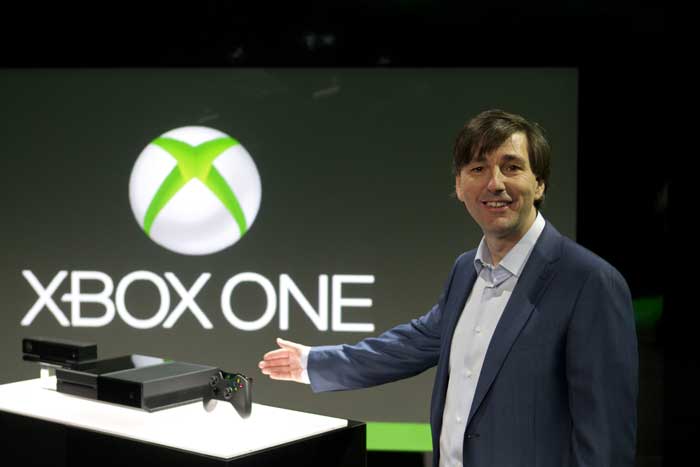
    Eight years, after the launch of the Xbox 360, Microsoft has launched its successor the Xbox One, which it claims is “the all-in-one entertainment console”. The company says that it will be available for sale by the end of this year but it has not yet revealed the price.Microsoft staked a claim to the Internet Age living room with an eagerly awaited Xbox One console touted as a home entertainment hub that goes far beyond games.
    “Today, we put you at the center of a new generation in the living room,” said Don Mattrick, head of Microsoft’s interactive entertainment business, unveiling the new version of the popular game console.

    The Xbox One’s hardware specs:

    While Microsoft said very little during the unveiling itself, the information we do have seems to confirm that the Xbox One is powered by an 8-core x86 AMD CPU, and a GPU that’s very similar to the Radeon 7790. There’s 8GB of DDR3 RAM (shared between the CPU and GPU), 32MB of very fast SRAM on the graphics die, and a total of 200GB of memory bandwidth (more on that later). There’s also some new silicon in Kinect 2.0, which will come with the Xbox One as standard. Rounding out the hardware, there’s a Blu-ray drive, 500GB hard drive, 802.11n WiFi (with WiFi Direct), HDMI in and out, Gigabit Ethernet (yay!), and USB 3.0. There’ll be three 802.11n radios, so that the console can connect to your gamepads (WiFi Direct), mobile devices, and home network without added latency.

    Features:

    Kinect: Kinect sensor has seen some serious upgrades in terms of the the camera and voice control, body movement detection etc and its bundled with the console now. The camera resolution is 1080p and is capable of capturing wide angles. It can also capture video at 60 frames per second. Oh, and the sensor can also read your heartbeat as you exercise, and tell whether you’re smiling or not.You can use the voice control on the Kinect to carry out tasks on the Xbox One such as setting up profiles and even turning the console on. You can also dictate activities to Xbox One. There’s also gesture recognition tech for controlling the system with your hands.

    Snap Mode: This will let you run two activities simultaneously. Skype has also been introduced to Xbox universe and you can make Skype calls while running another activity on the Xbox. The Xbox One also has a distinct Windows 8 user interface, along with the Xbox OS and you can switch between the two.

    New Xbox controller: Not much has changed as far as the controller is concerned, though unlike the Xbox 360 controller which used AA batteries, this will use integrated rechargeable batteries. According to ExpertReviews, the start and the select buttons are gone, replaced two new buttons with which look like they will trigger a menu and multi-tasking respectively.

    Xbox Live:  It comes with a TV guide which users can navigate by voice commands. The TV guide has a trending section that displays the most popular shows among your friends and the entire Xbox community. Instant Switch feature will you make the switch from gaming to Tv with just a voice command as well.

    The console also has deeper Smartglass support, which will let you use your smartphone or tablet on the gaming console to perform secondary functions such as changing channels, etc. There’s also a dedicated game Digital Video recorder to capture and share your winning moments with friends during a game.

  • Intel Haswell : 4th Gen. core CPUs

    Intel Haswell : 4th Gen. core CPUs

    The fourth generation of Core i3, Core i5 and Core i7 CPUs has now been released. Or at least detailed in an official capacity. Oddly enough, the mobile lineup hasn’t been fully detailed, although Intel did share the core features, which we’ll explore separately. The desktop collection has been fully listed, however. There are fourteen chips in the line if we’re reading things right, all but one quad-cores.
    Of those, eight are sure to ship through retail, while the others could be OEM parts, sold only as part of already configured OEM PCs.

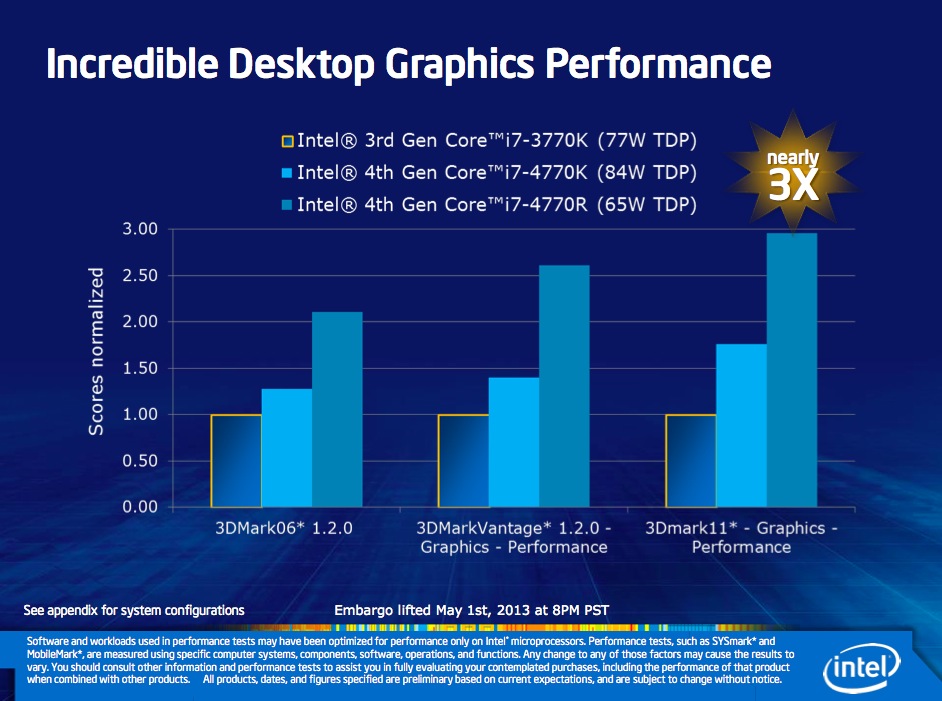
    One new Intel feature for folks wanting to hook up their PC to a quad resolution HD TV Intel’s 4K HDTV capability and an almost 2x improvement in 3D game graphics.  If you get confused over all these Intel generation chips, keep this simple guide in mind: Intel 2rd Generation processors have HD 3000 graphics (that shows up in the computer’s system information) while Intel 3rd Generation chips have HD 4000 graphics and the Intel 4th Generation processors have HD 4600 graphics.

    When combined with Intel’s desktop motherboard DZ87KLT-75K, the new Intel 4th Generation Core i7-4770K 3.5 GHz processor becomes the equivalent of turbo charging every part of your car. The two work in tandem for not just being faster than last year’s 3rd Generation 3770K 3.5 GHz Core i7 processor but also pushing the limits on overclocking (speeding up the frequency) of the CPU (general processing) GPU (graphics performance including video handling) and the system’s RAM memory. I used Kingston’s Hyperx/fb-dimm 2400MHz 16GB kit that let me overclock the RAM from the standard 1333MHz to almost 2400MHz. I was able to overclock this 4th Generation evaluation system to just under 4.5 GHz before my test PC became unstable. I know I know…too geeky. It is what it is!

    As odd as it may sound, only three chips have Hyper-Threading technology (double the number of logical cores vs. physical ones). The big names are Core i7-4770K and Core i7-4770 (quad-core, 8 threads). At the opposite end of the spectrum there is that lone dual-core we have mentioned, Core i5-4570T.All newcomers possess GT2 integrated graphics of varying performance, from 1.15 GHz to 1.25 GHz.
    Speaking of clock speeds, the x86-64 cores themselves range from 2 GHz to 3.5 GHz (base) and 3 GHz to 3.9 GHz (Turbo Boost).
    For those who don’t know, the GT2 graphics chip is also called HD 4600 and has 20 execution units. Other features that all CPUs share include a PCI Express 3.0 controller, 8 MB L3 cache, a dual-channel memory controller and, for the K-series, unlocked multipliers (good for overclocking).

    Haswell is the sort of CPU upgrade we’ve come to expect from Intel: a whole bunch of incremental improvements over last year’s model, all delivered basically on-time and as promised. Again, we’ll need to have test systems in hand to verify all of the lofty claims that the company is making here. But at least on paper, Haswell looks like a big push in the right directions. It increases GPU power to fight off Nvidia and AMD, and it decreases overall power consumption to better battle ARM.

    Unfortunately, the parts that will actually be doing battle with ARM haven’t even been announced yet. Powerful quad-core chips are all well and good, but if you’re waiting to see what Intel has in store for Ultrabooks you’re going to have to wait a bit longer. For our part, we’d guess that Computex will bring those CPUs along with a flood of accompanying Haswell Ultrabooks, convertibles, and tablets. Once we see those computers, we’ll have a better idea of what Haswell can do that Ivy Bridge couldn’t.

    Exact retail availability for the processors has not yet been announced, but expect that information to be available in the coming weeks.

  • Try out the new Future Fox : Australis

    Try out the new Future Fox : Australis

    The new Australis theme has been looming around the heads of the Firefox community for a very long time. Most of what we – that is the public – know about the theme is that it will modify how Firefox looks as it will replace the current default theme when it is released. What many Firefox users may not be aware of though is that Australis is more than just a theme replacement as it will affect the way we customize the browser.

    Australis

    The project that has been guiding Mozilla’s exploration of what a modern browser should look like is Australis (because Mozilla apparently likes to name projects after star systems) and the fruits of this project will soon find their way into the Firefox release channels, starting with Nightly once it hits version 25 soon. After that, it will make its way through the usual release channels, though Nightingale told me that the team may hold it back from the stable channel a bit longer to ensure that everything works smoothly.

    If you feel really adventurous, you can already install a version of Firefox from Mozilla’s relatively obscure UX branch and test it in its current state (but don’t blame us if it crashes a lot or shreds your hard drive).

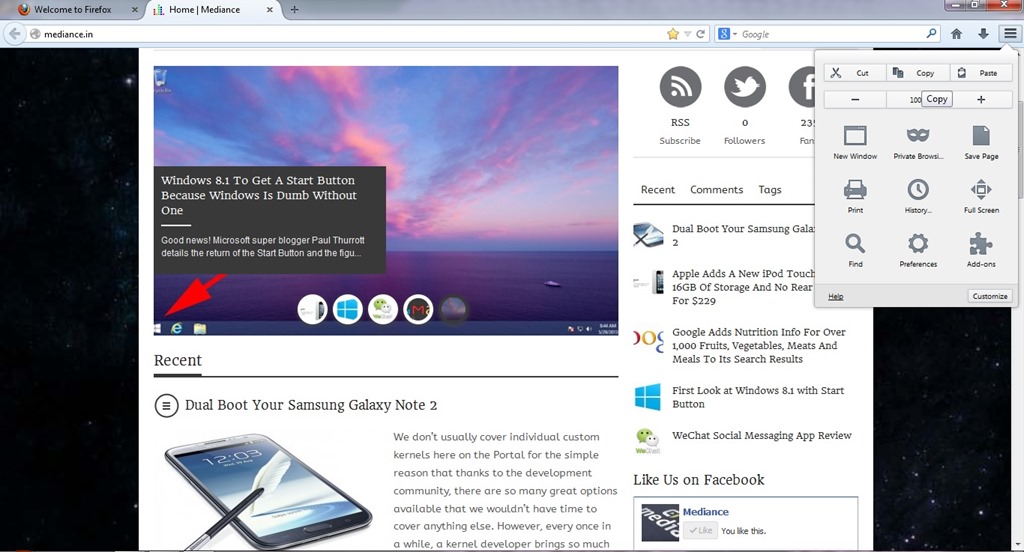
    firefox1While the main Australis theme won’t land in the stable channel before October. The combined stop/load/reload button in Firefox, for example, came out of this group. So did the new download manager and the fact that Firefox now doesn’t show the forward button anymore when there is no page to go forward to. The customization and tools menu now also uses icons in a three-by-three arrangement and dedicated buttons for copy, select and paste, as well as for increasing font sizes instead of just using a regular drop-down text menu.

    Australis is not just about the design, though. One area that’s also changing with Australis is how you customize the look and feel of your browser. Mozilla currently offers quite a few tools for this, but the team believes they are hard to find and not “fun” enough to use. As Mozilla’s Gavin Sharp told me, the idea here was to get users to enjoy customizing their browsers for the way they use it. Unless users can find these features, though, they could just as well be left out, so the team is working on ways to make it a bit more obvious that users can rearrange and remove virtually all the parts of the Firefox interface to suit their needs.

    ff2Now that Firefox is on a rapid-release schedule, the team obviously can’t change the user interface with every update, so the current thinking is to roll some things out together once they are ready and, where it makes sense, roll others out individually. This means that while we’ll see Australis and its curvy tabs in the nightlies of Firefox 25 very soon, it may not actually land in the stable version of Firefox 25.

  • First Look at Windows 8.1 with Start Button

    First Look at Windows 8.1 with Start Button

    Microsoft has revealed many of the new features, improvements and, yes, do-overs coming in Windows 8.1, the first major upgrade to Windows 8. Formerly called “Windows Blue,” Windows 8.1 has three main themes: making the user interface more friendly, adding new abilities and — perhaps most important — including support for smaller-screen devices.

    The update, which Microsoft is showing off in a preview today, remains touch-forward, while making more concessions to keyboard and mouse users. It’s designed to work better on smaller screens, and large desktop displays as well. It makes much greater use of features like Search and SkyDrive, and tries even harder to be a truly Internet-driven platform. But it also makes getting to your installed apps easier, and swapping from the desktop to the Start screen a more grounded experience. The Start button is back (sort of) but there’s no Start Menu.

    So, what are the Improvements !!

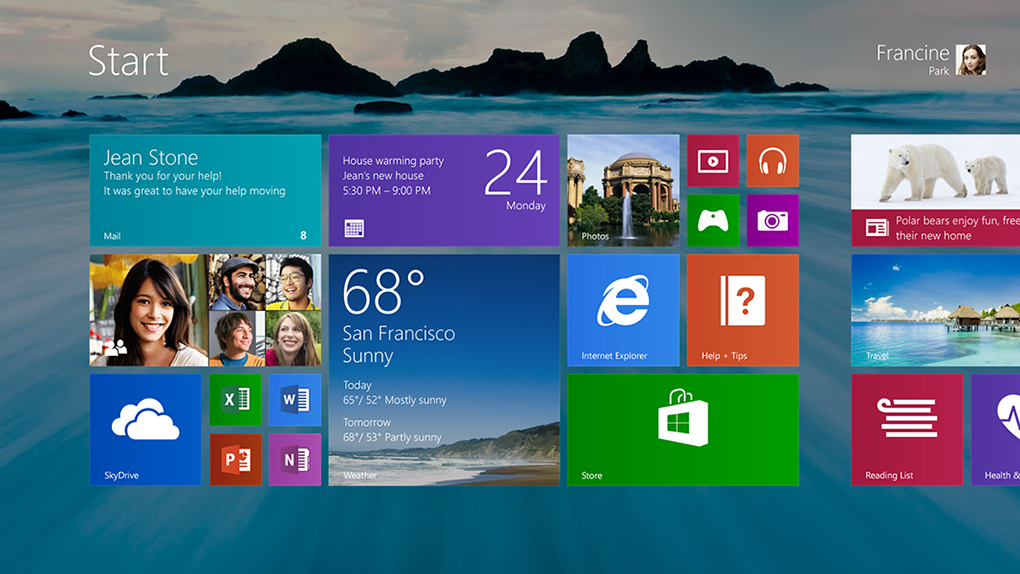
    Finally, Start Button Returns: Perhaps the biggest change, at least philosophically, is the return of the Start button in the desktop environment. Windows 8 famously killed off the Start button when it built the new operating system around the Start screen, which is basically a supercharged Start menu with a touch-first user interface. Users protested, though, and Microsoft has brought the button back in Windows 8.1, although it’s simply a visual cue for how to get back to the Start screen.

    New Live Tile Sizes: Windows 8.1 will offer users both an extra-small and extra-large size for live tiles (see below). The extra-large size is intended for apps that a user opens the most, or simply wants to see more information on the tile. For example, the weather app will show more forecast data in the extra-large size, which takes up the same room as two large tiles. Microsoft expects power users will like the tiny live tile. It allows users to fit four app icons in the same space where there used to be just one. Since Windows 8 doesn’t have “folders” for the Start screen, the extra-small tile is a decent substitute.

    Downloaded Apps No Longer Pin to Start: In Windows 8, apps automatically pin themselves to the Start screen. In Windows 8.1, that will no longer happen, which will theoretically lead to a neater Start screen for most users. Microsoft said the automatic pinning often led to a morass of downloaded-and-forgotten apps populating the center of many users’ Start screens.

    All Apps Gesture: Going hand-in-hand with the “no pinning” change, there’s now a fast way to see the All Apps screen — just swipe up. From there, it’s easy to find an app and pin it with new sorting tools that let you list apps by name, category or most recently downloaded.
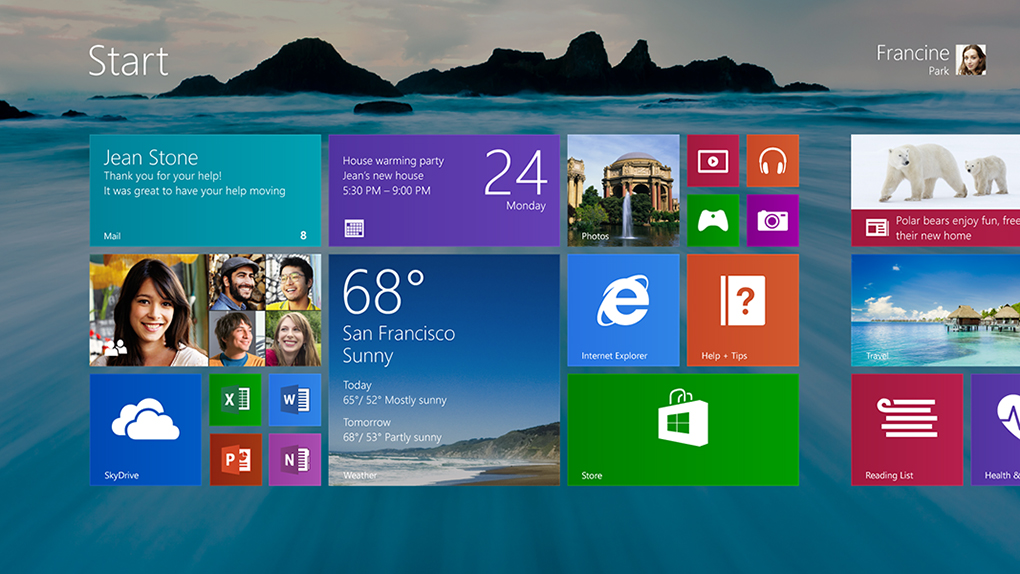
    Auto Updates: No more manual app updates! With Windows 8.1, all your apps will simply update themselves in the middle of the night when downloads are available.

    Boot to Desktop: In Windows 8.1, users will now be able to change settings to save them the single click they needed to perform in Windows 8 to take them to the desktop environment.

    More Colors, More Textures: Whereas Windows 8 gave the user a very limited selection of color themes, Windows 8.1 allows a much wider variety of options. There are many more textures, too.

    Desktop Background Image on Start: The Start screen in Windows 8.1 can now mirror the background image from the desktop environment, which should help reassure some users that the new UI isn’t an alien world that’s completely separate from the desktop.

    New Features included !!

    Global Search: Microsoft has greatly enhanced the device’s built-in search, one of the most-used functions in the Charms menu. In Windows 8.1, it’ll function more like an omnibox, incorporating apps, documents as well as web content in results.

    Snap Upgrade: Snap is what allows two apps to run on the screen at the same time, with one of the apps off to the side in a window that takes up 25% of the display. That percentage is much more flexible in Windows 8.1 (see below), letting users split the screen up any number of ways — 50/50, 60/40, 70/30, or anything in between.

    Better Multi-Monitor Support: A new Settings app, with moves several functions from the desktop to the modern UI, includes more options for multi-monitor setups and allowing users to set the resolution of secondary monitors manually if they wish.

    Reading List: In any app with content (including Internet Explorer), users will be able to save that content to a Reading List. It works with news apps like The New York Times and Microsoft’s home-grown ones as well as web pages.

    IE Improvements: IE in Windows 8.1 supports unlimited tabs. Also, your open tabs will sync across devices, and you can make live tiles out of websites — real live tiles, with updating content — as long as the developer has included them.

    Active Lock Screen: The lock screen supports an intelligent slide show that can do things like display photos from exactly a year ago. You’ll also be able to take a Skype call without unlocking the device.

    App Syncing Across Devices: When you log into a second Windows 8.1 device, the same apps you have on your first one will automatically download and sync. Similar to iOS, you’ll be able to opt individual apps and devices out of syncing.

    Deeper SkyDrive Integration: SkyDrive becomes the default for saving all documents. Any and all files stored in SkyDrive can be made available offline by mirroring the content to your PC.

    Photo Editing: The Photos app gets basic photo editing in Windows 8.1.

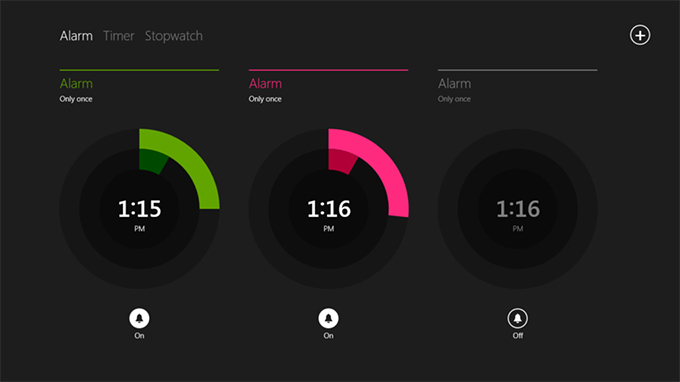
    New Microsoft Apps: Windows 8.1 introduces new Microsoft apps including a Calculator, and Alarm, Food & Drink (which has a nifty hands-free recipe mode that lets you wave your hand to advance to the next step) and Health & Fitness (with a WebMD-esque symptom tracker).
    Apps Enhancements: The Xbox-branded apps for Music, Video and Games all introduce new features that bring you to the content you interact with the most. News and Sports have similar enhancements, including customized sections and making stories and stats on your favorite teams more prominent.