Tag: android

  • Best android apps to overcome the iPhone’s Craze

    Best android apps to overcome the iPhone’s Craze

    Partly due to the Apple’s strict guidelines and partly due to Google’s open approach, presently Android is ruling the app market. Some of the Android apps offer functionality that your iPhone and iPad can’t have (at least not for now). There are many amazing things only an Android app can do and is missing on an iOS device. 4 such amazing apps are explained below. Read them and know for yourself.

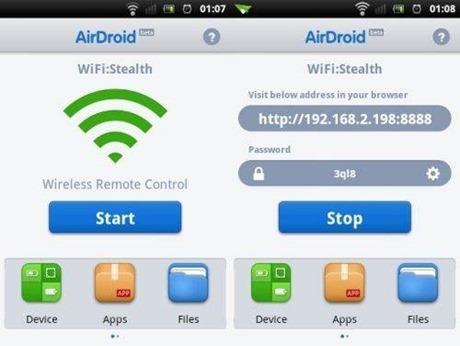
    AirDroid
    clip_image002

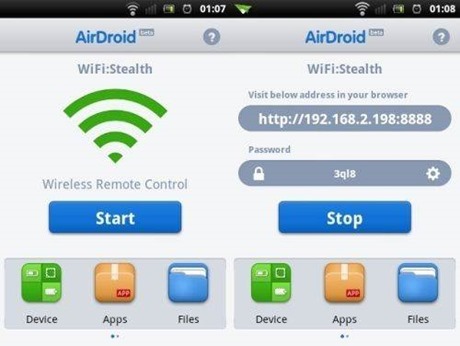
    Airdroid is free software that supports wireless transfer of files to a computer. Not only this it help in maintaining files, ringtones, contacts, images, videos, music and more.

    Key features:

    • · Works on Mac, Windows, Linux and Chromebook
    • · Receive and send SMS – individually or in groups
    • · View and manage photos on Android. Transfer them between computer and android
    • · Play and manage music on android. Transfer them between computer and android
    • · Export and import apps
    • · Export and set any ringtone
    • · Supports flashlight. View through both front and back camera
    • · Push url to Android and open it with Android Browser
    • · Share clipboard content between Android and computer
    • · Requires Android 2.2 and up
    Cover

    clip_image004

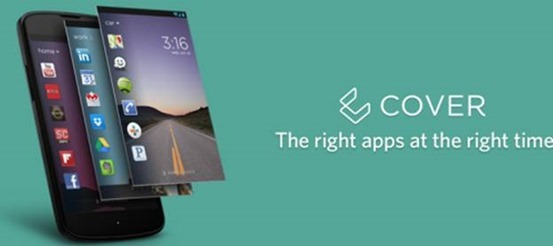
    No more hunting for the required app on the various screens you have on your smartphone. Cover puts the app required by you automatically on your lock screen for easy access whether you are at home, office or car. It makes a kind of geofence around the places you visit.

    Key features:

    • · Allows app switching
    • · “Peek” feature allows viewing apps from the lockscreen
    • · Have different ringtones or ringer volumes
    • · Have separate wallpapers for home, office or car
    • · Requires Android 4.1 and up

    Tasker

    clip_image006

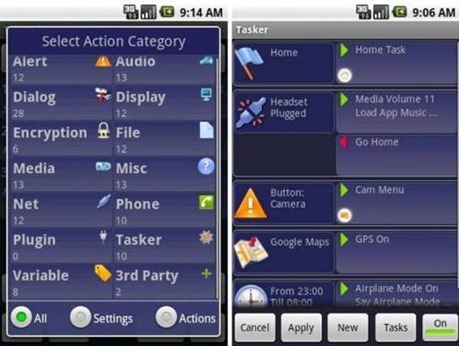
    Tasker carries out some tasks on the basis of contexts such as date, time, event, location, gesture and application in pre-defined profiles or in home screen widget.

    Key features:

    • · Passcode-lock application
    • · Alter home icons and wallpaper every day or in a specific location
    • · To return to the home screen: turn the phone upside down, turn 90 degrees to the left and back to toggle speakerphone during a call
    • · Zip/unzip file data on the fly
    • · Display a pop-up when an SMS arrives
    • · Verify battery levels to a file or SD card
    • · Record automatically you say over the phone to SD card
    • · Create home widget start wireless settings dialog, send an SMS with your GPS location.
    • · It supports Android 2.3 and above.
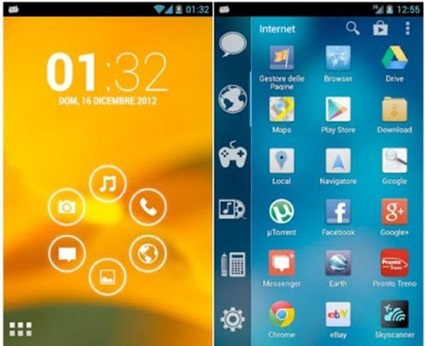
    Smart launcher
    clip_image008

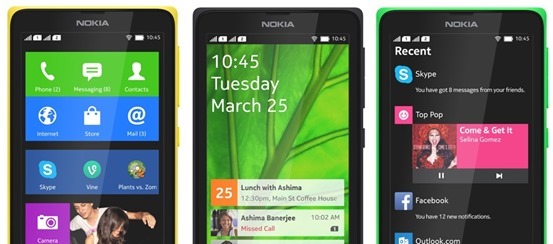
    Smart launcher has minimalist design and user friendly user interface which allows you to launch any applications in a few keys.

    Key features:

    • · Customizable lock screen with lot more colors
    • · Live wallpaper support
    • · Supports every screen and device
    • · Fast search
    • · Easy access to apps information
    • · Hide any app by long pressing an app, then selecting menu – hide.
    • · Widget (PRO version only)
    • · Drawer organized by categories
    • · Change single icon in the drawer
    • · Ready to use without special configurations
    • · New release compatible with API
    • · Requires android 2.1 and up

    Do you know any iOS app that does what these apps do? I am sure “no” is the answer. Install them on your Android devices today.

    Author Bio:

    Simon is a Mobile app developer by profession and writing-enthusiast at heart. He mainly covers topics related to Technology, Android and iOS Apps, and now days he is passionate to cover and write reviews or issues faced by iPhone and android application development services. He prefers and loves to read about the Changing technology trends and review them of his own.


  • Cut the Rope 2 arrives on android

    Cut the Rope 2 arrives on android

    cut-the-rope-2

    Just after its App Store debut in December 2013, developer ZeptoLab has released Cut the Rope 2 on Android. It’s currently available for free download in the Google Play store and will be launching on the Amazon Appstore on March 30. Although on app store the game is priced at $0.99.

    Also, ZeptoLab announced that the its Cut the Rope series got over 500 million overall downloads. The original has spawned a few sequels now, including Cut the Rope: Time Travel and Cut the Rope: Experiments.

    Om Nom breaks out of his box and travels through lush forests, busy cities, junkyards and underground tunnels, all in pursuit of one goal – CANDY! Along the way, he encounters the Nommies, the cutest candy collecting helpers a little green monster could wish for!

    Familiar to play, yet challenging to master, Cut the Rope 2 brings fresh challenges and unanticipated obstacles to the candy crunching, physics-based phenomenon that has delighted millions of players around the world!

    Don’t waste any time – exciting surprises await! Help Om Nom find his way home…out of the forest, through a pond and a junkyard, into the city and beyond!

    ALL NEW LOCATIONS TO EXPLORE! Travel through an interactive map to discover new locations filled with candy collecting, rope cutting action.

    ALL NEW CHARACTERS TO MEET! Find 5 new characters, the Nommies, to help you on your unexpected journey.

    ALL NEW HATS TO BRAG ABOUT! Customize Om Nom, choose your favorite candy and select your finger traces.

    ALL NEW ADVENTURES FOR OM NOM! Experience completely new graphics, sound and gameplay elements, including the ability to move Om Nom.

    ALL NEW MISSIONS! Collect the perfect number of stars and strategically gather fruit to complete the mission in each level.

    MEET OM NOM’S NEW FRIENDS, THE NOMMIES!

    • Roto can carry Om Nom to the best candy catching locations
    • Lick can make small bridges with his tongue to help Om Nom reach his goal
    • Blue can lift Om Nom to new levels of candy hunting fun
    • Toss can throw objects, including candy
    • Boo can scare Om Nom to jump to new heights

    Download Cut the rope 2 for android

  • How to Root Nokia X and Install Google Play Store

    How to Root Nokia X and Install Google Play Store

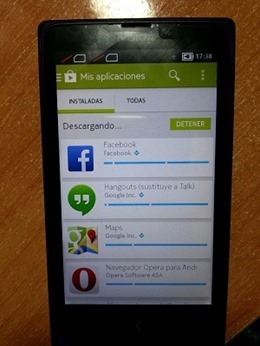
    If you just got your Nokia X and very much like to Install Google Play Store, Google Apps and Google Now Launcher in Nokia X, then are at the right place, this article will guide you on how to root Nokia x and install Google Play store on it. You cannot download apps directly from Play Store on Nokia X as the operating system on the phone is not a ‘pure’ android but is a forked version of android. Therefore, the phone is missing the google apps and it has microsoft apps pre-installed with it. Google Play Store is also replaced with Nokia Android Store.X-screens

    Also: Nokia launched its first android phone series X, X+ and XL at MWC 2014

    How to root Nokia X and install Google Play Store

    The unofficial method is from XDA Developers senior member Kashamalaga. Hence, all thanks to him for bringing this so early.

    This method is not same as conventional rooting and please take care while rooting your phone. Follow all the instructions step-by-step and carefully.

    Requirements

    Steps to follow

    1) You will need a rooted device, So Use Gandalf Exploit included in Framaroot app for rooting.

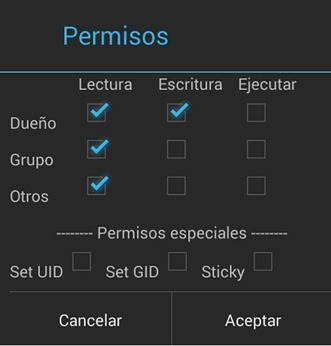
    2) Extract and copy all apks from “NokiaX_Gapps_KashaMalaga_28.02.2014.zip” to /system/app and change permissions for this files using your file explorer.

    3) Set the permissions for the APKs to “read” for all and “write” for just the first one from top, as below.PPBaJre

    4) Reboot your device.

    5) Extract and install as usaul every single needed apk include in “NokiaX_SomeGoogleApps.zip“. (If want to use Google Now Launcher, open it after install it)

    6) Now launch Google Play Store and login to your Google account and you are Done.nokia-x-root

    That’s all, now your Nokia X device has all the Google Apps and by doing this you will be able to download all the app from Google Play Store.

    Love flappy bird ? Read: How to download Flappy Bird on Android and Hack the score !

    For more information and support, you can also check the thread on xda.

    UPDATE: How to root the new v11.1.1 Nokia x update

    • Download the required files click here and extract the files.
    • Enable debugging mode in Nokia by going into Settings.
    • Connect Nokia X to the PC.
    • Now update ADB drivers.
      • Go to desktop on PC
      • Right click on computer and click manage
      • Select Device manager
      • In the list, Nokia X will be listed with a Question mark icon.
      • Right click and select update driver, then select Browse my computer for driver option.
      • Now select the path of above extracted folder, in the folder select driver file.
      • Now drivers are updated.
    • Now Reconnect the Nokia to the PC.
    • Open kingroot app from the extracted folder.
    • Now kingroot will detect Nokia X as Android device. Now root the device using the App.
    • Now your device is rooted.
    • For installing Play Store and apps, follow the steps same as above.

    For more information and support for rooting v11.1.1 Nokia X update, you can also check the thread on xda.

  • Top 5 Best Battery Saver Apps for Android Smartphones

    Top 5 Best Battery Saver Apps for Android Smartphones

    Android-Battery-LifeEveryone wants a better battery life for their smartphone. But the bulky applications running on your smartphone are just eating away your battery, but do not worry we have a collection of best battery saving apps.

    These apps will not only extend the life of your handset, but could also improve its overall performance.


    1. Juice Defender (Free/Paid)

    juicedefender-best-battery-saver-android-appsWith almost endless options, Juice Defender is the all favorite app on this list. Juice Defender is free app but it also comes in Plus and Ultimate versions. Depending on what level of control you are looking for. It can turn mobile data off automatically, and most of all, it can extend your battery life for long periods of time.

    Main Features of JuiceDefender
    • Multiple Preset Profiles
    • Easy UI
    • Home screen Battery Widgets
    • Smart Brightness control
    • 2G/3G auto toggle and Wi-Fi auto control
    • Battery Consumption Optimization
    • Comprehensive Connectivity Scheduling
    • CPU scaling when phone is idle


    2. DU Battery Saver (Free/Paid)

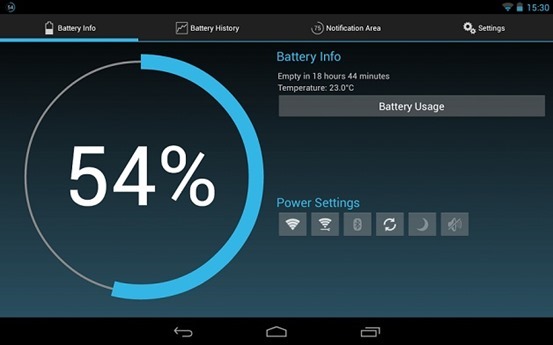
    du-best-battery-saver-androidDU Battery Saver has many intelligent options that provide more advantage over other battery saving apps. 

    There are various intelligent mode and pre-set options that you can set up to minimize your phone’s battery usage as possible. DU Battery Saver also comes with many inbuilt home screen widgets.

    Main Features of DU Battery Saver
    • Home screen widgets

    • Multiple preset profiles

    • One-Click Optimization

    • CPU Frequency management

    • Healthy charge manager

    –> Also Read: 7 tips for improving your smartphone’s battery life  <–

    3. Easy Battery Saver

    Easy Battery Saver is a powerful manager app specifically designed to extend battery life and optimize using habit. It saves your battery by intelligently dealing with phone’s network connectivity, screen time out and screen brightness. Also, the considerable sleep schedule setting will save your battery when you are sleeping.

    Main Features of Easy Battery Saver
    • Multiple Modes
    • Visual Battery status
    • Battery consumption list of real-time running items
    • Simple, interactive and helpful tutorial
    • Notice of how to use battery better


    4. Battery Doctor

    Battery Doctor also features a built-in task killer to get rid of the apps taking extra space and power in the background.

    This battery saver Android app actually shows information very accurately. One of the best parts of this app is it accurately gauges battery levels, you actually have an idea of when your device is going to run out of battery, based on previous your consumption patterns. Pretty much like a deadline.

    Main Features of Battery Doctor
    • Battery Level Gauges
    • Task Killer
    • Unique three-charge cycle that boosts battery life
    • Widgets that improve battery performance
    • Device software and hardware information


    5. Battery Widget Reborn

    Battery Widget Reborn comes with better design, Dashclock Extension that lets you activate you camera flash to use as a flashlight. It also has features like power saver mode etc. There are a few power saving options that automatically kick in during the night while you’re sleeping, such as turning Airplane Mode on. Overall, it’s one of the more useful battery saving Android apps, so check it out. If you want a Battery Widget Reborn for free you can try its beta version.batteyreborn

    Main Features of Battery Widget Reborn
    • Circle battery level indicator
    • Shortcuts to Power-Summary/Background Sync/Wifi/BT Settings
    • Status bar notification of battery status
    • Prediction (estimation) how long battery lasts
    • Automatic airplane mode during the night charging and discharging chart
    • Optional charging and discharging chart
    • Power related toggles: Wifi/Bluetooth/Background Sync/Airplane mode
    • Customizable notification priority


    So these is our top 5 picks for Battery saving apps, you are using any other app do let us know in comments and we will add it also

  • MWC 2014: YotaPhone with dual screen launched

    MWC 2014: YotaPhone with dual screen launched

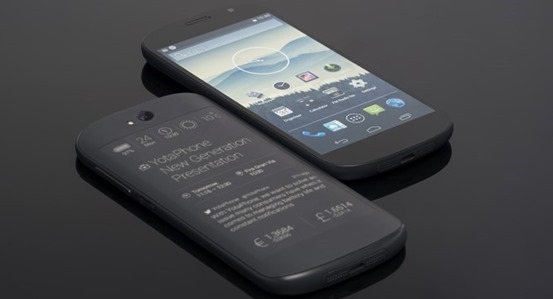
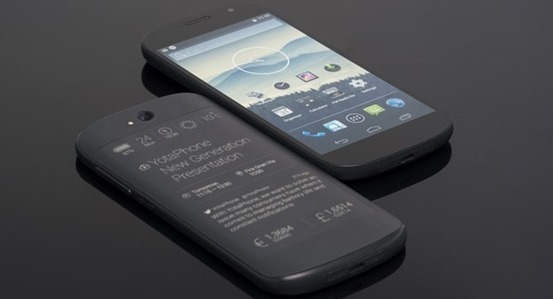
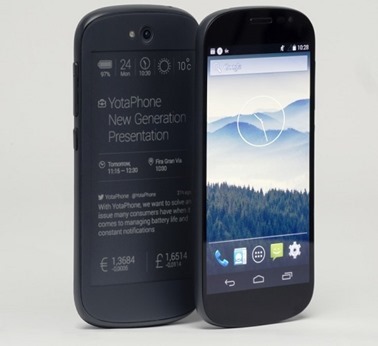
    nexusae0_YotaPhone_Photo_5_thumbRussian handset maker Yota Devices has revealed details of its second gen e-ink display equipped YotaPhone  at MWC 2014 in Barcelona.

    The new YotaPhone solves what was arguably the biggest problem with the original’s innovative concept – interacting with the e-Ink display. Previously, this was done by a series of gestures on a touchpad along the bottom of the e-Ink panel. But on the new YotaPhone, the panel is fully touch-enabled.The rear panel is 4.7″ large, and have greater pixel density than the previous model.It is also integrated with a light for the rear panel for using it in the dark.

    “A full touch second display opens a tremendous number of unique user cases for YotaPhone users. You can look and not just get information from the second display, but can interect. You can respond to email or SMS messages, you can do a lot of things,” Vlad Martynov, CEO of Yota Devices

    The idea behind having this always-on e-ink display was that it shows up notifications and updates without draining the battery.But with new YotaPhone, it’s now possible to respond to notifications and carry out actions (like making calls, messages etc.) without switching across to the main display at all.YotaPhone_ver

    Also, there’s a power saving mode that allows you to switch off the front display and just enable the back display.

    Yota says the new YotaPhone will go on sale in Russia and EMEA markets in Q4 2014, with US and Asian availability following in the next quarter or two.

    YotaPhone Specs:

    5-inch (1920 x 1080 pixels) HD OLED 442 PPI display

    Quad-core 2.3 GHz Qualcomm processor

    8-megapixel camera on the back

    2-megapixel front-facing camera

    2550 mAh battery

  • How to download Flappy Bird on Android and Hack the score !

    How to download Flappy Bird on Android and Hack the score !

    Flappy-Bird-TeaserIn an interview with Forbes, Flappy Bird developer Dong Nguyen has opened the real reason why he removed the extremely popular game from the App Store and the Google Play Store. According to him, the game’s addictiveness is what forced him to remove it, and the game will not back.

    Flappy Bird, an 8-bit inspired game features a bird that must navigate through a series of pipes extending from the top and bottom of the screen. Player taps the screen to keep the bird flying and not hitting the ground or pipes. Flappy Bird became so popular for being highly challenging and difficulty level.

    Nguyen cites people “sharing their scores on social networks” as a key reason for Flappy Bird’s ascent, and denies claims that he used questionable tactics to inflate the game’s rankings.

    “I respect other people’s opinions about my games,” says Nguyen. “I am sure I didn’t cheat anything, and I don’t have to do that.”

    The developer didn’t confirm how much money he made with Flappy Bird, however people estimates say he may have collected as much as $50,000 per day from ads – the app was available as a free download.

    How to play Flappy Bird in your browser

    Don’t worry if you can it on time from Play Store. You can still play the awesome-addictive Flappy Bird online in your browser too. Just head over to Kongregate for a flash version of Flappy Bird.


    But if your friends are teasing you by showing the game on their smartphone or you are too lazy to play it to your laptop or PC and really want it your smartphone and cut the chase.

    How to Download Flappy Bird on your android phone

    • First download the .apk file from xda-developers.
    • Move/Copy the .apk file to your phone.
    • Use any file explorer to install the game from .apk file
    • Select the Flappy Bird icon and your are DONE. 

    How to Hack Score in Flappy Bird

    You’ll need ES File Explorer to start with a rooted device 

    • Open Flappy Bird and play at least one time.
    • Close it. (Also kill it from task manager if you wish).
    • Open ES File Explorer, Go to the “Tools” line item and make sure “Root Explorer” is turned on.
    • Then select the “Local” line item, and choose “Device.” This puts you in the root of the System, and it’s where you need to start.
    • Go to folder named “data”, then again go to folder “data” and tap to open it.
    • Scroll down to find the folder named “com.dotgears.flappy” and open it.
    • Open the “shared_prefs” folder, & open the FlappyBird.xml file. You’ll get a choice of ways to open it, choose ES Note Editor.
    • Tap the three dots in the upper right, and choose Edit.
    • The line you need to change.

    <int name=”score” value =”your_showoff_score” />

    <int name=”score” value =”999999″ />

    • After changing, save the file when prompted.
    • Close ES File Explorer and open Flappy Bird. Play, and you’ll see your new high score.
  • Here’s why we like Maxthon Cloud Browser !

    Here’s why we like Maxthon Cloud Browser !

    Banner4Maxthon Cloud Browser is nothing new on the market but it struggled with “the Internet Explorer clone label” but it has been long lost thanks to the interesting multiple features and improvements implemented over the development.
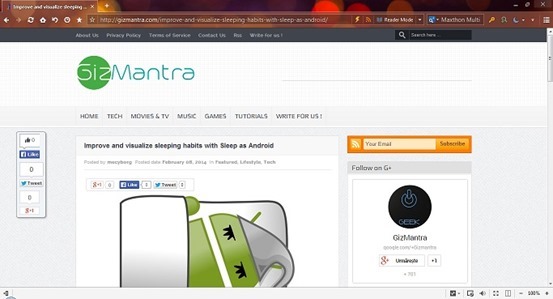
    With version 4.2, Maxthon integrates a tweaked Blink rendering engine in order to infuse increased browsing speeds and faster startup and file download times. With Modern Looks and essential buttons readily available in the toolbar, a multifunctional address bar, and the less used features hidden under the menu button.

    The browser is available both as a desktop version as well as a portable download for Windows PC. Also available for various platforms including Android, Mac, iPhone and Windows Phone.

    So, What we Like about Maxthon ? 

    Maxthon Cloud Services

    Maxthon offers many cloud services in-built with the browser such as:


    • Cloud Push: Supports sending text, images, websites/links and tabs to Mac, Android and Windows operating systems.
    • Cloud Share: Supports sharing text, images, websites/links and files with friends.
    • Cloud Download: Supports downloading files in various formats and uploading them to ‘My Cloud’ for backup on any device.
    • My Cloud Tabs: Lets you pick up where you left off by automatically syncing your tabs to Android, iOS or Mac devices.
    • Cloud Sync: Syncs account data (Favorites, Settings and Magic Fill data) to other devices.

    Also Read: Improve and visualize sleeping habits with Sleep as Android


    Easy Reading Features

    Reader Mode: Makes it easy to view articles by adjusting font sizes and removing ads and other distractions. It automatically detects long texts in the page and offers the possibility to switch to a view that hides distractions and focuses on content. There are tweaking options as far as the page width, color and font go.

    Night Mode: Adjusts the brightness of the screen for low-light reading. It changes the page colors to fit the contrast between the display and a darker environment. It can be also be scheduled to activate in between specific times.

    screenshot

    More Convenient Browsing

    • Magic Fill: Securely saves the names and passwords of websites you visit and then fills in that information when you return.
    • Ad Hunter (Ad-block): Maxthon removes advertisements with one click, and automatically blocks annoying pop-up windows.
    • New Session: Users and gamers can simultaneously log into the same website with different accounts.
    • Source Sniffer: Extract all photos, embedded videos and audio files from a web page and download them with one click.
    • SkyNote: Save and access text notes anywhere, anytime. You can also sync them across Windows and Android.
    • Snap: Click the camera button in the toolbar to easily and quickly capture a screenshot of the entire web page in one click!
    • “Do Not Track” protects your privacy by preventing ad networks from tracking you.

    Also Read: How to install Ubuntu on your Phone or tablet

    Extension Center

    Maxthon has a diverse selection of extensions for entertainment, information and social media.

    Extensions are easy to install and manage with just one click.


    Security and Privacy

    • Safe site technology identifies websites you are about to visit and lets you know if they are safe and secure.
    • Maxthon blocks malicious websites and phishing attempts for you, automatically.
    • Easily launch a private browsing session that does not track history.

    Free Download

    Maxthon for Windows

    Maxthon for Mac

    Maxthon for iPhone/iPad

    Android Browser

    Windows Phone Store

  • CES 2014:Huawei Ascend Mate 2’s big battery can charge your iPhone

    CES 2014:Huawei Ascend Mate 2’s big battery can charge your iPhone

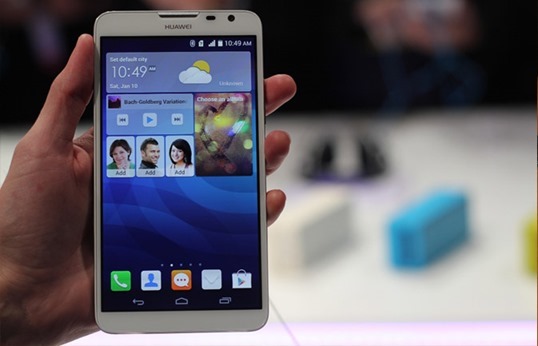
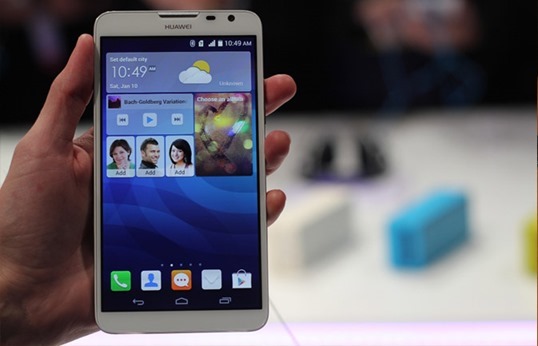
    Huawei_ssThe Huawei Ascent Mate 2 does everything big. It’s a 6.1 Android mega-phone with a whopping 4050mAh battery in the relative back, making it potentially the longest lasting smartphone to date. For perspective, the T-Mobile Galaxy Note 2 includes a 3200mAh battery — nearly 1000 mAh significantly less than the Mate 2 — also it lasted 11 hours during our testing. The Mate 2 doesn’t skimp on optics either: the front-facing camera’s 5MP sensor took excellent selfies. Throw in 4G LTE support and a March arrival to the U.S. smartphone market, and you’ve got a large device with big features that’ll be a large problem for your competition.
    Huawei has made a decision to opt from the home-grown K3V2 chipset because of this latest iteration, taking a Snapdragon 400 SoC instead. Imaging has been upgraded aswell, with the Mate 2 sporting a 13MP Sony-made primary cam and a 5MP front-facer.

    The Mate 2 features 2GB of RAM also, 16GB of internal storage, microSD expansion of to 32GB up, plus a couple of cameras — 5 megapixels f/2.4 on leading and 13 megapixels, f/2.0 on the relative back. That is all tucked in the familiar 202g, 9.5mm-thick body, which feels nice given the solid frame and slightly slimmer screen bezel rather, though we’re not too keen on the glossiness on the white Mate 2’s removable back cover (for usage of the SIM slot and microSD slot). On the program side, there’s Huawei’s Emotion UI 2.0 running together with Android 4.3, so users will reap the benefits of features optimized for single-hand usage — especially calling keypad that squashes itself to 1 side, based on your tilt. You obtain handy floating widgets like calculator also, calendar, messages and notes to be on top of other apps.

    Specifications:

    • Dimensions: 161 x 84.7 x 9.5mm, 202 g
    • Display: 6.1″ eHD (1280 x 720) IPS display, 241ppi
    • Chipset: Qualcomm Snapdragon 400; quad-core Cortex-A7 at 1.6GHz, Adreno 306 GPU, 2GB RAM
    • OS: Android 4.3 Jelly Bean
    • Camera: 13 MP, HDR, autofocus, LED flash, 5 MP front-facing
    • Video camera: 1080p video capture @ 30fps
    • Storage: 16GB built-in, microSD card slot with support of up to 64GB
    • Connectivity: A-GPS+GLONASS, WLAN (2.4/5Ghz) a/b/g/n, USB Host, Bluetooth 4.0 LE
    • Battery: 4,050 mAh
    • Misc: FM Radio, built-in accelerometer, multi-touch input, proximity sensor
    • Colors: Crystal Black, Pure White

    Follow it all at CES 2014 on Gizmantra

  • CES 2014: Asus Transformer Book Duet laptop runs Windows 8.1 and Android

    CES 2014: Asus Transformer Book Duet laptop runs Windows 8.1 and Android

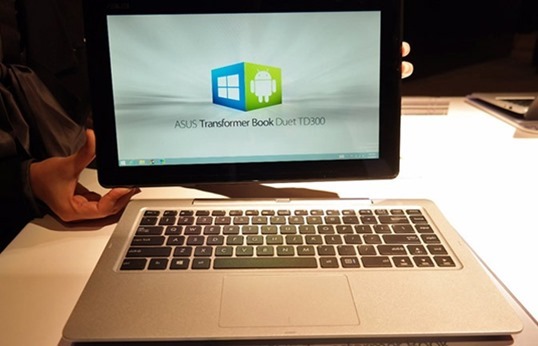
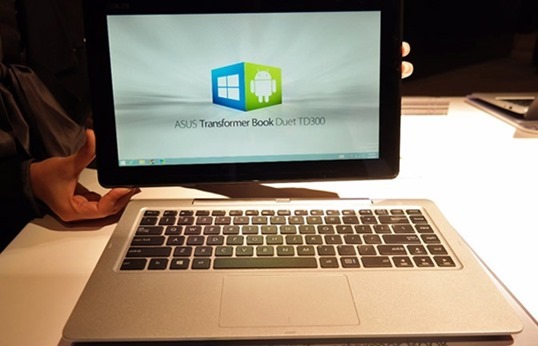
    asus_transformer_ss_2The ASUS Transformer Book Duet TD300 unites Windows 8.1 and Android. Thanks to BlueStacks’ virtualization software, this 13-inch combo tablet-laptop can switch between Microsoft’s and Google operating systems at the press of a button. That gives users access to Word Excel or documents spreadsheets in Windows, and lets them swing a quick game of “Angry Birds: Star Wars” over in Android. With a detachable keyboard dock, the Duet hits high notes on specs: there’s up to a 1TB storage drive, USB 3.0, HDMI and a 1080p display upgrade.
    The Transformer Book Duet also features a microSD card expansion slot, a front-facing camera, and audio enhancing SonicMaster technology to complement the tablet’s dual speakers.

    Though the dual-OS packing convertible tablet is an impressive release, the tablet has a few downsides. It runs an older version of Android (4.1) and, with the dock, it’s a thick and hefty package.As for the hardware, well, this feels like a $599 machine, and that’s actually us being generous. Granted, the build quality is solid, but the textured plastic back has a cheap, hollow feel to it. Also, at 1.9kg (4.2 pounds), it’s rather heavy for a 13-inch laptop, even a touchscreen one, so if you’re going to get this, you better be really excited about the dual-OS feature (and we’re sure some of you are). On the plus side, the tablet itself feels relatively light, given its 13-inch screen size, and for that, we probably do have the plastic construction to thank. Also, keep in mind that that thicker design gets you up to 1TB of storage in the dock, up to 128GB of space in the tablet and nice-to-have ports like an Ethernet jack and full-sized HDMI socket. A fair trade, we’d say.

    As for the hardware, well, this feels like a $599 machine, and that’s actually us being generous. Granted, the build quality is solid, but the textured plastic back has a cheap, hollow feel to it. Also, at 1.9kg (4.2 pounds), it’s rather heavy for a 13-inch laptop, even a touchscreen one, so if you’re going to get this, you better be really excited about the dual-OS feature (and we’re sure some of you are). On the plus side, the tablet itself feels relatively light, given its 13-inch screen size, and for that, we probably do have the plastic construction to thank. Also, keep in mind that that thicker design gets you up to 1TB of storage in the dock, up to 128GB of space in the tablet and nice-to-have ports like an Ethernet jack and full-sized HDMI socket. A fair trade, we’d say.

    Follow it all at CES 2014 on Gizmantra

  • 10 Reasons to Buy Samsung Galaxy S Duos 2

    10 Reasons to Buy Samsung Galaxy S Duos 2

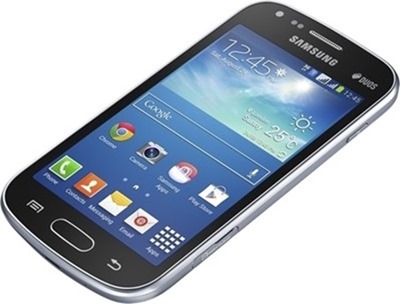
    samsung-galaxy-s-duos-2-slitSamsung has got a huge lineup and no matter what your requirements are, they have got a device for you. The Galaxy S Duos was launched long back and it was outdated very soon after it made its appearance. It ran a single core processor and there was nothing special about it except the dual SIM feature at a good price. The number of units it sold was solely on the basis of its dual SIM feature and its price. Apart from this device, there was no Samsung device in this price bracket which could stand strong against the rivals.
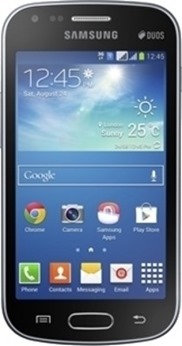
    Now however, they have come up with another device, another iteration of the Galaxy S Duos, which seems to be a promising device at a good price. The Galaxy S Duos 2 improves considerably over the S Duos and addresses various issues with the device. The S Duos was laggy and slow due to a single core which has been taken care of by the dual core processor. There are other improvements as well in terms of connectivity and software. Here we give you some reasons why you should consider buying this device.

    1. Dual core processor- This new device addresses the issue with the previous one. Most users of Galaxy S Duos complain about the device being slow and laggy. The primary reason was that by the time S Duos was launched, there were already a good number of dual core devices available at a good price. The Galaxy S Duos 2 is powered by a 1.2 GHz dual core processor which makes it much faster. The applications launch quickly, phone runs smooth and the overall experience of this new device is much better.

    2. Low cost- The S Duos 2 is priced less than 11 K in India which makes it a really good buy. For the price, you aren’t buying a compromise just for the sake of dual SIM. You will get a good dual core device which would perform well in your everyday use. You can easily run your social networking apps and web browsers. Not only that but you can play a good number of games too. And everything for a price that won’t get you a dual core android device from any other big brand.

    3. Samsung it is- Well this might not appear as a strong point to some but for most people it is. Samsung has established itself very well in the market and thesamsung-galaxy-s-duos-2 products are reliable. You also get support via the Samsung service network spread throughout the country. It is something that many people ignore at first but realize when they need repairs. You can easily find a Samsung service center in your city just in case your device decides to go rogue on you.
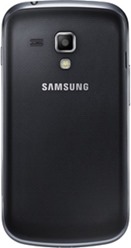
    4. Newer version of Android – The Galaxy S Duos runs android 4.0 Ice Cream Sandwich while the S Duos 2 runs Android Jelly Bean 4.2. You know the rule here, newer is better. While the interface is mostly similar, Jelly Bean is faster than ICS and has got a good number of features over the ICS.

    5. Software updates- As the Galaxy S Duos 2 is a newer device, you will get software updates for longer. It was on the internet that Samsung will update most of its new android devices to Android 4.4 Kit Kat soon. Who knows that even this device might be on their list? Even if they don’t provide you with a version update, you will be updated with minor fixes and updates.

    6. Faster 3G- While the Galaxy S Duos and most other low end devices support 3G data transfer rates up to 7.2 mbps; the Galaxy S Duos 2 supports transfer rates up to 21 mbps. We are very sure that you won’t like to stick to a device that can’t use your data plan to its full. With the improved speed you can expect good browsing speeds, reduced server response times and enhanced downloading capabilities.

    7. Bluetooth 4.0– The Galaxy S Duos 2 has got Bluetooth 4.0 against the Bluetooth 3.0 on S Duos and many other devices. It allows for faster data transfer rates and improved connections. Also many new Bluetooth devices need Bluetooth 4.0 to make use of their full capabilities.

    8. Storage – While both, Galaxy S Duos and Galaxy S Duos 2, have got the same amount of internal storage, the S Duos 2 can support memory cards up to 64 GBs, twice as much as the previous version. While you might not want to put that much storage on a low end device, it is good enough to handle it just in case you decide to. You can flood your device with loads of music and high definition videos and it won’t complain.samsung-galaxy-s-duos-2-rear

    9. Improved camera- The camera on this device can capture still images in 5 megapixels which is the same as the previous version. But this one can record videos in 720p which wasn’t possible with the Galaxy S Duos. You get better video recording quality, thanks to the 720p recording and the videos play effortlessly on the device. The camera interface is also improved on this device. There are a couple of additions and improvements, most of which are due to the newer version of software on this device.

    10. Touch Wiz- Personal opinions might vary but Samsung’s Touch Wiz UI is one of the best we have seen on android devices. It is simple yet packs in a lot of features. There are a good number of customization features that you won’t find on the stock android launcher. Also there are a couple of gestures that make life easier with Samsung devices. Even while it has got so many customization options, it is easy to use and neat unlike the Sense UI on HTC or the Sony UI.