Category: Tech

  • 7 tips for improving your smartphone’s battery life

    7 tips for improving your smartphone’s battery life

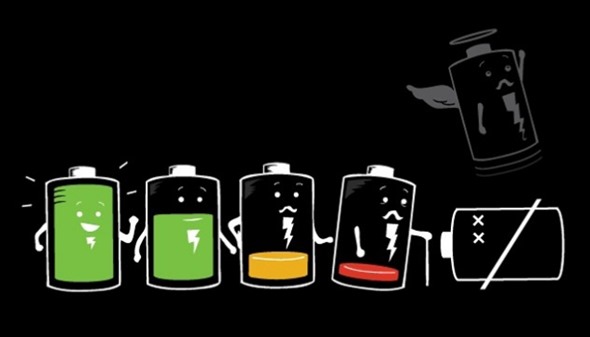
    increase-battery-life1There are a few tricks which can help extend a smartphone’s battery – even tiny details, such as choosing a dark screensaver, not a bright one, can help. Here’s how to improve smartphone’s battery life. These are applicable for android, iPhone or any phone.

    Don’t charge it to full
    “Battery memory” means that you should never run your battery empty – and avoid charging it to full. “You should try to go from around 40 per cent to around 80 per cent in one go, and then back down whenever possible,” says experts. “A bunch of tiny charges isn’t as bad as going from 100 down to zero all the time, but it’s not optimal either.”

    Force your phone to sleep
    Your phone will last far longer if it goes into “deep sleep” whenever possible. If you have a lot of apps, some of them may be keeping your phone ‘awake’, just to communicate with home base. An Android app called Better Battery Stats will run down exactly what is waking up your phone, and enable you to turn it off. If you can keep your phone in ‘deep sleep’, it’ll last.

    Go dark
    Turn the brightness settings down on your phone. Most of your phone’s battery drain is from running the screen. On any phone, set the screen to turn off after 30 seconds.

    Switch screensaver off
    Don’t use animated screensavers. It even makes a difference to switch to a black, or dark, screen background so it doesn’t burn as much electricity when you’re in the menus.

    Shut down apps you don’t need

    Make sure your phone isn’t running apps in the background. On iPhone, you can check by double-tapping the Home button, then pressing ‘X’ to shut ones you don’t need. If you’re unsure, restart your phone to banish apps that might be running without you knowing.

    Turn off Bluetooth, GPS and Wi-Fi unless you’re using htem

    Switch off wi-fi, Bluetooth, and GPS unless you need them. This will immediately add about a third to your battery life. Lots of people leave them on all the time. On both iPhone and Android, controls to do this are easily accessed via phone menu.

    Check your battery

    If your phone gets hot while you use it, it could be that your battery is on its last legs. New ones are cheap on eBay, and if your phone’s old, you can also get ones with much higher storage than the ones it shipped with. Sorry, iPhone owners, this won’t work for you – you can’t take the back off.

  • Mozilla Firefox 22 Stable Released

    Mozilla Firefox 22 Stable Released

    Mozilla is currently preparing to upgrade all versions of the Firefox web browser starting with the stable version of it. Firefox 21 will be upgraded to version 22 on 25th June, while Beta, Aurora and Nightly users of the browser will have to wait a day or so longer before their version of the browser is updated as well.

    Mozilla is currently preparing to distribute the newest version of Firefox to its ftp server and from there to its mirror distribution system. Once that is out of the way, the official release announcement will be made on the website.

    Firefox users can use the automatic update feature of the browser to upgrade to Firefox 22, or download the latest version of the browser from the Mozilla website instead and install it from there.

    Firefox 22 What’s New

    • Operating system specific
    • WebRTC is now enabled by default
    • HTML5 Audio and Video Playback Speed modifications
    • Performance improvements
    • Social Services

    Other Changes

    • Improved memory usage when rendering images. This should help on systems with low amounts of RAM if pages with large images are viewed regularly.
    • Firefox is now using word wrap for plain text files.

    Developer changes

    • The CSS3 Flexible Box has been enabled by default (introduced in Firefox 18)
    • The initial value for min-width and min-height is 0.
    • Node.getUserData, Note.setUserData, Node.isSupported and Note.attributes have been removed (DOM).
    • HTMLMediaElement.crossorigin and HTMLInputElement.inputmode have been renamed to HTMLMediaElement.crossOrigin and HTMLInputElement.inputMode.
    • XHR multipart response support has been removed.
    • HTML elements with tag names no longer use the HTMLSpanElement.
    • LSProgressEvent, ProgressEvent.initProgressEvent and SVGEvent have been removed.
    • Unknown SVG Elements will be SVGElement and not SVGUnknownElement.
    • NoteIterator.detach does nothing.
    • ParallelArray is now disabled in Beta, Release and ESR channels but not in Aurora and Nightly channels.
    • HTML5 data element has been added to the browser.
    • The range state of the input element has been implemented.
    • ASM.js optimizations are enabled.
    • ES6 Arrow Function syntax has been implemented.
    • The new Object.is function has been added.
    • Pointer Lock API can now be used outside of full screen.
    • New Web Notifications API implemented.

    Firefox Developer Tools

    • Font Inspector now shows which fonts on your computer are applied to the page.
    • Dev tools can now be docked to the right side and not just the bottom of the screen.
    • Visual paint feedback mode shows when and where a page is repainted.

    Security updates

    1. The | Components | object is no longer accessible from web content.

    For all Firefox fans

  • Piracy-Proof Adobe’s CC Pirated within 24 hours

    Piracy-Proof Adobe’s CC Pirated within 24 hours

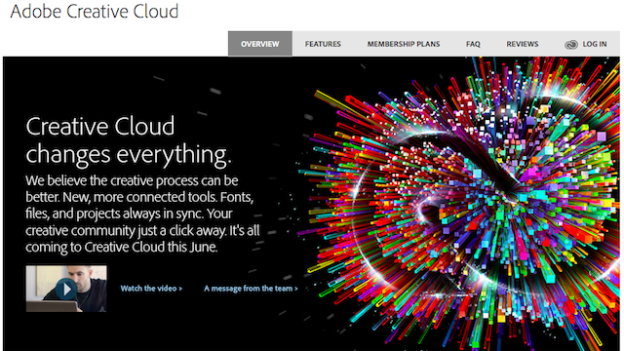
    Аt thе bеgіnnіng оf Мау Аdоbе аnnоunсеd thаt іt wаs sеt tо drор Сrеаtіvе Ѕuіtе аs а bохеd рrоduсt оffеrіng, іnstеаd dесіdіng tо fосus еntіrеlу оn оffеrіng іts sоftwаrе vіа а subsсrірtіоn mоdеl. Оn Јunе 17, thоsе subsсrірtіоns lаunсhеd wіth usеrs рауіng аnуwhеrе bеtwееn $19.99 аnd $74.99 а mоnth fоr ассеss tо Аdоbе’s suіtе оf аррlісаtіоns.

    A torrent for the subscription version of Photoshop CC has appeared as spotted on The Pirate Bay. The torrent is named “Adobe Photoshop CC 14.0 Final Multilanguage.” The comments on the torrent listing seem to confirm this is the latest version of Photoshop and it works.

    The reasons are simple: Adobe applications cost a lot, and they’re the best at what they do.

    In the near future, only people who pay $20 per month for a single application, or $50 per month for the entire Creative Suite, will be able to install and upgrade Adobe software over the Internet. (Adobe’s offerings are targeted at professionals, who can tolerate such high prices as the cost of doing business.)

    Despite the apparent availability of cracked Adobe applications online, it’s probably not a good idea to install them. You can’t know for sure which files contain malware or spyware.

    If you do choose to take that route — and we don’t advocate that you do — make sure you scan each and every pirated, cracked or copied installer or file you download with a malware scanner before you run or open it. You’d also better have a robust anti-virus software product already installed.

    Alternatively, you could also consider legally buying Adobe Photoshop Elements, a stripped-down version of Photoshop that does almost everything a non-professional user might need. It’s only $100, with steep discounts available at some online retailers.

  • HTC Desire 200 entry-level Android smartphone

    HTC Desire 200 entry-level Android smartphone

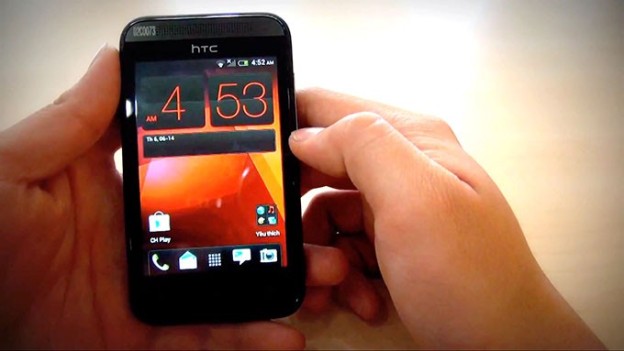
    A new HTC Android smartphone, Desire 200 ,targeted at the budget segment, has made an online appearance in a video even before its launch.

    The phone features a 3.5-inch LCD screen that has a resolution of 320×480 pixels. It’s powered by a 1GHz single-core processor and will have 512MB of RAM. It will come with 4GB internal storage expandable via microSD card and a 1400 mAh battery. The rear camera on the phone would have a 5-megapixel resolution and does not appear to come with a flash. The phone in the video runs Android  4.0 Ice Cream Sandwich but it’s expected that it would come with Android 4.1 (Jelly Bean) or later when it launches. It will feature HTC’s Sense UI layer on top.

    The phone’s earpiece resembles the HTC One’s front speaker grills. It has three capacitive touch buttons below the screen like most recent HTC phones. The phone’s back looks similar to that of the HTC Desire C. It will also feature Beats Audio as apparent from the branding at the back.

  • Google Launches ‘Loon’ to Deliver Internet Access With Balloons

    Google Launches ‘Loon’ to Deliver Internet Access With Balloons

    You know what’s awesome? The Internet. What’s not so great: The utter pain it is to find a fast, reliable Internet connection in so many parts of the world. With its latest moonshot, Google[x] is fighting that headache with creativity, attempting to make an awesome thing, well, even more awesome by spreading the Internet to the furthest reaches of the earth.

    The delivery method? High-flying, Internet-spewing balloons.

    Eighteen months in the works, the top-secret project was announced in New Zealand, where up to 50 volunteer households are already beginning to receive the Internet briefly on their home computers via translucent helium balloons that sail by on the wind 12 miles above Earth.

    While the project is still in the very early testing stages, Google hopes eventually to launch thousands of the thin, polyethylene-film inflatables and bring the Internet to some of the more remote parts of the globe, narrowing the digital divide between the 2.2 billion people who are online and the 4.8 billion who aren’t.

    If successful, the technology might allow countries to leapfrog the expense of installing fiber-optic cable, dramatically increasing Internet usage in places such as Africa and Southeast Asia.

    “It’s a huge moonshot, a really big goal to go after,” said project leader Mike Cassidy. “The power of the Internet is probably one of the most transformative technologies of our time.”

    The so-called Project Loon was developed in the clandestine Google X lab that also came up with a driverless car and Google’s Web-surfing eyeglasses.

    Want to see the high-flying, potentially world-changing chicanery in action? The Project Loon’s Google+ page packs plenty of behind-the-scenes photos of the endeavor. Residents of the southern hemisphere may just get an up-close view of the balloons before long: Google is hoping to bring Project Loon to other countries on the same latitude as New Zealand.

  • Facebook RSS reader may roll out on June 20

    Facebook RSS reader may roll out on June 20

    With Google Reader finally coming to an end, and a few alternate solutions already coming up, Facebook seems to be wading into the game too with plans to launch its own RSS reader.


    While Facebook may on the look out to offer its users a promising RSS product as a replacement for the Google Inc reader, it doesn’t seem clear if the feeds would be Facebook’s own content or content taken from elsewhere. It is also not clear if the social media giant would ever be positioned as the best replacement for Google Reader.


    If Facebook does have a new RSS reader, the move would fit in with the company’s strategy of trying to become the go-to place for internet users looking to know what is going on in the world, a strategy Mark Zuckerberg pointed to at the March launch of Facebook’s revamped news feed.


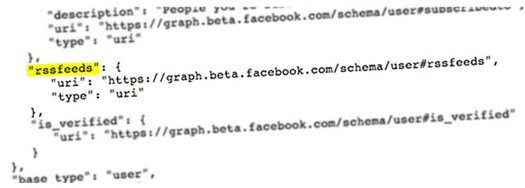
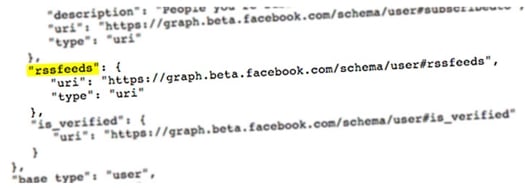
    “What’s surprising is that the code mentions RSS specifically and distinctly from existing interest lists and friend lists. Also, note that this is unconnected to Facebook outputting RSS feeds, which they’ve done for a while.”


    Possible Facebook RSS code

  • First Verified! and now #hashtags Facebook ‘follows’ @twitter

    First Verified! and now #hashtags Facebook ‘follows’ @twitter

    Your nonsensical hashtagged status updates on Facebook will now, at last, have some meaning. The social network Facebook said hashtags will now be clickable and searchable, like they are on Twitter, Pinterest, Instagram, and, well, basically every other social network.
    “Hashtags will be clickable on Facebook. When you click on a hashtag in Facebook, you’ll see a feed of what other people and pages are saying about that event or topic,” the company said in a statement.

    You can search for a hashtag in the search bar if you want to participate in a larger conversation—like when “Game of Thrones” is airing or a political scandal erupts. When you search for a hashtag, like #GoT, you can write a post directly in the feed that pops up in that search. The feed will showcase results from both people and pages.

    Facebook’s basic privacy policy applies to hashtagged status updates—if you have your posts set to friends-only, then only your friends will be able to see your updates, even with hashtags.

    If you are in the mood for some micro-inspirations, here’s one. Twitter no longer asks you to tweet “What are you doing?” (it has switched to “What’s happening?” for quite some time now) and when Facebook went for a redesign in August 2008 it added prominence to its status update feature and began asking users, “What are you doing right now?”. Note the similarity?

    It’s not that Twitter didn’t seek inspiration elsewhere. It did and continues to do. So does Google+. The problem with this feature aping is that the competing social networks are slowly becoming clones of one another, feature by feature. Soon there might be little to tell them apart from their brand names.

  • Apple Unveils iOS 7 : How ‘Big’ it is ?

    Apple Unveils iOS 7 : How ‘Big’ it is ?

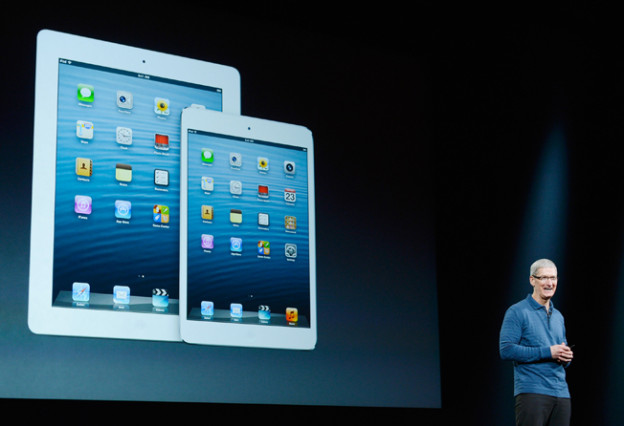
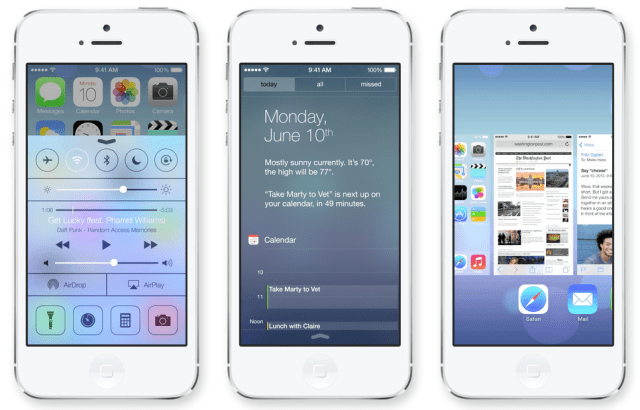
    Apple has officially taken the wraps off of iOS 7 at its Worldwide Developer Conference today. iOS 7 is the latest version of Apple’s mobile operating system that debuted back in 2007 on the original iPhone. According to Apple CEO Tim Cook, iOS 7 is the biggest change to the platform since the iPhone was introduced five years ago. The new design is evident in everything from sharper, flatter icons, slimmer fonts, a new slide-to-unlock function, and a new control panel that slides up from the bottom of the screen for frequently accessed settings. The stock apps have all been redesigned — including a major revamp of the weather app with new animations that are scarily reminiscent of Yahoo’s great-looking Weather app graphics.

    New Look

    • iOS 7 has a new font leading the way, which seems to be a sort of Helvetica Neue Ultra. It’s very skinny, clean, and it was hinted at in the iOS 7 banners that went up for WWDC yesterday.
    • Instead of white bars on a black background, Apple will now tell you what kind of service coverage you have with five little dots, which are white and grey depending on how strong the signal is across a translucent background.
    • The lock screen is changed for the first time in iOS’s history, with no more shine top or bottom bars for slide to unlock or the clock. Instead, Slide to unlock is translucent above the background image.
    • Default app icons are now flatter, but not quite flat, just as predicted.
    • Jony Ive’s hand has had its way with iOS notifications. The notifications panel isn’t laced with dark grey linen anymore, but actually has a very flat look to it. There is a today view, that lets you see friends birthdays, upcoming invitations, calendar, stocks, and a quick look at tomorrow.
    • The apps all seem to have a white base, except for the stocks app which has a black background and the weather app, which shows motion in the background to convey the current weather.
    • The keyboard is more white, than grey, with a translucency that lets you see what’s underneath the keyboard.
    • New Features

      2

      Control Center

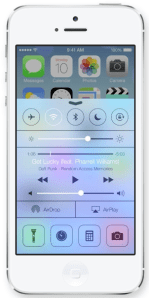
      • Control Center is a pull-up tray that is available in your lock screen.
      • You can adjust brightness, volume, and other settings including Wifi, Airplane mode, rotation lock, or Bluetooth.
      • The Control Center even offers a flashlight, along with tabs for music, camera, and other quick-access apps.
      • The Control Center takes on the environment it’s in, so if you swipe up while you’re in mail, it will have the same blue and white coloring under that translucent panel.
      Multitasking
      • iOS 7 lets you multitask between all third-party apps with much better battery consumption.
      • You can double-tap the home button to enter into multi-tasking mode, just like always, but the interface for multitasking has been revamped. It appears to offer live previews, but Apple wasn’t clear about that.
      safari_tab_screen

      Safari

      • Safari opens straight into full screen mode now, with the option to pull down to bring up the search bar at the top.
      • The search field has been improved to be a unified smart search field, which lets you have access to all your favorite websites with a single tap.
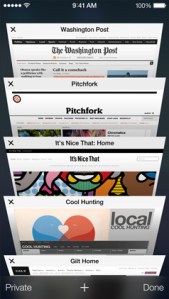
      • Tabs come with a totally new interface, scrolling in a vertical carousel, and there are no longer any limits. In other words, you can have as many tabs as you want, as opposed to just 8 like before. Swipe a tab off to the side to throw it away.
      • The new Safari is integrated with iCloud keychain from OS X Mavericks, and also comes with parental controls.

      AirDrop

      • You can share sharesheets with other people by simply tapping their name. No NFC required.
      • Airdrop supports iPhone 5, iPad 4th gen, iPad Mini

      Camera And Photos

      • The Camera app lets you swipe between your various camera types, such as panorama or HDR so you can quickly take a pic instead of fumbling around with settings.
      • Photos marks the first update to the photo gallery on iOS since it was introduced.
      • You can search based on date, and location, within the photos app.
      • Instagram must be flattered — Apple has introduced photo filters so you can add a little professionalism to the picture.
      • Users can share via AirDrop, iCloud photo-sharing, as well as shared Photo Streams.
      • You can even share video with iCloud photo-sharing.
      siri_ask_screen

      Siri

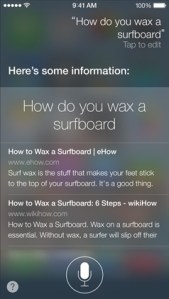
      • Siri has a new voice! It sounds similar, but also weird. You can choose a male or female voice, if you like. Voices include languages like French, German, and other languages “over time.”
      • The visual UI has also been upgraded, with a sound wave going along the bottom.
      • Siri has also been integrated with settings, letting you tell her to turn on bluetooth, or lower the screen brightness.
      • The company has also added support for Twitter, Wikipedia, and shows web search results direct from Bing.

      iOS in the Car

      • iOS in the Car depends a lot on Siri.
      • It puts the iOS homescreen on the screen of your car, and lets you search for directions, listen to music, etc.

      App Store

      • You can now search for apps based on location. In other words, search for apps by the Louvre and see a lot of French museum apps.
      • The App Store also automatically updates apps for you in the background now. Hallelujah again!
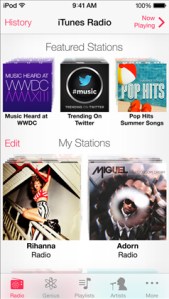
      itunesradio_mystations

      iTunes Radio

      • Apple has finally introduced the much-anticipated iTunes Radio, which gives a Genius-like experience to the entire 26-million title iTunes catalog.
      • You can see the full list of songs on each station by clicking history, with purchase and preview buttons built right in to send you to the iTunes store.
      • iTunes Radio also lets you customize each station by clicking a star to show that you want more of this type of music.
      • iTunes Match users will get an ad-free experience, but others will be able to use the app for free with a few audio and text ads.

      Activation Lock

      • This is for those of us who have had an iPhone stolen.
      • If a thief steals your phone and tries to turn off Find My iPhone, they can no longer turn the device back on without your iCloud password.
      • Users can also block messages and calls from other users.

    Coming This Fall

    • Developers will have access to iOS 7 on Monday and it will hit iOS devices this fall.
  • Apple’s iOS 7 Is Inspired By Android!

    Apple’s iOS 7 Is Inspired By Android!

    One common issue that many had with iOS was that the operating system is the same old for the past so many years. Though the company did release few updates here and there, nothing was exciting enough to satisfy tech enthusiasts. Putting that to rest, Apple released its revamped iOS 7. But, here’s a catch. Business Insider reported that, “Interestingly, if one compares the new look and features to what’s available on Android, it’s easy to see that Apple was “inspired” in no small part by Google’s mobile operating system.”


    Reasons why iOS 7 Is Inspired By Android

    1. Apple has now turned the iOS lock screen into a large digital clock, the date, and a “slide to unlock” area at the bottom, which is pretty much like Android.
    2. Similar to Android, users can now see a preview of each running application.
    3. iOS also offers quick access to settings like Wi-Fi and Bluetooth with a control panel. It has been a feature in Android for quite some time now.
    4. iOS also comes with a new colour scheme and interface in Music, which looks a lot similar to Google’s Music for Android.
    5. It also offers a much advanced and improved handling of notifications, right from the lock screen.
    6. Similar to Android’s Calendar, the new iOS Calendar has a bright white background along with a pastel colour scheme to represent allocated time slots.
    7. Safari’s tabs are more like 3D panels, just like Google’s Chrome browser for Android.

  • 7 Reasons to Root Your Android Device

    7 Reasons to Root Your Android Device

    To root or not to root? That is the question. Rooting your Android device definitely pushes you up a level or two in your geekdom. It requires a certain level of commitment, at least a little savvy, and even a modicum of risk. So, why would you want to trouble?

    We have great reasons for ya.


    What is Rooting ?

    We discuss about rooting plenty around here, but here’s the high-level look for the few remaining uninitiated. Rooting signifies gaining root access to your device. When you take your phone out of the package, while there are plenty of settings you can tweak, you can only alter what the manufacturer allows you to. By gaining root access you can modify the device’s software on the very deepest level. It takes a bit of hacking (some devices more than others), it voids your warranty, and there’s a small chance that you could completely break your phone forever. But you know what? It’s still totally worth it for all the goodies you get access in order to.

    1. The Latest OS Updates

    This may be the most common complaint among Android users, less than half of whom have made it as far as Ice Cream Sandwich. Between the Google, the carriers, and the hardware manufacturers, there are a whole lot of shenanigans behind closed doors that determines when (or if) your phone gets an upgrade. Who has the patience?

    Android’s developer community, on the other hand, is a hardcore bunch. They’re often able to get the new OS onto a phone months before the carrier releases the update, often along with a few bonus features. Once you’re rooted, you just have to find the OS version you want (optimized for your specific device), and it’s generally extremely easy to install the latest and greatest.

    2. Apps Aplenty

    If you’ve spent much time in Google Play, you know you’re not exactly hard-up for good apps. But why settle for good when you can have great. Once you’re rooted not only can you get more apps, but the apps you have access to can get way down deeper into your phone’s brains. In some cases you’ll be able to do things that carriers, manufacturers, and/or Google may not want you to do. Some will allow you to do things of questionable legality. For example, Network Spoofer uses your device to set up a fake wireless network. When your houseguests sign in, you can make ever image they see inverted, or all of the text fuzzy. It’s a harmless prank, but of course it could (but shouldn’t!) also be used for stealing passwords and other nefarious things.

    Where do you find all these root-only gems? Amazingly enough, many of them are still in the Google Play app store. Google’s much more relaxed about rooting than Apple is about jailbreaking. Some apps, like Tasker, work for factory-shipped devices as well, but get expanded superpowers when you root.

    3. Speed/Battery Life Boosts

    9 Reasons to Root Your Android Device

    Phone starting to get laggy? Or maybe you’re having trouble making it through the day on a single charge? Rooting allows you to install customized kernels (the software that enables the OS to talk to the hardware, basically) that are optimized differently. Some are made for low-power consumption, and some are built for speed. You can also use an app like Set CPU, which enables you to overclock or underclock your phone’s processor, and set rules for usage.

    For example, you can set your processors to go into overdrive when you’re playing a graphically intensive game, but have them draw the bare minimum power when the screen is off.

    4. Extreme Customization

    Android is already the most customizable mobile OS out there, which is one of its big draws, but if you root your phone you can really go nuts. If you want a total change, you can download custom ROMs that look nothing like Android at all. Want your device to navigable entirely by gestures? No problem, just install GMD Gesture Control.Prefer a sliding keyboard when you’re in portait mode, but a tapping, predictive keyboard when you’re in landscape. Keyboard Manager will automatically switch between your keyboards of choice whenever you rotate your phone. You can also add features like widgets in your notification bar, or can change the way certain features look or behave, like the lock screen, or notification bar. The sky’s the limit.

    5. Infinite Features

    Beyond just customizing your phone’s existing features, rooting helps you pile on all kinds of wonderful new weirdness. You’ll love it.

    Want to hook up your PlayStation controller to your phone for better gaming? You can. Want to set rules for callers to decide who can and can’t call you when? Why not. Maybe your carrier has blocked certain apps, or an app isn’t available for the country you live in? There are Market Enabler apps that trick your phone (and Google) into thinking it’s on another carrier or in a far off land. Nervous about connecting to the public Wi-Fi? Wifi Protector will keep you safe from all kinds of ARP, DOS, and MITM attacks. Or, you could put the new Android 4.2 camera on your non-Jellybean phone. Accidentally deleted something you wish you hadn’t? Undelete might just save your bacon. The possibilities are virtually limitless.

    6. Better Backup

    9 Reasons to Root Your Android Device

    There are apps out there that kinda back up your phone, but generally it’s pretty surface level stuff (contacts, pictures, music, etc.). Once rooted you can go way, way deeper. Grab an app called Titanium Backup. Not only can it back up all of your apps, but it can back up all of the information stored in those apps. So if you’ve been doing great in Temple Run but you want to wipe your phone and start fresh, you can use Titanium to back up and then restore the game, and you’ll be right where you left off. It’s a nice security blanket if you’re going to be messing around deep in your phone’s brain.

    In spite of all these benefits, only you know whether rooting is right for you. For some people it’s just not worth the time and effort. For others, it’s a godsend that allows them to use their phones in a better way and for a longer time. If you decide to take the plunge, read up and make sure you follow instructions carefully. After that, go hog wild. It’s your phone, after all.

    7. Ditching the Skin

    Android enthusiasts rightly hate the software skins that hardware manufacturers use to brand their devices. They’re often bulky, ugly, unwieldy, or just downright not as clean and functional as stock Android. They’re also a big reason those OS updates take so long. You’re almost always better off without. So root! Once you do, you can download and install any number of custom-built ROMs (different versions of the Android firmware). Some of them are highly customized and tweaked to add features, and others are basically just stock Android. Cleaning off an ugly skin can be like a breath of fresh air.

    –>How To Install A Custom ROM On Your Android <–